SETUP
282
�
Transferring a phone number
You can transfer the phone numbers in
your Bluetooth� phone to the system.
The phonebook manages a maximum
of 4 phonebooks in all. The data for
1000 contacts (up to 3 numbers per
contact) can be registered in total of
phonebooks.
Transfer it while the engine is running.
1. Touch “Transfer Contacts”.
2. Touch “Replace Contacts” or “Add
Contacts”.
In case that the phonebook contains
phonebook data, this screen is displayed.
3. Transfer the phonebook data to the
system using the Bluetooth � phone.
This screen appears while transferring. To
cancel it, touch “Cancel”. If the transfer-
ring is interrupted on the way, the phone-
book data transferred until then can be
memorized in the system.
When you have touched “Replace Con-
tacts”:
If your cellular phone does not support
PBAP or OPP service, you can not use this
function.
If your phone supports PBAP service, you
can transfer the phonebook data without
operating your phone.
If your phone does not support PBAP ser-
vice, you must transfer the phonebook
data by operating your phone.
When you have touched “Add Con-
tacts”:
If your cellular phone does not support
OPP service, you can not use this function.
You can transfer the phonebook data only
by operating your phone.
SETUP
317
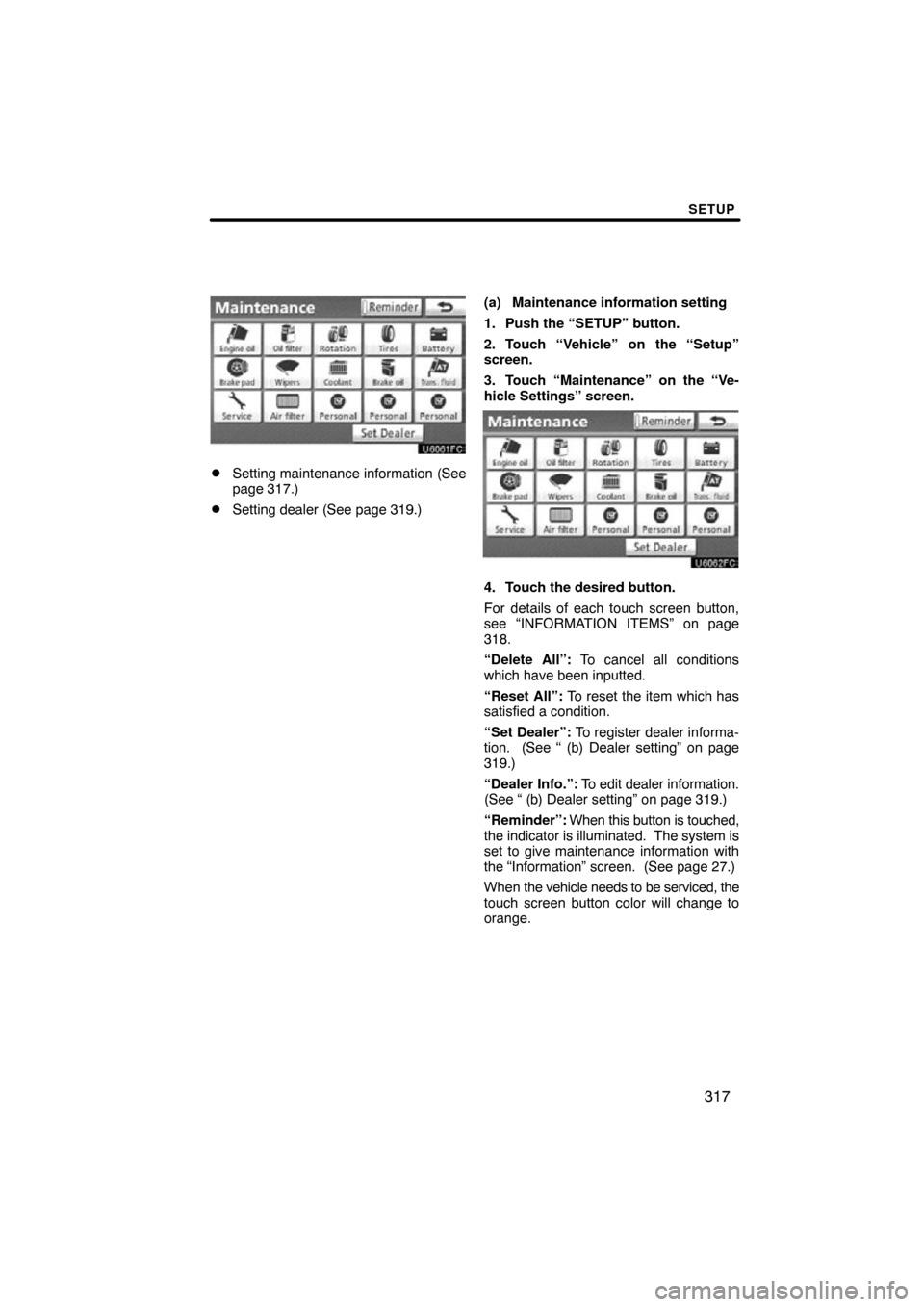
�Setting maintenance information (See
page 317.)
�Setting dealer (See page 319.)(a) Maintenance information setting
1. Push the “SETUP” button.
2. Touch “Vehicle” on the “Setup”
screen.
3. Touch “Maintenance” on the “Ve-
hicle Settings” screen.
4. Touch the desired button.
For details of each touch screen button,
see “INFORMATION ITEMS” on page
318.
“Delete All”: To cancel all conditions
which have been inputted.
“Reset All”: To reset the item which has
satisfied a condition.
“Set Dealer”: To register dealer informa-
tion. (See “ (b) Dealer setting” on page
319.)
“Dealer
Info.”: To edit dealer information.
(See “ (b) Dealer setting” on page 319.)
“Reminder”: When this button is touched,
the indicator is illuminated. The system is
set to give maintenance information with
the “Information” screen. (See page 27.)
When the vehicle needs to be serviced, the
touch screen button color will change to
orange.
APPENDIX
330
END USER TERMS
The data (“Data”) is provided for your
personal, internal use only and not for
resale. It is protec ted by copyright, and
is subject to the following terms and
conditions which are agreed to by you,
on the one hand, and DENSO COR-
PORATION (“DENSO”) and its licen-
sors (including their licensors and sup-
pliers) on the other hand.
2009 NAVTEQ. All rights reserved.
NAVTEQ holds a non −exclusive li-
cense from the United States Postal
Service
to publish and sell ZIP+4
information.
United States Postal Service
2009.
Prices are not established, controlled
or approved by the United States Post-
al Service
. The following trademarks
and registrations are owned by the
USPS: United States Postal Service,
USPS, and ZIP+4.TERMS AND CONDITIONS
Personal Use Only. You agree to use
this Data together wit h vehicle naviga-
tion system for the solely personal,
non−commercial purposes for which
you were licensed, and not for service
bureau, time−sharing or other similar
purposes. Accordingly, but subject to
the restrictions set forth in the following
paragraphs, you may copy this Data
only as necessary for your personal
use to (i) view it, and (ii) save it, pro-
vided that you do not remove any copy-
right notices that appear and do not
modify the Data in any way. You agree
not to otherwise reproduce, copy,
modify, decompile, disassemble or re-
verse engineer any portion of this
Data, and may not transfer or distribute
it in any form, for any purpose, except
to the extent permitted by mandatory
laws. Multi−disc sets may only be
transferred or sold as a complete set
as provided by DENSO and not as a
subset thereof.
APPENDIX
333
END USER NOTICE
PLEASE READ THIS NOTICE
CAREFULLY BEFORE USING THIS
NAVIGATION SYSTEM
The Point Of Interest Data (“POI”
Data) in the navigation system is in
part provided by infoUSA Inc.
(“infoUSA”). By using the POI Data,
you accept and agree to all terms
and conditions set forth below.
1. Ownership
All rights, title and interest to the
infoUSA POI Data shall be retained by
infoUSA.
2. Limitations on use
Except to the extent explicitly per-
mitted by mandatory laws, you may not
extract or reutilize any portion of the
contents of the POI Data, nor repro-
duce, copy, modify, adapt, translate,
disassemble, decompile, or reverse
engineer any portion of the POI Data.
3. Transfer
You may not transfer the POI Data to
third parties, except together with the
system for which it was created, pro-
vided that you do not retain any copy of
the POI Data.
4. Disclaimer of warranty
EXCEPT AS STATED HEREIN,
INFOUSA MAKES NO EXPRESS OR
IMPLIED WARRANTIES,
INCLUDING, WITHOUT LIMITATION,
ANY EXPRESS OR IMPLIED
WARRANTY OF FITNESS FOR A
PARTICULAR PURPOSE OR
WARRANTY OF
MERCHANTABILITY.
5. Limitation of liability
EITHER INFOUSA OR SUPPLIER OF
POI DATA SHALL NOT BE LIABLE
FOR ANY INDIRECT,
CONSEQUENTIAL OR INCIDENTAL
DAMAGES MADE OR ALLEGED IN
CONNECTION WITH YOUR USE OF
THE POI DATA.END USER LICENSE AGREEMENT
Personal Use Only. You agree to use
this information for solely personal,
non−commercial purposes, and not for
service bureau, time −sharing or other
similar purposes. You may not modify
the information or remove any copy-
right notices that appear on the infor-
mation in any way. You may not de-
compile, disassemble or reverse engi-
neer any portion of this information,
and may not transfer or distribute it in
any form, for any purpose. Without lim-
iting the foregoing, you may not use
this information with any products, sys-
tems, or applications installed or other-
wise connected to or in communication
with vehicles, capable of vehicle navi-
gation, positioning, dispatch, real time
route guidance, fleet management or
similar applications.
No Warranty. This information is pro-
vided to you “as is,” and you agree to
use it at your own risk. DENSO and its
licensors (and their licensors and sup-
pliers, collectively “DENSO”) make no
guarantees, representations or war-
ranties of any kind, express or implied,
arising by law or otherwise, including
but not limited to, and DENSO ex-
pressly disclaims any warranties re-
garding content, quality, accuracy,
completeness, effectiveness, reliabil-
ity, fitness for a particular purpose,
non−infringement, usefulness, use or
results to be obtained from this infor-
mation, or that the information or serv-
er will be uninterrupted or error −free.
Some states, territories and countries
do not allow certain warranty exclu-
sions, so to that extent, the above ex-
clusion may not apply to you.