Page 287 of 708
287
2-5. Driving information
2
When driving
●
Disconnecting
Set the height control of elec tronically modulated air suspen-
sion system to N mode.
Set the electronically modulate d air suspension system to
MAN. (manual).
Turn off the engine.
Set the supporting leg of the trailer on the ground and raise
the hitch by 4 in. (100 mm).
Turn the engine switch to the START position and start the
engine.
Press the height control mode select switch to cancel the
MAN. (manual) condition that was set on . Check that
the MAN. indicator turns off.
Wait until vehicle height is stabilized.
Make sure the hitch is disconne cted. If the hitch does not dis-
connect, raise the hitch higher and repeat steps 2 through 7.
Move the vehicle forward in LO mode where the hitch does
not touch anything in N mode.
Set the height control of elec tronically modulated air suspen-
sion system to N mode.
Page 289 of 708

289
2-5. Driving information
2
When driving
●
Avoid jerky starts or sudden acceleration.
● Avoid jerky steering and sharp turns, and slow down before mak-
ing a turn.
● Note that when making a turn, th e trailer wheels will be closer than
the vehicle wheels to the inside of the turn. Compensate by making
a wider than normal turning radius.
● Slow down before making a turn, in crosswinds, on wet or slippery
surfaces, etc.
Increasing vehicle speed can destabilize the trailer.
● Take care when passing other vehicles. Passing requires consider-
able distance. After passing a vehicle, do not forget the length of
your trailer, and be sure you hav e plenty of room before changing
lanes.
● To maintain engine braking efficiency and charging system perfor-
mance when using engine braking, do not use the transmission in
D.
Transmission shift range position must be in 4 in the S mode.
● Instability happens more frequently when descending steep or long
downhill grades. Before descending, slow down and downshift. Do
not make sudden downshifts while descending steep or long down-
hill grades.
● Avoid holding the brake pedal down too long or applying the
brakes too frequently. This could cause the brakes to overheat and
result in reduced braking efficiency.
● Due to the added load of the trailer, your vehicle’s engine may
overheat on hot days (at temperatures over 85°F [30°C]) when
driving up a long or steep grade. If the engine coolant temperature
gauge indicates overheating, immedi ately turn off the air condition-
ing (if in use), pull your vehicle off the road and stop in a safe spot.
( P. 637)
Page 293 of 708

293
2-5. Driving information
2
When driving
If you cannot find any problems, the speed at which trailer swaying occu\
rred
is beyond the limit of your particular vehicle-trailer combination.
Drive at a lower speed to prevent instability. Remember that swaying of the
towing vehicle-trailer increases as speed increases.
CAUTION
■
Trailer towing precautions
●To tow a trailer safely, use extreme care and drive the vehicle in accor-
dance with the trailer’s characteristics and operating conditions. Failure to
do so could cause an accident resulting in death or serious injury. Vehicle
stability and braking performance are affe cted by trailer stability, brake set-
ting and performance, and the hitch. Y our vehicle will handle differently
when towing a trailer.
● Vehicles with electronically modulated air suspension: Set the vehicle
height to the LO mode and turn off the rear height control air suspension
when you connect a trailer, otherwise the vehicle height may change due
to the automatic leveling function, and you may catch part of your body in
the vehicle, resulting in an accident.
■ To avoid accident or injury
●Do not exceed the TWR, unbraked TWR, GCWR, GVWR or GAWR.
● If the gross trailer weight is over 2000 lb. (907 kg), a sway control device
with sufficient capacity is required.
● If the gross trailer weight is over 5000 lb. (2268 kg), a weight distributing
hitch with sufficient capacity is required.
● Adjust the tongue weight within the appropriate range. Place heavier loads
as close to the trailer axle as possible.
● Do not exceed 65 mph (104 km/h), the posted towing speed limit or the
speed limit for your trailer as set forth in your trailer owner’s manual,
whichever is lowest. Slow down sufficiently before making a turn, in cross-
winds, on wet or slippery surface, etc. to help avoid an accident. If you
experience a vehicle-trailer instabilit y from reducing a certain speed, slow
down and make sure you keep your vehicle speed under the speed of
which you experience the instability.
● Do not make jerky, abrupt or sharp turns.
Page 298 of 708

298
3-1. Using the air conditioning system and defogger
Front air conditioning system ........................... 300
Rear air conditioning system ........................... 308
Rear window and outside rear view mirror
defoggers ....................... 312
Windshield wiper de-icer ............................ 314
Using the steering wheel climate remote control
switches ......................... 315
3-2. Using the audio system Audio system ................... 317
Using the radio ................. 321
Using the CD player ......... 329
Playing MP3 and WMA discs............................... 338
Operating an iPod ............ 346
Operating a USB memory .......................... 352
Optimal use of the audio system ........................... 359
Using the AUX port .......... 363
Using the steering wheel audio switches ............... 365 3-3. Using the Bluetooth® audio
system
Bluetooth
® audio
system ........................... 368
Using the Bluetooth
®
audio system.................. 371
Operating a Bluetooth
®
enabled portable
player ............................. 376
Setting up a Bluetooth
®
enabled portable
player ............................. 378
Bluetooth
® audio system
setup .............................. 383
3-4. Using the rear audio/video system
Rear seat entertainment system ........................... 384
Using the DVD player (DVD video) ................... 392
Using the DVD player (video CD)...................... 401
Using the DVD player (audio CD/CD text) ........ 404
Using the DVD player (MP3 discs) .................... 406
Using the video mode ...... 409
Changing the Setup Menu settings .......................... 411
Interior features3
Page 300 of 708
300
3-1. Using the air conditioning system and defogger
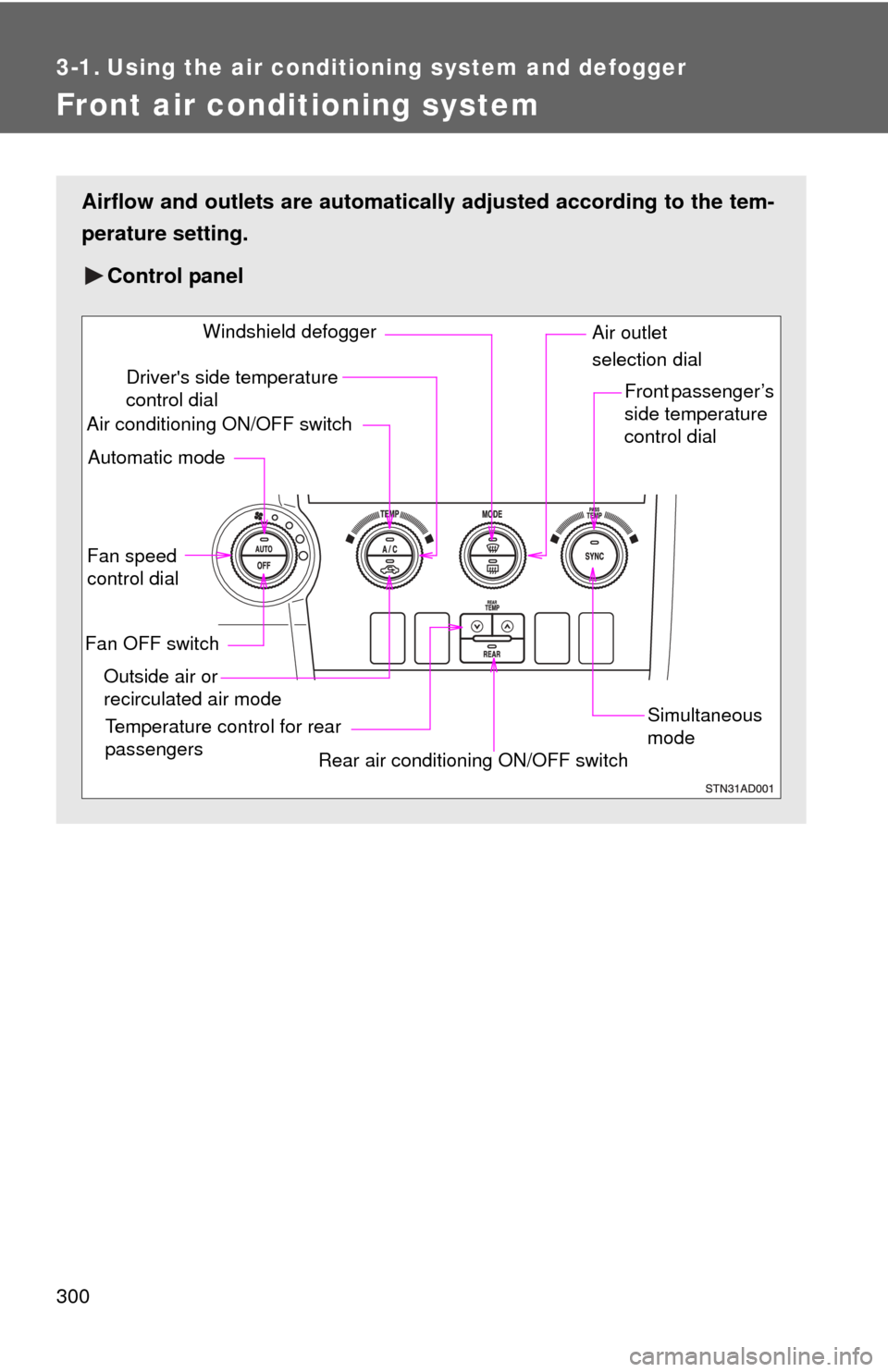
Front air conditioning system
Airflow and outlets are automatically adjusted according to the tem-
perature setting.
Control panel
Fan speed
control dial
Outside air or
recirculated air mode Front passenger’s
side temperature
control dial
Air conditioning ON/OFF switch
Simultaneous
mode
Rear air conditioning ON/OFF switch
Temperature control for rear
passengers Air outlet
selection dial
Driver's side temperature
control dial
Automatic mode Windshield defogger
Fan OFF switch
Page 301 of 708
301
3-1. Using the air conditioning system
and defogger
3
Interior features
Using the automatic mode
Press .
The air conditioning system will begin to operate. Air outlets and fan
speed are automatically adjusted according to the temperature set-
ting.
Turn the temperature control dial clockwise (warm) or coun-
terclockwise (cool).
The temperature for the driver and passenger seat can be set sepa-
rately.
Display
Front passenger’s side
temperature setting display
Fan speed display
Airflow display
Driver’s side temperature
setting display Temperature setting
display for rear passengers
Page 302 of 708
302 3-1. Using the air conditioning system and defogger
Adjusting the settings
■ Adjusting the temperature setting
Turn the temperature control dial clockwise (warm) or counter-
clockwise (cool).
The air conditioning system sw itches between individual and
simultaneous modes each time is pressed.
● Simultaneous mode (the indicator on is on)
The driver’s side temperature control dial can be used to adjust
the temperature for all seats.
● Individual mode (the indicator on is off)
The temperature for the driver’s, front passenger’s and rear
seats ( P. 308) can be adjusted separately. Operate the pas-
senger’s side or rear temperature controls to enter individual
mode.
■ Adjusting the fan speed
Turn the fan speed control dial clockwise (increase) or counter-
clockwise (decrease).
The fan speed is shown on the display. (7 levels)
Press to turn the fan off.
Page 303 of 708
303
3-1. Using the air conditioning system
and defogger
3
Interior features
■Changing the air outlets
Turn the air outlet selection dial.
The air outlets switch each time
either side of air outlet selection
dial is turned.
Air flow as shown according to the mode selected.
When the dial is set to , air
flows to the upper body.
When the dial is set to , air
flows to the upper body and feet.