Page 268 of 708

268 2-5. Driving information
CAUTION
■Things that must not be carried in the luggage compartment
The following things may cause a fire if loaded in the luggage compart-
ment.
●Receptacles containing gasoline
●Aerosol cans
■Storage precautions
Observe the following precautions.
Failure to do so may result in death or serious injury.
●Do not stack anything in the luggage compartment higher than the
seatbacks.
Such items may be thrown about and possibly injure people in the
vehicle during sudden braking or in an accident.
●Do not place cargo or luggage in or on the following locations as the item
may get under the brake or accelerator pedal and prevent the pedals from
being depressed properly, block the driver’s vision, or hit the driver or pas-
sengers, causing an accident.
• Driver’s feet
• Front passenger or rear seats (when stacking items)
• Instrument panel
• Dashboard
• Auxiliary box or tray that has no lid
●
Secure all items in the occupant compartment, as they may shift and
injure someone during sudden braking, sudden swerving or an acci-
dent.
●Never allow anyone to ride in the luggage compartment. It is not
designed for passengers. They should ride in their seats with their seat
belts properly fastened. Otherwise, th ey are much more likely to suffer
death or serious bodily injury, in t he event of sudden braking, sudden
swerving or an accident.
■Capacity and distribution
●Do not exceed the maximum axle weight rating or the total vehicle
weight rating.
Page 298 of 708

298
3-1. Using the air conditioning system and defogger
Front air conditioning system ........................... 300
Rear air conditioning system ........................... 308
Rear window and outside rear view mirror
defoggers ....................... 312
Windshield wiper de-icer ............................ 314
Using the steering wheel climate remote control
switches ......................... 315
3-2. Using the audio system Audio system ................... 317
Using the radio ................. 321
Using the CD player ......... 329
Playing MP3 and WMA discs............................... 338
Operating an iPod ............ 346
Operating a USB memory .......................... 352
Optimal use of the audio system ........................... 359
Using the AUX port .......... 363
Using the steering wheel audio switches ............... 365 3-3. Using the Bluetooth® audio
system
Bluetooth
® audio
system ........................... 368
Using the Bluetooth
®
audio system.................. 371
Operating a Bluetooth
®
enabled portable
player ............................. 376
Setting up a Bluetooth
®
enabled portable
player ............................. 378
Bluetooth
® audio system
setup .............................. 383
3-4. Using the rear audio/video system
Rear seat entertainment system ........................... 384
Using the DVD player (DVD video) ................... 392
Using the DVD player (video CD)...................... 401
Using the DVD player (audio CD/CD text) ........ 404
Using the DVD player (MP3 discs) .................... 406
Using the video mode ...... 409
Changing the Setup Menu settings .......................... 411
Interior features3
Page 299 of 708

Interior features3
299
3-5. Using the hands-free phone system (for cellular phone)
Hands-free phone system (for cellular phone)
features .......................... 419
Using the hands-free phone system ................ 423
Making a phone call ......... 432
Setting a cellular phone ... 436
Security and system setup .............................. 440
Using the phone book ...... 443
3-6. Using the interior lights Interior lights list ............... 449
• Personal/interior light main switch .................... 450
• Personal/interior lights ... 451
• Interior light .................... 452
3-7. Using the storage features List of storage features .... 453
• Glove boxes ................... 454
• Coin holder .................... 455
• Front console box .......... 456
• Card holder .................... 458
• Map holder ..................... 459
• Pen holder ..................... 461
• Tissue pocket................. 462
• Rear console box ........... 463
• Overhead console.......... 466
• Cup holders ................... 468 • Bottle holders ................. 472
• Auxiliary boxes............... 473
3-8. Other interior features Sun visors ........................ 475
Vanity mirrors ................... 476
Clock ................................ 477
Outside temperature display............................ 478
Portable ashtray ............... 480
Cigarette lighter................ 481
Conversation mirror ......... 482
Power outlets ................... 483
Seat heaters..................... 489
Seat heaters and ventilators ...................... 492
Armrests........................... 494
Rear side sunshades ....... 495
Seatback table ................. 497
Floor mat .......................... 498
Luggage compartment features .......................... 500
Garage door opener......... 505
Compass .......................... 511
Page 318 of 708
318 3-2. Using the audio system
Type C: CD player with changer controller and AM/FM radio
TitlePage
Using the radioP. 321
Using the CD playerP. 329
Playing MP3 and WMA discsP. 338
Operating an iPodP. 346
Operating a USB memoryP. 352
Optimal use of the audio systemP. 359
Using the AUX portP. 363
Using the steering wheel audio switchesP. 365
Page 363 of 708
363
3-2. Using the audio system
3
Interior features
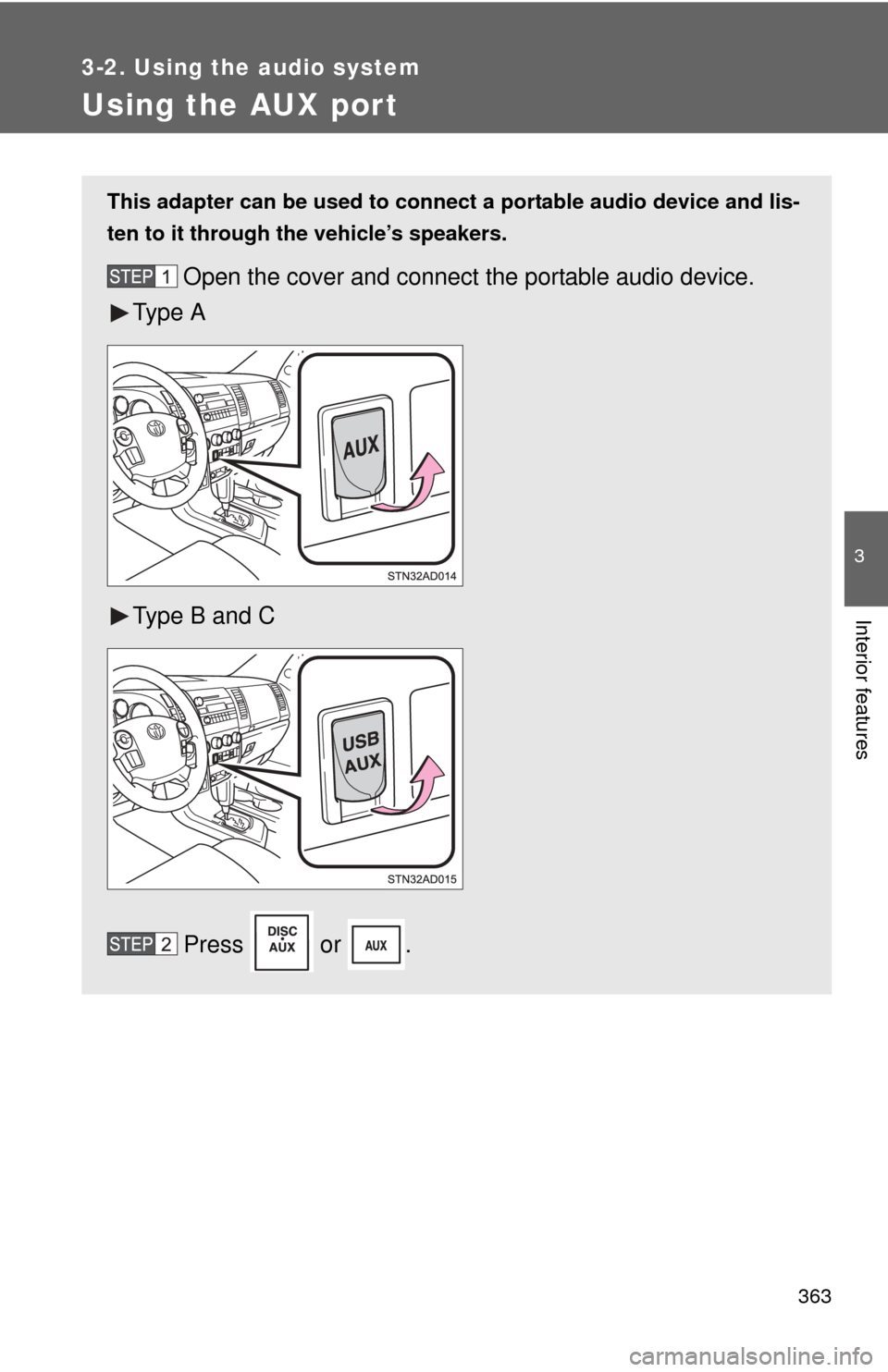
Using the AUX port
This adapter can be used to connect a portable audio device and lis-
ten to it through the vehicle’s speakers.
Open the cover and connect the portable audio device.
Ty p e A
Type B and C
Press or .
Page 366 of 708
366 3-2. Using the audio system
Turning the power onPress when the audio system is turned off.
The audio system can be turned off by holding the switch down until you
hear a beep.
Changing the audio sourcePress when the audio system is turned on. The audio source
changes as follows each time the switch is pressed.
If no discs are inserted in the player, that mode will be skipped.
Type B:
FM SAT CD changer RSE*Bluetooth® audio AUX
USB/iPodAM
Type C:
FM SAT CDBluetooth® audio AUXUSB/iPodAM
*: Vehicles with rear seat entertainment system
Adjusting the volume
Press “+” on to increase the volume and “-” to decrease the
volume.
Press and hold the switch to continue increasing or decreasing the vol-
ume.
Selecting a radio station Press to select the radio mode.
Press “” or “ ” on to select a radio station.
To scan for receivable stations, press and hold “ ” or “ ” on
until you hear a beep.
Page 372 of 708
372 3-3. Using the Bluetooth® audio system
Operating the system using voice commandsBy following the voice guidance inst ructions output from the speaker,
voice commands enable the operation of the Bluetooth
® audio sys-
tem without the need to check the display or operate .
■ Operation procedure when using voice commands
Press the talk switch and follow the voice guidance instructions.
■ Auxiliary commands when using voice commands
The following auxiliary commands can be used when operating the
system using a voice command:
“Cancel”: Exits the Bluetooth
® audio system
“Repeat”: Repeats the previous voice guidance instruction
“Go back”: Returns to the previous procedure
“Help”: Reads aloud the function summary if a help comment is
registered for the selected function
Page 426 of 708

426 3-5. Using the hands-free phone system (for cellular phone)
Operating the system by using a voice command
By following the voice guidance inst ructions output from the speaker,
voice commands enable the operation of the hands-free phone sys-
tem without the need to check the display or operate .
■ Operation procedure when using a voice command
Press the talk switch and follow the voice guidance instructions.
■ Auxiliary commands when using a voice command
The following auxiliary commands can be used when operating the
system using a voice command:
“Cancel”: Exits the hands-free phone system
“Repeat”: Repeats the previous voice guidance instruction
“Go back”: Returns to the previous procedure
“Help”: Reads aloud the function summary if a help comment is
registered for the selected function
Using the hands-free phone system for the first time
Before using the hands-free phone system, it is necessary to register
a cellular phone in the system. Th e phone registration mode will be
entered automatically when starting the system with no cellular
phone registered. Follow the procedure below to register a cellular
phone:
Press the off-hook switch or the talk switch.
The introductory guidance and phone name registration instructions
are heard.
Select “Pair Phone” using a voice command or .