Page 466 of 708
466 3-7. Using the storage features
Overhead consoleThe overhead console is useful for temporarily storing sunglasses
and similar small items.
Type A Push the knob forward to open
the console.
CAUTION
■Caution while driving
Keep the console box closed.
Injuries may result in the event of an accident or sudden braking.
■ When opening/closing the lower box
Be careful not to get your hands or feet caught between the lower box and
the upper box.
Failure to do so may result in serious injury.
■ When opening the lower box
Make sure that the upper box is locked. Items stored inside may fall out and
cause injury.
Rear console box and overhead console
Page 469 of 708
469
3-7. Using the
storage features
3
Interior features
Rear console box (if equipped)
Attach the separator when using
either console box as a cup
holder.
Both cup holders cannot be used
at the same time.
■Removing the cup holder (front)
Push the tab down to release the lock.
Remove the lid.
Stow the lid.
Cup holders
Page 474 of 708
474 3-7. Using the storage features
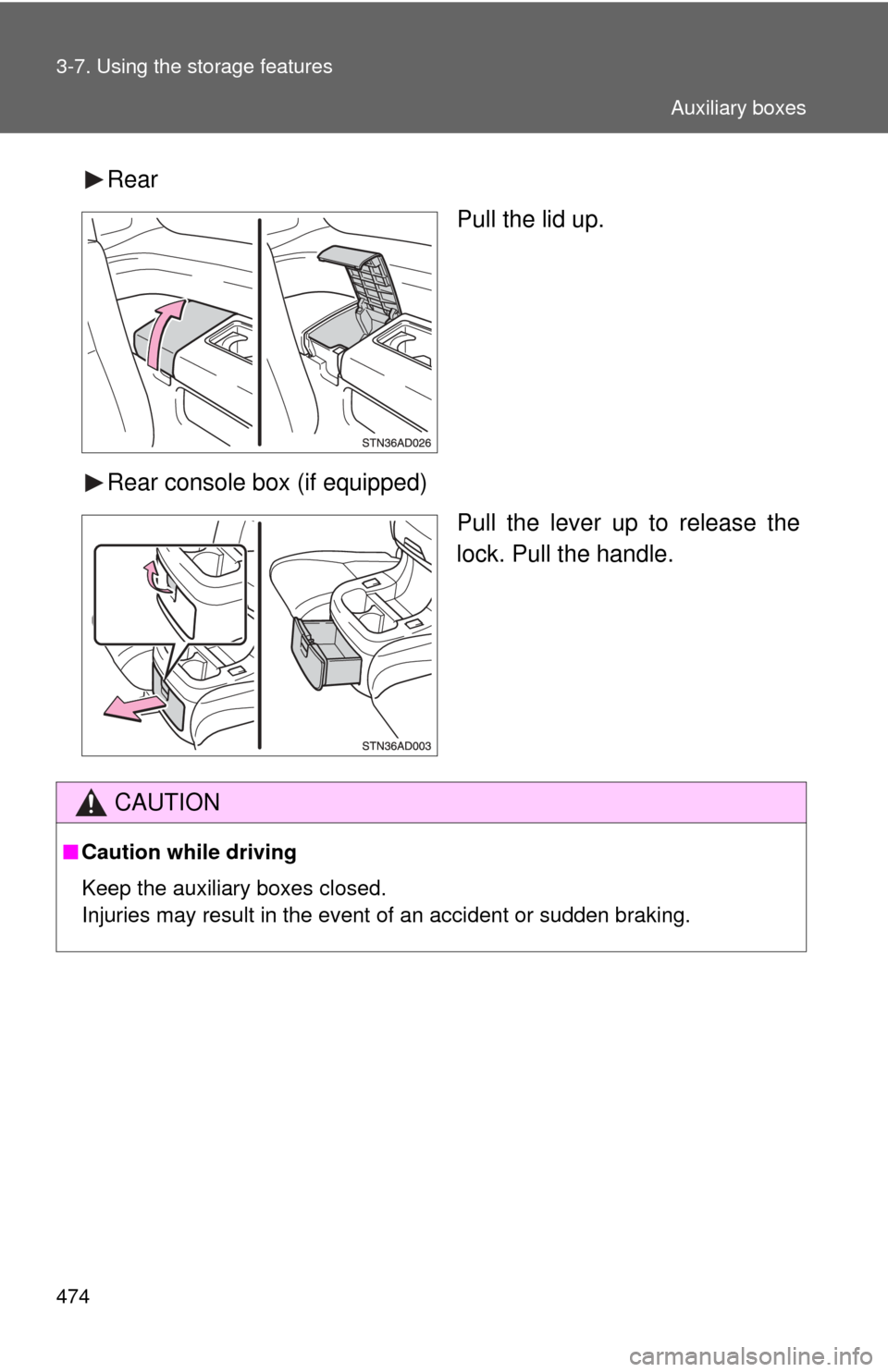
RearPull the lid up.
Rear console box (if equipped) Pull the lever up to release the
lock. Pull the handle.
CAUTION
■Caution while driving
Keep the auxiliary boxes closed.
Injuries may result in the event of an accident or sudden braking.
Auxiliary boxes
Page 477 of 708
477
3-8. Other interior features
3
Interior features
Clock
■For quicker adjustme nt of the clock
Hold down the M or H button continuously. This allows faster advancement
of the minutes and hours.
■ The clock is displayed when
The engine switch is in the ACC or ON position.
■ When disconnecting and reco nnecting battery terminals
The time display will automatically be set to 1:00.
Adjusts the hours.
Adjusts the minutes.
Page 484 of 708
484 3-8. Other interior features
*1: Vehicles without rear seat entertainment system
Inside the front console box (12 V)
Pull the knob up to release the
lock. Lift the lid.
Back of the front console box (12 V)
*1
Page 494 of 708
494
3-8. Other interior features
Armrests
: If equipped
NOTICE
■To prevent damage to the armrest
●Do not place too much strain on the armrest.
● Do not sit on the armrest.
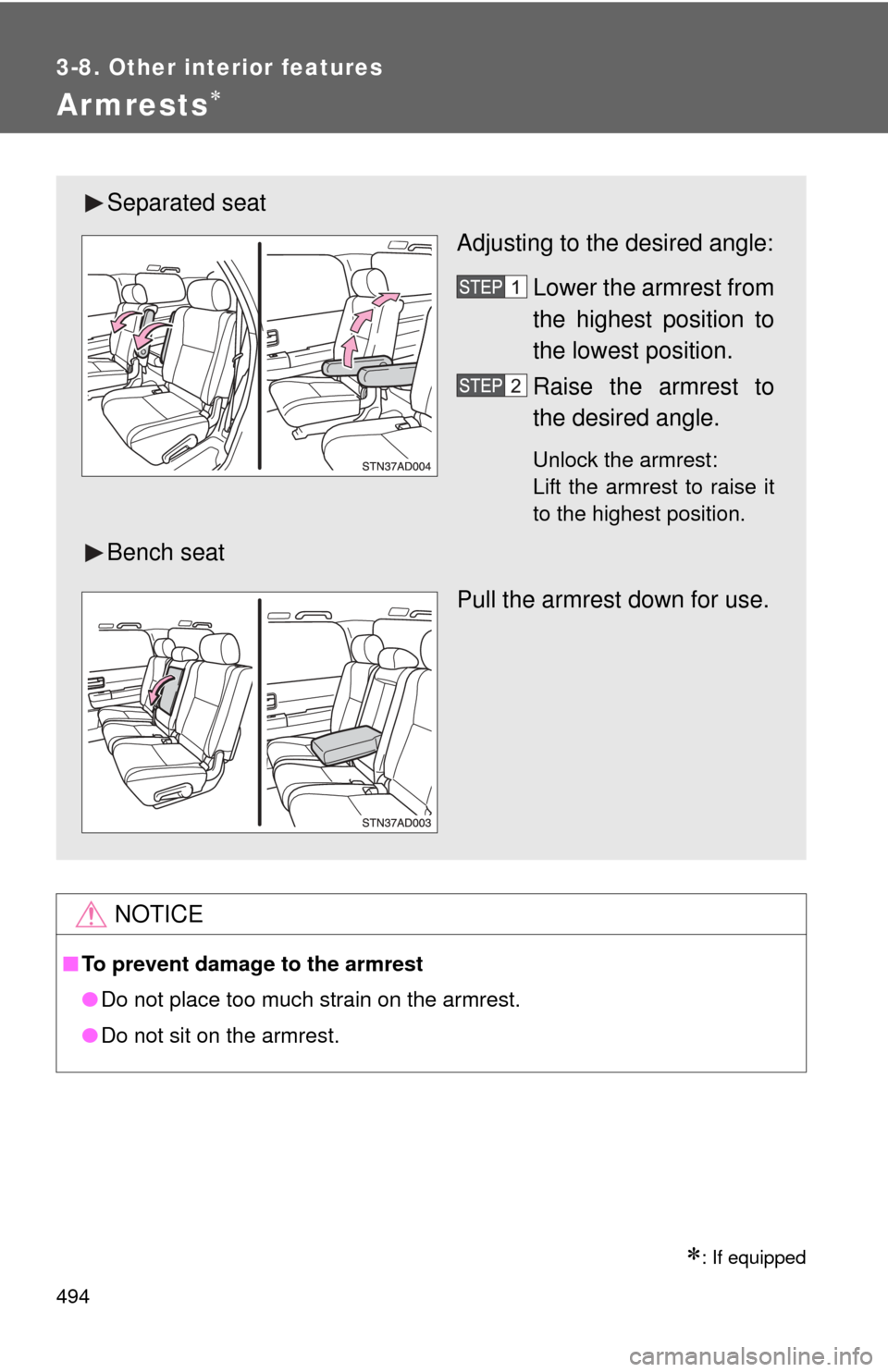
Separated seat
Adjusting to the desired angle:
Lower the armrest from
the highest position to
the lowest position.
Raise the armrest to
the desired angle.
Unlock the armrest:
Lift the armrest to raise it
to the highest position.
Bench seat
Pull the armrest down for use.
Page 505 of 708
505
3-8. Other interior features
3
Interior features
Garage door opener
The garage door opener (HomeLink® Universal Transceiver) is manufac-
tured under license from HomeLink®.
Programming the HomeLink® (for U.S.A. owners)
The HomeLink
® compatible transceiver in your vehicle has 3 buttons
which can be programmed to operate 3 different devices. Refer to the
programming method below appropriate for the device.
Indicator
Buttons
■ Programming the HomeLink
Point the remote control trans-
mitter for the device 1 to 3 in. (25
to 75 mm) from the HomeLink
®
control buttons.
Keep the indicator on the
HomeLink® in view while pro-
gramming.
: If equipped
The garage door opener can be programmed to operate garage
doors, gates, entry do ors, door locks, home lighting systems, secu-
rity systems, and other devices.
Page 508 of 708

508 3-8. Other interior features
Test the operation of the HomeLink® by pressing the newly
programmed button. Check to se e if the gate/device operates
correctly.
Repeat the steps above to program another device for each of
the remaining HomeLink
® buttons.
■ Programming other devices
To program other devices such as home security systems, home
door locks or lighting, contact your authorized Toyota dealer for
assistance.
■ Reprogramming a button
The individual HomeLink
® buttons cannot be erased but can be
reprogrammed. To reprogram a button, follow the programming
instructions.
Operating the HomeLink®
Press the appropriate HomeLink® button. The HomeLink® indicator
on the HomeLink® transceiver should turn on.
The HomeLink® continues to send a signal for a maximum of 20 seconds
as long as the button is pressed.
Reprogramming a HomeLink® button
Press and hold the desired HomeLink
® button. After 20 seconds, the
HomeLink® indicator light will start flashing slowly. Keep pressing the
HomeLink® button and then follow the “Programming the HomeLink®
(for U.S.A. owners)” instructions. ( P. 505)