Page 2 of 544

TABLE OF CONTENTSIndex
2
1-1. Key informationKeys ..................................... 24
1-2. Opening, closing and locking the doors
Smart key system................. 26
Wireless remote control ....... 38
Side doors ............................ 42
Back door ............................. 46
1-3. Adjustable components (seats, mirrors,
steering wheel)
Front seats ........................... 50
Rear seats ............................ 55
Head restraints ..................... 66
Seat belts ............................. 70
Steering wheel ..................... 78
Anti-glare inside rear view mirror .................................. 79
Outside rear view mirrors ..... 81
1-4. Opening and closing the windows and moon roof
Power windows .................... 83
Moon roof ............................. 87
1-5. Refueling Opening the fuel tank cap .... 91 1-6. Theft deterrent system
Engine immobilizer system ................................ 95
Theft prevention labels (U.S.A.)............................... 98
1-7. Safety information Correct driving posture ......... 99
SRS airbags ....................... 101
Front passenger occupant classification system ......... 113
Child restraint systems ....... 119
Installing child restraints ..... 123
2-1. Driving procedures Driving the vehicle .............. 136
Engine (ignition) switch (vehicles with smart
key system) ...................... 145
Engine (ignition) switch (vehicles without smart
key system) ...................... 149
Automatic transmission ...... 152
Turn signal lever ................. 155
Parking brake ..................... 156
Horn .................................... 157
2-2. Instrument cluster Gauges and meters ............ 158
Indicators and warning lights ................................. 161
Trip information display ...... 164
1Before driving
2When driving
Page 23 of 544

Before driving1
23
1-1. Key informationKeys ................................... 24
1-2. Opening, closing and locking the doors
Smart key system .............. 26
Wireless remote control ..... 38
Side doors .......................... 42
Back door ........................... 46
1-3. Adjustable components (seats, mirrors,
steering wheel)
Front seats ......................... 50
Rear seats.......................... 55
Head restraints................... 66
Seat belts ........................... 70
Steering wheel ................... 78
Anti-glare inside rear view mirror ....................... 79
Outside rear view mirrors.............................. 81
1-4. Opening and closing the windows and moon roof
Power windows .................. 83
Moon roof ........................... 87 1-5. Refueling
Opening the fuel tank cap ................................... 91
1-6. Theft deterrent system Engine immobilizer system ............................. 95
Theft prevention labels (U.S.A.) ............................ 98
1-7. Safety information Correct driving posture....... 99
SRS airbags ..................... 101
Front passenger occupant classification
system ........................... 113
Child restraint systems..... 119
Installing child restraints ........................ 123
Page 26 of 544
26
1-2. Opening, closing and locking the doors
Smart key system
The following operations can be performed simply by carrying the
electronic key on your person, for example in your pocket.
(The driver should always carry the electronic key.)
Locks and unlocks the doors ( P. 2 7 )
Locks and unlocks the back door ( P. 27)
Starts the engine ( P. 145)
Electronic key
Electronic key
Electronic key
: If equipped
Page 29 of 544
29
1-2. Opening, closing and locking the doors
1
Before driving
■
Effective range (areas within which the electronic key is
detected)
When locking or unlocking
the doors
The system can be operated
when the electronic key is
within about 2.3 ft. (0.7 m) of
either of the outside front
door handles and back door
handle.
When starting the engine
or changing “ENGINE
START STOP” switch
modes
The system can be operated
when the electronic key is
inside the vehicle.
Page 31 of 544

31
1-2. Opening, closing and locking the doors
1
Before driving
The setting changes each time an operation is performed, as shown below.
(When changing the setting continuously, release the buttons, wait for at
least 5 seconds, and repeat step 2.)
■ Battery-saving function
In the following circumstances, the entry function is disabled in order to pre-
vent the vehicle and electronic key batteries from discharging.
●When the entry function has not been used for 2 weeks or more
● When the electronic key has been left within approximately 3 ft. (1 m) of
the vehicle for 10 minutes or more
The system will resume operation when...
● The vehicle is locked using the door handle lock button.
● The vehicle is locked/unlocked using the wireless remote control func-
tion. ( P. 38)
● The vehicle is locked/unlocked using the mechanical key. ( P. 471)
ModeUnlocking doorsBeep
Driver’s door
unlocking mode
Hold the driver's door han-
dle to unlock only the
driver's door.
Exterior: Beeps twice
Interior: Pings once
Hold the front passenger’s
door handle to unlock all
doors
All doors unlocking modeHold either front and back
door handle to unlock all
doorsExterior: Beeps twice
Interior: Pings once
Page 35 of 544
35
1-2. Opening, closing and locking the doors
1
Before driving
■
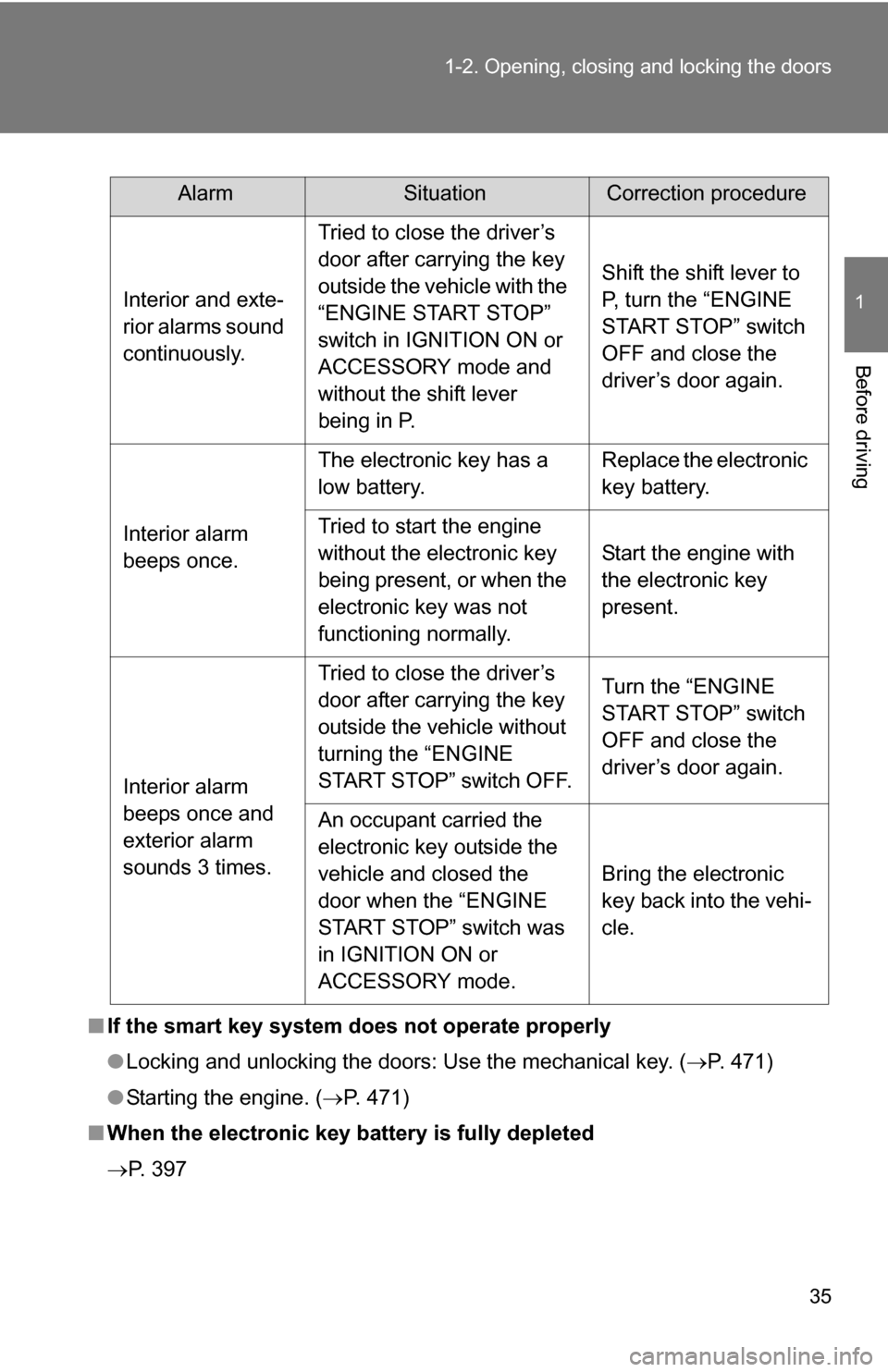
If the smart key system does not operate properly
● Locking and unlocking the doors: Use the mechanical key. ( P. 471)
● Starting the engine. ( P. 471)
■ When the electronic key battery is fully depleted
P. 397
AlarmSituationCorrection procedure
Interior and exte-
rior alarms sound
continuously. Tried to close the driver’s
door after carrying the key
outside the vehicle with the
“ENGINE START STOP”
switch in IGNITION ON or
ACCESSORY mode and
without the shift lever
being in P. Shift the shift lever to
P, turn the “ENGINE
START STOP” switch
OFF and close the
driver’s door again.
Interior alarm
beeps once. The electronic key has a
low battery.
Replace the electronic
key battery.
Tried to start the engine
without the electronic key
being present, or when the
electronic key was not
functioning normally. Start the engine with
the electronic key
present.
Interior alarm
beeps once and
exterior alarm
sounds 3 times. Tried to close the driver’s
door after carrying the key
outside the vehicle without
turning the “ENGINE
START STOP” switch OFF.
Turn the “ENGINE
START STOP” switch
OFF and close the
driver’s door again.
An occupant carried the
electronic key outside the
vehicle and closed the
door when the “ENGINE
START STOP” switch was
in IGNITION ON or
ACCESSORY mode. Bring the electronic
key back into the vehi-
cle.
Page 46 of 544
46
1-2. Opening, closing and locking the doors
Back door
Rear step bumperThe rear step bumper is
intended for rear end protection
and easier step-up loading.
The back door can be opened using the back door handle. The back
door can be locked and unlocked us ing the wireless remote control,
entry function (vehicles with sm art key system) or door lock switch.
■Entry function (vehicles with smart key system)
P. 2 7
■ Wireless remote control
P. 3 8
■ Door lock switch
P. 4 3
■Customization that can be co nfigured at Toyota dealer
Settings (e.g. wireless remote control) can be changed.
(Customizable features P. 510)
Page 170 of 544

170 2-3. Operating the lights and wipers
■Automatic light off system
Vehicles without smart key system:
The headlights and tail lights turn off 30 seconds after driver’s door is
opened and closed if the engine switch has been turned to “ACC” or “LOCK”
position.
To turn the lights on again, turn the engine switch to the “ON” position, or
turn the headlight switch off and then back to or .
Vehicles with smart key system:
The headlights and tail lights turn off 30 seconds after driver’s door is
opened and closed if the “ENGINE START STOP” switch has been turned to
ACCESSORY mode or turned OFF.
To turn the lights on again, turn the “ENGINE START STOP” switch to IGNI-
TION ON mode, or turn the headlight switch off and then back to or
.
■ Customization that can be co nfigured at Toyota dealer
Settings (e.g. light sensor sensitivity) can be deactivated.
(Customizable features P. 510)
NOTICE
■To prevent battery discharge
Do not leave the lights on longer than necessary when the engine is not run-
ning.


