Page 169 of 544
169
2-3. Operating the lights and wipers
2
When driving
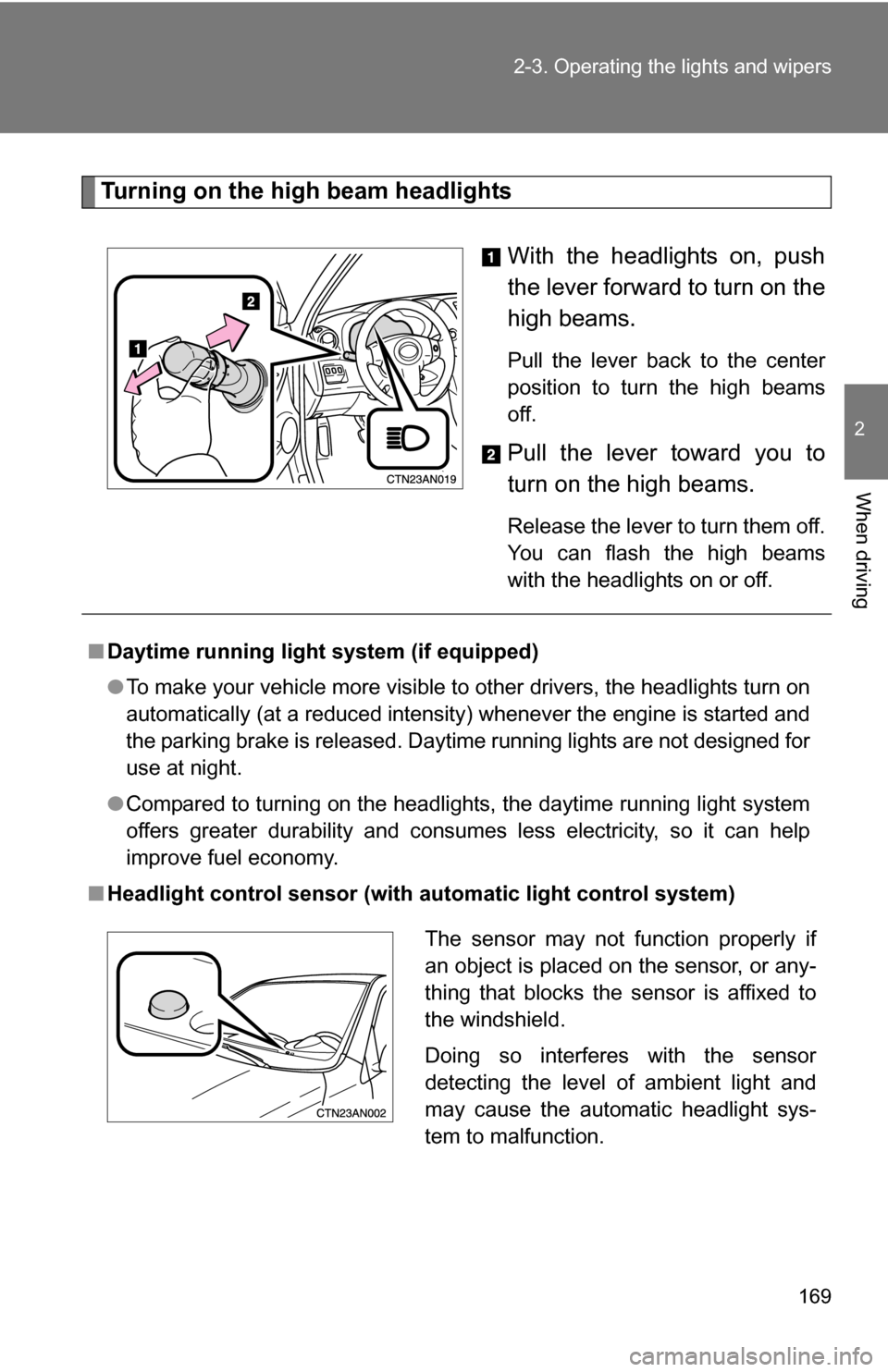
Turning on the high beam headlights
With the headlights on, push
the lever forward to turn on the
high beams.
Pull the lever back to the center
position to turn the high beams
off.
Pull the lever toward you to
turn on the high beams.
Release the lever to turn them off.
You can flash the high beams
with the headlights on or off.
■Daytime running light system (if equipped)
●To make your vehicle more visible to other drivers, the headlights turn on
automatically (at a reduced intensity) whenever the engine is started and
the parking brake is released. Daytime running lights are not designed for
use at night.
● Compared to turning on the headlights, the daytime running light system
offers greater durability and consumes less electricity, so it can help
improve fuel economy.
■ Headlight control sensor (with au tomatic light control system)
The sensor may not function properly if
an object is placed on the sensor, or any-
thing that blocks the sensor is affixed to
the windshield.
Doing so interferes with the sensor
detecting the level of ambient light and
may cause the automatic headlight sys-
tem to malfunction.
Page 170 of 544

170 2-3. Operating the lights and wipers
■Automatic light off system
Vehicles without smart key system:
The headlights and tail lights turn off 30 seconds after driver’s door is
opened and closed if the engine switch has been turned to “ACC” or “LOCK”
position.
To turn the lights on again, turn the engine switch to the “ON” position, or
turn the headlight switch off and then back to or .
Vehicles with smart key system:
The headlights and tail lights turn off 30 seconds after driver’s door is
opened and closed if the “ENGINE START STOP” switch has been turned to
ACCESSORY mode or turned OFF.
To turn the lights on again, turn the “ENGINE START STOP” switch to IGNI-
TION ON mode, or turn the headlight switch off and then back to or
.
■ Customization that can be co nfigured at Toyota dealer
Settings (e.g. light sensor sensitivity) can be deactivated.
(Customizable features P. 510)
NOTICE
■To prevent battery discharge
Do not leave the lights on longer than necessary when the engine is not run-
ning.
Page 175 of 544
175
2-3. Operating the lights and wipers
2
When driving
■
The windshield wipers and washer can be operated when
Vehicles without smart key system
The engine switch is in the “ON” position.
Vehicles with smart key system
The “ENGINE START STOP” switch is in IGNITION ON mode.
■ If no windshield washer fluid sprays
Check that the washer nozzles are not blocked and if there is washer fluid in
the windshield washer fluid reservoir.
Increases the intermittent
windshield wiper frequency
Decreases the intermittent
windshield wiper frequency
Wash/wipe operation
The wipers will automatically
operate a couple of times after
the washer squirts.
(After operating several times,
the wipers operate one more
time after a short delay to pre-
vent dripping.)
Page 178 of 544
178 2-3. Operating the lights and wipers
■The rear window wiper and w asher can be operated when
Vehicles without smart key system
The engine switch is in the “ON” position.
Vehicles with smart key system
The “ENGINE START STOP” switch is in IGNITION ON mode.
NOTICE
■ When the rear window is dry
Do not use the wipers, as they may damage the rear window.
■ When a nozzle is blocked
Do not try to clear it with a pin or other object. The nozzle will be damaged.
Ty p e B
Intermittent window
wiper operation
Normal window
wiper operation
Washer/wiper dual
operation
Washer/wiper dual
operation
Page 184 of 544
184 2-4. Using other driving systems
■The rear view monitor system can be operated when
Vehicles without smart key system
The shift lever is in R, the back door is fully closed and the engine switch is
in the “ON” position.
Vehicles with smart key system
The shift lever is in R, the back door is fully closed and the “ENGINE START
STOP” switch is in IGNITION ON mode.
■ Changing display modes
The rear view monitor display mode can be changed while the screen is on.
●To temporarily disable the rear view monitor system
Push the “AUTO” button.
The indicator will turn amber.
Vehicles without smart key system
The system will be re-enabled once the
engine switch is turned OFF and then
turned to the “ON” position.
Vehicles with smart key system
The system will be re-enabled once the
“ENGINE START STOP” switch is
turned OFF and then turned to IGNI-
TION ON mode.
Page 185 of 544

185
2-4. Using other
driving systems
2
When driving
●To constantly disable the rear view monitor system
● To re-enable the rear view monitor system
Push the “AUTO” button. The indicator will turn green.
■ Selecting a language (Eng lish, French or Spanish)
Push and hold the “AUTO” button for 12
to 15 seconds.
The screen will turn off and on after 6
seconds. Keep pushing the button until
the screen turns back off. The indicator
will flash amber.
Vehicles without smart key system
The system will not automatically turn
on again after the engine switch is OFF
and then turned to the “ON” position. Vehicles with smart key system
The system will not automatically turn
on again after the “ENGINE START
STOP” switch is OFF and then turned
to IGNITION ON mode.
Push and hold the “AUTO”
button for 6 to 12 seconds.
The screen will turn on and
the indicator will turn green.
Push the “AUTO” button.
Each time the “AUTO” button
is pushed and released, the
language changes. A mes-
sage will flash in the mirror for
5 seconds after the button is
released, indicating that the
change has been completed.STEP 1
STEP 2
Page 193 of 544
193
2-4. Using other
driving systems
2
When driving
To disable TRAC and/or VSC (2WD models)
If the vehicle gets stuck in fresh snow or mud, TRAC and VSC may
reduce power from the engine to the wheels. You may need to turn
the system off to enable you to rock the vehicle in order to free it. The
AUTO LSD function is activated when the system is in TRAC off
mode.
■ Turning off TRAC
Quickly push and release the
switch to turn off TRAC.
The “AUTO LSD” and VSC OFF
indicator lights should come on.
While the AUTO LSD function is
operating the slip indicator light
flashes.
Push the switch again to turn the
system back on.
■Turning off TRAC and VSC
Push and hold the switch while
the vehicle is stopped to turn off
TRAC and VSC.
The VSC OFF indicator light
should come on.
Push the switch again to turn the
system back on.
Page 194 of 544
194 2-4. Using other driving systems
To disable TRAC and/or VSC (4WD models)If the vehicle gets stuck in fres h snow or mud, TRAC and VSC may
reduce power from the engine to the wheels. You may need to turn
the system off to enable you to rock the vehicle in order to free it.
■ Turning off TRAC
Quickly push and release the
switch to turn off TRAC.
The “TRAC OFF” indicator light
should come on.
Push the switch again to turn the
system back on.
■Turning off TRAC and VSC
Push and hold the switch while
the vehicle is stopped to turn off
TRAC and VSC.
The “TRAC OFF” and VSC OFF
indicator lights should come on.
Push the switch again to turn the
system back on.


