Page 304 of 544
304
3-3. Using the hands-free phone system (for cellular phone)
Security and system setup
Setting or changing the PIN■ Setting a PIN
Select “Set PIN” using a voice command or .
Enter a PIN using a voice command or .
When using , input the code 1 digit at a time.
■Changing the PIN
Select “Set PIN” using a voice command or .
To enter the menu of each setting, follow the steps below:
■Security setting items and operation procedure
● Setting or changing t he PIN (Personal Identification Number)
1. “Setup” 2. “Security” 3. “Set PIN”
● Locking the phone book
1. “Setup” 2. “Security” 3. “Phonebook Lock”
● Unlocking the phone book
1. “Setup” 2. “Security” 3. “Phonebook Unlock”
■ System setup items and operation procedure
●Setting voice guidance volume
1. “Setup” 2. “System Setup” 3. “Guidance Vol”
● Initialization
1. “Setup” 2. “System Setup” 3. “Initialize”
can only be used for system setup operation.
STEP 1
STEP 2
STEP 1
Page 306 of 544
306 3-3. Using the hands-free phone system (for cellular phone)
Initialization
Select “Initialize” and then “Confirm” using .
Select “Confirm” using .
■Initialization
●The following data in the system can be initialized:
• Phone book
• Outgoing and incoming call history
• Speed dials
• Registered cellular phone data
• Security code
● Once the initialization has been completed, the data cannot be restored
to its original state.
■ When the phone book is locked
The following functions cannot be used:
●Dialing by inputting a name
● Speed dialing
● Dialing a number stored in the call history memory
● Using the phone book
STEP 1
STEP 2
Page 332 of 544

332 3-6. Other interior features
CAUTION
■Using a power outlet
Observe the following precautions to reduce the risk of injury.
●Use of the power outlet when it is wet with water or snow may result in
electrical shocks and is extremely dangerous. The power outlet must be
thoroughly dried before use.
● Do not allow children to use or play with the power outlet.
● Be careful not to get any part of your body caught in the power outlet lid.
● When using electrical appliances, strictly follow any cautions and notices
written on their labels and in the manufacturers' instruction manuals.
● Do not modify, disassemble or repair the power outlet or its inverter in any
way. Doing so may result in unexpected malfunctions or accidents, which
could cause serious damage or injuries. Contact your Toyota dealer for
any necessary repairs.
■ To prevent injuries and accidents, securely fix all electric appliances
before use and do not use any appl iances that may do any of the fol-
lowing:
● Distract the driver while driving, or hamper safe driving.
● Result in a fire or burn injuries due to the appliance rolling, falling or over-
heating while driving.
● Emit steam while the windows of the cabin are closed.
■ To prevent unexpected accidents, su ch as electric shocks, do not per-
form any of the following:
● Using the power outlet for electric heaters while sleeping.
● Contaminating the power outlet with liquid substances or mud.
● Handling electrical appliance plugs at the power outlet with wet hands o\
r
feet.
● Inserting foreign objects into the power outlet.
● Using malfunctioning electric appliances.
● Inserting inappropriate or badly fitting plugs into the power outlet.
Page 334 of 544

334 3-6. Other interior features
NOTICE
■To prevent any damage caused by heat
●Do not use any electrical appliances that give off intense heat, such as
toasters, in any locations including the internal or external trim, seats and
deck.
● Do not use any electrical appliances that are easily affected by vibration or
heat inside the vehicle. Vibration while driving, or the heat of the sun while
parking, may result in damage to those electrical appliances.
■ If any electrical appliances are to be used while driving
Securely fasten both the appliances and their cables to prevent them from
falling or getting caught in any of the power train components.
■ If the power outlet is loose when an electrical appliance plug is con-
nected
Replace the outlet. Contact your Toyota dealer for any necessary replace-
ments.
■ If the power outlet gets dirty
Use a soft, clean cloth to wipe it gently. Do not use any cleansing materials,
such as organic solvents, wax, or compound cleaners, as these may dam-
age the power outlet or cause it to malfunction.
Page 339 of 544
339
3-6. Other interior features
3
Interior features
Floor mat
CAUTION
Observe the following precautions.
Failure to do so may cause the driver's floor mat to slip, possibly interfering
with the pedals while driving. An unexpectedly high speed may result or it may
become difficult to stop the vehicle, leading to a serious accident.
■When installing the driver's floor mat
●Do not use floor mats designed for other models or different model year
vehicles, even if they are Toyota Genuine floor mats.
● Only use floor mats designed for the driver's seat.
● Always install the floor mat securely using the retaining hooks (clips) pro-
vided.
● Do not use two or more floor mats on top of each other.
● Do not place the floor mat bottom-side up or upside-down.
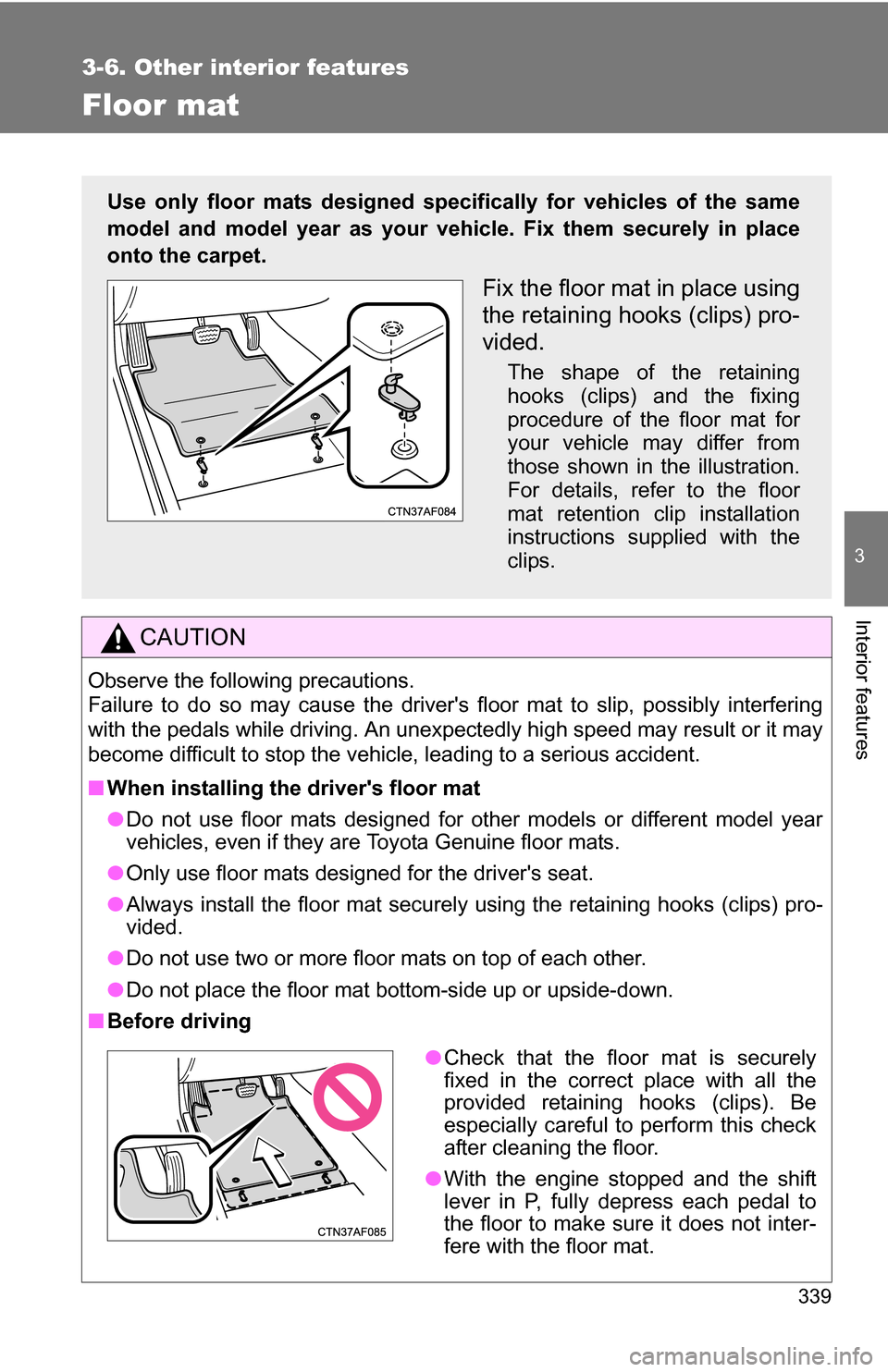
■ Before driving
Use only floor mats designed specifically for vehicles of the same
model and model year as your vehic le. Fix them securely in place
onto the carpet.
Fix the floor mat in place using
the retaining hooks (clips) pro-
vided.
The shape of the retaining
hooks (clips) and the fixing
procedure of the floor mat for
your vehicle may differ from
those shown in the illustration.
For details, refer to the floor
mat retention clip installation
instructions supplied with the
clips.
● Check that the floor mat is securely
fixed in the correct place with all the
provided retaining hooks (clips). Be
especially careful to perform this check
after cleaning the floor.
● With the engine stopped and the shift
lever in P, fully depress each pedal to
the floor to make sure it does not inter-
fere with the floor mat.
Page 340 of 544
340
3-6. Other interior features
Luggage compartment features
■Cargo hooks
Cargo hooks are provided for
securing loose items.
■ Grocery bag hooks
■ Storage box (vehicles without third seats)
Ty p e A
The rear deck board can be folded up into two positions.
Lift the rear deck board.
STEP 1
Page 344 of 544
344 3-6. Other interior features
CAUTION
■When the cargo hooks are not in use
To avoid injury, always return the cargo hooks to their stowed positions.
■ Caution while driving
●Do not drive with any of the deck boards opened. Items may fall out and
cause injury.
● Do not place anything on the luggage cover to avoid death or serious
injury.
■ When installing/stowing the luggage cover
Make sure that the luggage cover is securely installed/stowed. Failure to do
so may result in serious injury in the event of sudden braking or a collision.
NOTICE
■To prevent damage to the grocery bag hooks
Do not hang heavy loads on the hooks.
Page 356 of 544
356 4-2. Maintenance
Vehicle interior
ItemsCheck points
Accelerator pedal • Moves smoothly (without uneven
pedal effort or catching)?
Automatic transmission “Park”
mechanism • Can the vehicle be held securely
on an incline with the shift lever in
P?
Brake pedal • Moves smoothly?
• Does it have appropriate clear-
ance and correct amount of free
play?
Brakes • Not pull to one side when
applied?
• Loss of brake effectiveness?
• Spongy feeling brake pedal?
• Pedal almost touches floor?
Head restraints • Move smoothly and lock
securely?
Indicators/buzzers • Function properly?
Lights • Do all the lights come on?
• Headlights aimed correctly?
Parking brake • Moves smoothly?
• Can hold the vehicle securely on
an incline?
Seat belts • Does the seat belt system oper-
ate smoothly?
• Are the belts undamaged?
Seats • Do the seat controls operate
properly?
Steering wheel • Moves smoothly?
• Has correct free play?
• No strange noises?


