Page 339 of 544
339
3-6. Other interior features
3
Interior features
Floor mat
CAUTION
Observe the following precautions.
Failure to do so may cause the driver's floor mat to slip, possibly interfering
with the pedals while driving. An unexpectedly high speed may result or it may
become difficult to stop the vehicle, leading to a serious accident.
■When installing the driver's floor mat
●Do not use floor mats designed for other models or different model year
vehicles, even if they are Toyota Genuine floor mats.
● Only use floor mats designed for the driver's seat.
● Always install the floor mat securely using the retaining hooks (clips) pro-
vided.
● Do not use two or more floor mats on top of each other.
● Do not place the floor mat bottom-side up or upside-down.
■ Before driving
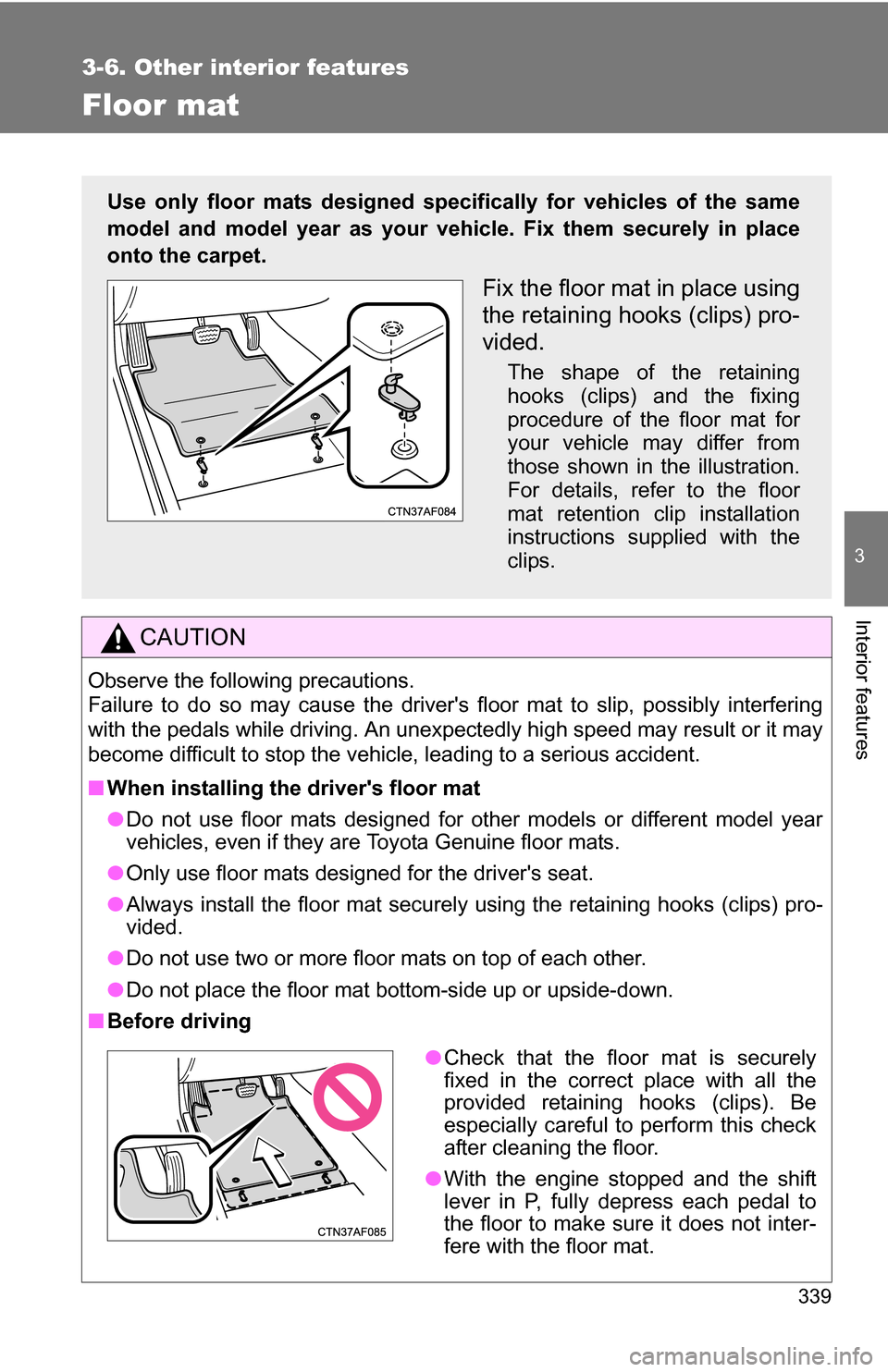
Use only floor mats designed specifically for vehicles of the same
model and model year as your vehic le. Fix them securely in place
onto the carpet.
Fix the floor mat in place using
the retaining hooks (clips) pro-
vided.
The shape of the retaining
hooks (clips) and the fixing
procedure of the floor mat for
your vehicle may differ from
those shown in the illustration.
For details, refer to the floor
mat retention clip installation
instructions supplied with the
clips.
● Check that the floor mat is securely
fixed in the correct place with all the
provided retaining hooks (clips). Be
especially careful to perform this check
after cleaning the floor.
● With the engine stopped and the shift
lever in P, fully depress each pedal to
the floor to make sure it does not inter-
fere with the floor mat.
Page 361 of 544

361
4-3. Do-it-yourself maintenance
4
Maintenance and care
CAUTION
The engine compartment contains many mechanisms and fluids that may
move suddenly, become hot, or become electrically energized. To avoid death
or serious injury, observe the following precautions.
■
When working on the engine compartment
●Keep hands, clothing, and tools away from the moving fans and engine
drive belt.
● Be careful not to touch the engine, radiator, exhaust manifold, etc. right
after driving as they may be hot. Oil and other fluids may also be hot.
● Do not leave anything that may burn easily, such as paper or rags, in the
engine compartment.
● Do not smoke, cause sparks or expose an open flame to fuel or the bat-
tery. Fuel and battery fumes are flammable.
● Be extremely cautious when working on the battery. It contains poisonous
and corrosive sulfuric acid.
● Take care because brake fluid can harm your hands or eyes and damage
painted surfaces.
If fluid gets on your hands or in your eyes, flush the affected area with
clean water immediately.
If you still experience discomfort, see a doctor.
■ When working near the electric c ooling fans or radiator grille
Vehicles without smart key system: Be sure the engine switch is OFF. With
the engine switch in the “ON” position, the electric cooling fans may auto-
matically start to run if the air conditioning is on and/or the coolant tempera-
ture is high. ( P. 375)
Vehicles with smart key system: Be sure the “ENGINE START STOP” switch
is OFF. With the “ENGINE START STOP” switch in IGNITION ON mode, the
electric cooling fans may automatically start to run if the air conditioning is on
and/or the coolant temperature is high. ( P. 375)
■ Safety glasses
Wear safety glasses to prevent flying or falling material, fluid spray, etc. from
getting in the eyes.
Page 386 of 544

386 4-3. Do-it-yourself maintenance
■Tire pressure warning system certification
FCC ID: PAXPMV107J
FCC ID: HYQ13BCXFor vehicles sold in the U.S.A.
This device complies with part 15 of the FCC Rules. Operation is subject
to the following two conditions: (1) This device may not cause harmful
interference, and (2) this device must accept any interference received,
including interference that may cause undesired operation.
FCC WARNING:
Changes or modifications not expre ssly approved by the party responsi-
ble for compliance could void the user's authority to operate the equip-
ment.
For vehicles sold in Canada
Operation is subject to the following two conditions: (1) this device may
not cause interference, and (2) this de vice must accept any interference,
including interference that may caus e undesired operation of the device.
CAUTION
■When inspecting or replacing tires
Observe the following precautions to prevent accidents. Failure to do so
may cause damage to parts of the drive train, as well as dangerous han-
dling characteristics, which may lead to an accident resulting in death or
serious injury.
●Do not mix tires of different makes, models or tread patterns.
Also, do not mix tires of remarkably different treadwear.
●Do not use tire sizes other than those recommended by Toyota.
●Do not mix differently constructed ti res (radial, bias-belted or bias-ply
tires).
●Do not mix summer, all season and snow tires.
●Do not tow the vehicle with the spare tire installed.
Page 425 of 544
5
When trouble arises
425
5-1. Essential information
If your vehicle needs to be towed
Before towingThe following may indicate a problem with your transmission. Contact
your Toyota dealer before towing.
● The engine is running, but the vehicle will not move.
● The vehicle makes an abnormal sound.
If towing is necessary, we recommend having your vehicle towed by
your Toyota dealer or a commercial towing service, using a wheel-lift
type truck or a flat bed truck.
Use a safety chain system for all to wing, and abide by all state/pro-
vincial and local laws.
2WD models: If towing your vehicle with a wheel-lift type truck from
the front, the vehicle's rear wheels and axles must be in good condi-
tions. ( P. 428, 431)
If they are damaged, use a towing dolly or flat bed truck.
4WD models: If towing your vehicle with a wheel-lift type truck, use a
towing dolly. ( P. 428, 431)
Page 442 of 544

442 5-2. Steps to take in an emergency
Follow the correction procedures. (vehicles with smart key system)
After taking the specified steps to correct the suspected problem,
check that the warning light turns off.
Interior
buzzerExterior
buzzerWarning lightWarning light/DetailsCorrection procedure
Once (Comes
on for 8
seconds.) Smart key system warning
light
Indicates that the electronic
key is not present when the
“ENGINE START STOP”
switch is pressed. Confirm the
location of the
electronic
key*.
Once3 times
Smart key system warning
light
Indicates that a door other
than the driver’s door has
been opened and closed with
the “ENGINE START STOP”
switch in any mode other
than OFF and the electronic
key has been taken out of
the detection area. Confirm the
location of the
electronic
key.
Once3 times
Smart key system warning
light
Indicates that the driver’s
door has been opened and
closed with the shift lever in
P, the “ENGINE START
STOP” switch in any mode
other than OFF and the elec-
tronic key has been taken out
of the detection area. Turn the
“ENGINE
START
STOP” switch
OFF or con-
firm the loca-
tion of the
electronic
key.
Page 472 of 544
472 5-2. Steps to take in an emergency
To change “ENGINE START STOP” switch modes: Within 5
seconds after the buzzer sounds, release the brake pedal and
press the “ENGINE START STOP” switch. Modes can be
changed each time the switch is pressed. (P. 146)
To start the engine: Press the “ENGINE START STOP” switch
within 5 seconds after the buzzer sounds, keeping the brake
pedal depressed.
In the event that the “ENGINE ST ART STOP” switch still cannot be
operated, contact your Toyota dealer.
■ Stopping the engine
Shift the shift lever to P and press the “ENGINE START STOP” switch as
you normally do when stopping the engine.
■ Replacing the key battery
As the above procedure is a temporary measure, it is recommended that the
electronic key battery be replaced immediately when the battery is depleted.
(P. 398)
STEP 3
Page 474 of 544

474 5-2. Steps to take in an emergency
■Starting the engine when the battery is discharged
The engine cannot be started by push-starting.
■ To prevent battery discharge
●Turn off the headlights and the audio system while the engine is turned
off.
● Turn off any unnecessary electrical components when the vehicle is run-
ning at a low speed for an extended period, such as in heavy traffic, etc.
■ Charging the battery
The electricity stored in the battery will discharge gradually even when the
vehicle is not in use, due to natural discharge and the draining effects of cer-
tain electrical appliances. If the vehicle is left for a long time, the battery may
discharge, and the engine may be unable to start. (The battery recharges
automatically during driving.)
Maintain the engine speed of the second vehicle, and turn
the engine switch to the “ON” position (vehicles without
smart key system) or turn the “ENGINE START STOP”
switch to IGNITION ON mode (vehicles with smart key sys-
tem), to start the vehicle's engine.
Once the vehicle’s engine has started, remove the jumper
cables in the exact reverse order in which they were con-
nected.
Once the engine starts, have the vehicle checked at your Toyota
dealer as soon as possible.STEP 4
STEP 5
Page 478 of 544

478
5-2. Steps to take in an emergency
If the vehicle becomes stuck
CAUTION
■When attempting to free a stuck vehicle
If you choose to rock the vehicle back and forth to free it, make sure the sur-
rounding area is clear, to avoid striki ng other vehicles, objects or persons.
The vehicle may also lunge forward or lunge back suddenly as it becomes
free. Use extreme caution.
■ When shifting the shift lever
Be careful not to shift the shift lever with the accelerator pedal depressed.
This may lead to unexpected rapid acceleration of the vehicle that may
cause an accident and result in death or serious injury.
Carry out the following procedures if the tires spin or the vehicle
becomes stuck in mud, dirt, or snow.
Stop the engine. Set the parking brake and put the shift
lever in P.
Remove the mud, snow, or sand from around the stuck tire.
Place wood, stones or some other material to help provide
traction under the tires.
Restart the engine.
4WD models: Activate four-wheel drive lock mode. ( P. 203)
Shift the shift lever to the D or R position, release the park-
ing brake and carefully depress the accelerator pedal to
free the vehicle.
Turn off TRAC and/or VSC if these functions are hampering your
attempts to free the vehicle. ( P. 193)
STEP 1
STEP 2
STEP 3
STEP 4
STEP 5
STEP 6

