Page 44 of 684
44
1-1. Plug-in hybrid system
PRIUS PHV_OM_OM47818U_(U)
Plug-in hybrid system precautions
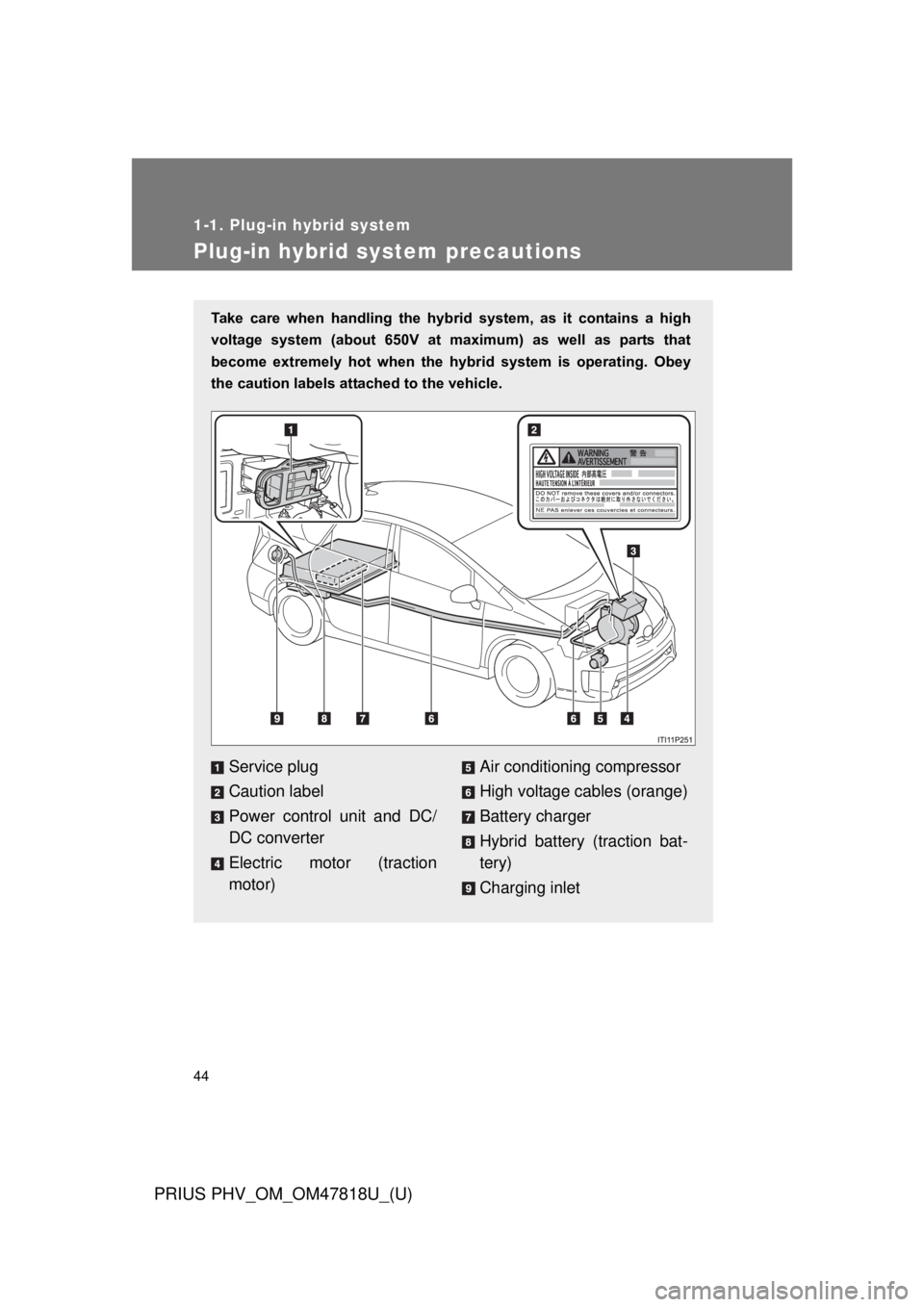
Take care when handling the hybrid system, as it contains a high
voltage system (about 650V at maximum) as well as parts that
become extremely hot when the hybrid system is operating. Obey
the caution labels attached to the vehicle.
Service plug
Caution label
Power control unit and DC/
DC converter
Electric motor (traction
motor)Air conditioning compressor
High voltage cables (orange)
Battery charger
Hybrid battery (traction bat-
tery)
Charging inlet
Page 54 of 684
54 1-1. Plug-in hybrid system
PRIUS PHV_OM_OM47818U_(U)
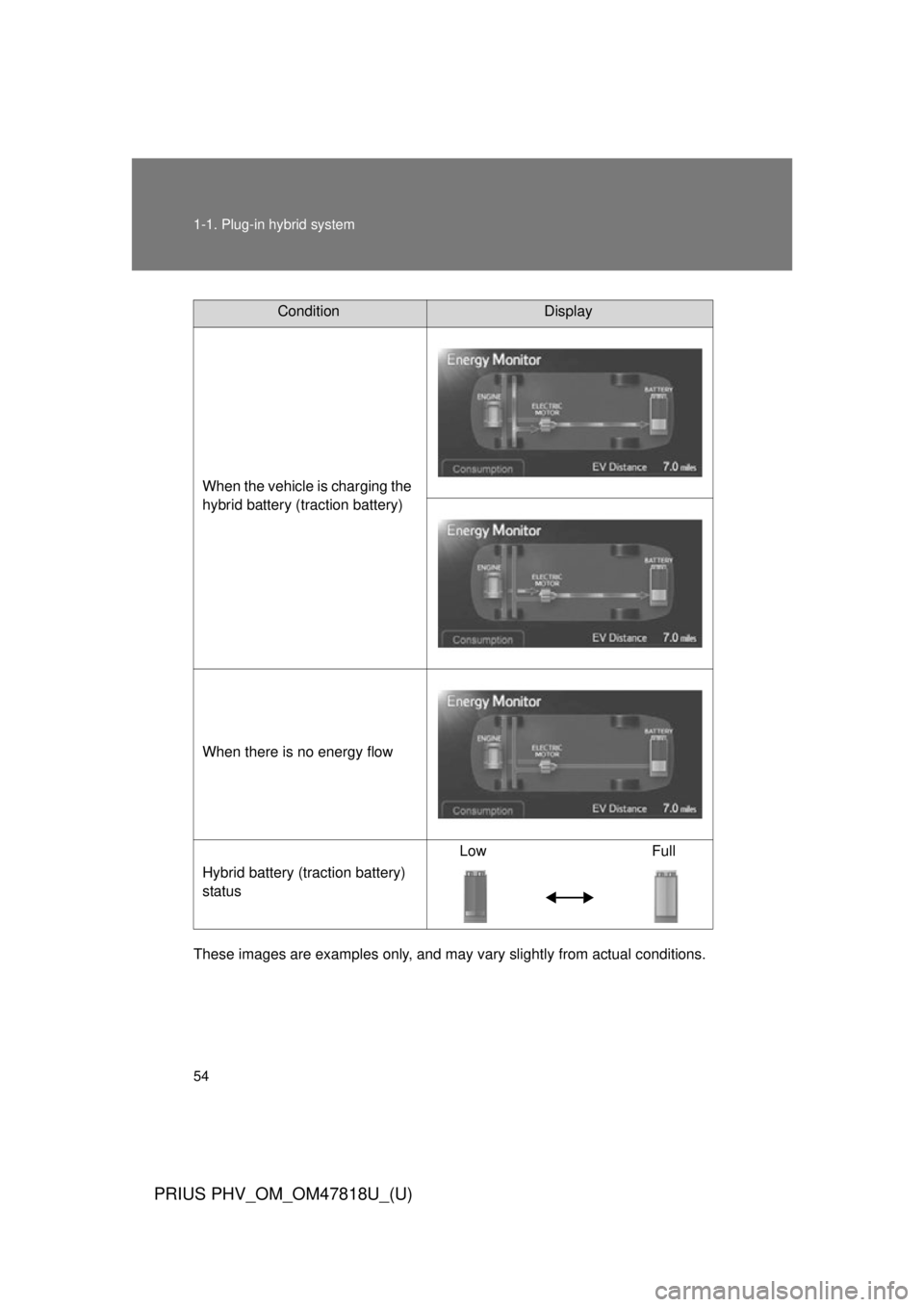
These images are examples only, and may vary slightly from actual conditions.
ConditionDisplay
When the vehicle is charging the
hybrid battery (traction battery)
When there is no energy flow
Hybrid battery (traction battery)
status Low Full
Page 57 of 684
57
1-1. Plug-in hybrid system
1
Before driving
PRIUS PHV_OM_OM47818U_(U)
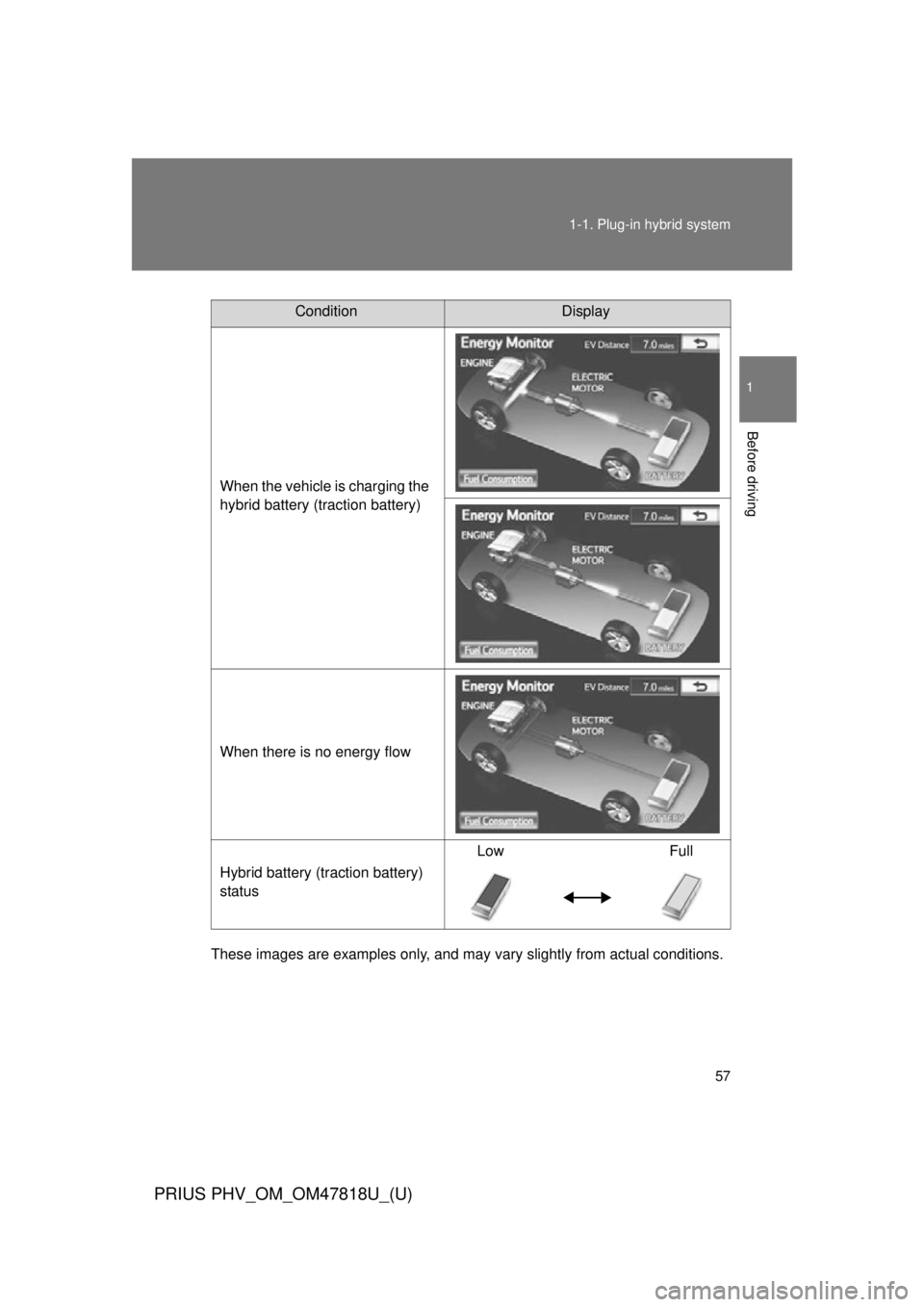
These images are examples only, and may va
ry slightly from actual conditions.
ConditionDisplay
When the vehicle is charging the
hybrid battery (traction battery)
When there is no energy flow
Hybrid battery (traction battery)
status Low Full
Page 59 of 684
59
1-1. Plug-in hybrid system
1
Before driving
PRIUS PHV_OM_OM47818U_(U)
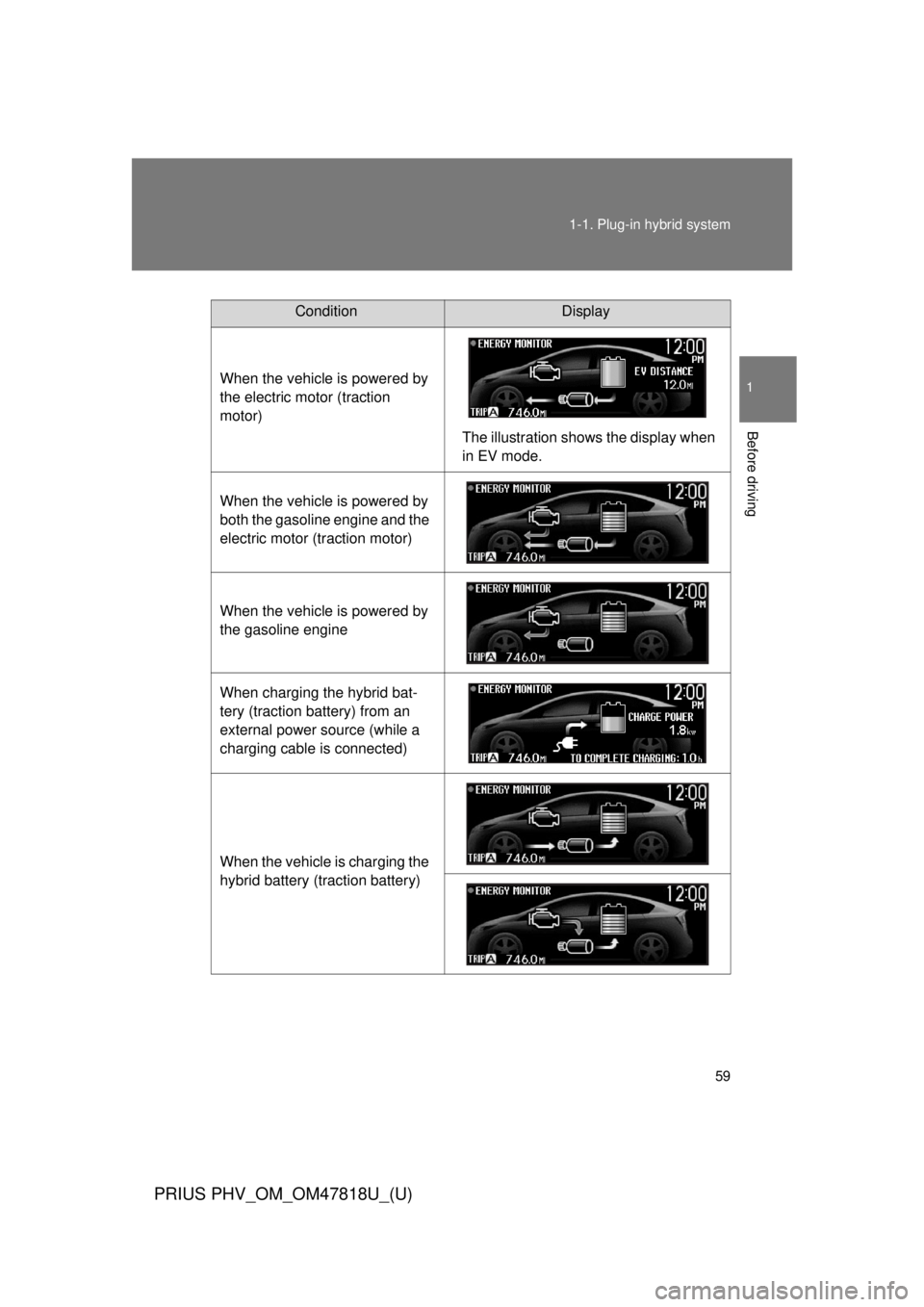
ConditionDisplay
When the vehicle is powered by
the electric motor (traction
motor) The illustration shows the display when
in EV mode.
When the vehicle is powered by
both the gasoline engine and the
electric motor (traction motor)
When the vehicle is powered by
the gasoline engine
When charging the hybrid bat-
tery (traction battery) from an
external power source (while a
charging cable is connected)
When the vehicle is charging the
hybrid battery (traction battery)
Page 68 of 684
68 1-1. Plug-in hybrid system
PRIUS PHV_OM_OM47818U_(U)
■Highway driving
Control your speed and keep at a constant speed. Also, before
stopping at a toll booth or similar, allow plenty of time to release
the accelerator and gently apply the brakes. A greater amount of
electrical energy can be reta ined when slowing down.
Electricity consumptio n will increase substantially when driving
at high speeds in EV mode. If ther e will be a long distance to the
next external charging point afte r leaving a freeway, driving in
HV mode while on the freeway and in EV mode after leaving the
freeway is recommended.
■ Air conditioning on/off
●Switch the air conditioning ( ) to off when it is not
needed. Doing so can help cont rol excessive electricity and
fuel consumption.
In summer: In high temperatures, use the recirculated air
mode. Doing so will help to reduce the burden on the air con-
ditioner and reduce fuel consumption as well.
In winter: Because the gasoli ne engine will not automatically
cut out until the gasoline engine and the interior of the vehicle
are warm, it will consume fuel. Also, fuel consumption can be
improved by avoiding overuse of the heater.
● For efficiency, use the Remo te Air Conditioning System
before departing while the c harging cable is connected.
Page 70 of 684
70
1-1. Plug-in hybrid system
PRIUS PHV_OM_OM47818U_(U)
Plug-in Hybrid Applications
Plug-in Hybrid Applications operationThe following functions can be us ed with the navigation system.
● Download of nearby charging stat ions to the map screen (Type A)
● View list of nearby charging stations and corresponding charging
station information (such as voltage supported) (Type B)
The function of Type B is a function added to Entune.
For details about the function, re fer to http://www.toyota.com/entune/
.
Plug-in Hybrid Applications is a service for plug-in hybrid vehicles.
These are added to the Safety Connect and Entune products.
The contents provide charge su pport, comfort support and drive
support via the vehicle’s navigati on system and the owner’s Smart-
phone.
Both of the following accounts are required for the services.
● Active Safety Connect account
● Active Toyota Entune account
For Safety Connect and Entune, refer to the following page.
Page 71 of 684
71
1-1. Plug-in hybrid system
1
Before driving
PRIUS PHV_OM_OM47818U_(U)
■
Download of nearby charging stations to the map screen
POI icons of charging stations can be displayed on the map
screen.
Their location can also be set as a destination and used for route
guidance.
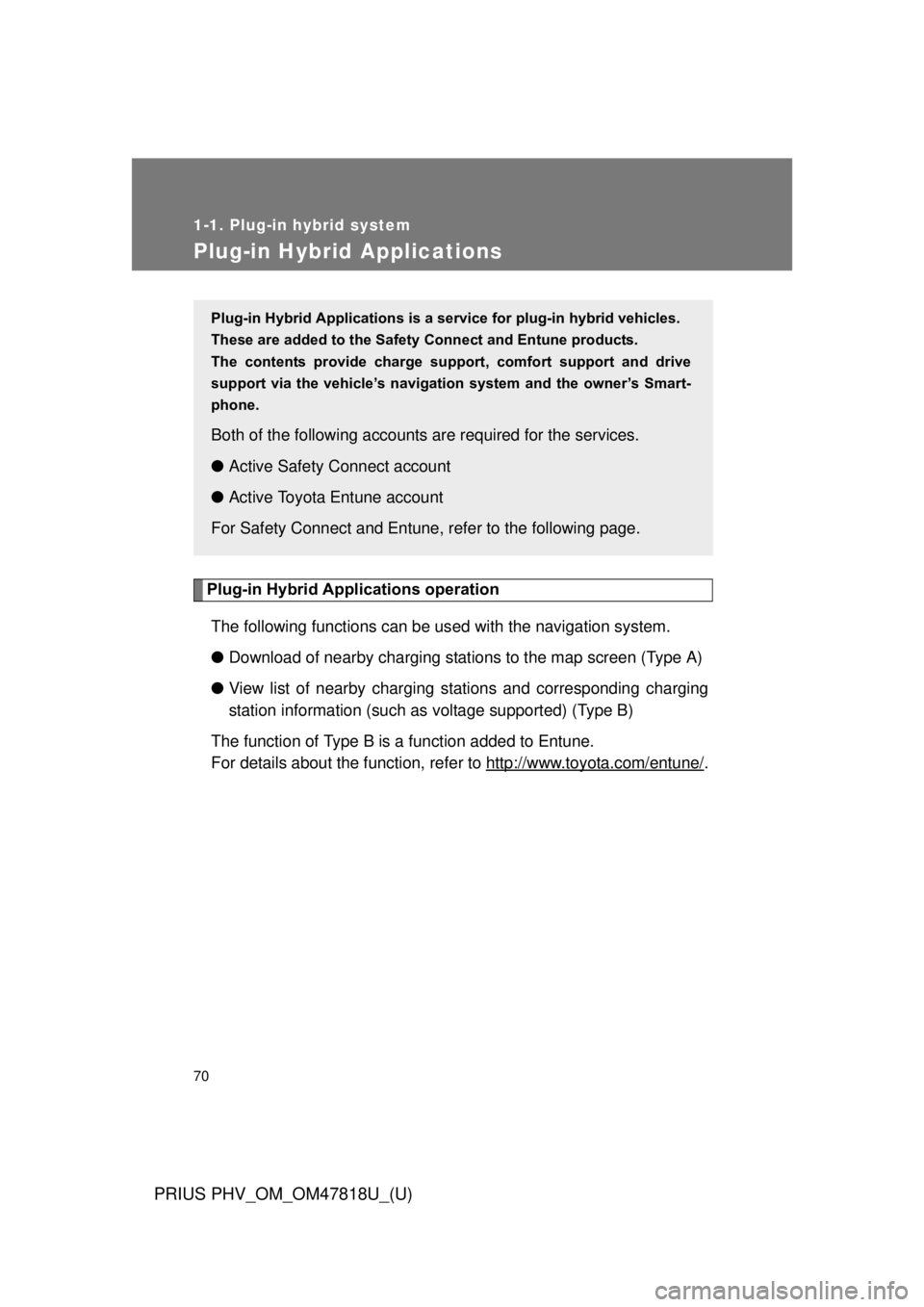
Press “INFO APPS”.
Touch “Apps” on the “Informa-
tion” screen.
Touch “Charge Stations” to
download nearby charging sta-
tions.
STEP 1
STEP 2
STEP 3
Page 72 of 684
72 1-1. Plug-in hybrid system
PRIUS PHV_OM_OM47818U_(U)
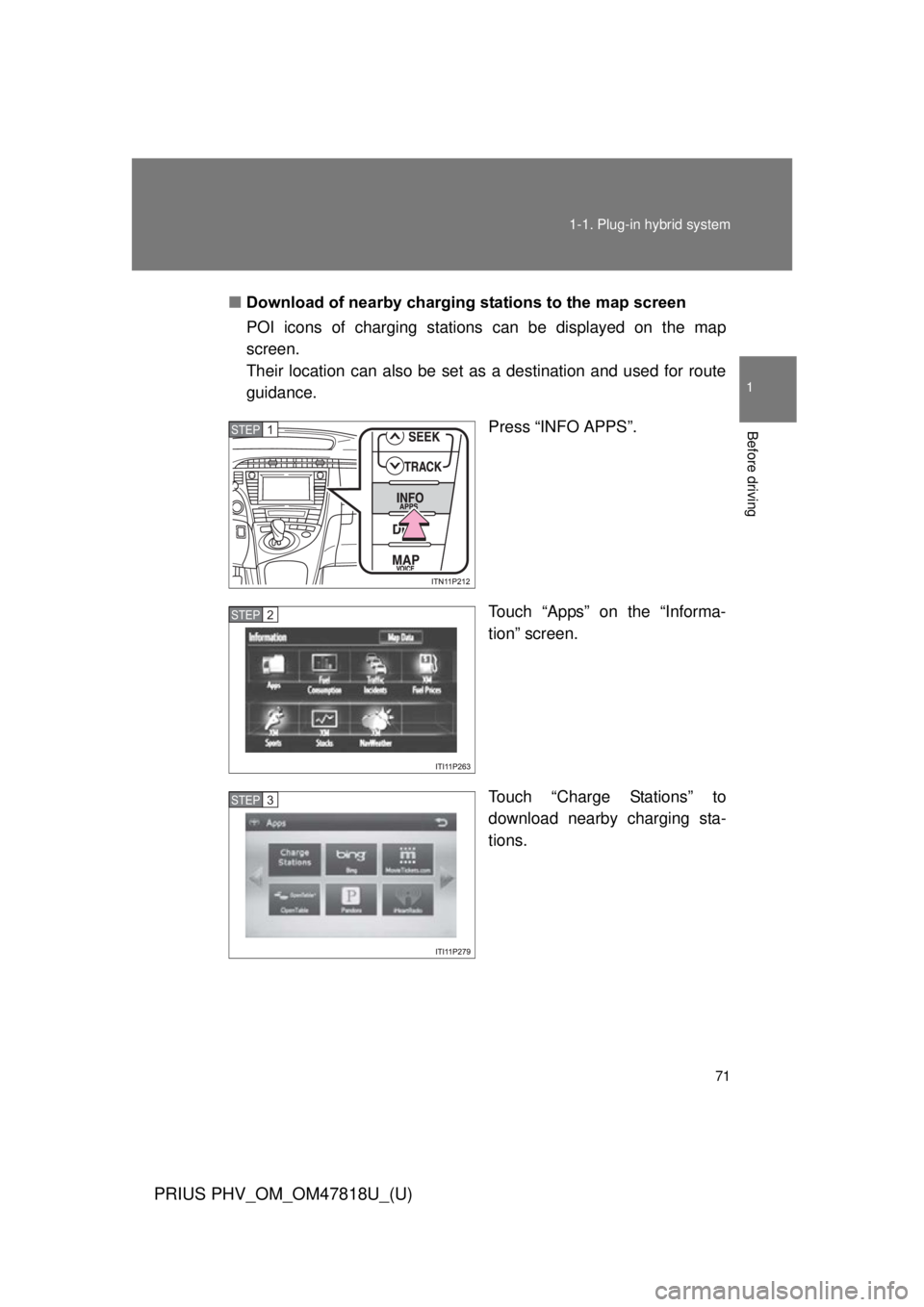
Touch “Show on Map” to display
nearby charging stations on the
map screen.
■ To Hide POI icons
Touch “Show on Map”.
Touch “Charging Station Icons”.
The map screen will be displayed
with the POI icons hidden.
To display the POI icons again,
touch “Charging Station Icons” on
the “Show on Map” screen.
STEP 4
STEP 1
STEP 2