Page 91 of 684
91
1-2. Charging
1
Before driving
PRIUS PHV_OM_OM47818U_(U)
■
Safety functions
● The hybrid system will not start while the charging cable is attached to
the vehicle, even if the “POWER” switch is operated.
● If the charging cable is connected while the “READY” indicator is illumi-
nated, the hybrid system will stop automatically and driving will not be
possible.
● When the charging cable is connected to the vehicle, the shift position
cannot be changed from P to another position.
● If the latch release button is pressed, charging will not begin even if the
charging cable is connected.
Also, charging will be stopped if the latch release button is pressed and
held for several seconds during charging. When restarting charging, rein-
sert the charging connector after pulling it out, and check that the charg-
ing indicator illuminates.
■ For correct operat ion of the charging timer function
Check the following points.
● Check that the time is correct.
● Check that the “POWER” switch is OFF.
● Do not use a connector which has an electricity interruption function
(including timer functions).
(Use a connector which supplies electricity normally.)
■ Automatic cancelation of the charging timer function
● If the Remote Air Conditioning System is operated while the charging
cable is connected, the charging timer function will be canceled. Charg-
ing will commence after the Remote Air Conditioning System has been
turned off.
● Charging will not commence if the “POWER” switch is not OFF, even at
the set time.
Page 92 of 684

92 1-2. Charging
PRIUS PHV_OM_OM47818U_(U)
■Charging timer function (finish time setting mode)
● The finish time setting mode should only be used as a reference for the
time at which charging will finish.
Charging may not complete at the finish time depending on the effects of
the electricity supply, temperature etc. In this event, charging will continue
until completed.
● If the function detects that charging cannot be finished on time, charging
will start immediately, and will continue until fully charged.
■ Charging indicator
● The charging indicator illuminates if the Remote Air Conditioning System
(P. 371) is used during charging or while the charging cable is con-
nected.
● If a system malfunction occurs during charging or during Remote Air
Conditioning System use, the indicator will flash for approximately 10
seconds and then turn off.
■ When the outside temperature is low or high
The level shown on the remaining charge display ( P. 60) may drop slightly
when the “POWER” switch is turned to ON mode, even if charging has been
completed and the hybrid battery (traction battery) is fully charged. However,
this does not indicate a malfunction.
■ Using a DC Charger
DC Chargers cannot be used with this vehicle.
Page 105 of 684
105
1
Before driving
PRIUS PHV_OM_OM47818U_(U)
1-3. Key information
Keys
Using the mechanical keyTo take out the mechanical key,
push the release button and take
the key out.
After using the mechanical key,
store it in the electronic key. Carry
the mechanical key together with
the electronic key. If the electronic
key battery is depleted or the
entry function does not operate
properly, you will need the
mechanical key. (P. 591)
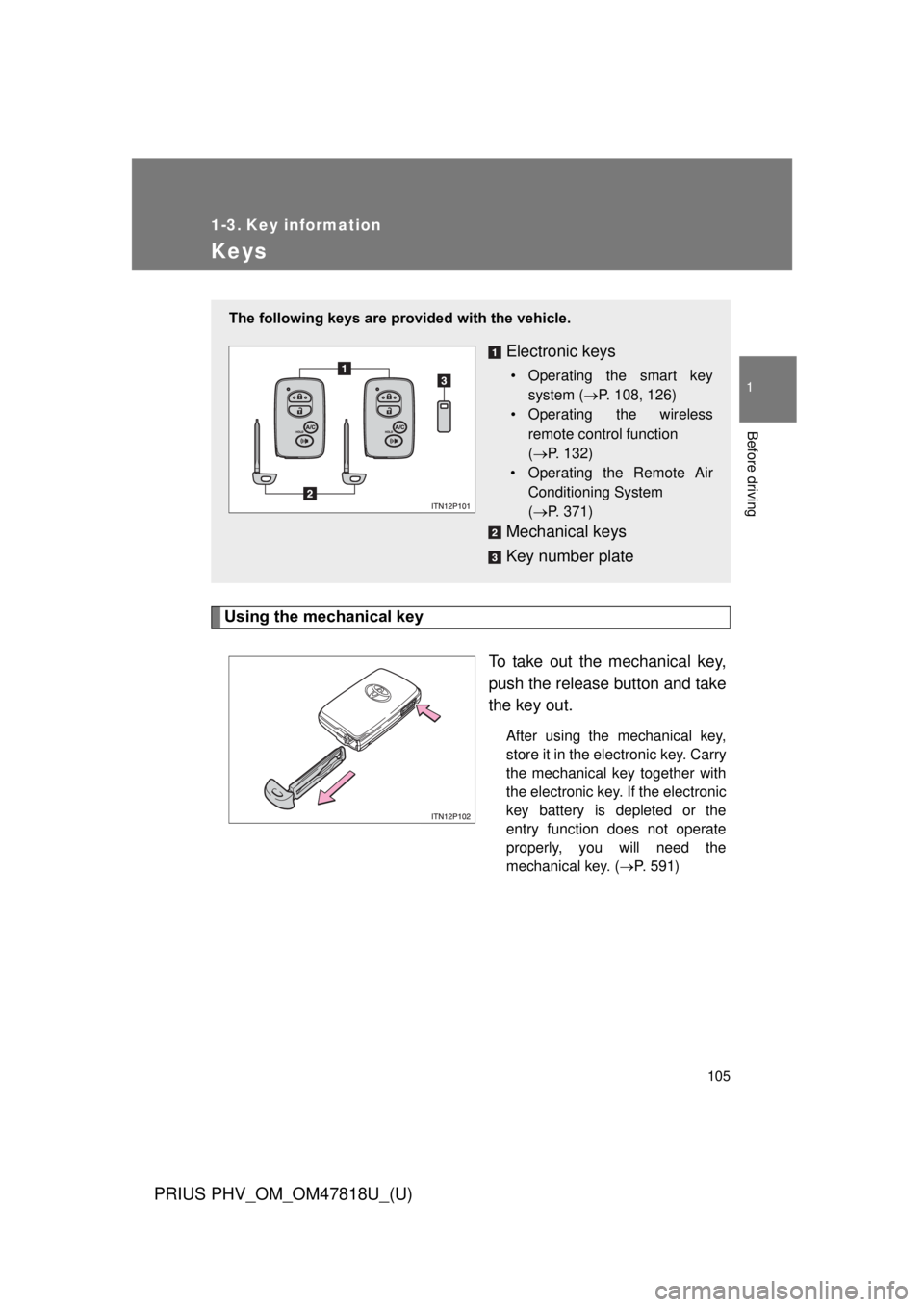
The following keys are provided with the vehicle.
Electronic keys
• Operating the smart key
system ( P. 108, 126)
• Operating the wireless
remote control function
(P. 132)
• Operating the Remote Air
Conditioning System
(P. 371)
Mechanical keys
Key number plate
Page 247 of 684
247
2-1. Driving procedures
PRIUS PHV_OM_OM47818U_(U)
2
When driving
■
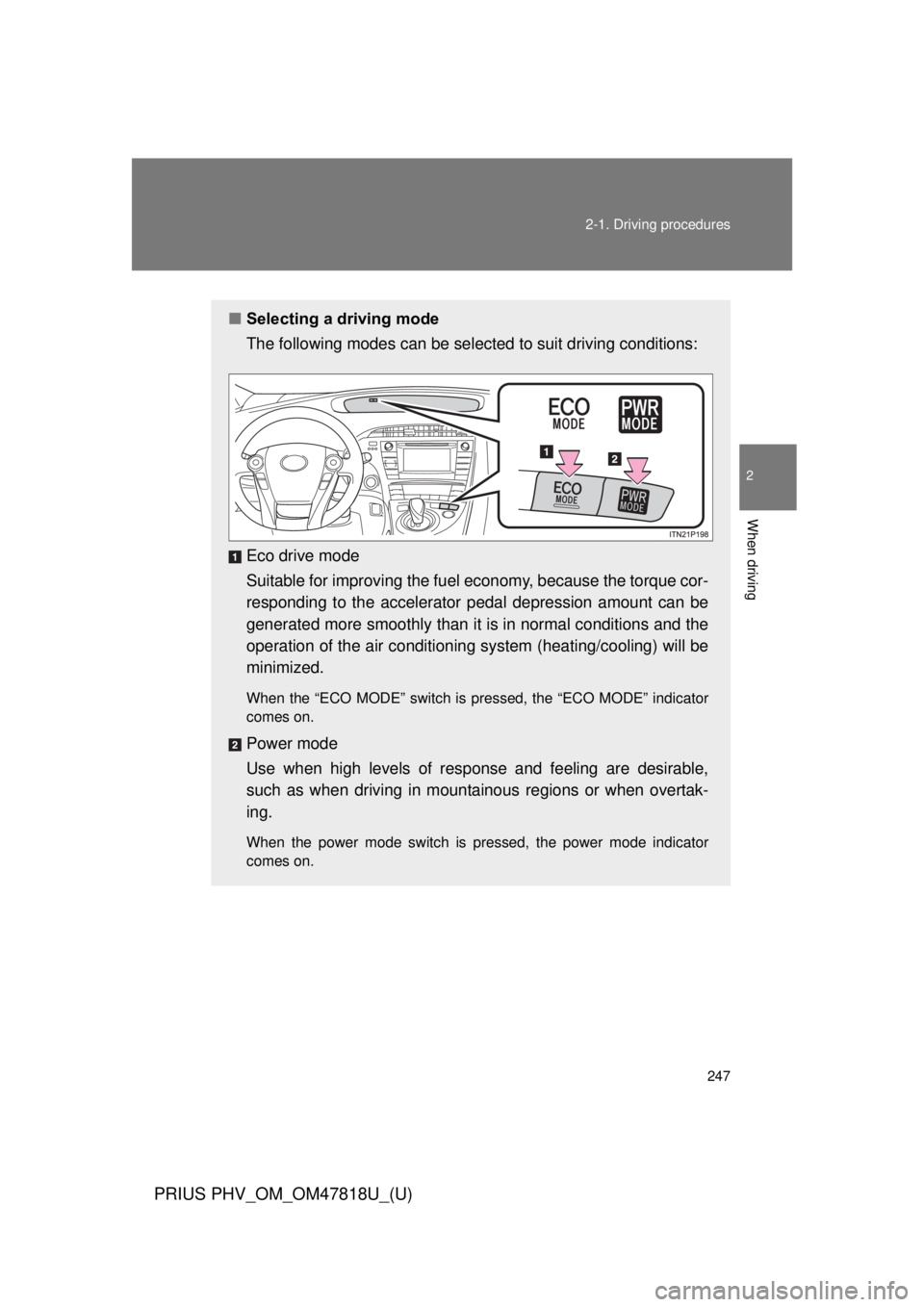
Selecting a driving mode
The following modes can be selected to suit driving conditions:
Eco drive mode
Suitable for improving the fuel economy, because the torque cor-
responding to the accelerator pedal depression amount can be
generated more smoothly than it is in normal conditions and the
operation of the air conditioning system (heating/cooling) will be
minimized.
When the “ECO MODE” switch is pressed, the “ECO MODE” indicator
comes on.
Power mode
Use when high levels of response and feeling are desirable,
such as when driving in mountainous regions or when overtak-
ing.
When the power mode switch is pressed, the power mode indicator
comes on.
Page 249 of 684
249
2-1. Driving procedures
PRIUS PHV_OM_OM47818U_(U)
2
When driving
■
Operation of the air conditio ning system in Eco drive mode
Eco drive mode controls the heating/cooling operations and fan speed of the
air conditioning system to enhance fuel efficiency. ( P. 247) To improve air
conditioning performance, adjust the fan speed or turn off Eco drive mode.
■ For the shift positions
● When the “POWER” switch is off, the shift position cannot be changed.
● When the “POWER” switch is in ON mode (the hybrid system is not oper-
ating), the shift position can only be changed to N. The shift position will
be changed to N even if the shift lever is shifted to D or R and held in that
position.
However, immediately after turning the “POWER” switch to ON mode,
the shift position may not change to N.
● When the “READY” indicator is on, the shift position can be changed
from P to D, N or R.
● When the “READY” indicator is flashing, the shift position cannot be
changed from P to another position even if the shift lever is operated.
Wait until the “READY” indicator changes from a flashing to a solid light,
and then operate the shift lever again.
● The shift position can only be changed to B directly from D.
In addition, if an attempt is made to change the shift position by moving the
shift lever in any of the following situations, the buzzer will sound and the
shifting operation will be disabled or the shift position will automatically
change to N. When this happens, select an appropriate shift position.
● Situations where the shifting operation will be disabled:
• When an attempt is made to change the shift position from P to another
position by moving the shift lever without depressing the brake pedal.
• When an attempt is made to change the shift position from P or N to B by moving the shift lever.
• When an attempt is made to change the shift position from P to another position by moving the shift lever while the charging cable is connected
to the vehicle.
Page 296 of 684
296 2-3. Operating the lights and windshield wipers
PRIUS PHV_OM_OM47818U_(U)
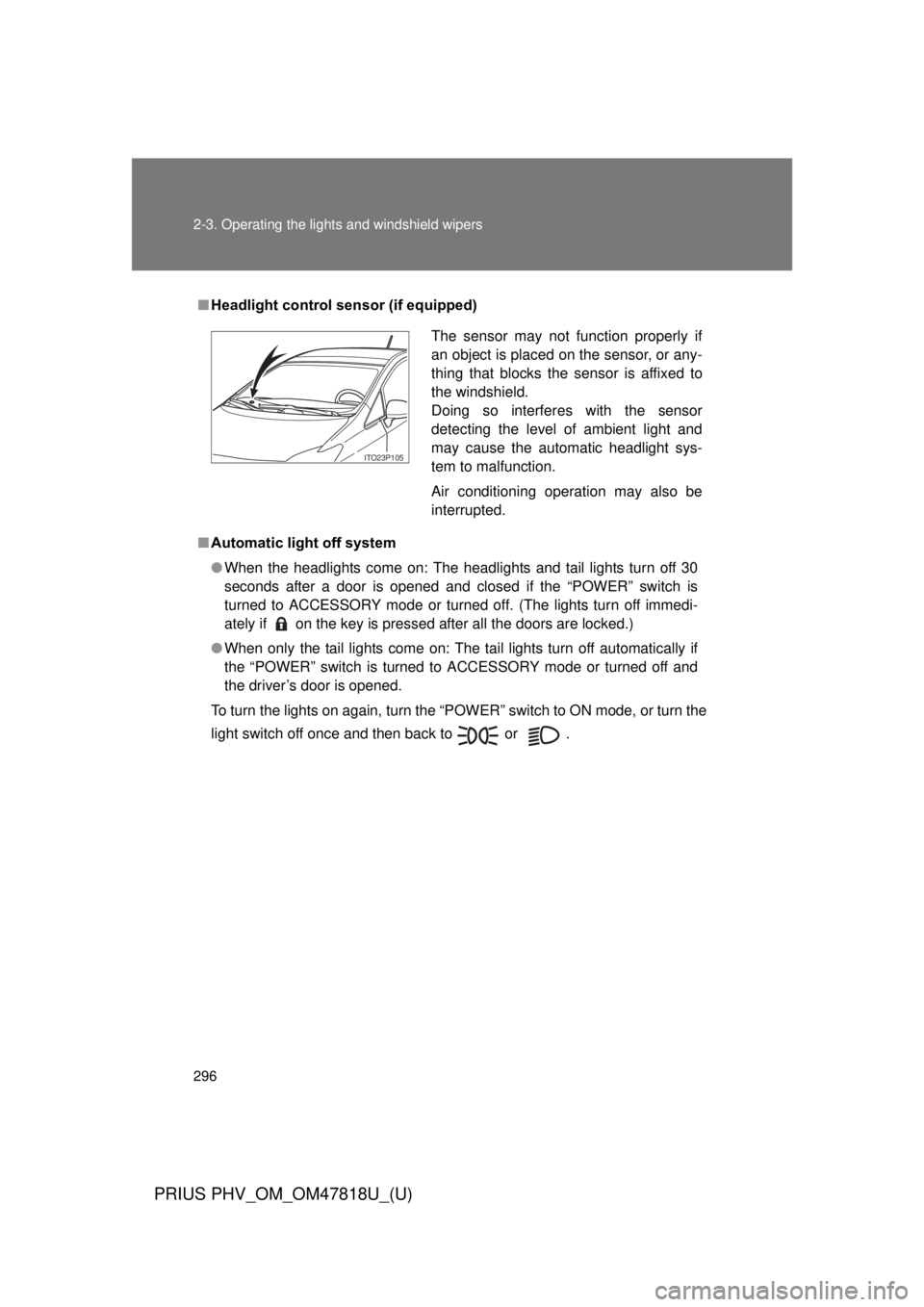
■Headlight control sensor (if equipped)
■ Automatic light off system
● When the headlights come on: The headlights and tail lights turn off 30
seconds after a door is opened and closed if the “POWER” switch is
turned to ACCESSORY mode or turned off. (The lights turn off immedi-
ately if on the key is pressed after all the doors are locked.)
● When only the tail lights come on: The tail lights turn off automatically if
the “POWER” switch is turned to ACCESSORY mode or turned off and
the driver’s door is opened.
To turn the lights on again, turn the “POWER” switch to ON mode, or turn the
light switch off once and then back to or .
The sensor may not function properly if
an object is placed on the sensor, or any-
thing that blocks the sensor is affixed to
the windshield.
Doing so interferes with the sensor
detecting the level of ambient light and
may cause the automatic headlight sys-
tem to malfunction.
Air conditioning operation may also be
interrupted.
ITO23P105
Page 357 of 684
Interior features3
357
PRIUS PHV_OM_OM47818U_(U)
3-1.Using the air conditioning
system
and defogger
Air conditioning system .... 358
Using the steering wheel climate remote control
switches ......................... 369
Remote Air Conditioning System ........................... 371
Rear window and outside rear view mirror defoggers
switch ............................. 375
3-2. Using the audio system Audio system types .......... 376
Using the AUX port/USB port................................. 381
3-3. Using the interior lights Interior lights list ............... 382
• Front interior lights ......... 383
• Personal lights ............... 383
• Rear interior light ........... 384 3-4. Using the storage features
List of storage features .... 385
• Glove boxes ................... 386
• Console box ................... 387
• Cup holders ................... 388
• Bottle holders ................. 390
• Auxiliary boxes ............... 391
3-5. Other interior features Sun visors ........................ 392
Vanity mirrors ................... 393
Outside temperature display............................ 394
Power outlets ................... 395
Seat heaters..................... 397
Armrest ............................ 399
Assist grips....................... 400
Floor mats ........................ 401
Luggage compartment features .......................... 403
Garage door opener......... 407
Safety Connect ................ 415
Page 358 of 684
358
PRIUS PHV_OM_OM47818U_(U)
3-1. Using the air conditioning system and defogger
Air conditioning system
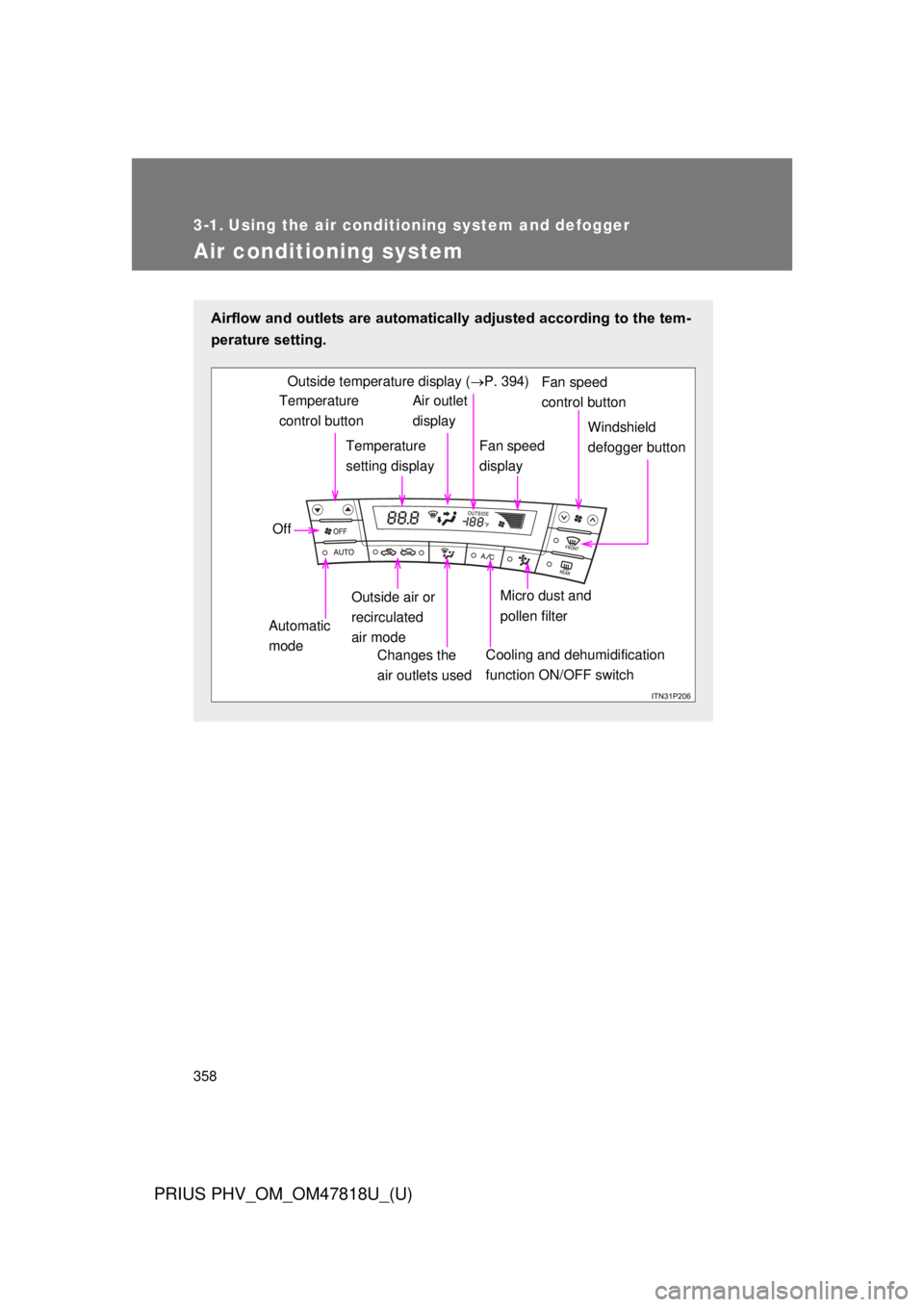
Airflow and outlets are automatically adjusted according to the tem-
perature setting.
Temperature
control buttonTemperature
setting displayAir outlet
display
Fan speed
display Windshield
defogger button
Off
Automatic
mode Outside air or
recirculated
air mode
Changes the
air outlets used
Fan speed
control buttonOutside temperature display ( P. 394)
Micro dust and
pollen filter
Cooling and dehumidification
function ON/OFF switch