Page 25 of 636

25
Event data recorder
This vehicle is equipped with an event data recorder (EDR). The main pur-
pose of an EDR is to record, in certain crash or near crash-like situations,
such as an air bag deployment or hitting a road obstacle, data that will assist
in understanding how a vehicle’s systems performed. The EDR is designed
to record data related to vehicle dynamics and safety systems for a short
period of time, typically 30 seconds or less.
The EDR in this vehicle is designed to record such data as:
• How various systems in your vehicle were operating;
• Whether or not the driver and passenger safety belts were buckled/fas-tened;
• How far (if at all) the driver was depressing the accelerator and/or brake pedal; and,
• How fast the vehicle was traveling.
These data can help provide a better understanding of the circumstances in
which crashes and injuries occur.
NOTE: EDR data are recorded by your vehicle only if a non-trivial crash situ-
ation occurs; no data are recorded by the EDR under normal driving condi-
tions and no personal data (e.g., name, gender, age, and crash location) are
recorded. However, other parties, such as law enforcement, could combine
the EDR data with the type of personally identifying data routinely acquired
during a crash investigation.
To read data recorded by an EDR, special equipment is required, and access
to the vehicle or the EDR is needed. In addition to the vehicle manufacturer,
other parties, such as law enforcement, that have the special equipment, can
read the information if they have access to the vehicle or the EDR.
Page 31 of 636
31
1-1. Hybrid system
1
Before driving
■
When stopped/during start off
The gasoline engine stops
* when the vehicle is stopped. During
start off, the electric motor (tra ction motor) drives the vehicle. At
slow speeds or when traveling down a gentle slope, the engine
is stopped
* and the electric motor (traction motor) is used.
When shift position is in N, the hybrid battery (traction battery)
will not be charged. Thus, shift to P when the vehicle is stopped.
In addition, when driving in heavy traffic, use D or B.
*: However, when the hybrid battery (traction battery) need to be charged or while the engine is being warmed up, the gasoline
engine may not stop automatically. ( P. 33)
■ During normal driving
The gasoline engine is predominantly used. The electric motor
(traction motor) charges the hybr id battery (traction battery) as
necessary.
■ When accelerating sharply
When the accelerator pedal is depressed heavily, the power of
the hybrid battery (traction battery ) is added to that of the gaso-
line engine via the electric motor (traction motor).
■ When braking (regenerative braking)
The electric motor (traction mo tor) charges the hybrid battery
(traction battery).
Page 56 of 636
56
1-1. Hybrid system
Hybrid vehicle driving tips
For economical and ecological driving, pay attention to the
following points:
■Using Eco drive mode
When using Eco drive mode, the torque corresponding to the
accelerator pedal depression amount can be generated more
smoothly than it is in normal conditions. In addition, the opera-
tion of the air conditioning system (heating/cooling) will be mini-
mized, improving th e fuel economy. (P. 204)
■ Use of Hybrid System Indicator
Eco-friendly driving is possible by keeping the indicate of Hybrid
System Indicator within Eco area. ( P. 225)
■ When braking the vehicle
Make sure to operate the brakes gently and in good time. A
greater amount of electrical energy can be retained when slow-
ing down.
■ Delays
Repeated acceleration and deceleration, as well as long waits at
traffic lights, will lead to bad fuel consumption. Check traffic
reports before leaving and avoid delays as much as possible.
When encountering a delay, gently release the brake pedal to
allow the vehicle to move forward slightly while avoiding overuse
of the accelerator pedal. Doing so can help control excessive
gasoline consumption.
■ Highway driving
Control your speed and keep at a constant speed. Also, before
stopping at a toll booth or similar, allow plenty of time to release
the accelerator and gently apply the brakes. A greater amount of
electrical energy can be reta ined when slowing down.
Page 69 of 636

69
1-3. Opening, closing and locking the doors
1
Before driving
*1: A message will be shown on the multi-information display in the instru-
ment cluster.
*2: If the hybrid system does not start when the electronic key is inside thevehicle, the electronic key battery may be depleted or there may be dif-
ficulties receiving signal from the key. ( P. 541)
AlarmSituationCorrection procedure
Interior alarm
pings once
*1
The electronic key has a
low battery Replace the electronic
key battery
An attempt was made to
start the hybrid system
without the electronic key
being present, or the elec-
tronic key was not func-
tioning normally Start the hybrid sys-
tem with the elec-
tronic key present
*2
Interior alarm
pings once and
exterior alarm
sounds 3 times
*1
The driver’s door was
closed after the key was
carried outside the vehicle,
and the “POWER” switch
was not turned OFF
Turn the “POWER”
switch off and close
the driver’s door again
An occupant carried the
electronic key outside the
vehicle and closed the
door while the “POWER”
switch was not OFF Bring the electronic
key back into the vehi-
cle
Page 83 of 636

83
1-3. Opening, closing and locking the doors
1
Before driving
*1: A message will be shown on the multi-information display in the instru-
ment cluster.
*2: If the hybrid system does not start when the electronic key is inside thevehicle, the electronic key battery may be depleted or there may be dif-
ficulties receiving signal from the key. ( P. 541)
■ If the electronic key do es not operate properly
P. 541
■ When the electronic key battery is fully depleted
P. 454
■ Customization
Settings (e.g. smart key system) can be changed.
(Customizable features P. 590)
AlarmSituationCorrection procedure
Interior alarm
pings once
*1
The electronic key has a
low battery Replace the electronic
key battery
An attempt was made to
start the hybrid system
without the electronic key
being present, or the elec-
tronic key was not func-
tioning normally Start the hybrid sys-
tem with the elec-
tronic key present
*2
Interior alarm
pings once and
exterior alarm
sounds 3 times
*1
The driver’s door was
closed after the key was
carried outside the vehicle,
and the “POWER” switch
was not turned OFF
Turn the “POWER”
switch off and close
the driver’s door again
An occupant carried the
electronic key outside the
vehicle and closed the
door while the “POWER”
switch was not OFF Bring the electronic
key back into the vehi-
cle
Page 118 of 636
118
1-4. Adjustable components (seats, mirrors, steering wheel)
Inside rear view mirror
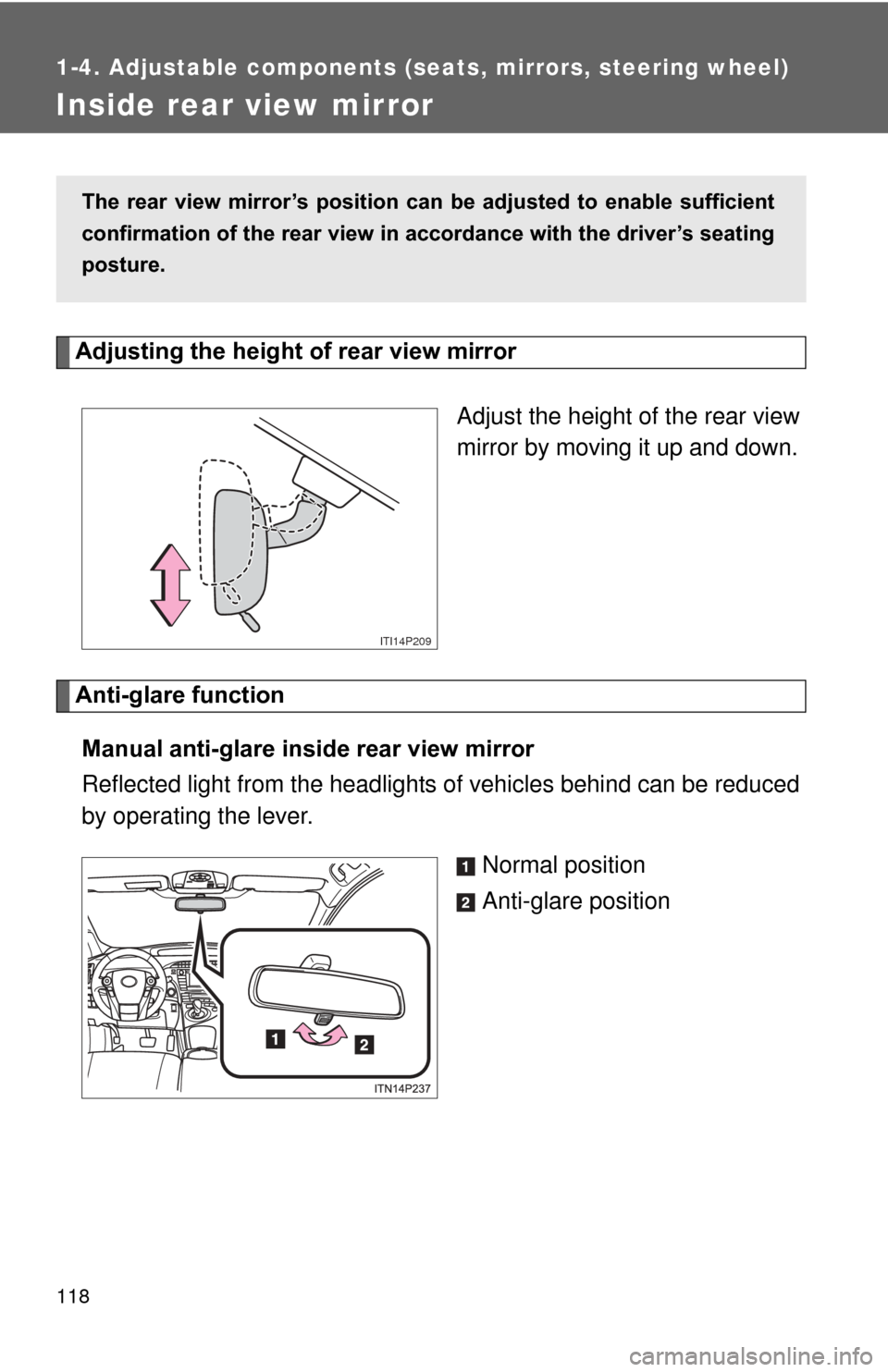
Adjusting the height of rear view mirrorAdjust the height of the rear view
mirror by moving it up and down.
Anti-glare functionManual anti-glare inside rear view mirror
Reflected light from the headlights of vehicles behind can be reduced
by operating the lever.
Normal position
Anti-glare position
The rear view mirror’s position can be adjusted to enable sufficient
confirmation of the rear view in accordance with the driver’s seating
posture.
ITI14P209
Page 124 of 636
124 1-5. Opening and closing the windows and moon roof
■Operating the power wi ndows after turning the hybrid system off
The power windows can be operated for approximately 45 seconds even
after the “POWER” switch is turned to ACCESSORY mode or turned off.
They cannot, however, be operated once either front door is opened.
■ Jam protection function
If an object becomes caught between the window and the window frame,
window travel is stopped and the window is opened slightly.
■ When the power window does not close normally
If the jam protection function is operating abnormally and a window cannot
be closed, perform the following operations using the power window switch
on the relevant door.
●After stopping the vehicle, the window can be closed by holding the
power window switch in the one-touch closing position while the
“POWER” switch is turned to ON mode.
● If the window still cannot be closed even by carrying out the operation
explained above, initialize the function by performing the following proce-
dure.
Hold the power window switch in the one-touch closing position.
Continue holding the switch for a further 6 seconds after the win-
dow has closed.
Hold the power window switch in the one-touch opening position.
Continue holding the switch for a further 2 seconds after the win-
dow has opened completely.
Hold the power window switch in the one-touch closing position
once again. Continue holding the switch for a further 2 seconds
after the window has closed.
If you release the switch while the window is moving, start again from the
beginning.
If the window continues to close but then re-open slightly even after perform-
ing the above procedure correctly, have the vehicle inspected by your Toyota
dealer.
STEP 1
STEP 2
STEP 3
Page 134 of 636
134 1-6. Refueling
NOTICE
■Refueling
Do not spill fuel during refueling.
Doing so may damage the vehicle, such as causing the emission control
system to operate abnormally or damaging fuel system components or the
vehicle’s painted surface.