Page 83 of 636
83
1-3. Opening, closing and locking the doors
1
Before driving
*1: A message will be shown on the multi-information display in the instru-
ment cluster.
*2: If the hybrid system does not start when the electronic key is inside thevehicle, the electronic key battery may be depleted or there may be dif-
ficulties receiving signal from the key. ( P. 541)
■ If the electronic key do es not operate properly
P. 541
■ When the electronic key battery is fully depleted
P. 454
■ Customization
Settings (e.g. smart key system) can be changed.
(Customizable features P. 590)
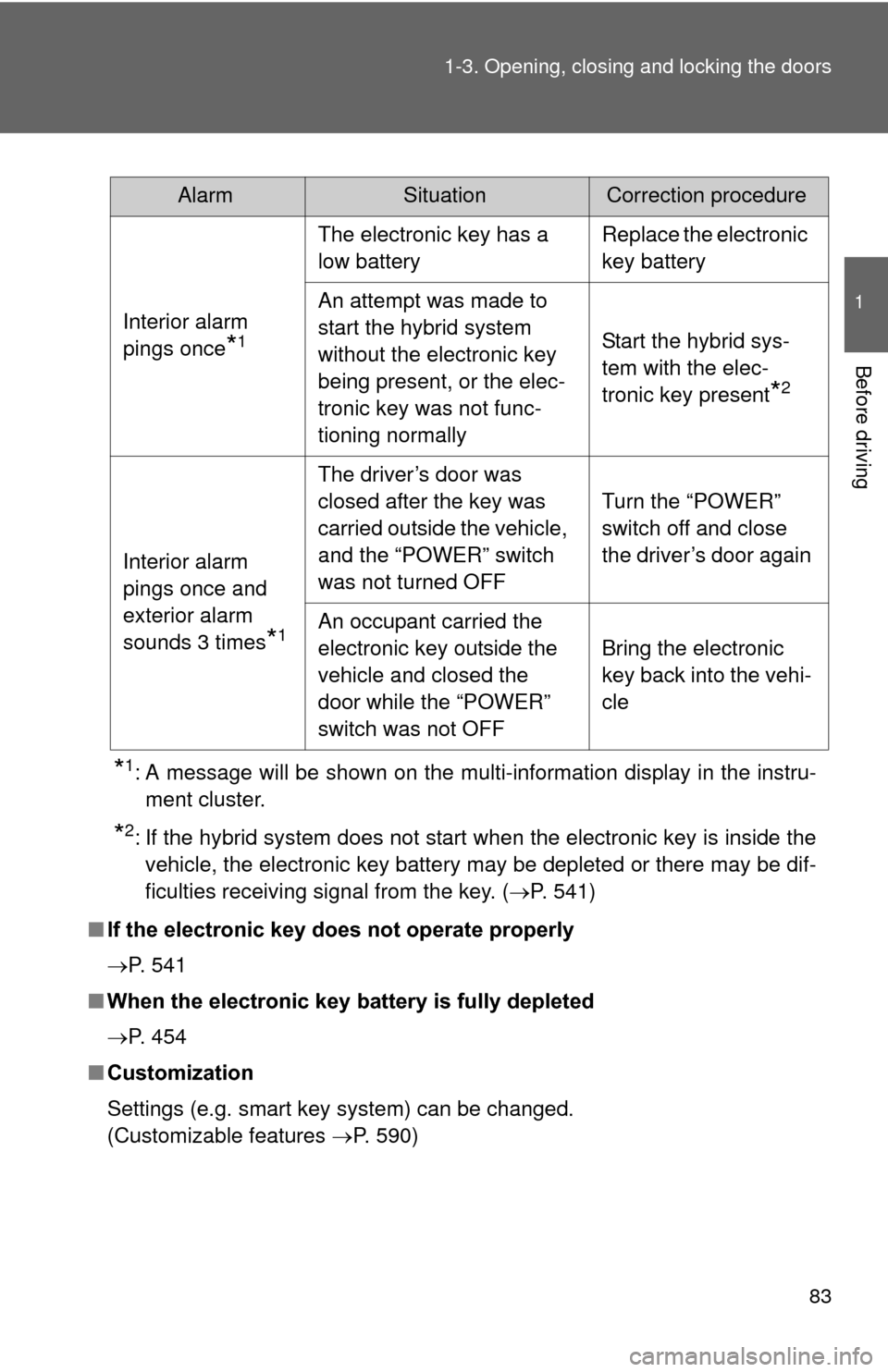
AlarmSituationCorrection procedure
Interior alarm
pings once
*1
The electronic key has a
low battery Replace the electronic
key battery
An attempt was made to
start the hybrid system
without the electronic key
being present, or the elec-
tronic key was not func-
tioning normally Start the hybrid sys-
tem with the elec-
tronic key present
*2
Interior alarm
pings once and
exterior alarm
sounds 3 times
*1
The driver’s door was
closed after the key was
carried outside the vehicle,
and the “POWER” switch
was not turned OFF
Turn the “POWER”
switch off and close
the driver’s door again
An occupant carried the
electronic key outside the
vehicle and closed the
door while the “POWER”
switch was not OFF Bring the electronic
key back into the vehi-
cle
Page 86 of 636
86 1-3. Opening, closing and locking the doors
■Panic mode
■ Security feature
P. 7 0
■ Conditions affecting operation
P. 7 2
■ If the wireless remote contro l does not operate properly
Locking and unlocking the doors: Use the mechanical key. ( P. 541)
■ Electronic key battery depletion
P. 7 6
■ When the electronic key battery is fully depleted
P. 454
■ Customization
Settings (e.g. door unlocking function) can be changed.
(Customizable features P. 590)
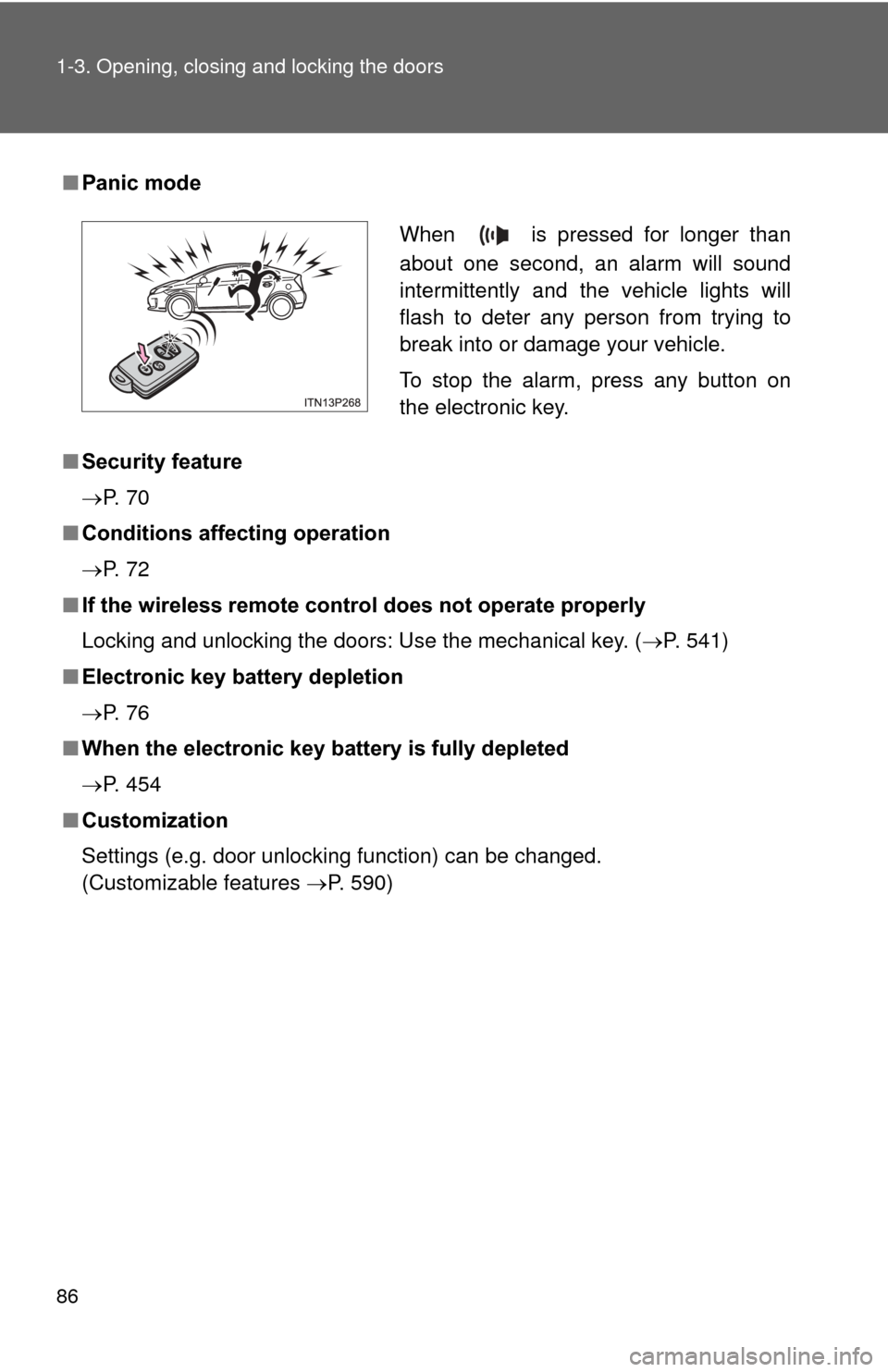
When is pressed for longer than
about one second, an alarm will sound
intermittently and the vehicle lights will
flash to deter any person from trying to
break into or damage your vehicle.
To stop the alarm, press any button on
the electronic key.
Page 195 of 636

195
2-1. Driving procedures
2
When driving
■
Auto power off function
If the vehicle is left in ACCESSORY or ON mode (the hybrid system is not
operating) for more than an hour with the shift position in P, the “POWER”
switch will automatically turn off. However, this function cannot entirely pre-
vent the 12-volt battery from discharging. Do not leave the vehicle with the
“POWER” switch in ACCESSORY or ON mode for long periods of time when
the hybrid system is not operating.
■ Sounds and vibrations specific to a hybrid vehicle
P. 3 4
■ Electronic key battery depletion
P. 7 6
■ When the ambient temperature is low, such as during winter driving
conditions
The “READY” indicator may flash for a long time when the hybrid system\
is
starting. Driving will become possible once the “READY” indicator has illumi-
nated. Wait until the “READY” indicator has illuminated.
■ Conditions affecting operation
P. 7 2
■ Notes for the entry function
P. 7 3
■ If the hybrid system does not start
The immobilizer system may not have been deactivated. ( P. 135)
Contact your Toyota dealer.
Page 196 of 636

196 2-1. Driving procedures
■When the “POWER” switch in dicator flashes in amber
The system may be malfunctioning. Have the vehicle inspected by your
Toyota dealer immediately.
■ If the “READY” indicator does not come on
If the “READY” indicator does not come on when you press the “POWER”
switch with the shift position in P and the brake pedal depressed, contact
your Toyota dealer immediately.
■ If the hybrid system is malfunctioning
P. 495
■ If the electronic key battery is depleted
P. 454
■ Operation of the “POWER” switch
●When operating the “POWER” switch, one short, firm press is enough. If
the switch is pressed improperly, the hybrid system may not start or the
“POWER” switch mode may not change. It is not necessary to press and
hold the switch.
● If attempting to restart the hybrid system immediately after turning the
“POWER” switch off, the hybrid system may not start in some cases.
After turning the “POWER” switch off, please wait a few seconds before
restarting the hybrid system.
■ Automatically P position selection function
P. 207
Page 344 of 636
344 3-1. Using the air conditioning system and defogger
■Security feature
Any unlocked doors will be automatically locked when the system is operat-
ing. The buzzer will beep and the emergency flashers flash when the doors
have been locked or the system has been turned off.
(The doors locked: Once; The system turned off: Twice)
■ Conditions affecting operation
P. 7 2
■ Electronic key battery depletion
P. 7 6
■ When the electronic key battery is fully depleted
P. 7 6
■ Customization
Setting (e.g. Operation using the on the wireless remote control) can
be changed.
(Customizable features P. 596)
Page 356 of 636
356 3-3. Using the interior lights
■Illuminated entry system
The lights automatically turn on/off according to “POWER” switch mode, the
presence of the electronic key, whether the doors are locked/unlocked, and
whether the doors are opened/closed.
■ To prevent 12-volt battery discharge
If the interior lights remain on when the door is not fully closed and the inte-
rior light switch (door position on/off) is on, the lights will go off automatically
after 20 minutes.
■ Customization
Setting (e.g. The time elapsed before lights turn off) can be changed.
(Customizable features P. 594)
NOTICE
■To prevent 12-volt battery discharge
Do not leave the lights on longer than necessary when the hybrid system is
off.
Rear interior light
Page 395 of 636
Maintenance and care4
395
4-1. Maintenance and careCleaning and protecting the vehicle exterior ......... 396
Cleaning and protecting the vehicle interior .......... 399
4-2. Maintenance Maintenance requirements .................. 402
General maintenance....... 405
Emission inspection and maintenance (I/M)
programs........................ 409
4-3. Do-it-yourself maintenance Do-it-yourself service precautions .................... 410
Hood ................................ 413
Positioning a floor jack ..... 416
Engine compartment ........ 419
12-volt battery .................. 431
Tires ................................. 437
Tire inflation pressure ...... 447
Wheels ............................. 451
Electronic key battery....... 454
Checking and replacing fuses .............................. 456
Light bulbs........................ 467
Page 433 of 636

433
4-3. Do-it-yourself maintenance
4
Maintenance and care
■
After recharging/reconnecting the 12-volt battery
●Unlocking the doors using the smart key system may not be possible
immediately after reconnecting the 12-volt battery. If this happens, use
the wireless remote control or the mechanical key to lock/unlock the
doors.
● Start the hybrid system with the “POWER” switch in ACCESSORY mode.
The hybrid system may not start with the “POWER” switch turned off.
However, the hybrid system will operate normally from the second
attempt.
● The “POWER” switch mode is recorded by the vehicle. If the 12-volt bat-
tery is reconnected, the vehicle will return the “POWER” switch mode to
the status it was in before the 12-volt battery was disconnected. Make
sure to turn off the power before disconnect the 12-volt battery. Take
extra care when connecting the 12-volt battery if the “POWER” switch
mode prior to discharge is unknown.
● Restart the hybrid system, depress the brake pedal, and confirm that it is
possible to shift into each shift position.
If the system will not start even after multiple attempts at all methods above,
contact your Toyota dealer.