Page 88 of 357

88
2. ROUTE GUIDANCE
PRIUS (US) NAVI 47719U
11.10.26 15:37
5. SETTING ROUTE
1Touch “Route” .
2Touch “Detour” .
3Touch a screen button to select the de-
sired detour distance. “1 mile (km)”, “3 miles (km)” or “5 miles
(km)”
: Touch one of these screen buttons
to start the detour process. After detouring,
the system returns to the original guidance
route.
“Whole Route” : Touch to make the sys-
tem calculate an entire new route to the
destination.
“Around Traffic” : Touch to make the sys-
tem search for the route based on the traf-
fic congestion information received from
XM NavTraffic
®. For details, see “XM
NavTraffic®” on page 300.
DETOUR SETTING
While the route guidance is operating,
the route can be changed to detour
around a section of the route where a
delay is caused by road repairs, or an
accident, etc.
INFORMATION
● This picture shows an example of how
the system would guide around a delay
caused by a traffic jam.
This position indicates the location of a
traffic jam caused by road repairs, an
accident, etc.
This route indicates the detour sug-
gested by the system.
● When the vehicle is on a freeway, the
detour distance selections are 5, 15 and
25 miles (or 5, 15 and 25 km if units are
in km).
● The system may not be able to calculate
a detour route depending on the
selected distance and surrounding road
conditions.
Page 122 of 357
122
4. SETUP
PRIUS (US) NAVI 47719U
11.10.26 15:37
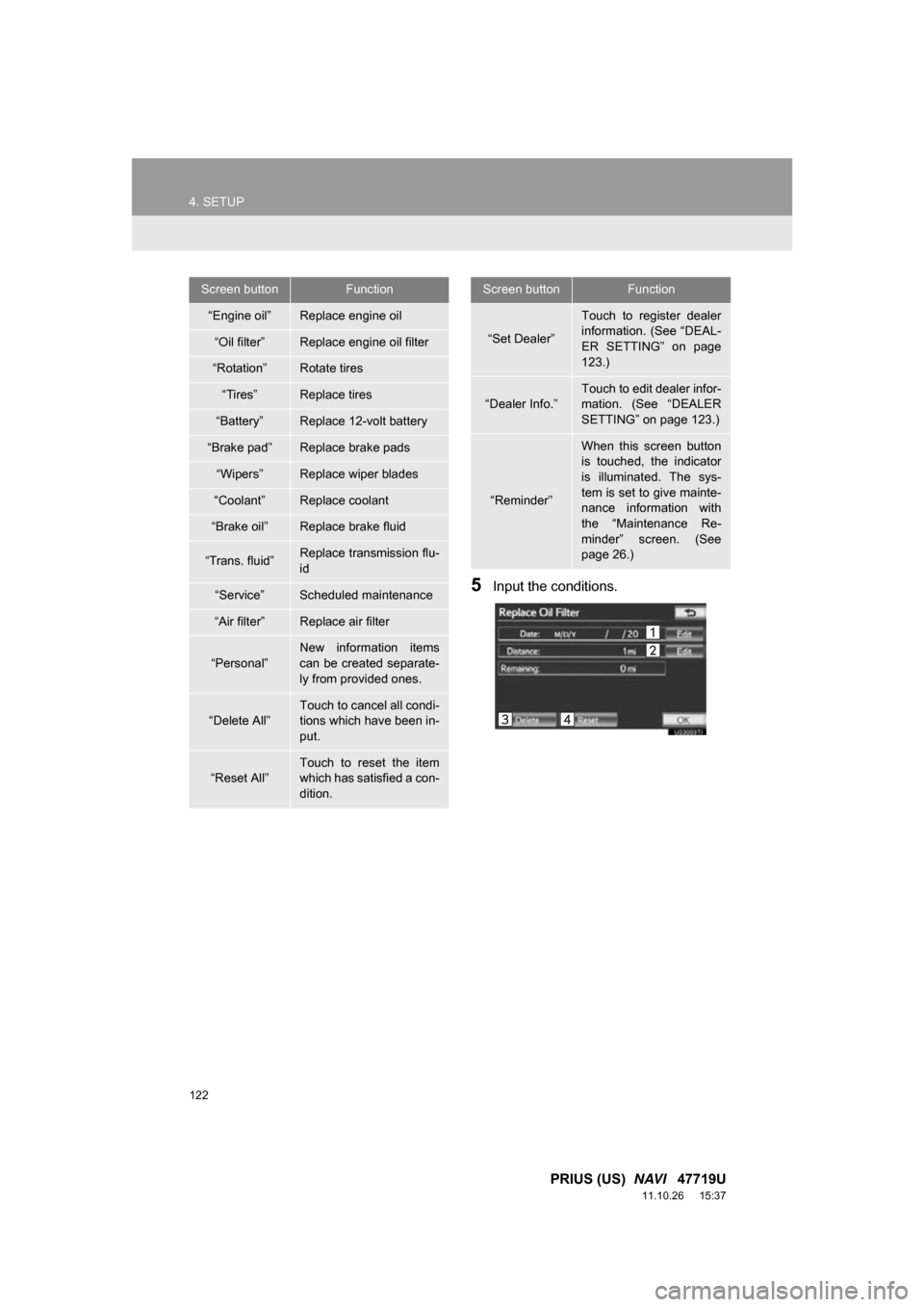
5Input the conditions.
Screen buttonFunction
“Engine oil”Replace engine oil
“Oil filter”Replace engine oil filter
“Rotation”Rotate tires
“Tires”Replace tires
“Battery”Replace 12-volt battery
“Brake pad”Replace brake pads
“Wipers”Replace wiper blades
“Coolant”Replace coolant
“Brake oil”Replace brake fluid
“Trans. fluid”Replace transmission flu-
id
“Service”Scheduled maintenance
“Air filter”Replace air filter
“Personal”
New information items
can be created separate-
ly from provided ones.
“Delete All”
Touch to cancel all condi-
tions which have been in-
put.
“Reset All”Touch to reset the item
which has satisfied a con-
dition.
“Set Dealer”
Touch to register dealer
information. (See “DEAL-
ER SETTING” on page
123.)
“Dealer Info.”
Touch to edit dealer infor-
mation. (See “DEALER
SETTING” on page 123.)
“Reminder”
When this screen button
is touched, the indicator
is illuminated. The sys-
tem is set to give mainte-
nance information with
the “Maintenance Re-
minder” screen. (See
page 26.)
Screen buttonFunction
Page 136 of 357

136
1. PHONE OPERATION
PRIUS (US) NAVI 47719U
11.10.26 15:37
Volume control switch
Press the “+” side to increase the volume.
Press the “-” side to decrease the vol-
ume.
The following data is stored for every reg-
istered phone. When another phone is
connected, the following registered data
cannot be read:
• Phonebook data
• Call history data
• Speed dial data
• Image data
• Messages
• Quick reply messages
• All phone settings
INFORMATION
●The other party’s voice will be heard
from the front speakers. The audio sys-
tem will be muted during phone calls or
when hands-free voice commands are
used.
● Talk alternately with the other party on
the phone. If both parties speak at the
same time, the other party may not hear
what has been said. (This is not a mal-
function.)
● Keep the volume of receiving voice
down. Otherwise, an echo will be heard
and receiving voice can be heard out-
side of the vehicle. When you talk on the
phone, speak clearly towards the micro-
phone.
● The other party may not hear you clearly
when:
• Driving on an unpaved road. (Making
excessive traffic noise.)
• Driving at high speeds.
• The roof or windows are open.
• The air conditioning vents are pointed towards the microphone.
• The sound of the air-conditioning fan is loud.
• There is a negative effect on sound quality due to the phone and/or net-
work being used.
USING THE STEERING
SWITCHES
ABOUT THE PHONEBOOK IN
THIS SYSTEM
INFORMATION
● When a phone’s registration is deleted,
the above-mentioned data is also
deleted.
Page 259 of 357

259
1. AUDIO/VIDEO SYSTEM OPERATION
5
AUDIO/VIDEO SYSTEM
PRIUS (US) NAVI 47719U
11.10.26 15:37
The following iPod®, iPod nano®, iPod
classic®, iPod touch® and iPhone® devic-
es can be used with this system.
Made for
• iPod touch (4th generation)
• iPod touch (3rd generation)
• iPod touch (2nd generation)
• iPod touch (1st generation)
• iPod classic
• iPod with video
• iPod nano (6th generation)
• iPod nano (5th generation)
• iPod nano (4th generation)
• iPod nano (3rd generation)
• iPod nano (2nd generation)
• iPod nano (1st generation)
• iPhone 4
• iPhone 3GS
• iPhone 3G
• iPhone
Depending on differences between mod-
els or software versions etc., some models
might be incompatible with this system.
USB memory that can be used for MP3
and WMA playback:
• USB communication formats: USB 2.0
HS (480 Mbps) and FS (12 Mbps)
• File formats: FAT 16/32
• Correspondence class: Mass storage class
This DVD player is intended for use with
4.7 in. (12 cm) discs only.
Extremely high temperatures can keep the
DVD player from working. On hot days,
use the air conditioning system to cool the
inside of the vehicle before using the
player.
Bumpy roads or other vibrations may
make the DVD player skip.
If moisture gets into the DVD player, the
discs may not be able to be played.
Remove the discs from the player and
wait until it dries.
COMPATIBLE MODELS
USB MEMORY
CARING FOR YOUR DVD
PLAYER AND DISC
CAUTION
●DVD players use an invisible laser beam
which could cause hazardous radiation
exposure if directed outside the unit. Be
sure to operate the player correctly.
Page 272 of 357
272
1. VOICE COMMAND SYSTEM OPERATION
PRIUS (US) NAVI 47719U
11.10.27 15:59
Type A
Type B
MICROPHONE
It is unnecessary to speak directly into
the microphone when giving a com-
mand.INFORMATION
● Wait for the confirmation beep before
speaking a command.
● Voice commands may not be recognized
if:
• Spoken too quickly.
• Spoken at a low or high volume.
• The roof or windows are open.
• Passengers are talking while voice
commands are spoken.
• The air conditioning speed is set high.
• The air conditioning vents are turned towards the microphone.
● In the following conditions, the system
may not recognize the command prop-
erly and using voice commands may not
be possible:
• The command is incorrect or unclear.
Note that certain words, accents or
speech patterns may be difficult for the
system to recognize.
• There is excessive background noise, such as wind noise.
