Page 188 of 552
188 2-2. Instrument cluster
■Odometer/trip meter
Each time the “TRIP” switch is pr essed, the display changes as fol-
lows:
Odometer
Displays the total distance that the vehicle has been driven.
Some models, pressing and holding the “TRIP” switch will switch the dis-
play between MPH and km/h.
Trip meter
Displays the distance the vehicl e has been driven since the meter
was last reset. The trip meters can be split and used in 2 catego-
ries, A or B.
Pressing and holding the “TRIP” switch will reset the trip meter.
Page 189 of 552
189
2-2. Instrument cluster
2
When driving
Switching menu screens
Each time the “DISP” switch is pressed, the menu screen changes.
When the desired menu screen is displayed, stop pressing the
“DISP” switch. The details screen will soon be displayed.
However, to display the “Settings & Screen Off” details screen, press
and hold the “DISP” switch after the “Settings & Screen Off” menu
screen is displayed.
“Energy Monitor”
Operating conditions of the hybrid system can be confirmed. ( P. 35)
“Drive Information”
Average speed, driving time, EV driving rate/EV driven distance, cruising
range and outside temperature (P. 331) are displayed. ( P. 190)
“ECO Score”
Evaluates the level of Eco-friendly driving and displays the results.
(P. 192)
“5min Consumption”*
Displays the average fuel consumption in intervals of 5 minutes. Current
fuel consumption is simultaneously displayed, allowing it to be compared
with previous fuel consumption rates. ( P. 39)
Page 197 of 552
197
2-2. Instrument cluster
2
When driving
■
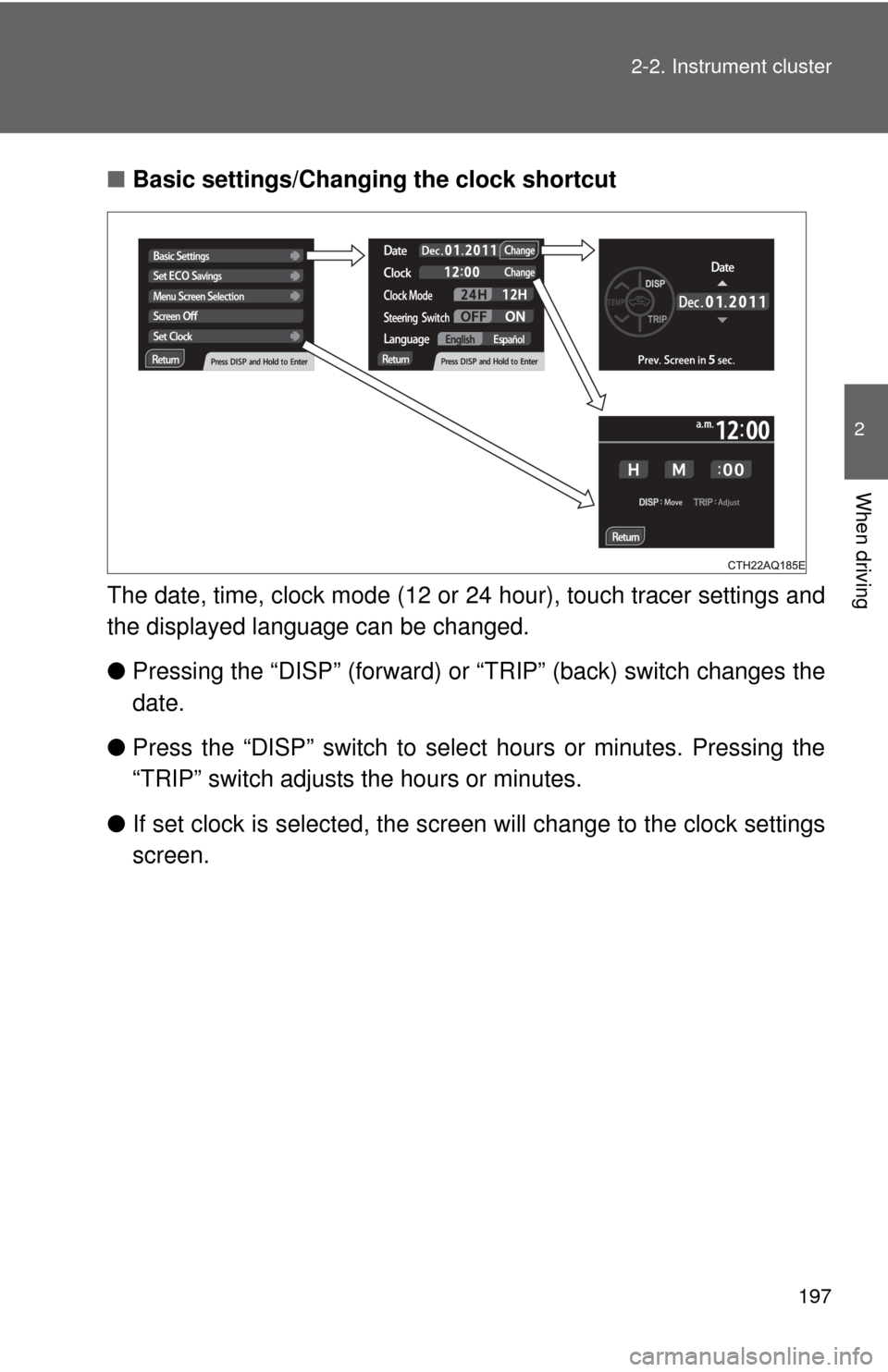
Basic settings/Changing the clock shortcut
The date, time, clock mode (12 or 24 hour), touch tracer settings and
the displayed language can be changed.
● Pressing the “DISP” (forward) or “TRIP” (back) switch changes the
date.
● Press the “DISP” switch to sele ct hours or minutes. Pressing the
“TRIP” switch adjusts the hours or minutes.
● If set clock is selected, the scre en will change to the clock settings
screen.
Page 205 of 552
205
2-3. Operating the lights and wipers
2
When driving
■
Customization that can be co nfigured at Toyota dealer
Setting of the daytime running light system can be changed.
(Customizable features: P. 516)
NOTICE
■To prevent 12-volt battery discharge
Do not leave the lights on longer than necessary when the hybrid system is
off.
Page 216 of 552
216 2-4. Using other driving systems
■Adjusting the set speed
To change the set speed, operate the lever until the desired set
speed is obtained.
Increases the speed
Decreases the speed
Fine adjustment: Momentarily
move the lever in the desired
direction.
Large adjustment: Hold the
lever in the desired direction.
The set speed will be increased or decreased as follows:
Fine adjustment: By approximately 1 mph (1.6 km/h) each time the
lever is operated.
Large adjustment: The set speed can be increased or decreased con-
tinually until the lever is released.
■ Canceling and resuming the constant speed control
Pulling the lever toward you
cancels the constant speed
control.
The speed setting is also can-
celed when the brakes are
applied.
Pushing the lever up
resumes the constant
speed control.
Resuming is available when
the vehicle speed is more than
approximately 25 mph (40
km/h).
Page 237 of 552
237
3-1. Using the air conditioning system
and defogger
3
Interior features
Using the automatic air conditioning system
Press .
The air conditioning system beg ins to operate. Air outlets and
fan speed are automatically adjus ted according to the temper-
ature setting.
To adjust the temperature setting, turn clockwise to
increase the temperature and turn counterclockwise to
decrease the temperature.
Adjusting the settings manually
To adjust the fan speed, press “ ” on to increase the
fan speed and “ ” to decrease the fan speed.
Press to turn the fan off.
To adjust the temperature setting, turn clockwise to
increase the temperature and turn counterclockwise to
decrease the temperature.
To change the air outlets, press .
The air outlets used are switched each time the button is pressed.
( P. 238)
STEP1
STEP2
STEP1
STEP2
STEP3
Page 286 of 552
286
3-2. Using the audio system
Using the steering wheel audio switches
Turning on the powerPress when the audio system is turned off.
Changing the audio source
Press when the audio system is turned on. The audio source
changes as follows each time is pressed. If a mode cannot be
used, it will be skipped.
AM FM CD mode iPod or USB memory mode Bluetooth® audio AUX
Some audio features can be cont rolled using the switches on the
steering wheel.
Operation may differ and usage may not be possible with audio/nav-
igation systems that are not compat ible with the steering switches in
this vehicle.
Vo l u m e
Radio mode: Select radio
stations
CD mode: Select tracks and
files (MP3 and WMA)
iPod mode: Selects a song
USB memory mode:
Selects a folder and file
Bluetooth
® audio mode:
Selects an album and track
Power on, select audio
source
Page 320 of 552

320 3-4. Using the interior lights
■Illuminated entry system
Vehicles without a smart key system
When the interior lights switch is in the “DOOR” position, the interior lights
automatically turn on/off according to the engine switch position, whether the
doors are locked/unlocked, and whether the doors are open/closed.
Vehicles with a smart key system
When the interior lights switch is in the “DOOR” position, the interior lights
automatically turn on/off according to “POWER” switch mode, the presence
of the electronic key, whether the doors are locked/unlocked, and whether
the doors are open/closed.
■ To prevent 12-volt battery discharge
Vehicles without a smart key system
If the interior lights, personal lights or luggage compartment light remain on
when the engine switch is “LOCK” position, the lights will go off automatically
after 20 minutes.
Vehicles with a smart key system
If the interior lights, personal lights or luggage compartment light remain on
when the “POWER” switch is off, the lights will go off automatically after 20
minutes.
■ Customization that can be co nfigured at Toyota dealer
Settings (e.g. the time elapsed before lights turn off) can be changed.
(Customizable features P. 516)
NOTICE
■To prevent 12-volt battery discharge
Do not leave the lights on longer than necessary when the hybrid system is
off.
Interior lights/personal lights