Page 195 of 516
195
3-2. Using the audio system
3
Interior featuresLanguage settings (type B only)
The language used for all voice guidance, voice recognition and mes-
sages may be changed. Press .
Press (MORE).
Press (LANG).
Press that corresponds to the desired language.For vehicles sold in the U.S.A.
“ENG” (English) or “ESP” (Spanish)
For vehicles sold in Canada
“ENG” (English) or “FRAN” (French)
■Using cellular phones
Interference may be heard through the audio system's speakers if a cellular
phone is being used inside or close to the vehicle while the audio syste\
m is
operating.
TitlePage
Using the radioP. 197
Using the CD playerP. 204
Playing MP3 and WMA discsP. 2 1 1
Operating an iPodP. 220
Operating a USB memoryP. 227
Optimal use of the audio systemP. 235
Using the AUX portP. 239
Using the steering wheel audio switchesP. 241
STEP1
STEP2
STEP3
STEP4
Page 241 of 516
241
3-2. Using the audio system
3
Interior features
Using the steering wheel audio switches
Turning on the powerPress when the audio system is turned off.
The audio system can be turned off by holding down until you hear a
beep.
Some audio features can be cont rolled using the switches on the
steering wheel.
Vo l u m e
Radio mode: Selects radio
stations
CD mode: Selects tracks,
files (MP3 and WMA) and
discs
iPod mode: Selects songs
USB memory mode: Selects files and fold-
ers
Bluetooth
® audio mode:
Selects tracks and
albums
Turns the power on, selects
audio source
Page 243 of 516
243
3-2. Using the audio system
3
Interior features
Selecting a track/file or song
Press to select CD, iPod, USB memory or Bluetooth
®
audio mode.
Press “” or “ ” on to select the desired track/file or song.
Selecting a folder or album
Press to select CD, U SB memory or Bluetooth
® audio
mode.
Press and hold “ ” or “ ” on until you hear a beep.
Selecting a disc in the CD player (CD player with changer only)
Press to select CD mode.
Press and hold “ ” or “ ” on until you hear a beep.
CAUTION
■To reduce the risk of an accident
Exercise care when operating the audio switches on the steering wheel.
STEP1
STEP2
STEP1
STEP2
STEP1
STEP2
Page 254 of 516
254 3-3. Using the Bluetooth
® audio system
Fast-forwarding and reversing tracksPress and hold “
” or “ ” on .
Switching the display
Press .
Each time is pressed, the display changes in the following order:
Track title Track title/Artist name Track title/Album name Track
title/Elapsed time
Using the steering wheel audio switches
P. 2 4 1
■Bluetooth® audio system functions
Depending on the portable player that is connected to the system, certain
functions may not be available.
Page 267 of 516
267
3-4. Using the hand
s-free phone system (for cellular phone)
3
Interior features
■Steering wheel telephone switches
Vo l u m e
The voice guidance volume
cannot be adjusted using this
button.
Off-hook switch
Turns the hands-free sys-
tem on/starts a call
On-hook switch
Turns the hands-free sys-
tem off/ends a call/refuses a
call
Talk switch
Turns the voice command
system on (press)/turns the
voice command system off
(press and hold)
Page 339 of 516
339
4-2. Maintenance
4
Maintenance and care
Vehicle interior
ItemsCheck points
Accelerator pedal • Moves smoothly (without uneven
pedal effort or catching)?
Automatic transmission “Park”
mechanism • Can the vehicle be held securely
on an incline with the shift lever in
P?
Brake pedal • Moves smoothly?
• Does it have appropriate clear-
ance and correct amount of free
play?
Brakes • Not pull to one side when
applied?
• Loss of brake effectiveness?
• Spongy feeling brake pedal?
• Pedal almost touches floor?
Clutch pedal • Moves smoothly?
Head restraints • Move smoothly and lock
securely?
Indicators/buzzers • Function properly?
Lights • Do all the lights come on?
Parking brake • Moves smoothly?
• Can hold the vehicle securely on
an incline?
Seat belts • Does the seat belt system oper-
ate smoothly?
• Are the belts undamaged?
Seats • Do the seat controls operate
properly?
Steering wheel • Moves smoothly?
• Has correct free play?
• No strange noises?
Page 392 of 516

392 4-3. Do-it-yourself maintenance
11 IGN7.5 ASRS airbag system, multiport fuel
injection system/sequential multi-
port fuel injection system, front
passenger occupant classification
system
12 METER 7.5 A Gauge and meters
13 HTR-IG 10 AAir conditioning system, rear win-
dow defogger, PTC heater
14 WIPER 25 A Windshield wipers
15 RR WIPER 15 A Rear window wiper
16 WASHER 15 A Windshield washer
17 ECU-IG NO. 1 10 A Main body ECU, electric power
steering, electric cooling fan(s),
shift lock control system, anti-lock
brake system, multiport fuel injec-
tion system/sequential multiport
fuel injection system, tire pressure
warning system, vehicle stability
control system, all wheel drive sys-
tem
18 ECU-IG NO. 2 10 A Back-up lights, charging system,
rear window defogger, auto anti-
glare inside rear view mirror
19 OBD 7.5 A On-board diagnosis system
20 STOP 10 AStop lights, high mounted stop-
light, anti-lock brake system, vehi-
cle stability control system,
multiport fuel injection system/
sequential multiport fuel injection
system, shift lock control system
21 DOOR 25 A Power door lock system
22 ACC-B 25 A CIG, ACC
23 4WD 7.5 A All wheel drive system
FuseAmpereCircuit
Page 406 of 516
406 5-1. Essential information
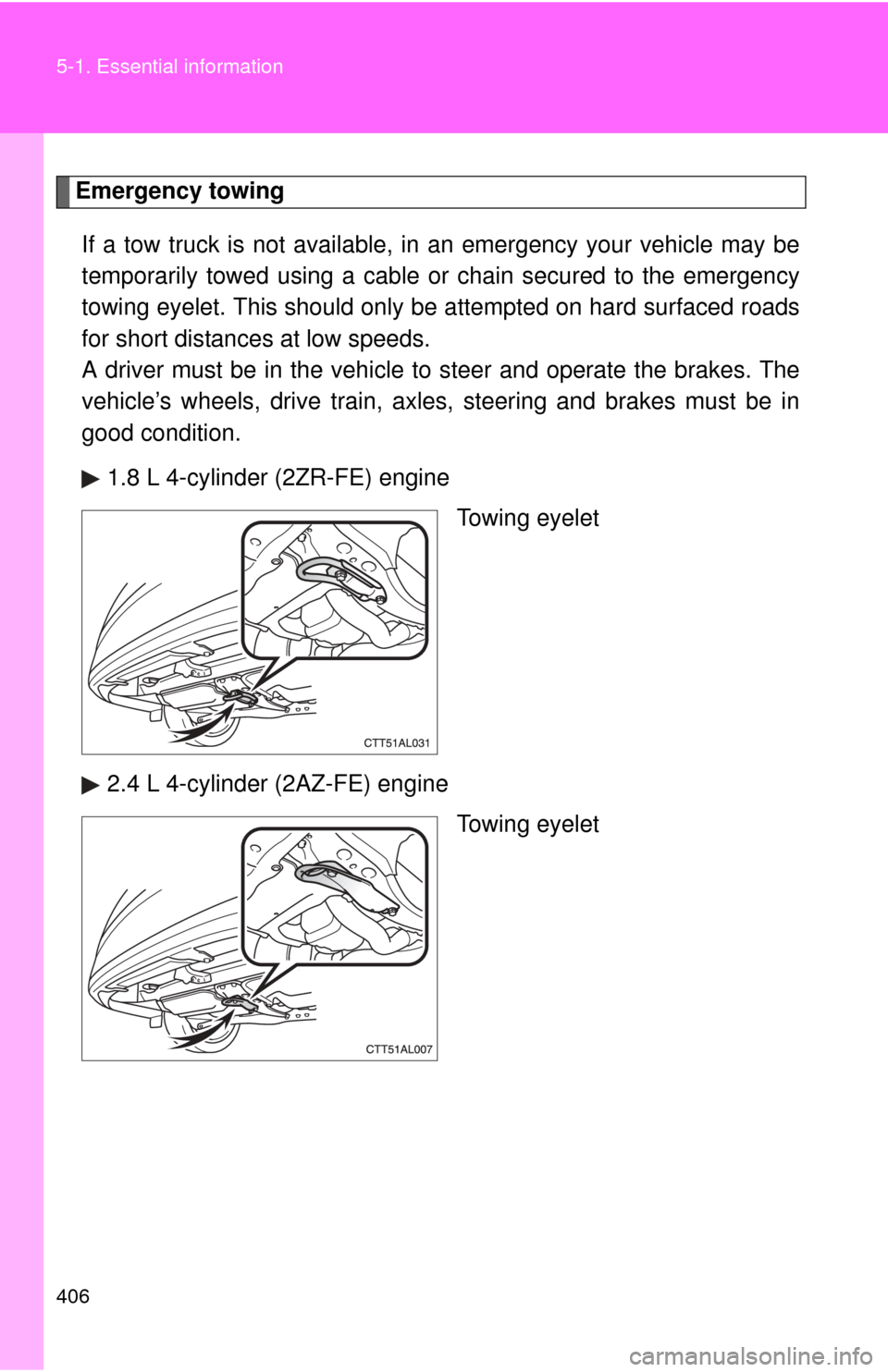
Emergency towingIf a tow truck is not available, in an emergency your vehicle may be
temporarily towed using a cable or chain secured to the emergency
towing eyelet. This should only be attempted on hard surfaced roads
for short distances at low speeds.
A driver must be in the vehicle to steer and operate the brakes. The
vehicle’s wheels, drive train, axles, steering and brakes must be in
good condition.
1.8 L 4-cylinder (2ZR-FE) engine Towing eyelet
2.4 L 4-cylinder (2AZ-FE) engine Towing eyelet