2012 TOYOTA IQ ECU
[x] Cancel search: ECUPage 45 of 476

45 1-2. Opening, closing and locking the doors
1
Before driving
iQ_WE_74014E
Note for door locking operation
When touching a lock sensor to lock the doors while wearing gloves, the
response may be slow or the doors may not be locked. In this case,
touch the lock sensor without wearing a glove.
When door handles get wet while washing the vehicle with the electronic
key on your person, the doors may be locked and unlocked repeatedly. In
this case, keep the electronic key 2 m (6 ft.) or more away from the vehi-
cle while washing (pay attention to key theft).
When the electronic key is inside the vehicle and door handles get wet
due to a car wash, interior and exterior alarms may sound. In this case,
lock the doors to stop the alarms.
A lock sensor covered with ice, snow or mud may not work properly. In
this case, remove the ice, snow or mud from the lock sensor surface and
then touch the sensor again, or unlock the doors using the lock sensor
located on the lower edge of the door handle.
Fingernails may come into contact with a door when taking hold of a door
handle. Be careful not to damage the door surface or your fingernails.
Note for door unlocking operation
The doors may not be unlocked when a door handle is operated quickly,
or if you suddenly enter the operating range of the exterior antenna and
operate a door handle. In this case, return the door handle to its original
position, unlock the doors again, and then check that the doors are
unlocked before pulling the door handle.
When taking hold of a door handle while wearing gloves, the unlocking
response may become slow or the doors may not be unlocked.
If there is another electronic key in the operating range, the response
time to unlock the doors after a door handle is taken hold of may become
longer.
When the vehicle is not driven for extended periods
To prevent theft of the vehicle, do not leave the electronic key within 2 m
(6 ft.) of the vehicle.
The smart entry & start system can be disabled. (P. 459)
Security feature
If a door is not opened within approximately 30 seconds after the vehicle is
unlocked, the security feature automatically locks the vehicle again.
Page 63 of 476

63 1-2. Opening, closing and locking the doors
1
Before driving
iQ_WE_74014E
Operation signals
The emergency flashers flash to indicate that the doors have been locked/
unlocked. (Locked: Once; Unlocked: Twice)
Door lock buzzer (vehicles with smart entry & start system)
If a door is not fully closed, a buzzer sounds continuously if an attempt to
lock the door is made. Fully close the door to stop the buzzer, and lock the
vehicle once more.
Alarm (if equipped)
Using the wireless remote control to lock the door will set the alarm system.
(P. 1 1 9 )
Key battery depletion
Vehicles without smart entry & start system
The standard battery life is 1 to 2 years. (The battery becomes depleted
even if the key is not used.) If the wireless remote control function does
not operate, the battery may be depleted. Replace the battery when nec-
essary. (P. 357)
Vehicles with smart entry & start system
P. 4 3
Security feature
Vehicles without smart entry & start system
If a door is not opened within approximately 30 seconds after the vehicle
is unlocked, the security feature automatically locks the vehicle again.
Vehicles with smart entry & start system
P. 4 5
When the key battery is fully depleted
P. 357
Page 77 of 476
77 1-2. Opening, closing and locking the doors
1
Before driving
iQ_WE_74014E
CAUTION
Operating the back door
Observe the following precautions.
Failure to do so may cause parts of the body to be caught, resulting in seri-
ous injury.
Remove any heavy loads, such as snow and ice, from the back door
before opening it. Failure to do so may cause the back door to suddenly
shut again after it is opened.
When opening or closing the back door, thoroughly check to make sure
the surrounding area is safe.
If anyone is in the vicinity, make sure they are safe and let them know that
the back door is about to open or close.
Use caution when opening or closing the back door in windy weather as it
may move abruptly in strong wind.
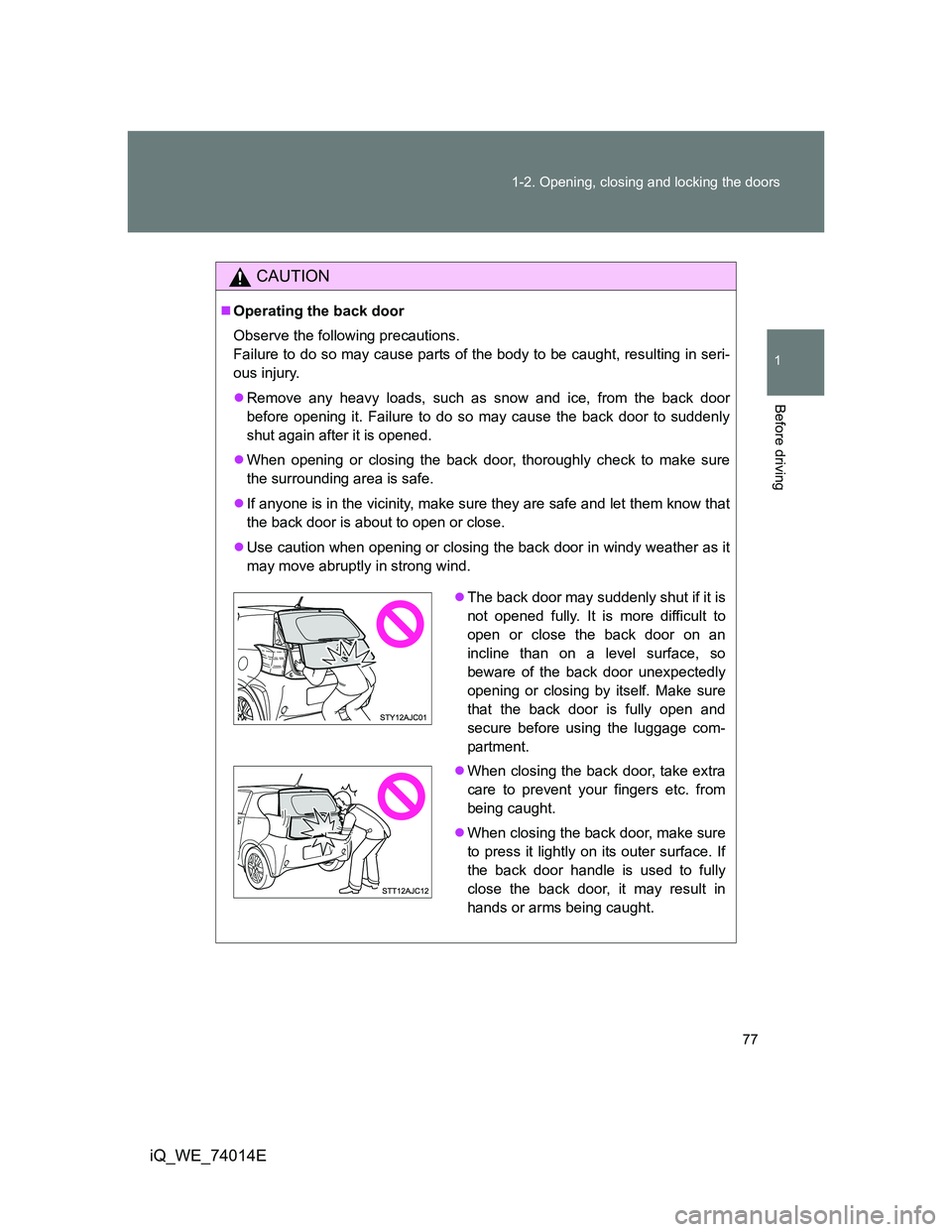
The back door may suddenly shut if it is
not opened fully. It is more difficult to
open or close the back door on an
incline than on a level surface, so
beware of the back door unexpectedly
opening or closing by itself. Make sure
that the back door is fully open and
secure before using the luggage com-
partment.
When closing the back door, take extra
care to prevent your fingers etc. from
being caught.
When closing the back door, make sure
to press it lightly on its outer surface. If
the back door handle is used to fully
close the back door, it may result in
hands or arms being caught.
Page 81 of 476

81 1-3. Adjustable components (seats, mirrors, steering wheel)
1
Before driving
iQ_WE_74014E
CAUTION
Seat adjustment
When sliding the seat rearward, make sure not to squash the legs of the
rear passengers.
Do not recline the seat more than necessary when the vehicle is in motion
to reduce the risk of sliding under the lap belt.
If the seat is too reclined, the lap belt may slide past the hips and apply
restraint forces directly to your abdomen or your neck may contact the
shoulder belt, increasing the risk of death or serious injury in the event of
an accident.
After adjusting the seat, make sure that the seat is locked in position.
When returning the seatback upright, be careful not to be hit by the seat-
back which will rebound with considerable spring force.
When operating the front seat from the rear seat, make sure that no pas-
senger is seated in the front seat.
After returning the seatback
Push and pull the seatback to confirm that it is securely locked.
When sitting down or getting up off the rear seat
When sitting down or getting up off the rear seat, make sure not to trip over
the seat rail grooves.
Caution while driving
Never operate the seat position adjustment lever and the seatback angle
adjustment lever while driving.
Do not place anything under the front seats.
The items may fly out and interrupt pedal operation in events such as sud-
den braking, and may cause an accident.
Page 84 of 476
84 1-3. Adjustable components (seats, mirrors, steering wheel)
iQ_WE_74014E
CAUTION
Observe the following precautions.
Failure to do so may result in death or serious injury.
When operating the rear seat
Do not operate the seat while driving.
Stop the vehicle on level ground, set the parking brake and shift the shift
lever to P (Multidrive) or 1 (manual transmission).
Be careful not to get your hands or feet pinched in the seat.
Do not allow anyone to sit on a folded seatback or in the luggage compart-
ment while driving.
Do not allow children to enter the luggage compartment.
After returning the rear seats to their original position
Make sure the seatbacks and bottom cushion are securely locked.
Check that the seat belts are not twisted or caught under the seats.
Caution while driving
Do not drive with the seat cushion raised.
Do not place anything that may roll, or is larger than the available space
under the seat.
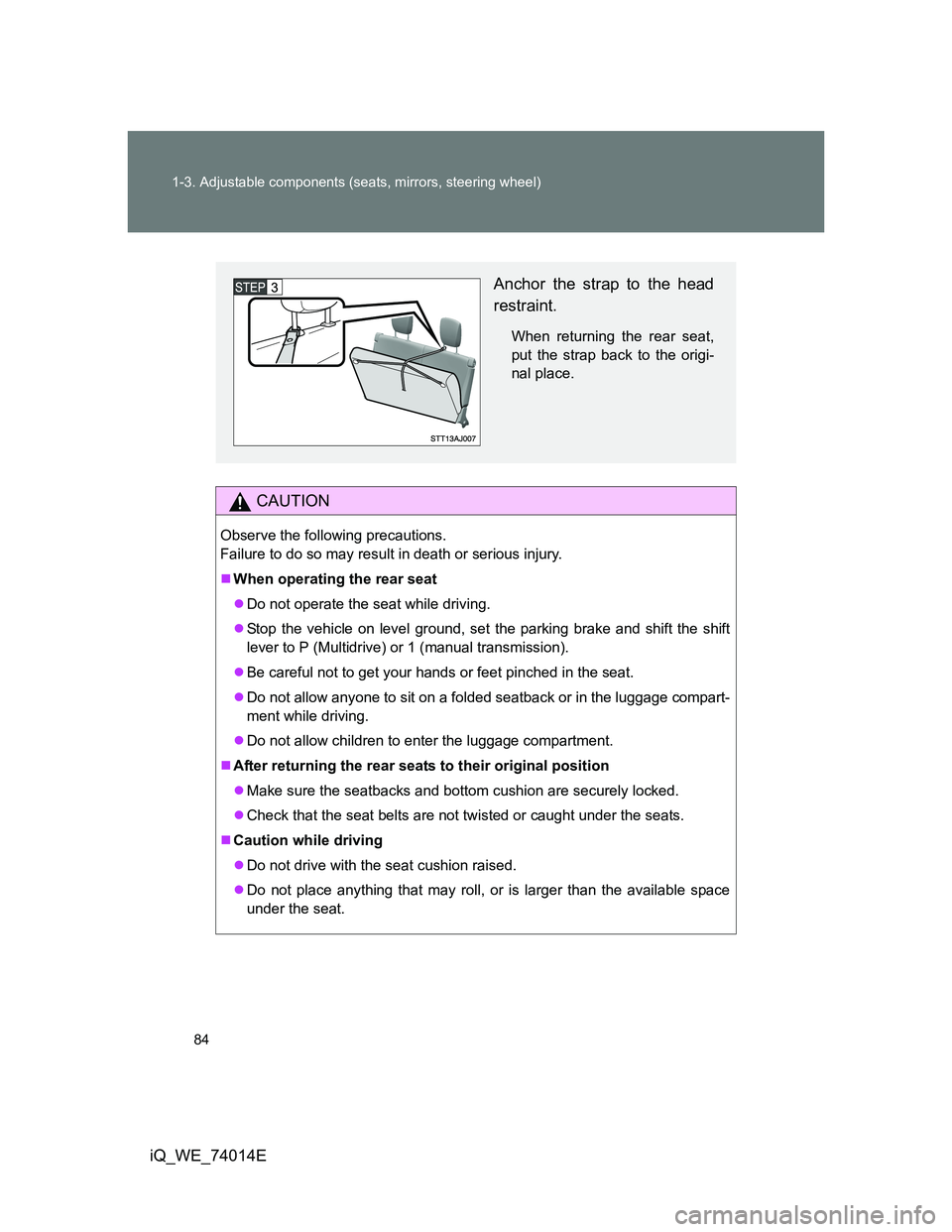
Anchor the strap to the head
restraint.
When returning the rear seat,
put the strap back to the origi-
nal place.
Page 91 of 476

91
1
1-3. Adjustable components (seats, mirrors, steering wheel)
Before driving
iQ_WE_74014E
Steering wheel
CAUTION
Caution while driving
Do not adjust the steering wheel while driving.
Doing so may cause the driver to mishandle the vehicle and an accident,
resulting in death or serious injury.
After adjusting the steering wheel
Make sure that the steering wheel is securely locked.
Otherwise, the steering wheel may move suddenly, possibly causing an
accident and resulting in death or serious injury.
The steering wheel can be adjusted to a comfortable position.
Hold the steering wheel and
press the lever down.
Adjust to the ideal position by
moving the steering wheel
vertically.
After adjustment, pull the lever
up to secure the steering
wheel.
Page 108 of 476

108
iQ_WE_74014E
1-6. Theft deterrent system
Engine immobilizer system
System maintenance
The vehicle has a maintenance-free type engine immobilizer system.
Conditions that may cause the system to malfunction
If the key is in contact with a metallic object
If the key is in close proximity to or touching a key to the security system
(key with a built-in transponder chip) of another vehicle
The vehicle’s keys have built-in transponder chips that prevent the
engine from starting if the key has not been previously registered in
the vehicle’s on-board computer.
Never leave the keys inside the vehicle when you leave the vehicle.
Vehicles without smart entry & start system: The system begins
operating after the key has been removed from the engine switch.
Vehicles with smart entry & start system: The system begins oper-
ating after the “ENGINE START STOP” switch has been turned
OFF.
Vehicles without smart entry & start system: The system is can-
celed after the registered key has been inserted into the engine
switch.
Vehicles with smart entry & start system: The system is canceled
after the “ENGINE START STOP” switch has been turned to
ACCESSORY or IGNITION ON mode.
Page 133 of 476

133 1-7. Safety information
1
Before driving
iQ_WE_74014E
CAUTION
SRS airbag precautions
Improperly seated and/or restrained infants and children can be killed or
seriously injured by a deploying airbag. An infant or child who is too small
to use a seat belt should be properly secured using a child restraint sys-
tem. Toyota strongly recommends that all infants and children be placed in
the rear seats of the vehicle and properly restrained. The rear seats are
the safest for infants and children. (P. 137)
Do not sit on the edge of the seat or
lean against the dashboard.
Do not allow a child to stand in front of
the SRS front passenger airbag unit or
sit on the knees of a front passenger.
Do not drive the vehicle while the driver
or passenger has items resting on their
knees.
Vehicles without curtain shield airbags:
Do not lean against the front door.
Vehicles with curtain shield airbags: Do
not lean against the door, the roof side
rail or the front, side and rear pillars.