Page 205 of 476
205
2-2. Instrument cluster
2
When driving
iQ_WE_74014E
Multi-infor mation display
The multi-information display presents the driver with a variety of
driving-related information, including the current outside tempera-
ture and time.
Fuel gauge
Displays the quantity of fuel
remaining in the tank.
Shift position and shift
range/gear display (vehicles
with a Multidrive) (P. 185)
Displays the shift position
along with the currently
selected shift range or gear.
Clock (P. 209)
Displays the time and sets the
clock.
Outside temperature dis-
play
Displays the outside air tem-
perature.
The temperature range that
can be displayed is from -40°C
(-40°F) to 50°C (122°F).
Trip information (P. 206)
Displays odometer, trip meter,
fuel consumption and other
cruising-related information.
Page 209 of 476
209 2-2. Instrument cluster
2
When driving
iQ_WE_74014E
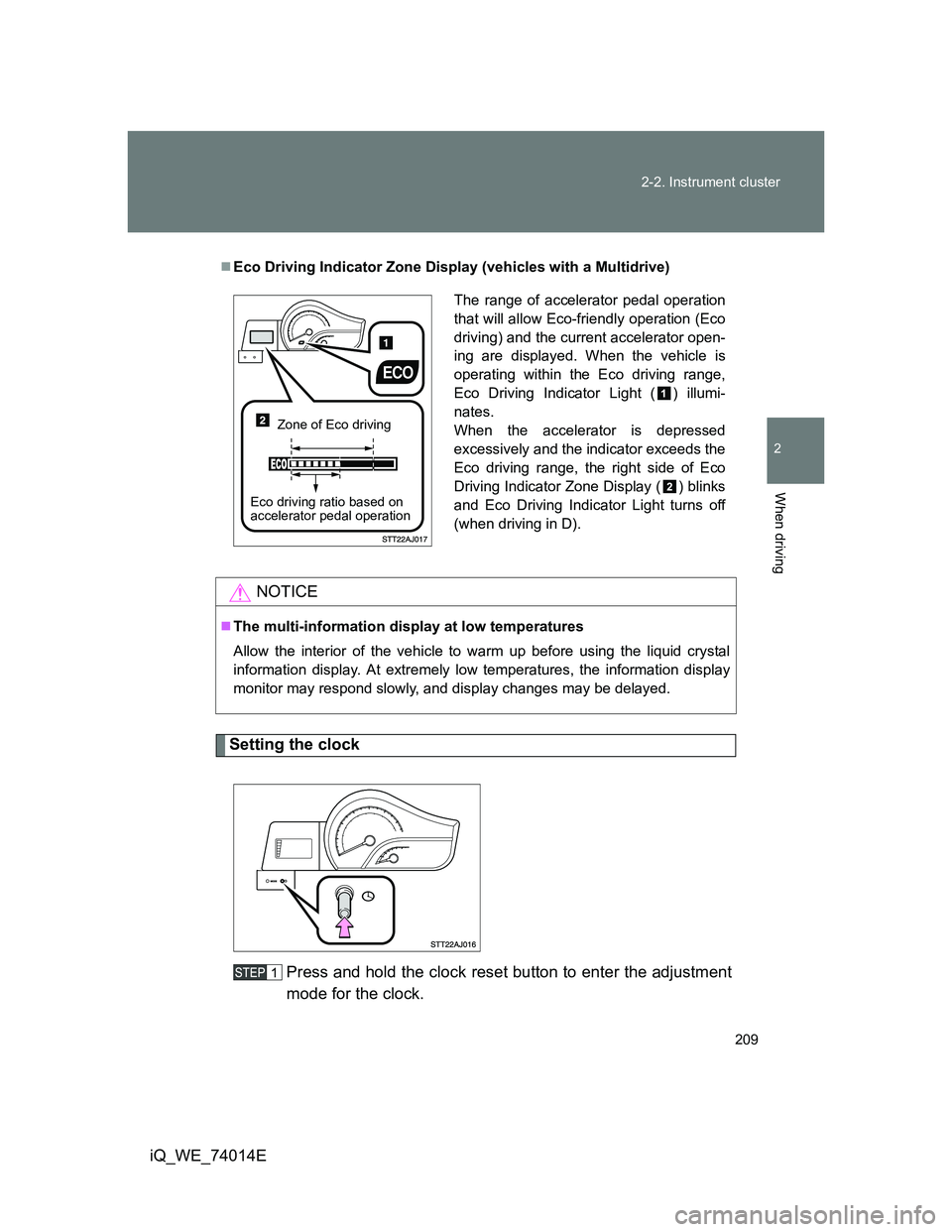
Setting the clock
Press and hold the clock reset button to enter the adjustment
mode for the clock.
Eco Driving Indicator Zone Display (vehicles with a Multidrive)
NOTICE
The multi-information display at low temperatures
Allow the interior of the vehicle to warm up before using the liquid crystal
information display. At extremely low temperatures, the information display
monitor may respond slowly, and display changes may be delayed.
The range of accelerator pedal operation
that will allow Eco-friendly operation (Eco
driving) and the current accelerator open-
ing are displayed. When the vehicle is
operating within the Eco driving range,
Eco Driving Indicator Light ( ) illumi-
nates.
When the accelerator is depressed
excessively and the indicator exceeds the
Eco driving range, the right side of Eco
Driving Indicator Zone Display ( ) blinks
and Eco Driving Indicator Light turns off
(when driving in D).
Zone of Eco driving
Eco driving ratio based on
accelerator pedal operation
Page 210 of 476
210 2-2. Instrument cluster
iQ_WE_74014EPress the clock reset button to adjust the minutes.
After adjusting the minutes, wait 5 seconds to allow the minutes to
be automatically input.
Press the clock reset button to adjust the hours.
After adjusting the hours, wait 5 seconds to allow the hours to be
automatically input and the mode to return to normal.
The multi-information display can be operated when
Vehicles without smart entry & start system
The engine switch is in the ON position.
Vehicles with smart entry & start system
The “ENGINE START STOP” switch is in IGNITION ON mode.
When disconnecting and reconnecting battery terminals
The following information will be reset.
Clock
Trip meter
Average fuel consumption after refueling
Average vehicle speed
Adjusting to a full hour
If you press the clock reset button, the minute values will be rounded to the
nearest hour. So, minute values from “:00” to “:29” are rounded down, and
values from “:30” to “:59” are rounded up.
*
*
: e.g.
1:00 to 1:29 1:00
1:30 to 1:59 2:00
Page 214 of 476

214 2-3. Operating the lights and wipers
iQ_WE_74014E
Daytime running light system (if equipped)
To make your vehicle more visible to other drivers, the headlights and tail
lights turn on automatically whenever the engine is started. (However, the
daytime running light system will be cancelled when the headlight switch is
operated manually or the automatic headlight system turns on the tail lights.)
Daytime running lights are not designed for use at night.
Headlight control sensor (if equipped)
Automatic light off system (if equipped)
Vehicles without smart entry & start system
When the light switch is in
AUTO: The headlights and all lights turn off
automatically if the engine switch is turned to ACC position or turned
OFF and the driver’s door is opened.
To turn the lights on again, switch to ON mode, or turn the light switch off
once and then back to the
or position.
Vehicles with smart entry & start system
When the light switch is in AUTO: The headlights and all lights turn off
automatically if the “ENGINE START STOP” switch is switched to
ACCESSORY mode or turned OFF and the driver’s door is opened.
To turn the lights on again, switch to IGNITION ON mode, or turn the light
switch off once and then back to
or .
The sensor may not function properly if
an object is placed on the sensor, or any-
thing that blocks the sensor is affixed to
the windshield.
Doing so interferes with the sensor
detecting the level of ambient light and
may cause the automatic headlight sys-
tem to malfunction.
Page 221 of 476

221 2-3. Operating the lights and wipers
2
When driving
iQ_WE_74014E
Vehicles without smart entry & start system:
If the wiper switch is turned to AUTO position while the engine switch is in
the ON position, the wiper will operate once to show that AUTO mode is
activated.
Vehicles with smart entry & start system:
If the wiper switch is turned to AUTO position while the “ENGINE START
STOP” switch is in IGNITION ON mode, the wiper will operate once to
show that AUTO mode is activated.
If the temperature of the raindrop sensor is 90°C (194°F) or higher, or
-10°C (14°F) or lower, automatic operation may not occur. In this case,
operate the wipers in any mode other than “AUTO”.
If no windshield washer fluid sprays
Check that the washer nozzles are not blocked and that there is washer fluid
in the windshield washer fluid reservoir.
CAUTION
Caution regarding the use of windshield wipers in AUTO mode
(vehicles with rain-sensing windshield wipers)
The windshield wipers may operate unexpectedly if the sensor is touched or
the windshield is subject to vibration in AUTO mode. Take care that your fin-
gers or anything else does not become caught in the windshield wipers.
NOTICE
When the windshield is dry
Do not use the wipers, as they may damage the windshield.
When there is no washer fluid spray from the nozzle
Damage to the washer fluid pump may be caused if the lever is pulled
toward you and held continually.
When a nozzle becomes blocked
Do not try to clear it with a pin or other object. The nozzle will be damaged.
Page 224 of 476
224
iQ_WE_74014E
2-4. Using other driving systems
Driving assist systems
To help enhance driving safety and performance, the following sys-
tems operate automatically in response to various driving situations.
Be aware, however, that these systems are supplementary and
should not be relied upon too heavily when operating the vehicle.
ABS (Anti-lock Brake System)
Helps to prevent wheel lock when the brakes are applied suddenly, or if
the brakes are applied while driving on a slippery road surface.
Brake Assist
Generates an increased level of braking force after the brake pedal is
depressed, when the system detects a panic stop situation.
VSC (Vehicle Stability Control)
Helps the driver to control skidding when swerving suddenly or turning
on slippery road surfaces.
VSC+ (Vehicle Stability Control+)
Provides cooperative control of the ABS, TRC, VSC and EPS.
Helps to maintain directional stability when swerving on slippery road
surfaces by controlling steering performance.
TRC (Traction Control)
Maintains drive power and prevents the front wheels from spinning
when starting the vehicle or accelerating on slippery roads.
EPS (Electric Power Steering)
Employs an electric motor to reduce the amount of effort needed to turn
the steering wheel.
Page 229 of 476

229
2
When driving
iQ_WE_74014E
2-5. Driving information
Cargo and luggage
CAUTION
Things that must not be carried in the luggage compartment
The following things may cause a fire if loaded in the luggage compartment.
Receptacles containing gasoline
Aerosol cans
Storage precautions
Observe the following precautions.
Failing to do so may result in death or serious injury.
Do not place cargo or luggage in or on the following locations as the item
may get under the brake or accelerator pedal and prevent the pedals from
being depressed properly, block the driver’s vision, or hit the driver or pas-
sengers, causing an accident.
• Driver’s feet
• Front passenger or rear seats (when stacking items)
• Instrument panel
• Dashboard
• Auxiliary box or tray that has no lid
Do not stack anything in the luggage compartment higher than the seat-
backs.
Such items may be thrown about and possibly injure people in the vehicle
during sudden braking or in an accident.
Take notice of the following information about storage precautions,
cargo capacity and load.
Stow cargo and luggage in the luggage compartment whenever
possible.
Be sure all items are secured in place.
Be careful to keep the vehicle level. Placing the weight as far for-
ward as possible helps maintain vehicle balance.
For better fuel economy, do not carry unnecessary weight.
Page 232 of 476
232 2-5. Driving information
iQ_WE_74014E
When driving the vehicle
Accelerate the vehicle slowly and drive at a reduced speed suit-
able to road conditions.
When parking the vehicle
Park the vehicle and move the shift lever to P (Multidrive) or to 1
or R (manual transmission) without setting the parking brake
and then chock the tires. The parking brake may freeze up, pre-
venting it from being released. If necessary, block the wheels to
prevent inadvertent sliding or creeping.