Page 1 of 636
TABLE OF CONTENTS
1
1Before drivingAdjusting and operating features such as door locks,
mirrors, and steering column.
2When drivingDriving, stopping and safe-driving information.
3Interior
featuresAir conditioning and audio systems, as well as other
interior features for a comfortable driving experience.
4Maintenance
and careCleaning and protecting your vehicle, performing do-it-
yourself maintenance, and maintenance information.
5When trouble
arisesWhat to do if the vehicle needs to be towed, gets a flat
tire, or is involved in an accident.
6Vehicle
specificationsDetailed vehicle information.
7For ownersReporting safety defects for U.S. owners, and seat belt
and SRS airbag instructions for Canadian owners
IndexAlphabetical listing of information contained in this
manual.
Page 2 of 636

TABLE OF CONTENTSIndex
2
1-1. Key informationKeys ..................................... 32
1-2. Opening, closing and locking the doors
Smart key system................. 35
Wireless remote control ....... 48
Side doors ............................ 54
Back door ............................. 60
Glass hatch .......................... 70
1-3. Adjustable components (seats, mirrors,
steering wheel)
Front seats ........................... 74
Rear seats ............................ 77
Head restraints ..................... 85
Seat belts ............................. 88
Steering wheel ..................... 94
Anti-glare inside rear view mirror.......................... 95
Outside rear view mirrors ..... 98
1-4. Opening and closing the windows and moon roof
Power windows .................. 101
Moon roof ........................... 104
1-5. Refueling Opening the fuel tank cap ................................... 109 1-6. Theft deterrent system
Engine immobilizer system .............................. 113
Alarm .................................. 116
Theft prevention labels (U.S.A.)............................. 120
1-7. Safety information Correct driving posture ....... 121
SRS airbags ....................... 123
Front passenger occupant classification system ......... 135
Child restraint systems ....... 142
Installing child restraints ..... 147
2-1. Driving procedures Driving the vehicle .............. 160
Engine (ignition) switch (vehicles with smart
key system) ...................... 170
Engine (ignition) switch (vehicles without smart
key system) ...................... 174
Automatic transmission ...... 177
Turn signal lever ................. 182
Parking brake ..................... 183
Horn .................................... 184
2-2. Instrument cluster Gauges and meters ............ 185
Indicators and warning lights ................................. 187
Multi-information display ..... 191
1Before driving
2When driving
Page 4 of 636

TABLE OF CONTENTSIndex
4
3-3. Using the Bluetooth® audio
system
Blue tooth
® audio system .... 347
Using the Bluetooth®
audio system .................... 350
Operating a Bluetooth
®
enabled portable player ... 355
Setting up a Bluetooth
®
enabled portable player ... 357
Bluetooth
® audio system
setup ................................ 362
3-4. Using the hands -free
phone syste m
(for cellular phone)
Hands-free phone system (for cellular phone)
features ............................ 363
Using the hands-free phone system ................... 367
Making a phone call ........... 376
Setting a cellular phone...... 380
Security and system setup ................................ 385
Using the phone book ........ 389
3-5. Using the interior lights Interior lights list ................. 396
• Personal/interior light
main sw itch ...................... 397
• Personal/interior lights...... 397
• Interior light ...................... 398 3-6. Using the storage features
List of storage features ....... 399
• Glove box ......................... 400
• Console box ..................... 401
• Overhead console ............ 402
• Cup holders ...................... 403
• Bottle holders ................... 407
• Auxiliary boxes ................. 408
• Side table ......................... 410
3-7. Other interior features Sun visors ........................... 412
Vanity mirrors ..................... 413
Clock................................... 414
Conversation mirror ............ 415
Power outlets ...................... 416
Seat heaters ....................... 420
Armrests ............................. 422
Floor mat ............................ 423
Luggage compartment features ............................ 424
Garage door opener ........... 429
Compass ............................ 435
Page 12 of 636
12
B
Door lock switch P. 55
Pictorial indexInterior
Power window switches P. 101
Window lock switch P. 101
Inside door lock button P. 55
Page 16 of 636
16
Rear view monitor system
Multi-information display
Clock
P. 219
P. 191
P. 414
Gauges and
meters
P. 185
Tilt and telescopic steering lock release
lever
P. 94
Glove box P. 400
Pictorial indexInstrument panel
Power back door
main switch
P. 62
Tire pressure warning reset switch P. 480
Parking brake pedal P. 183
Hood release lever P. 457
Auxiliary box P. 408
Engine (ignition) switch
(vehicles with smart key system)
P. 170
Fog light switch
Headlight switch
Turn signal lever P. 206
P. 200
P. 182
Windshield wiper and
washer switch
Rear window wiper and
washer switch
P. 208
P. 212
Horn
P. 184Floor mat P. 423
Fuel filler door opener P. 109
Page 31 of 636

Before driving1
31
1-1. Key informationKeys ................................... 32
1-2. Opening, closing and locking the doors
Smart key system .............. 35
Wireless remote control ..... 48
Side doors .......................... 54
Back door ........................... 60
Glass hatch ........................ 70
1-3. Adjustable components (seats, mirrors,
steering wheel)
Front seats ......................... 74
Rear seats.......................... 77
Head restraints................... 85
Seat belts ........................... 88
Steering wheel ................... 94
Anti-glare inside rear view mirror ....................... 95
Outside rear view mirrors.............................. 98 1-4. Opening and closing the
windows and moon roof
Power windows ................ 101
Moon roof ......................... 104
1-5. Refueling Opening the fuel tank cap ................................. 109
1-6. Theft deterrent system Engine immobilizer system ........................... 113
Alarm................................ 116
Theft prevention labels (U.S.A.) .......................... 120
1-7. Safety information Correct driving posture..... 121
SRS airbags ..................... 123
Front passenger occupant classification system ...... 135
Child restraint systems..... 142
Installing child restraints ........................ 147
Page 35 of 636
35
1
Before driving
1-2. Opening, closing and locking the doors
Smart key system
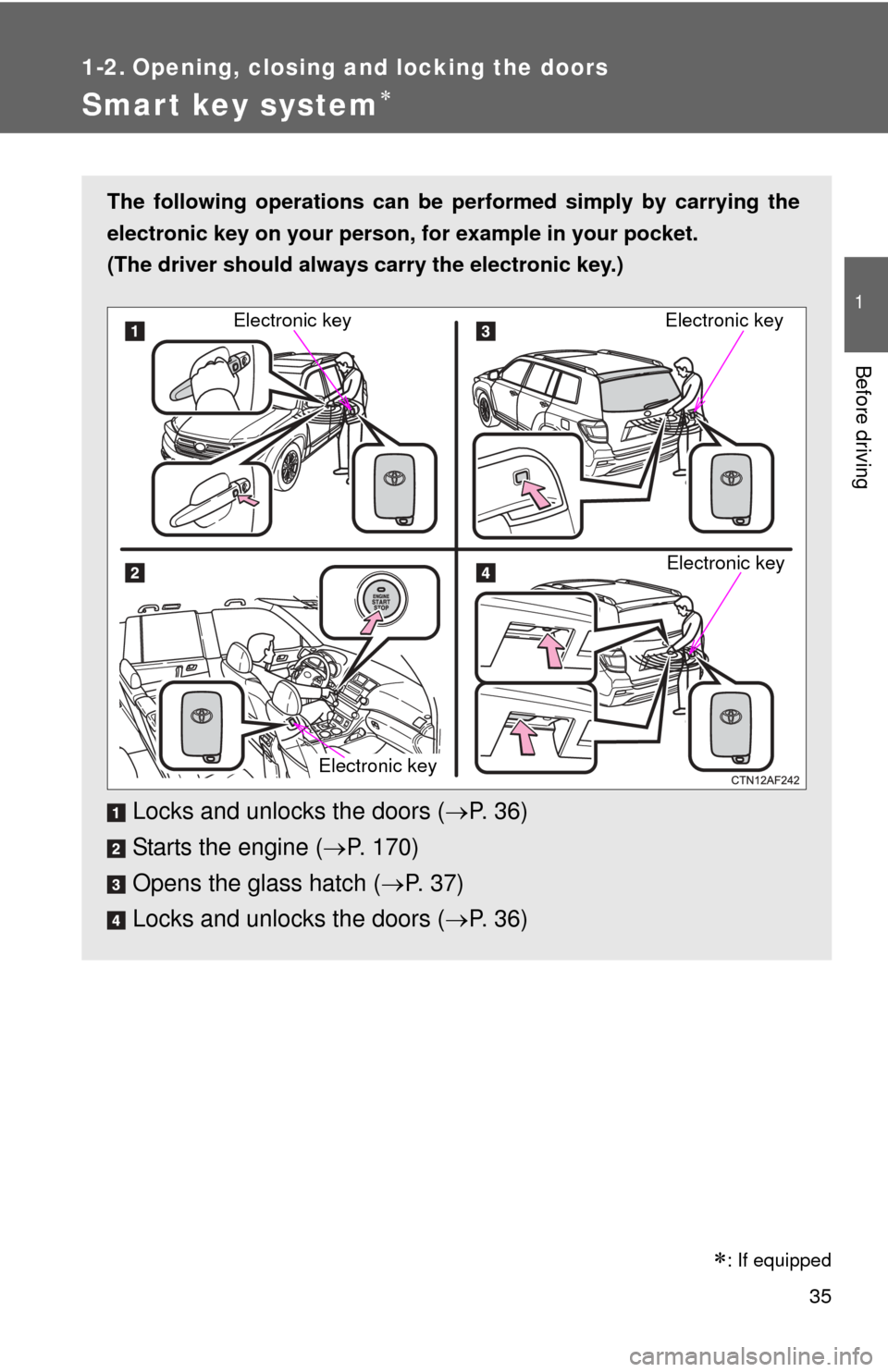
The following operations can be performed simply by carrying the
electronic key on your person, for example in your pocket.
(The driver should always carry the electronic key.)
Locks and unlocks the doors ( P. 3 6 )
Starts the engine ( P. 170)
Opens the glass hatch ( P. 37)
Locks and unlocks the doors ( P. 3 6 )
Electronic key
Electronic key
Electronic key
Electronic key
: If equipped
Page 36 of 636
36 1-2. Opening, closing and locking the doors
Unlocking and locking the doorsFront door handles Grip the handle to unlock the
doors.
Make sure to touch the sensor on
the back of the handle.
The door cannot be unlocked for
3 seconds after the door is
locked.
Press the lock button to lock the
doors.
Back door handle Press the button to unlock the
door.
The door cannot be unlocked for
3 seconds after the door is
locked.
If you carry the electronic key on
your person, the back door can
be opened even if it is locked.
Lock the back door again when
you leave the vehicle. The back
door will not lock automatically
after it has been opened and then
closed.