Page 3 of 540

1
2
3
4
5
6
7
3
2-3. Operating the lights andwipers
Headlight swi tch .................. 146
Windshield wipers and washer .............................. 148
Rear window wiper and washer .............................. 150
2-4. Using other driving systems Cruise control ...................... 151
Intuitive parking assist......... 155
Rear view monitor system... 160
Four-wheel drive system (4WD models with
a manual transmission)..... 164
Four-wheel drive system (4WD models with
an automatic
transmission) .................... 167
Active traction control system .............................. 170
AUTO LSD system (2WD models) ................... 172
Rear differential lock system .............................. 174
Clutch start cancel switch (vehicles with a manual
transmission) .................... 177
Driving assist systems ........ 178
2-5. Driving information Off-road precautions ........... 183
Cargo and luggage ............. 188
Vehicle load limits ............... 192
Winter driving tips ............... 193
Trailer towing ...................... 196
Dinghy towing ..................... 214 3-1. Using the air conditioning
system and defogger
Air conditioning system ...... 218
Rear window defogger ....... 225
3-2. Using the audio system Audio system ...................... 226
Using the radio ................... 230
Using the CD player ........... 237
Playing MP3 and WMA discs ................................. 245
Operating an iPod .............. 252
Operating a USB memory ............................ 259
Optimal use of the audio system .............................. 267
Using the AUX port............. 270
Using the steering wheel audio switches.................. 271
Detachable pole antenna ... 274
3-3. Using the Bluetooth
® audio
system
Bluetooth
® audio system .... 277
Using the Bluetooth® audio
system .............................. 280
Operating a Bluetooth
®
enabled portable player.... 285
Setting up a Bluetooth
®
enabled portable player.... 287
Bluetooth
® audio system
setup ................................ 292
3Interior features
Page 115 of 540

When driving2
115
2-1. Driving proceduresDriving the vehicle............ 116
Engine (ignition) switch .... 127
Automatic Transmission... 130
Manual Transmission ....... 132
Turn signal lever .............. 134
Parking brake ................... 135
Horn ................................. 137
2-2. Instrument cluster Gauges and meters ......... 138
Indicators and warning lights .............................. 141
Accessory meter .............. 144
2-3. Operating the lights and wipers
Headlight switch ............... 146
Windshield wipers and washer ........................... 148
Rear window wiper and washer ........................... 150
2-4. Using other driving systems Cruise control ................... 151
Intuitive parking assist...... 155
Rear view monitor system ........................... 160 Four-wheel drive system
(4WD models with
a manual
transmission) ................. 164
Four-wheel drive system (4WD models with
an automatic
transmission) ................. 167
Active traction control system ........................... 170
AUTO LSD system (2WD models) ................ 172
Rear differential lock system ........................... 174
Clutch start cancel switch (vehicles with a manual
transmission) ................. 177
Driving assist systems ..... 178
2-5. Driving information Off-road precautions ........ 183
Cargo and luggage .......... 188
Vehicle load limits ............ 192
Winter driving tips ............ 193
Trailer towing ................... 196
Dinghy towing .................. 214
Page 126 of 540
126 2-1. Driving procedures
NOTICE
■When encountering flooded roads
Do not drive on a road that has flooded after heavy rain etc. Doing so may
cause the following serious damage to the vehicle.
●Engine stalling
● Short in electrical components
● Engine damage caused by water immersion
In the event that you drive on a flooded road and the vehicle is flooded, be
sure to have your Toyota dealer check the following.
● Brake function
● Changes in quantity and quality of oil and fluid used for the engine, trans-
mission, transfer (4WD models), differentials, etc.
● Lubricant condition for the propeller shaft, bearings and suspension joints
(where possible) and the function of all joints, bearings, etc.
Page 131 of 540
131
2-1. Driving procedures
2
When driving
■
Downshifting restrictions
The shift lever cannot be downshifted if the following speeds are exceeded.
2WD models
4WD models
■ When driving with the cruise control system (if equipped)
The engine brake will not operate when downshifting from D to 4.( P. 151)
■ If the shift lever cannot be shifted from P (P. 468)
■ AI-SHIFT
The AI-SHIFT automatically shifts the gear to the suitable position according
to the driver performance and driving conditions.
The AI-SHIFT automatically operates when the shift lever is in D.
DownshiftingMaximum speed
mph (km/h)
4 3 90 (145)
3 2 59 (95)
2 L 25 (40)
DownshiftingTransfer positionMaximum speed
mph (km/h)
4 3 H2 and H4 90 (145)
L4 34 (55)
3 2 H2 and H4 59 (95)
L4 22 (35)
2 L H2 and H4 25 (40)
L4 9 (15)
Page 164 of 540
164
2-4. Using other driving systems
Four-wheel drive system (4WD models with a manual transmission)
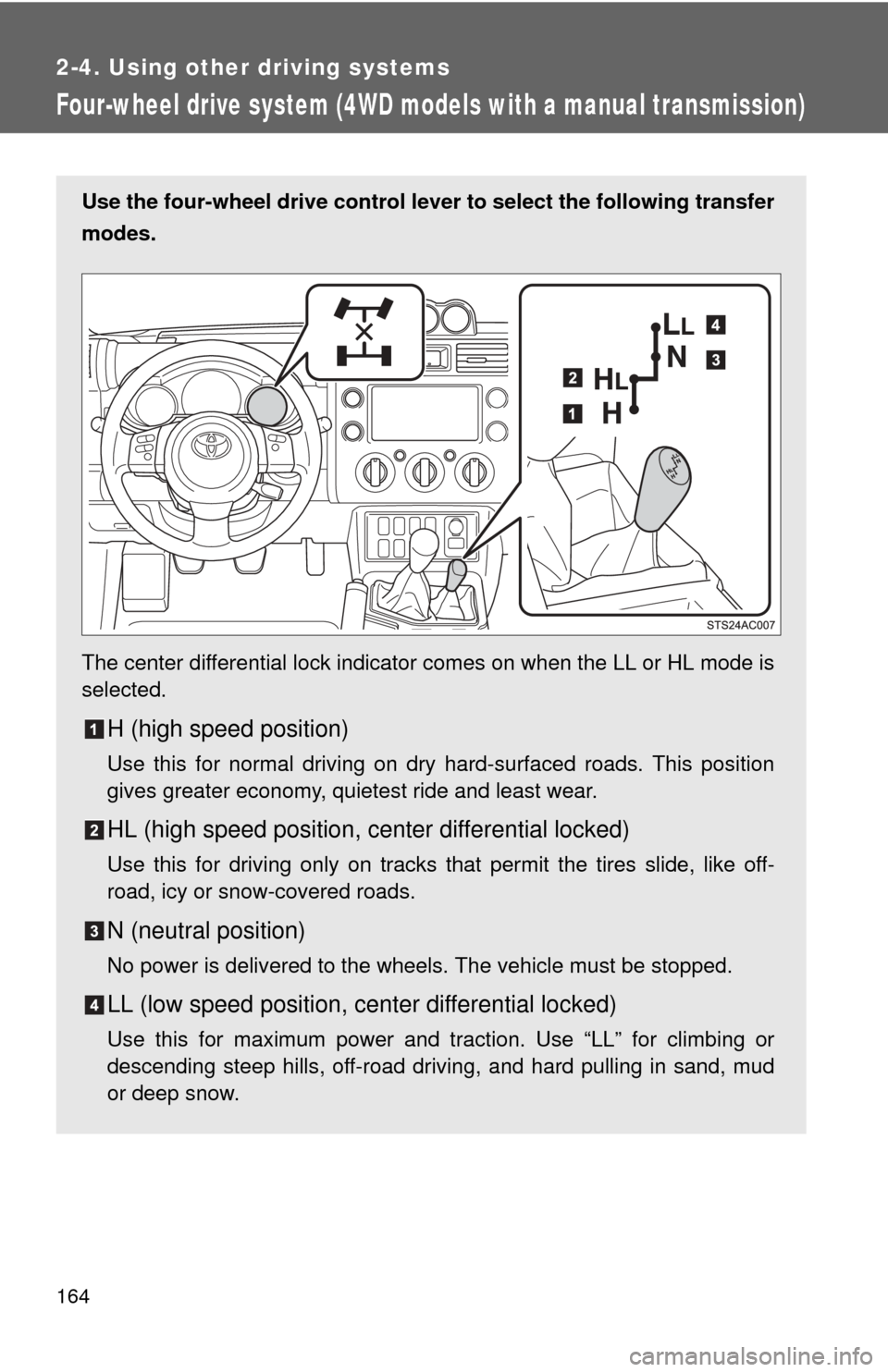
Use the four-wheel drive control lever to select the following transfer
modes.
The center differential lock indicator comes on when the LL or HL mode is
selected.
H (high speed position)
Use this for normal driving on dry hard-surfaced roads. This position
gives greater economy, quietest ride and least wear.
HL (high speed position, center differential locked)
Use this for driving only on tracks that permit the tires slide, like off-
road, icy or snow-covered roads.
N (neutral position)
No power is delivered to the wheels. The vehicle must be stopped.
LL (low speed position, ce nter differential locked)
Use this for maximum power and traction. Use “LL” for climbing or
descending steep hills, off-road driving, and hard pulling in sand, mud
or deep snow.
Page 167 of 540
167
2-4. Using other driving systems
2
When driving
Four-wheel drive system (4WD models with an automatic transmission)
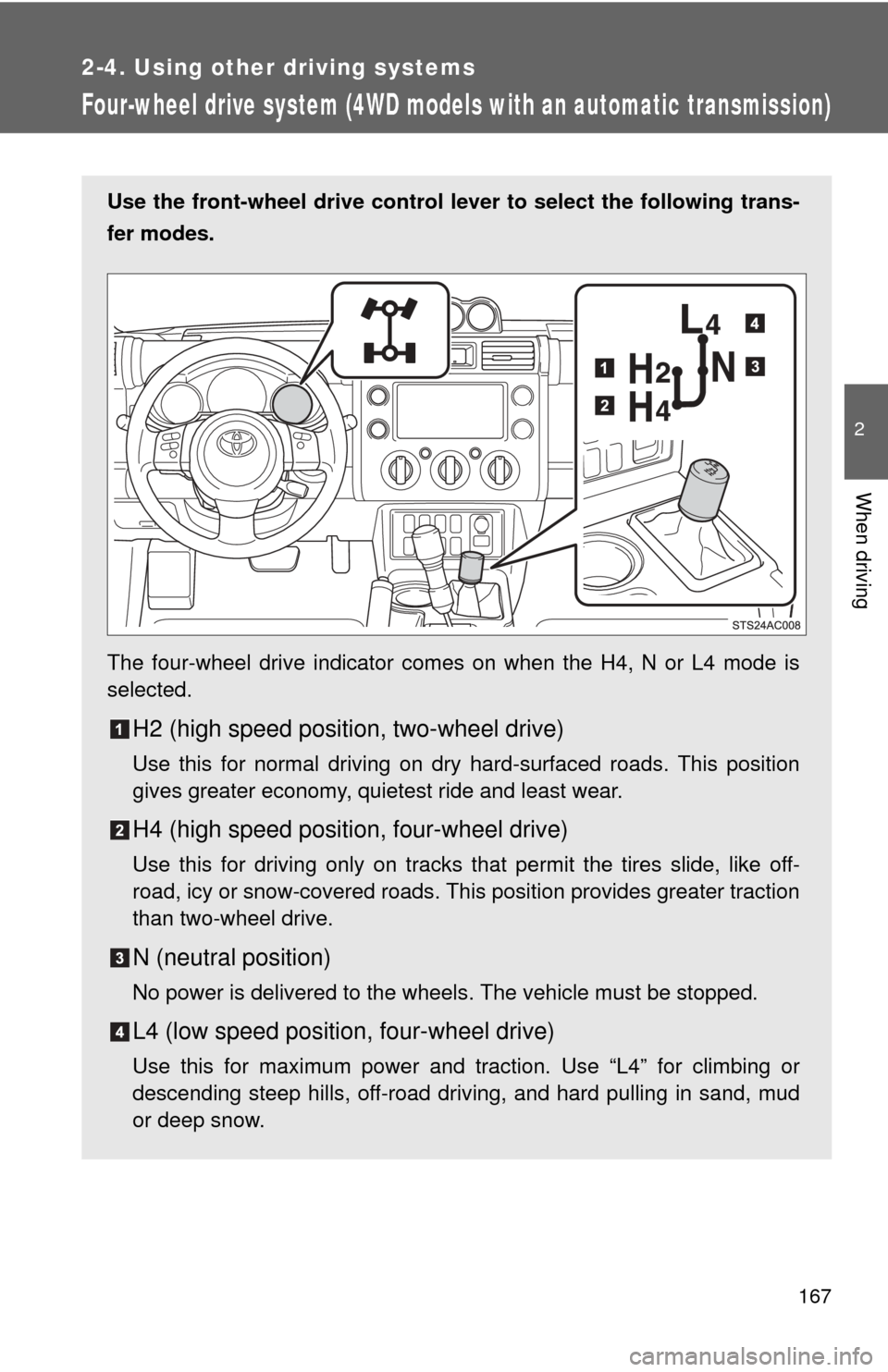
Use the front-wheel drive control lever to select the following trans-
fer modes.
The four-wheel drive indicator comes on when the H4, N or L4 mode is
selected.
H2 (high speed position, two-wheel drive)
Use this for normal driving on dry hard-surfaced roads. This position
gives greater economy, quietest ride and least wear.
H4 (high speed position, four-wheel drive)
Use this for driving only on tracks that permit the tires slide, like off-
road, icy or snow-covered roads. This position provides greater traction
than two-wheel drive.
N (neutral position)
No power is delivered to the wheels. The vehicle must be stopped.
L4 (low speed position, four-wheel drive)
Use this for maximum power and traction. Use “L4” for climbing or
descending steep hills, off-road driving, and hard pulling in sand, mud
or deep snow.
Page 174 of 540

174
2-4. Using other driving systems
Rear differential lock system
Using the rear differential lock systemAutomatic transmission 4WD models: Before using the rear differential lock system.
Stop the vehicle, shift the shift lever to N and shift the front-
wheel drive control lever into L4 to see if this is sufficient. If
this has no effect, additionally use the rear differential lock
system.
Be sure to stop the wheels.
Press the RR DIFF LOCK switch.
Gently depress the accelerator pedal.
After the rear differential is locked, the indicator will come on.
Unlock the rear differential as soon as the vehicle moves.
To unlock the rear differential, push the switch again.
: If equipped
The rear differential lock system is provided for use only when wheel
spinning occurs in a ditch or on a slippery or rugged surface.
The rear differential lock system is effective in case one of the rear
wheels is spinning.
Press the RR DIFF LOCK
switch to lock the rear differen-
tial.
At this time, the rear differential
lock indicator will blink. Wait a
few seconds for the system to
complete operation. After the
rear differential is locked, the
indicator will stop blinking and
remain on.
To unlock the rear differential,
push the switch again.
Page 175 of 540

175
2-4. Using other
driving systems
2
When driving
Manual transmission
Before using the rear differential lock system.
Stop the vehicle or reduce your speed to less than 5 mph (8
km/h). Depress the clutch pedal and shift the four-wheel drive
control lever into LL to see if this is sufficient. If this has no
effect, additionally use the r ear differential lock system.
Be sure to stop the wheels.
Depress the clutch pedal.
Press the RR DIFF LOCK switch.
Slowly release the clutch pedal.
After the rear differential is locked, the indicator will come on.
Unlock the rear differential as soon as the vehicle moves.
To unlock the rear differential, push the switch again.
■ Locking the rear differential
●When the rear differential is locked, VSC is automatically turned off.
(The rear differential lock and VSC OFF indicators will come on.)
● The following systems do not operate when the rear differential is locked.
It is normal operation for the ABS warning light and VSC OFF indicator to
be on at this time.
•ABS
• Brake assist system
•VSC
• TRAC (TRC)
■ The rear differential lock is disengaged when
●Shift the four-wheel drive control lever to H or HL. (4WD models with a
manual transmission)
● Shift the front-wheel drive control lever to H2 or H4. (4WD models with
an automatic transmission)
Never forget to turn off the switch after using this feature.
■ After unlocking the rear differential
Check that the indicator goes off.