Page 135 of 529

135
2-1. Driving procedures
2
When driving
Engine (ignition) switch (vehicles without smart key system)
■Starting the engine
Automatic transmission
Check that the parking brake is set.
Check that the shift lever is set in P.
Sit in the driver’s seat and firmly depress the brake pedal.
Turn the engine switch to the “START” position and start
the engine.
1.8 L 4-cylinder (2ZR-FE) engine: The engine will crank until it
starts or for up to 25 seconds, whichever is less. If you turn the
engine switch, the engine will keep cranking for about 30 seconds
maximum.
Continue depressing the brake pedal until the engine is com-
pletely started.
Manual transmissionCheck that the parking brake is set.
Check that the shift lever is set in N.
Firmly depress the clutch pedal.
Turn the engine switch to the “START” position and start
the engine.
1.8 L 4-cylinder (2ZR-FE) engine: The engine will crank until it
starts or for up to 25 seconds, whichever is less. If you turn the
engine switch, the engine will keep cranking for about 30 seconds
maximum.
Continue depressing the brake pedal until the engine is com-
pletely started.
STEP 1
STEP 2
STEP 3
STEP 4
STEP 1
STEP 2
STEP 3
STEP 4
Page 137 of 529
137
2-1. Driving procedures
2
When driving
■
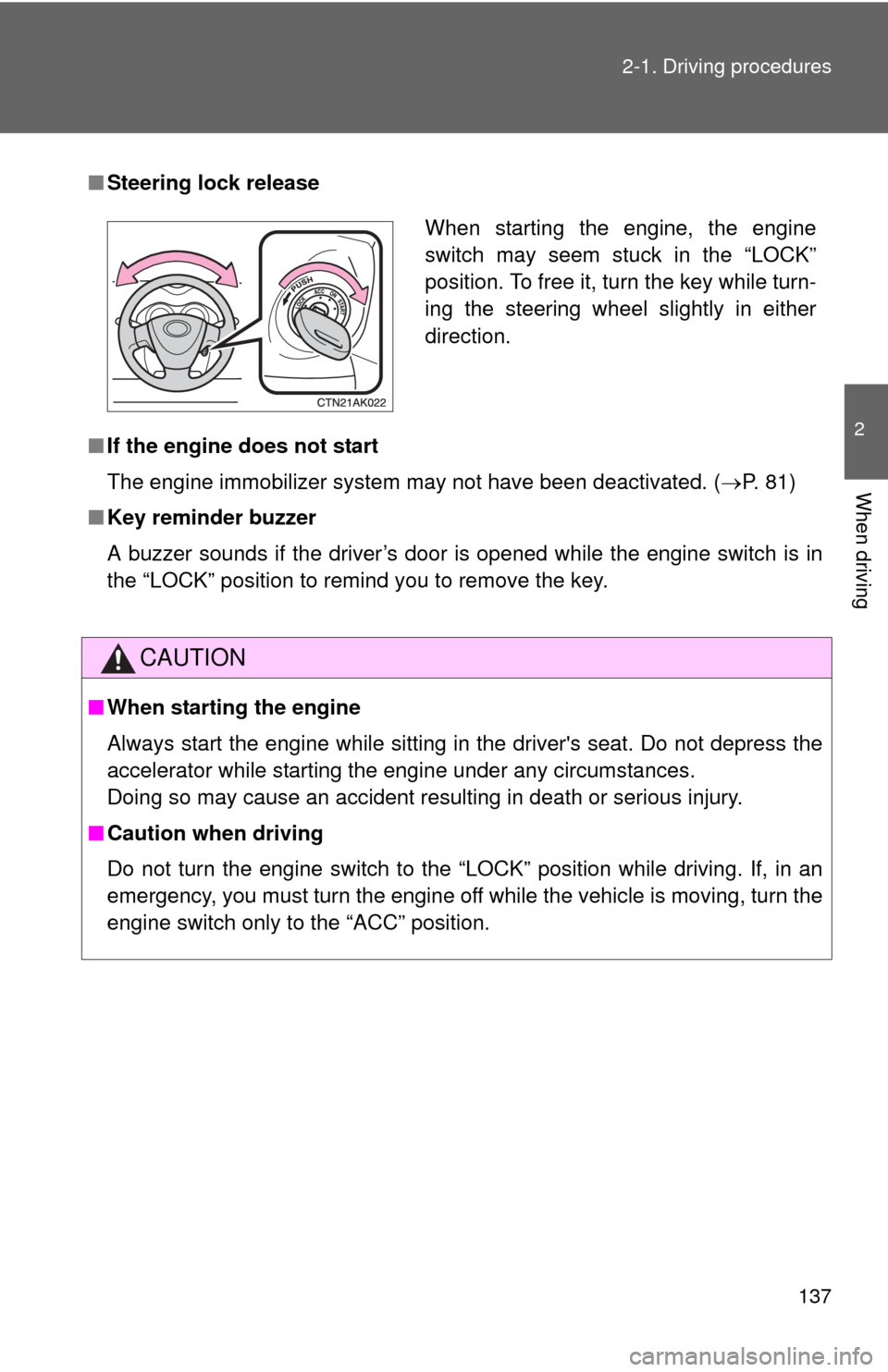
Steering lock release
■ If the engine does not start
The engine immobilizer system may not have been deactivated. ( P. 81)
■ Key reminder buzzer
A buzzer sounds if the driver’s door is opened while the engine switch is in
the “LOCK” position to remind you to remove the key.
CAUTION
■When starting the engine
Always start the engine while sitting in the driver's seat. Do not depress the
accelerator while starting the engine under any circumstances.
Doing so may cause an accident resulting in death or serious injury.
■ Caution when driving
Do not turn the engine switch to the “LOCK” position while driving. If, in an
emergency, you must turn the engine off while the vehicle is moving, turn the
engine switch only to the “ACC” position.
When starting the engine, the engine
switch may seem stuck in the “LOCK”
position. To free it, turn the key while turn-
ing the steering wheel slightly in either
direction.
Page 179 of 529

179
2-5. Driving information
2
When driving
CAUTION
■Storage precautions
Observe the following precautions.
Failing to do so may result in death or serious injury.
●To prevent cargo and luggage from sliding forward during braking, do
not stack anything in the enlarged trunk. Keep cargo and luggage low,
as close to the floor as possible.
●Never allow anyone to ride in the enlarged trunk. It is not designed for
passengers. They should ride in their seats with their seat belts prop-
erly fastened. Otherwise, they are much more likely to suffer death or
serious bodily injury, in the event of sudden braking, sudden swerving
or an accident.
●Do not place cargo or luggage in or on the following locations as the
item may get under the clutch, brake or accelerator pedal and prevent
the pedals from being depressed properly, block the driver’s vision, or
hit the driver or passengers, causing an accident.
• Driver’s feet
• Front passenger or rear seats (when stacking items)
• Package tray
• Instrument panel
• Dashboard
●Secure all items in the occupant compartment, as they may shift and
injure someone during sudden braking, sudden swerving or an acci-
dent.
■Capacity and distribution
●Do not exceed the maximum axle weight rating or the total vehicle
weight rating.
●Even if the total load of occupant's weight and the cargo load is less
than the total load capacity, do not apply the load unevenly.
Improper loading may cause deterioration of steering or braking con-
trol which may cause death or serious injury.
Page 180 of 529
180
2-5. Driving information
Vehicle load limits
■Total load capacity and seating capacity
These details are also described on the tire and loading information
label. (P. 376)
CAUTION
■Overloading the vehicle
Do not overload the vehicle.
It may not only cause damage to the ti res, but also degrade steering and
braking ability, resulting in an accident.
Vehicle load limits include total load capacity, seating capacity,
trailer weight rating and cargo capacity.
■ Total load capacity: 825 lb. (370 kg)
Total load capacity means the combined weight of occupants, cargo
and luggage.
■Seating capacity: 5 occupants (Front 2, Rear 3)
Seating capacity means the maxi mum number of occupants whose
estimated average weight is 150 lb. (68 kg) per person.
■ Trailer weight rating
2.4 L 4-cylinder (2AZ-FE) engine: 1500 lb. (680 kg)
1.8 L 4-cylinder (2ZR-FE) engine: Toyota does not recommend
towing a trailer with your vehicle.
■ Cargo capacity
Cargo capacity may increase or decrease depending on the weight
and the number of occupants.
Page 205 of 529
Interior features3
205
3-3. Using the Bluetooth®
audio system
Blu etooth
®
audio/phone ................... 279
Using the Bluetooth
®
audio/phone ................... 282
Operating a Bluetooth
®
enabled portable
player ............................. 287
3-4. Using the hands-free phone system
(for cellular phone)
Making a phon e call ......... 290
Using the “SET UP” menu (“Bluetooth” menu) ......... 295
Using the “SET UP” menu (“Phone” menu).............. 301
3-5. Using the interior lights Interior lights list ............... 307
• Interior light .................... 309
• Personal lights ............... 309
• Personal/interior lights ... 310 3-6.
Using the storage
features
List of storage fea tures .... 311
• Glove box....................... 312
• Console box ................... 312
• Cup holders ................... 314
• Auxiliary boxes ............... 317
• Bottle holders ................. 319
3-7. Other interior features Sun visors ........................ 320
Vanity mirrors ................... 321
Clock ................................ 322
Ashtray ............................. 323
Cigarette lighter................ 324
Power outlet ..................... 325
Seat heaters..................... 326
Floor mat .......................... 328
Compass .......................... 329
Page 279 of 529
279
3
Interior features
3-3. Using the Bluetooth® audio system
Bluetooth® audio/phone
■Conditions affecting operation
The Bluetooth
® audio/phone may not operate normally in the following situa-
tions:
● The portable player does not support Bluetooth
®
●The cellular phone is located outside the service area
● The Bluetooth
® device is switched off
● The Bluetooth
® device has a low battery
● The Bluetooth
® device is not connected to the system
● The Bluetooth
® device is behind the seat or in the glove box or console
box, or metal material covers or touches the device
■ Bluetooth® audio
The Bluetooth
® audio system enables yo u to enjoy music played
on a portable digital audio player (portable player) from the vehi-
cle speakers via wireless communication.
This audio system supports Bluetooth
®, a wireless data system
capable of playing portable audi o music without cables. If your
portable player does not support Bluetooth
®, the Bluetooth®
audio system will not function.
■ Bluetooth
® phone (hands-free phone system)
This system supports Bluetooth
®, which allows you to make or
receive calls without using cables to connect a cellular phone
and the system, and without operating the cellular phone.
: If equipped
Page 326 of 529
326
3-7. Other interior features
Seat heaters
■The seat heaters can be used when
Vehicles with smart key system
The “ENGINE START STOP” switch is in IGNITION ON mode.
Vehicles without smart key system
The engine switch is in the “ON” position.
CAUTION
■ Burns
●Use caution when seating the following persons in a seat with the seat
heater on to avoid the possibility of burns:
• Babies, small children, the elderly, the sick and the disabled
• Persons with sensitive skin
• Persons who are fatigued
• Persons who have taken alcohol or drugs that induce sleep (sleeping
drugs, cold remedies, etc.)
● Do not cover the seat with anything when using the seat heater.
Using the seat heater with a blanket or cushion increases the temperature
of the seat and may lead to overheating.
Heats the driver’s seat
Heats the front passenger’s
seat
The indicator light is on while
the seat heater is operating.
Push the switch once again to
turn off the seat heater.
: If equipped
Page 327 of 529
327
3-7. Other interior features
3
Interior features
NOTICE
■
To prevent seat heater damage
Do not put unevenly weighted objects on the seat and do not stick sharp
objects (needles, nails, etc.) into the seat.
■ To prevent battery discharge
Turn the switches off when the engine is not running.