Page 4 of 772
TABLE OF CONTENTSIndex
4
AVENSIS_EE (OM20B44E)
3-1. Using the air conditioning
system and defogger
Automatic air conditioning
system .............................. 360
Manual air conditioning
system .............................. 370
Power heater ...................... 378
Rear window and outside
rear view mirror
defoggers.......................... 381
Windshield wiper
de-icer............................... 3823-2. Using the audio system
Audio system types ............ 383
Using the radio ................... 391
Using the CD player ........... 398
Playing back MP3 and
WMA discs ....................... 406
Operating an iPod .............. 416
Operating a USB
memory ............................ 426
Optimal use of the audio
system.............................. 436
Using the AUX port ............ 438
Using the steering wheel
audio switches ................. 439
Bluetooth
® audio/phone ..... 442
Using the Bluetooth®
audio/phone ..................... 449
Operating a Bluetooth
®
enabled portable
player ............................... 455
Making a phone call ........... 459
Using the “SET UP” menu
(“Bluetooth” menu) ........... 465
Using the “SET UP” menu
(“TEL” menu).................... 471
3-3. Using the interior lights
Interior lights list ................. 478
• Personal/interior light
main switch ...................... 479
• Personal/interior lights ..... 479
• Personal lights ................. 480
3Interior features
Page 244 of 772
244 2-2. Instrument cluster
AVENSIS_EE (OM20B44E)
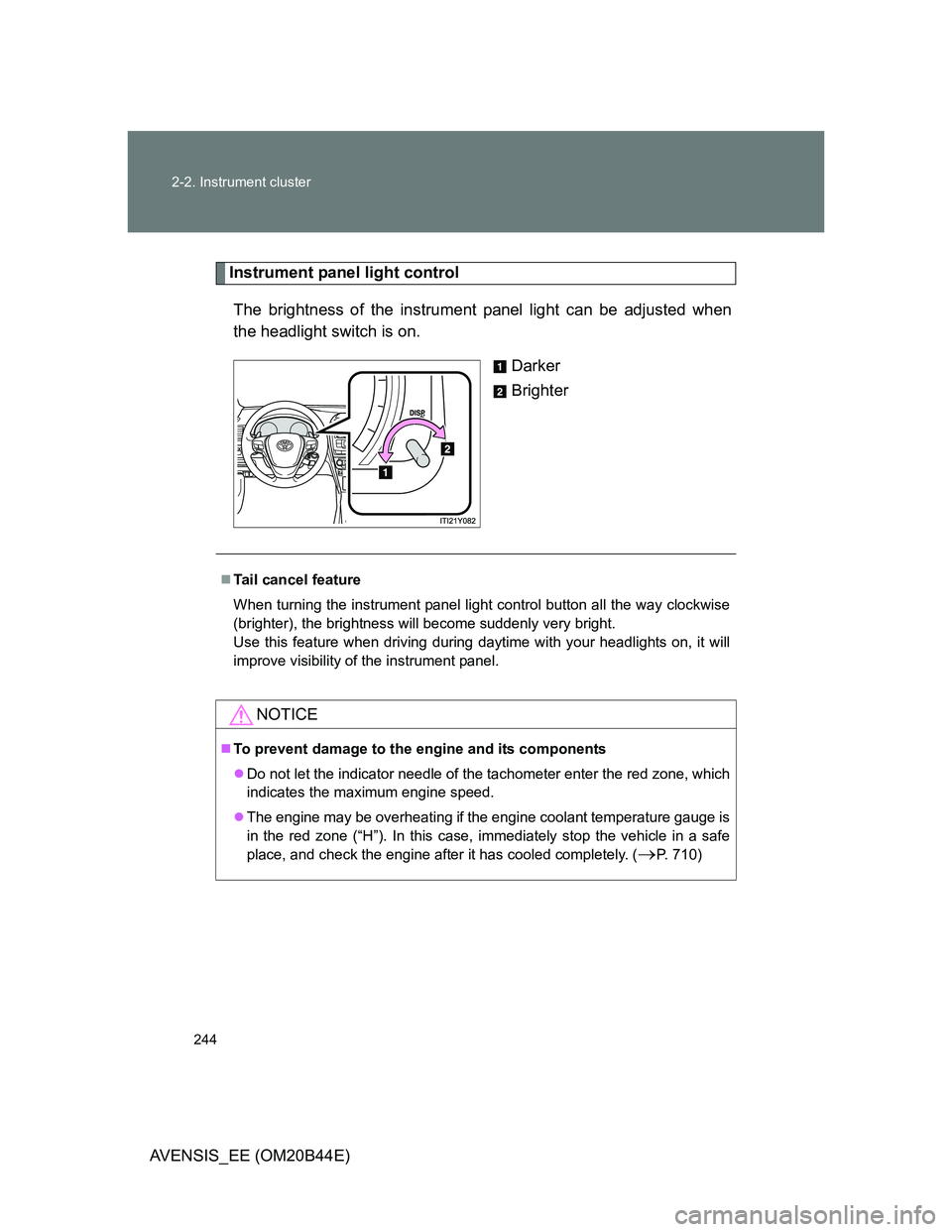
Instrument panel light control
The brightness of the instrument panel light can be adjusted when
the headlight switch is on.
Darker
Brighter
Tail cancel feature
When turning the instrument panel light control button all the way clockwise
(brighter), the brightness will become suddenly very bright.
Use this feature when driving during daytime with your headlights on, it will
improve visibility of the instrument panel.
NOTICE
To prevent damage to the engine and its components
Do not let the indicator needle of the tachometer enter the red zone, which
indicates the maximum engine speed.
The engine may be overheating if the engine coolant temperature gauge is
in the red zone (“H”). In this case, immediately stop the vehicle in a safe
place, and check the engine after it has cooled completely. (
P. 710)
Page 263 of 772
263 2-3. Operating the lights and wipers
2
When driving
AVENSIS_EE (OM20B44E)
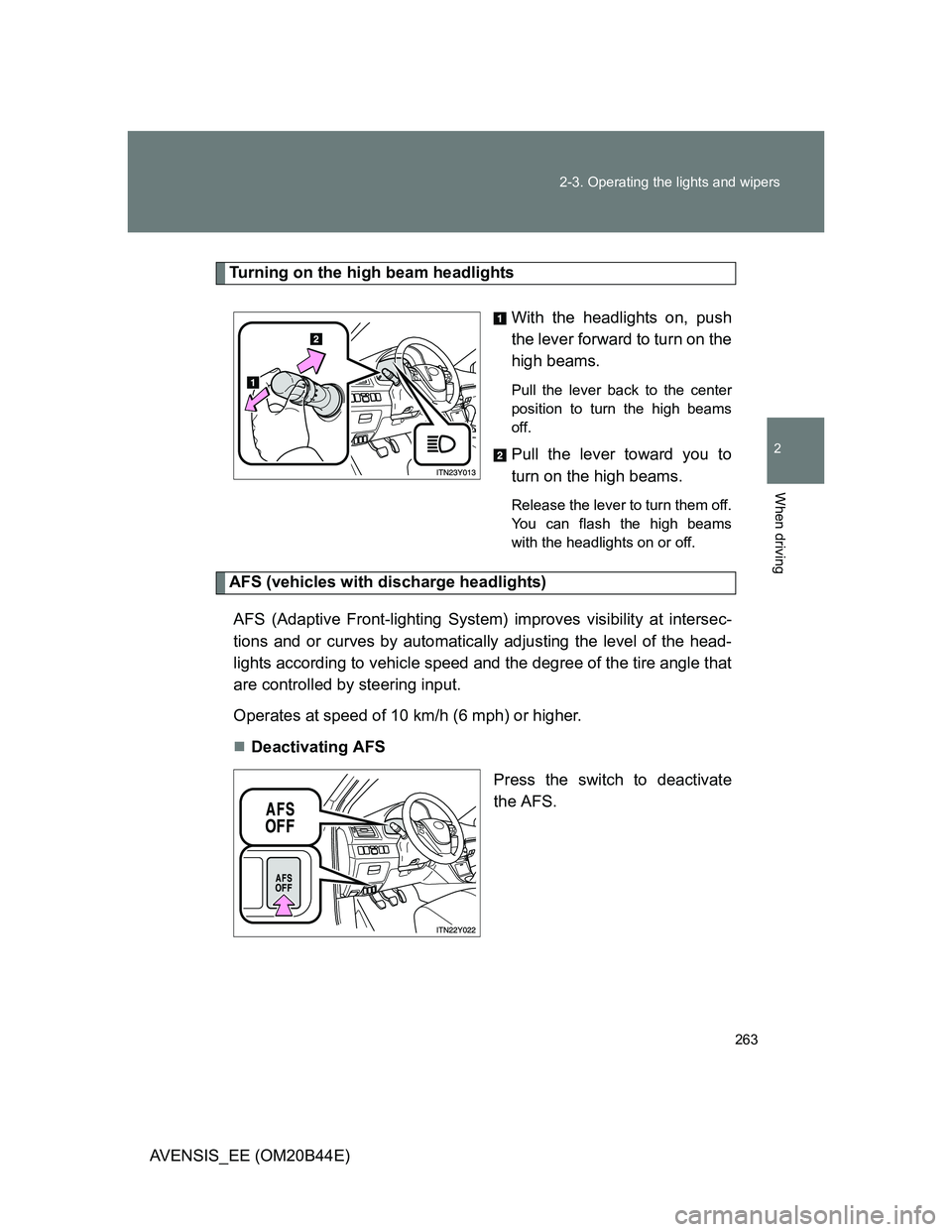
Turning on the high beam headlights
With the headlights on, push
the lever forward to turn on the
high beams.
Pull the lever back to the center
position to turn the high beams
off.
Pull the lever toward you to
turn on the high beams.
Release the lever to turn them off.
You can flash the high beams
with the headlights on or off.
AFS (vehicles with discharge headlights)
AFS (Adaptive Front-lighting System) improves visibility at intersec-
tions and or curves by automatically adjusting the level of the head-
lights according to vehicle speed and the degree of the tire angle that
are controlled by steering input.
Operates at speed of 10 km/h (6 mph) or higher.
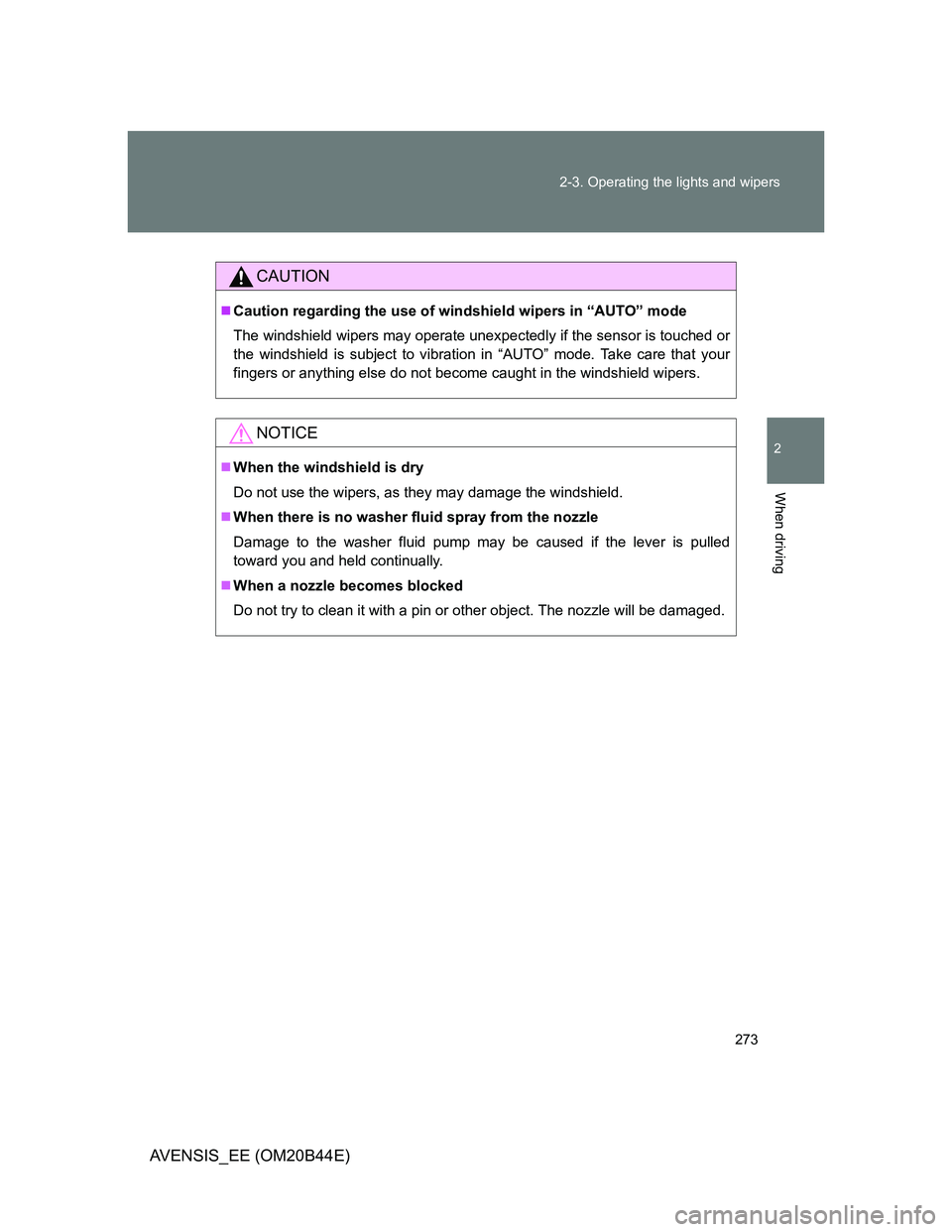
Deactivating AFS
Press the switch to deactivate
the AFS.
Page 273 of 772
273 2-3. Operating the lights and wipers
2
When driving
AVENSIS_EE (OM20B44E)
CAUTION
Caution regarding the use of windshield wipers in “AUTO” mode
The windshield wipers may operate unexpectedly if the sensor is touched or
the windshield is subject to vibration in “AUTO” mode. Take care that your
fingers or anything else do not become caught in the windshield wipers.
NOTICE
When the windshield is dry
Do not use the wipers, as they may damage the windshield.
When there is no washer fluid spray from the nozzle
Damage to the washer fluid pump may be caused if the lever is pulled
toward you and held continually.
When a nozzle becomes blocked
Do not try to clean it with a pin or other object. The nozzle will be damaged.
Page 293 of 772
293 2-4. Using other driving systems
2
When driving
AVENSIS_EE (OM20B44E)
Automatic cancelation of constant speed control
The cruise control will stop maintaining the vehicle speed in the following sit-
uations:
Actual vehicle speed is more than approximately 16 km/h (10 mph)
below the set vehicle speed.
At this time, the memorized set speed is not retained.
Actual vehicle speed falls below approximately 40 km/h (25 mph).
VSC is activated.
Speed limiter is activated. (if equipped)
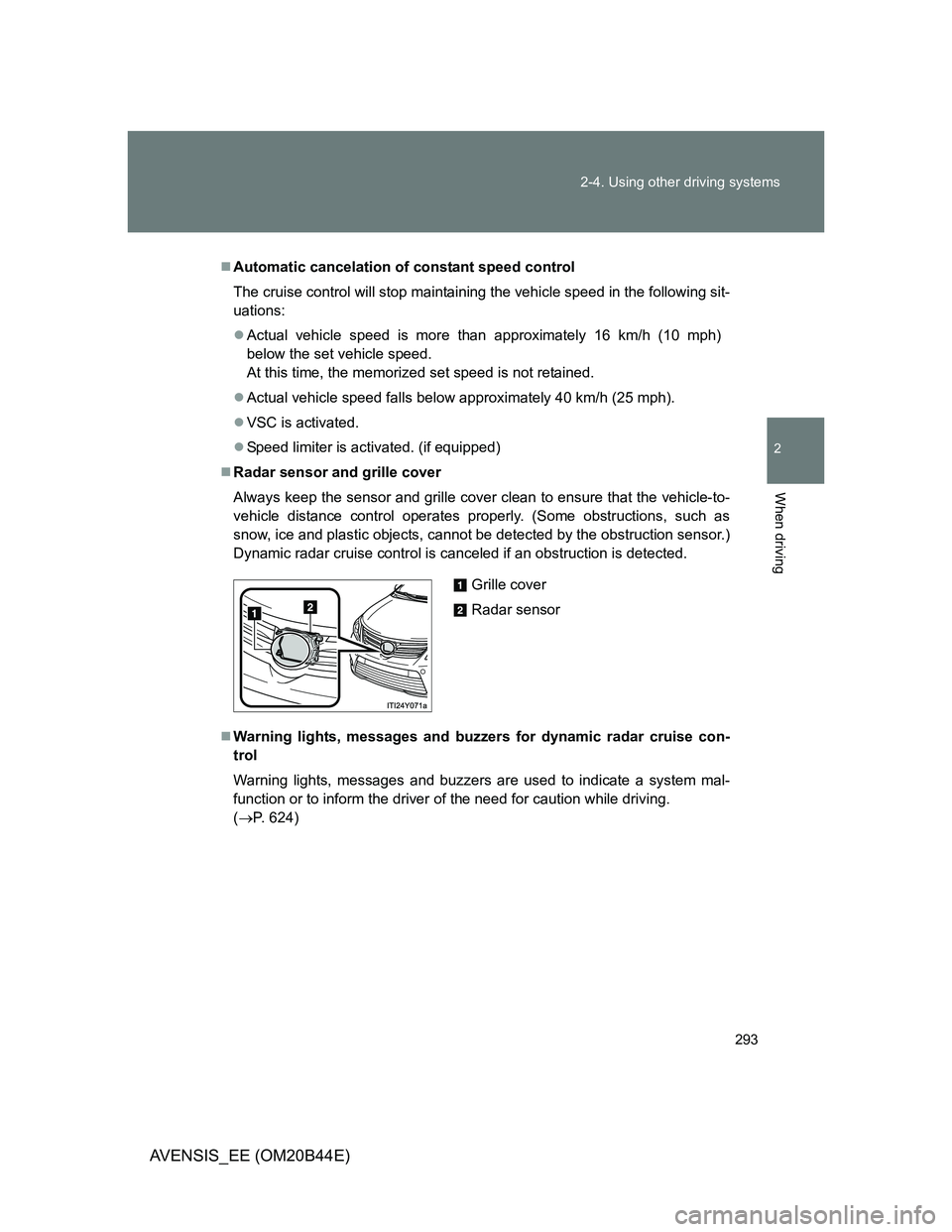
Radar sensor and grille cover
Always keep the sensor and grille cover clean to ensure that the vehicle-to-
vehicle distance control operates properly. (Some obstructions, such as
snow, ice and plastic objects, cannot be detected by the obstruction sensor.)
Dynamic radar cruise control is canceled if an obstruction is detected.
Warning lights, messages and buzzers for dynamic radar cruise con-
trol
Warning lights, messages and buzzers are used to indicate a system mal-
function or to inform the driver of the need for caution while driving.
(P. 624)
Grille cover
Radar sensor
Page 323 of 772
323 2-4. Using other driving systems
2
When driving
AVENSIS_EE (OM20B44E)
Hands-free driving warning
If the steering wheel is not operated for about 15 seconds on a straight road
or about 5 seconds on a curve, the buzzer will beep twice, indicators on the
multi-information display will flash, and the lane keeping assist function will
be temporarily canceled. If you drive the vehicle with your hands lightly
touching the steering wheel, this may also be detected as hands-free driv-
ing.
When the vehicle has been parked in the sun
The LKA system functions may not be available for a while after driving has
started. In such cases, turn the LKA system off and turn it on again after nor-
mal temperature returns. When the temperature in the cabin decreases and
the temperature around the camera sensor becomes suitable for its opera-
tion, the functions will begin to operate.
Warning lights and messages for LKA
Warning lights and messages are used to indicate a system malfunction or
to inform the driver of the need for caution while driving. (P. 619)
CAUTION
Before using the LKA system
Do not rely on the LKA system to remain within a selected lane. The LKA
system is not designed to enable inattentive driving. The steering wheel
should be operated by the driver to maintain the vehicle in a suitable position
within its lane. Always drive carefully.
Page 354 of 772
354 2-5. Driving information
AVENSIS_EE (OM20B44E)
Guidance
Your vehicle will handle differently when towing a trailer. In order to
avoid accident, death or serious injury, keep the following in mind
when towing:
Checking connections between trailer and lights
Stop the vehicle and check the operation of the connection
between the trailer and lights after driving for a brief period as well
as before setting off.
Practicing driving with a coupled trailer
Get the feel for turning, stopping and reversing with the trailer
coupled by practicing in an area with no or light traffic.
When reversing with a coupled trailer, hold the section of the
steering wheel nearest to you and rotate clockwise to turn the
trailer left or counterclockwise to turn right. Always rotate gradu-
ally to prevent steering error. Have someone guide you when
reversing to lessen the risk of accident.
Increasing vehicle-to-vehicle distance
At a speed of 10 km/h (6 mph), the distance to the vehicle running
ahead of you should be equivalent to or greater than the combined
length of your vehicle and trailer. Avoid sudden braking that may
cause skidding. Otherwise, the vehicle may spin out of control.
This is especially true when driving on wet or slippery road sur-
faces.
Page 359 of 772
3Interior features
359
AVENSIS_EE (OM20B44E)
3-2. Using the audio system
Audio system types .......... 383
Using the radio ................. 391
Using the CD player ......... 398
Playing back MP3
and WMA discs............... 406
Operating an iPod............. 416
Operating a USB
memory........................... 426
Optimal use of the
audio system .................. 436
Using the AUX port ........... 438
Using the steering
wheel audio switches...... 439
Bluetooth
® audio/phone.... 442
Using the Bluetooth®
audio/phone .................... 449
Operating a Bluetooth
®
enabled portable
player .............................. 455
Making a phone call.......... 459
Using the “SET UP” menu
(“Bluetooth” menu).......... 465
Using the “SET UP”
menu (“TEL” menu) ........ 471
3-3. Using the interior lights
Interior lights list................ 478
• Personal/interior light
main switch ..................... 479
• Personal/interior lights .... 479
• Personal lights ................ 4803-4. Using the storage features
List of storage features ..... 481
• Glove box ....................... 482
• Console box.................... 483
• Overhead console .......... 484
• Cup holders .................... 485
• Bottle holders.................. 486
• Coin box ......................... 488
3-5. Other interior features
Sun visors ......................... 489
Vanity mirror ..................... 490
Ashtray.............................. 491
Cigarette lighter ................ 492
Power outlet ...................... 493
Seat heaters ..................... 494
Armrest ............................. 496
Trunk/luggage
compartment storage
extension ........................ 497
Panoramic roof shade
(wagon)........................... 498
Rear sunshade
(sedan) ........................... 501
Rear side sunshades
(sedan) ........................... 502
Floor mats ......................... 503
Trunk features (sedan) ..... 505
Luggage compartment
features (wagon)............. 507