Page 369 of 772
369 3-1. Using the air conditioning system and defogger
3
Interior features
AVENSIS_EE (OM20B44E)
Air conditioning odors
During use, various odors from inside and outside the vehicle may enter
into and accumulate in the air conditioning system. This may then cause
odor to be emitted from the vents.
To reduce potential odors from occurring:
• It is recommended that the air conditioning system be set to outside air
mode prior to turning the vehicle off.
• The start timing of the blower may be delayed for a short period of time
immediately after the air conditioning system is started in AUTO mode.
CAUTION
To prevent the windshield from fogging up
Do not use during cool air operation in extremely humid weather.
The difference between the temperature of the outside air and that of the
windshield can cause the outer surface of the windshield to fog up, blocking
your vision.
NOTICE
To prevent battery discharge
Do not leave the air conditioning system on longer than necessary when the
engine is stopped.
Page 372 of 772
372 3-1. Using the air conditioning system and defogger
AVENSIS_EE (OM20B44E)
Adjusting the settings
Adjusting the temperature setting (vehicles with air condition-
ing system)
Turn the temperature control dial clockwise (warm) or counter-
clockwise
(cool).
If is not pressed, the system will blow ambient temperature air
or heated air.
Adjusting the temperature setting (vehicles without air condi-
tioning system)
Turn the temperature control dial clockwise (warm) or counter-
clockwise (cool).
This system will supply only ambient temperature air if the dial is turned
to counterclockwise (cool).
Adjusting the fan speed
Turn the fan speed control dial clockwise (increase) or counter-
clockwise.
Press , or to turn the fan off.
Selecting the air outlets
Press
or .
The air outlets switch each time
the button is pressed.
Page 377 of 772
377 3-1. Using the air conditioning system and defogger
3
Interior features
AVENSIS_EE (OM20B44E)
CAUTION
To prevent the windshield from fogging up
Do not use
during cool air operation in extremely humid weather.
The difference between the temperature of the outside air and that of the
windshield can cause the outer surface of the windshield to fog up, blocking
your vision.
NOTICE
To prevent battery discharge
Do not leave the air conditioning system on longer than necessary when the
engine is stopped.
Page 418 of 772
418 3-2. Using the audio system
AVENSIS_EE (OM20B44E)
Selecting a play mode
Press [MENU] to select iPod menu mode.
Turning clockwise changes the play mode in the fol-
lowing order:
“Playlists”“Artists”“Albums”“Songs”“Podcasts”“Genres”
“Composers”“Audiobooks”
Press to select the desired play mode.
STEP1
STEP2
STEP3
Page 480 of 772
480 3-3. Using the interior lights
AVENSIS_EE (OM20B44E)
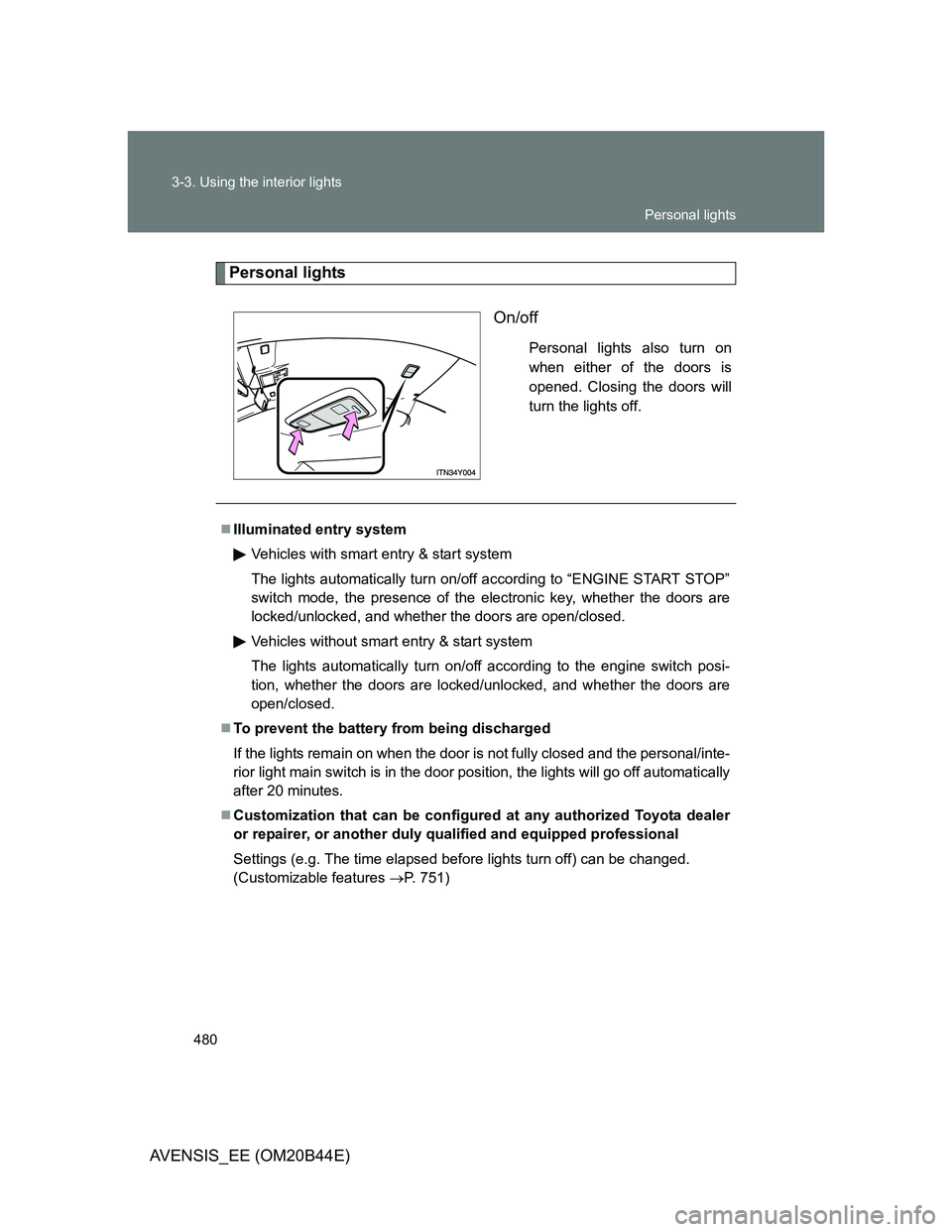
Personal lights
On/off
Personal lights also turn on
when either of the doors is
opened. Closing the doors will
turn the lights off.
Illuminated entry system
Vehicles with smart entry & start system
The lights automatically turn on/off according to “ENGINE START STOP”
switch mode, the presence of the electronic key, whether the doors are
locked/unlocked, and whether the doors are open/closed.
Vehicles without smart entry & start system
The lights automatically turn on/off according to the engine switch posi-
tion, whether the doors are locked/unlocked, and whether the doors are
open/closed.
To prevent the battery from being discharged
If the lights remain on when the door is not fully closed and the personal/inte-
rior light main switch is in the door position, the lights will go off automatically
after 20 minutes.
Customization that can be configured at any authorized Toyota dealer
or repairer, or another duly qualified and equipped professional
Settings (e.g. The time elapsed before lights turn off) can be changed.
(Customizable features P. 751)
Personal lights
Page 482 of 772
482 3-4. Using the storage features
AVENSIS_EE (OM20B44E)
Glove box
Left-hand drive vehicles
Pull up the lever to open the
glove box.
Right-hand drive vehicles
The glove box can be opened by pulling the lever, locked and
unlocked by using the key.
Open
Lock
Unlock
Glove box light
The glove box light turns on when the tail lights are on.
CAUTION
While driving
Keep the glove box closed.
Injuries may result in the event of sudden braking, sudden swerving or an
accident.
Glove box
Page 483 of 772
483 3-4. Using the storage features
3
Interior features
AVENSIS_EE (OM20B44E)
Console box
Pull up the lever to release the
lock.
Slide the armrest.
Pull up the lever and lift the
armrest to open.
CAUTION
While driving
Keep the console box closed.
Injuries may result in the event of sudden braking, sudden swerving or an
accident.
Console box
Page 530 of 772
530 4-3. Do-it-yourself maintenance
AVENSIS_EE (OM20B44E)
CAUTION
When working near the electric cooling fan or radiator grille
Vehicles with smart entry & start system
Be sure the “ENGINE START STOP” switch is OFF.
With the “ENGINE START STOP” switch in IGNITION ON mode, the
electric cooling fan may automatically start to run if the air conditioning is
on and/or the coolant temperature is high. (P. 545)
Vehicles without smart entry & start system
Be sure the engine switch is in the “LOCK” position.
With the engine switch in the “ON” position, the electric cooling fan may
automatically start to run if the air conditioning is on and/or the coolant
temperature is high. (P. 545)
Safety glasses
Wear safety glasses to prevent flying or falling material, fluid spray, etc. from
getting in the eyes.
NOTICE
If you remove the air cleaner filter
Driving with the air cleaner filter removed may cause excessive engine wear
due to dirt in the air. Also a backfire could cause a fire in the engine compart-
ment.
If the brake fluid level is low or high
It is normal for the brake fluid level to go down slightly as the brake pads
wear or when the fluid level in the accumulator is high.
If the reservoir needs frequent refilling, it may indicate a serious problem.
![TOYOTA AVENSIS 2012 Owners Manual 418 3-2. Using the audio system
AVENSIS_EE (OM20B44E)
Selecting a play mode
Press [MENU] to select iPod menu mode.
Turning clockwise changes the play mode in the fol-
lowing order:
“Playlists”ï](/manual-img/14/59673/w960_59673-417.png "TOYOTA AVENSIS 2012 Owners Manual 418 3-2. Using the audio system
AVENSIS_EE (OM20B44E)
Selecting a play mode
Press [MENU] to select iPod menu mode.
Turning clockwise changes the play mode in the fol-
lowing order:
“Playlists”ï")