Page 42 of 580
42
1-2. Opening, closing and locking the doors and trunk
Wireless remote control
The wireless remote control can be used to lock and unlock the vehi-
cle and the trunk from outside the vehicle.
Vehicles with smart key system
Locks all doors
Unlocks all doors
Pressing the button unlocks
the driver’s door. Pressing the
button again within 3 seconds
unlocks the other doors.
Unlocks the trunk
(push and hold)
Sounds alarm
(push and hold) (P. 102)
Page 44 of 580

44 1-2. Opening, closing and locking the doors and trunk
■Security feature
P. 3 8
■ When the key battery is fully depleted
P. 440
■ Conditions affecting operation
Vehicles with smart key system
P. 3 4 Vehicles without smart key systemThe wireless remote control function may not operate normally in the fol-
lowing situations.
●Near a TV tower, radio station, el ectric power plant, airport or other
facility that generates strong radio waves
●When carrying a portable radio, cellular phone or other wireless com- munication device
●When multiple wireless keys are in the vicinity
●When the wireless key has come into contact with, or is covered by a metallic object
●When a wireless key (that emits radio waves) is being used nearby
●When the wireless key has been left near an electrical appliance such as a personal computer
■ Customization that can be co nfigured at Toyota dealer
Settings (e.g. 2-step unlocking function, trunk unlocking function) can be
changed. (Customizable features P. 545)
Page 45 of 580

45
1-2. Opening, closing and locking the doors and trunk
1
Before driving
■
Certification for wireless remote control
For vehicles sold in the U.S.A.
FCC ID: HYQ14AAB
FCC ID: HYQ13BZH
FCC ID: HYQ14ABK
FCC ID: HYQ13BZW
FCC ID: HYQ14AEM
FCC ID: NI4TMLF-1
NOTE:
This device complies with part 15 of the FCC Rules. Operation is subject to
the following two conditions: (1) This device may not cause harmful interfer-
ence, and (2) this device must accept any interference received, including
interference that may cause undesired operation.
FCC WARNING:
Changes or modifications not expressly approved by the party responsible
for compliance could void the user’s authority to operate the equipment. For vehicles sold in Jordan.
Type Approval Number: TRC/LPD/2009/4
NOTE:
This device complies with the specifications mentioned in test reports No.
(20071409200), (20071409300), and (20071409500) issued by Telefication
B.V./The Netherlands.
TRC WARNING:
This Certificate does not apply to any modified or changed product nor does
it authorize its holder to enter the subject equipment into Jordan without hav-
ing a special permissions.
If this occurs Jordan TRC has the right to impose any penalties stipulat\
ed in
Jordan’s Telecommunications Law No. 13 of 1995 and its amendments and
regulations of the Telecommunication Regulatory Commission.
Page 47 of 580
47
1
1-2. Opening, closing and locking the doors and trunk
Before driving
Doors
The vehicle can be locked and unlocked using the entry function,
wireless remote control or door lock switch.
■Entry system (vehicles with smart key system)
P. 3 1
■ Wireless remote control
P. 4 2
■ Key
Vehicles with smart key system
The doors can also be locked a nd unlocked with the mechanical
key. ( P. 505)
Vehicles without smart key system Locks all doors
Unlocks all doors
Turning the key unlocks the
driver’s door. Turning the key
again unlocks the other doors.
Page 54 of 580
54
1-2. Opening, closing and locking the doors and trunk
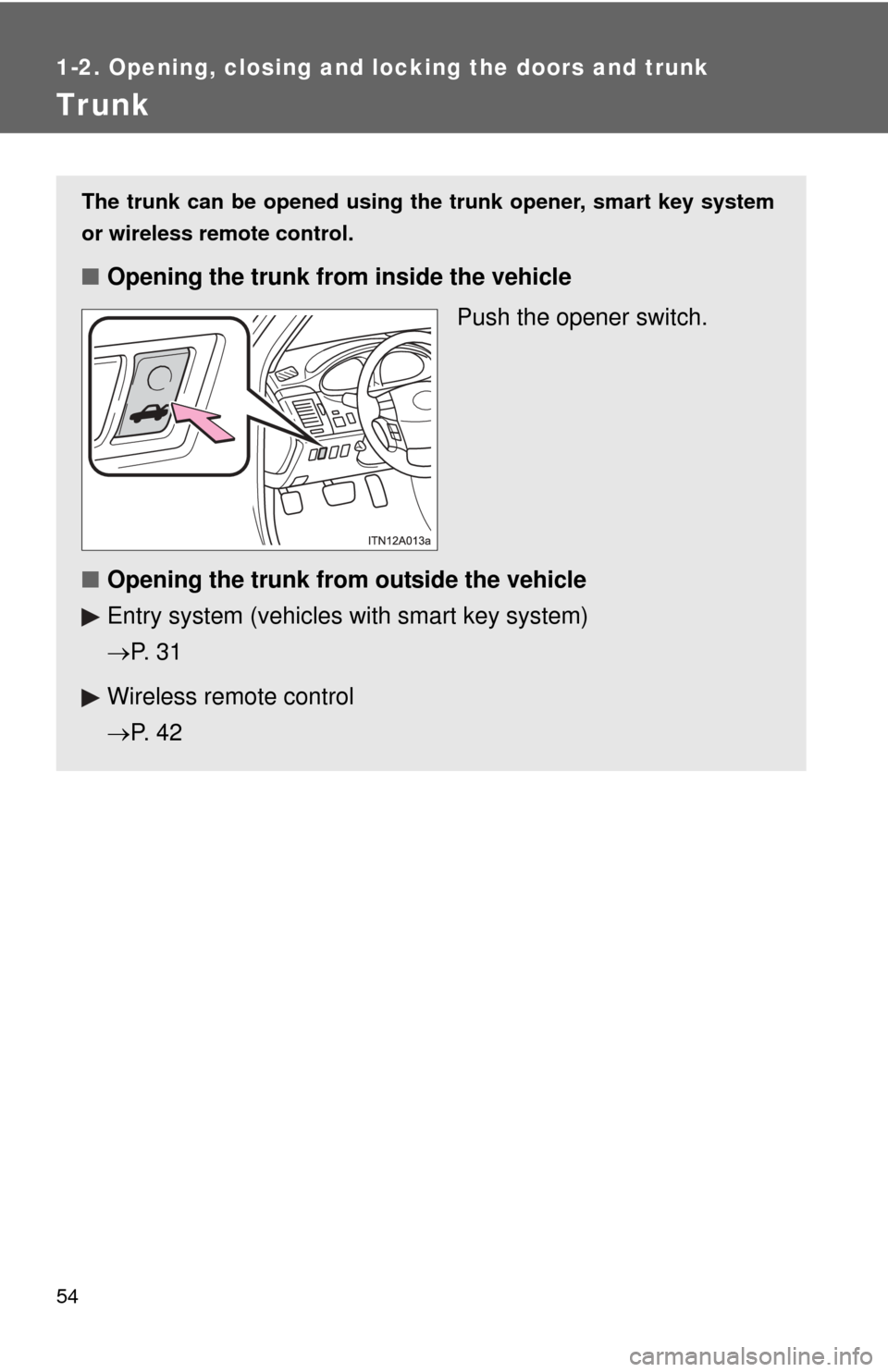
Trunk
The trunk can be opened using the trunk opener, smart key system
or wireless remote control.
■ Opening the trunk from inside the vehicle
Push the opener switch.
■ Opening the trunk from outside the vehicle
Entry system (vehicles with smart key system)
P. 3 1
Wireless remote control
P. 4 2
Page 65 of 580
65
1-3. Adjustable components (seat
s, steering wheel, mirrors)
1
Before driving
Linking driving position memory with door unlock operation
(vehicles with smart key system)
Memorized driving positions can be recalled when you unlock the
driver’s door using the entry function or wireless remote control and
open the driver’s door.
■ Setting the linked door unlock operation
Set the driving positions into the memory system using the “1”
or “2” buttons. ( P. 6 3 )
Turn the “ENGINE START STOP” switch OFF, then close the
driver’s door.
Push the “1” or “2” button on the
driver’s side and the button
on the wireless remote control at
the same time for about 1 sec-
ond until you hear a beep.
Open one of the doors.
If a door is not opened within 60 seconds after is pressed, the
doors will be locked again and the alarm will automatically be set.
In case that the alarm is triggered, immediately stop the alarm.
( P. 99)
STEP1
STEP2
STEP3
STEP4
Page 66 of 580

66 1-3. Adjustable components (seats, steering wheel, mirrors)
■Canceling the linked door unlock operation
Close the driver’s door with the “ENGINE START STOP”
switch OFF.
Push the “SET” button and the button on the wireless
remote control at the same time for about 1 second until you
hear 2 beeps.
■Retained accessory power
Memorized positions can be activated up to 180 seconds after the driver’s
door is opened and another 60 seconds after it is closed again, even if the
“ENGINE START STOP” switch or the engine switch is OFF.
■ If any position memory button is pushed while the adjustments are
being made
The operation will stop. To reactivate the system, push the desired button
(“1” or “2”) again.
■ If the battery is disconnected
The memorized positions must be reset because the computer’s memory is
erased when the battery is disconnected.
CAUTION
■Seat adjustment caution
Take care during seat adjustment that the seat does not strike the rear pas-
senger.
If this happens, you can stop the movement by pressing another seat posi-
tion memory button.
STEP1
STEP2
Page 102 of 580
102 1-6. Theft deterrent system
■Panic mode
Vehicles with smart key system
Vehicles without smart key system
NOTICE
■To ensure the system operates correctly
Do not modify or remove the system. If modified or removed, the proper
operation of the system cannot be guaranteed.
When is pushed for longer than
about one second, an alarm will sound for
about 60 seconds and the vehicle lights
will flash to deter any person from trying
to break into or damage your vehicle.
To stop the alarm, push any button on the
wireless remote control.