Page 238 of 299
SETUP
238
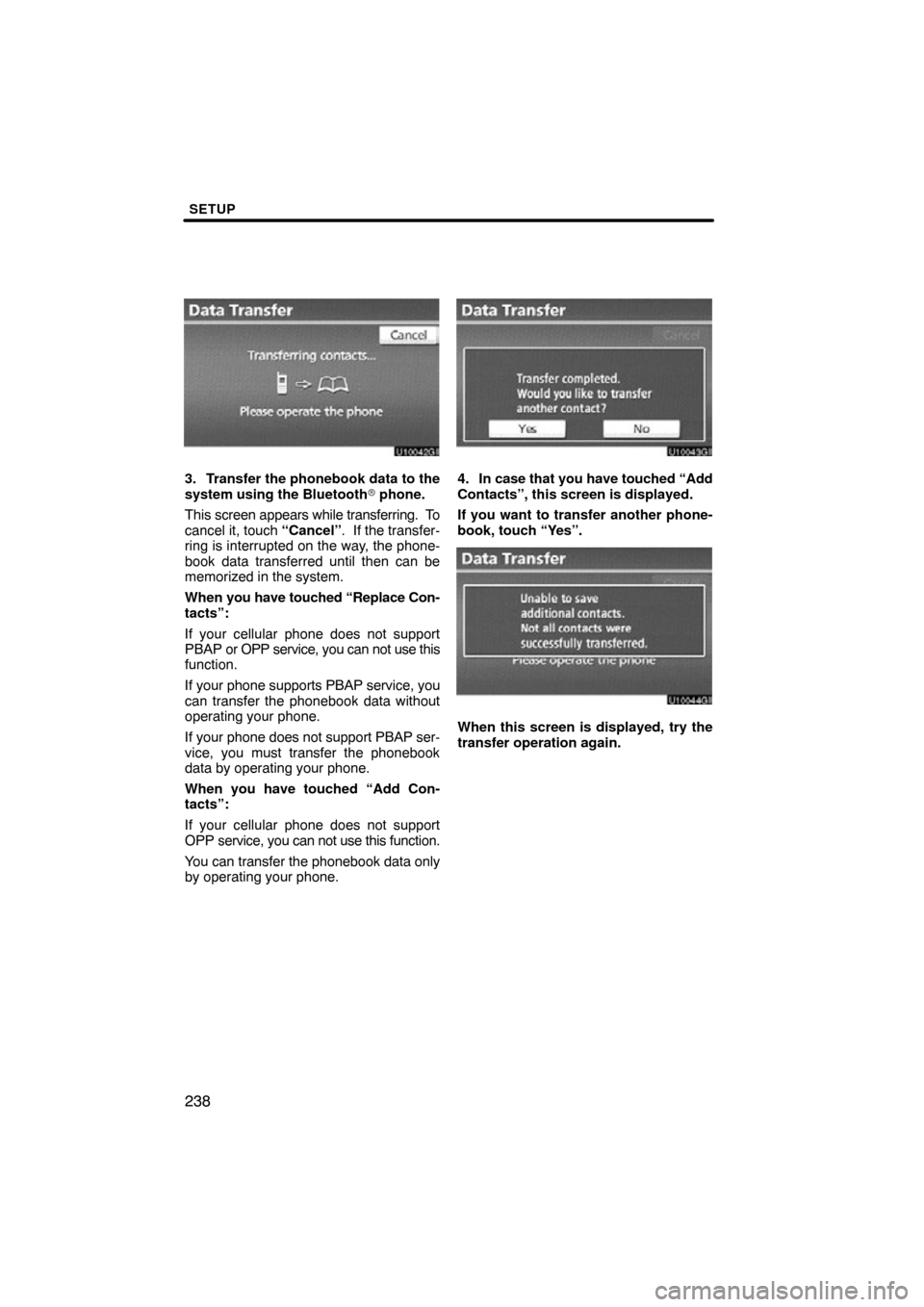
3. Transfer the phonebook data to the
system using the Bluetooth� phone.
This screen appears while transferring. To
cancel it, touch “Cancel”. If the transfer-
ring is interrupted on the way, the phone-
book data transferred until then can be
memorized in the system.
When you have touched “Replace Con-
tacts”:
If your cellular phone does not support
PBAP or OPP service, you can not use this
function.
If your phone supports PBAP service, you
can transfer the phonebook data without
operating your phone.
If your phone does not support PBAP ser-
vice, you must transfer the phonebook
data by operating your phone.
When you have touched “Add Con-
tacts”:
If your cellular phone does not support
OPP service, you can not use this function.
You can transfer the phonebook data only
by operating your phone.4. In case that you have touched “Add
Contacts”, this screen is displayed.
If you want to transfer another phone-
book, touch “Yes”.
u10044gi
When this screen is displayed, try the
transfer operation again.
Page 239 of 299
SETUP
239
When another Bluetooth� device is
connected
When another Bluetooth � device is cur-
rently connected, this screen is displayed.
If you want to disconnect it, touch “Yes”.
INFORMATION
Bluetooth � audio will disconnect
during transfer on phonebook data.
In this case, it will reconnect auto-
matically when data transfer finish-
es. (It will not be reconnected de-
pending the phone you are using.)
�Registering the phonebook data
You can register the phonebook data.
Up to 3 numbers per person can be reg-
istered.
1. Touch “New Contact”.
2. Use the software keyboard to input
the name and touch “OK”.
Page 244 of 299
SETUP
244
You can also delete it in the following
way.
1. Push the “INFO/PHONE” button.
2. Touch “Phone”.
3. Touch “Contacts”.
4. Select the desired data from the list.
5. Touch “Options”.
6. Touch “Delete Contact”.
7. Touch “Yes”.
INFORMATION
When you delete a Bluetooth �
phone, the phonebook data will be
deleted at the same time.
Page 257 of 299
SETUP
257
— Bluetooth�
You can confirm and change the
Bluetooth� settings.
1. Push the “SETUP” button.
2. Touch “Phone”.
3. Touch “Bluetooth*”.
*: Bluetooth is a registered trademark of Bluetooth SIG, Inc.
4. This screen is displayed. The information displays the following
items.
“Device Name”
The name in the Bluetooth�
. . . . .
network. You can change it.
“Passcode” The passcode when you used
. . . . .
to register your Bluetooth �
phone in the system. You can
change it.
“Device Address” The address peculiar to the
. . . . .
system. You can not change it.
If the same device name is dis-
played on the screen of your
phone, refer to it.
If you want to change the settings, refer
to the following pages.
When you change the settings, touch
“Save” after changing them.
Page 258 of 299
SETUP
258 �
Changing the Bluetooth� settings
You can change the Bluetooth� set-
tings according to the following proce-
dures.
Changing the handsfree power
The “Handsfree Power” display shows
the following state.
When “Handsfree Power” is “On” :
Vehicles with smart key system —
The Bluetooth � phone is automatically
connected when you turn the “ENGINE
START STOP” switch to ACCESSORY or
IGNITION ON mode.
Vehicles without smart key system —
The Bluetooth � phone is automatically
connected when you turn the engine
switch to the “ACC” or “ON” position.
When “Handsfree Power” is “Off” :
The Bluetooth � phone is disconnected,
and the system will not connect to it next
time.
You can select the state of “Handsfree
Power”.
On: The auto connection is turned on.
Off: The auto connection is turned off.
You can not change the state from “On”
into “Off” while driving.
1. Touch “Handsfree Power”.
2. Touch “On” or “Off”.
Page 259 of 299
SETUP
259
3. Touch “Save”.
In case that “Handsfree Power” is
changed from “Off” into “On”, Blue-
tooth� connection will begin.
When you connect the phone while
Bluetooth � audio is playing
This screen is displayed, and the
Bluetooth � audio will stop temporarily. Editing the device name
1. Touch “Edit” of “Device Name”.
2. Use the software keyboard to input
the device name.
INFORMATION
The device names are common
Bluetooth
� audio and Bluetooth �
phone.
If you change the device name of the
phone, the device name of the audio
will change at same time.
However, passcodes can be set sep-
arately.
Page 260 of 299
SETUP
260
Editing the passcode
1. Touch “Edit” of “Passcode”.
2. Input a passcode and touch “OK”.
�Initializing the Bluetooth� settings
You can initialize the settings.
1. Touch “Default”.
2. Touch “Yes”.
If “Handsfree P ower” is changed from “Off”
into “On”, Bluetooth� connection will be-
gin.
Page 261 of 299
SETUP
261
If you connect a phone while
Bluetooth� audio is playing
This screen is displayed, and the
Bluetooth � audio will stop temporarily. You can do the detail settings.
1. Push the “SETUP” button.
2. Touch “Phone”.
3. Touch “Details”.
4. Do each setting according to the fol-
lowing procedures.
5. When you complete each setting,
touch “Save”.
— Details


