2012 TOYOTA AURIS automatic transmission
[x] Cancel search: automatic transmissionPage 5 of 750

3
1
8 7
6
5
4
3
2
UK_AURIS/AURIS_HV_EE (OM12E33E)3-5. Opening and closing the
windows
Power windows ..................220
4-1. Before driving
Driving the vehicle .............226
Cargo and luggage ............243
Trailer towing
(except hybrid model) ......244
Trailer towing
(hybrid model)..................253
4-2. Driving procedures
Engine (ignition) switch
(except hybrid model
[vehicles without a smart
entry & start system]).......254
Engine (ignition) switch
(except hybrid model
[vehicles with a smart
entry & start system]).......258
Power (ignition) switch .......268
EV drive mode ...................274
Multidrive ...........................276
Multi-mode Manual
Transmission ...................281
Manual transmission ..........286
Hybrid transmission ...........289
Turn signal lever ................297
Parking brake.....................298
Horn ...................................2994-3. Operating the lights and
wipers
Headlight switch ................ 300
Automatic High Beam ....... 306
Fog light switch ................. 310
Windshield wipers and
washer ............................ 312
Rear window wiper and
washer ............................ 316
4-4. Refueling
Opening the fuel tank
cap .................................. 318
4-5. Using the driving support
systems
Cruise control .................... 322
Speed limiter ..................... 327
Toyota parking
assist-sensor ................... 330
Simple-IPA
(Simple-Intelligent
Parking Assist) ................ 336
Stop & Start system .......... 350
Driving assist systems....... 356
Hill-start assist control ....... 362
Diesel particulate filter
system............................. 364
4-6. Driving tips
Hybrid vehicle driving
tips .................................. 366
Winter driving tips.............. 368
4Driving
Page 227 of 750

225
4Driving
UK_AURIS/AURIS_HV_EE (OM12E33E)4-1. Before driving
Driving the vehicle ............. 226
Cargo and luggage ............ 243
Trailer towing (except
hybrid model) ................... 244
Trailer towing
(hybrid model).................. 253
4-2. Driving procedures
Engine (ignition) switch
(except hybrid model
[vehicles without a smart
entry & start system])....... 254
Engine (ignition) switch
(except hybrid model
[vehicles with a smart
entry & start system])....... 258
Power (ignition) switch....... 268
EV drive mode ................... 274
Multidrive ........................... 276
Multi-mode Manual
Transmission ................... 281
Manual transmission.......... 286
Hybrid transmission ........... 289
Turn signal lever ................ 297
Parking brake .................... 298
Horn ................................... 2994-3. Operating the lights and
wipers
Headlight switch................. 300
Automatic High Beam ........ 306
Fog light switch .................. 310
Windshield wipers and
washer ............................. 312
Rear window wiper and
washer ............................. 316
4-4. Refueling
Opening the fuel tank
cap ................................... 318
4-5. Using the driving support
systems
Cruise control..................... 322
Speed limiter ...................... 327
Toyota parking
assist-sensor ................... 330
Simple-IPA
(Simple-Intelligent
Parking Assist)................. 336
Stop & Start system ........... 350
Driving assist systems ....... 356
Hill-start assist control........ 362
Diesel particulate filter
system ............................. 364
4-6. Driving tips
Hybrid vehicle driving
tips ................................... 366
Winter driving tips .............. 368
Page 266 of 750

2644-2. Driving procedures
UK_AURIS/AURIS_HV_EE (OM12E33E)
Auto power off function
Vehicles with a Multidrive
If the vehicle is left in ACCESSORY mode or IGNITION ON mode (the engine
is not running) for more than an hour with the shift lever in P, the engine
switch will automatically turn off.
Vehicles with a manual transmission
If the vehicle is left in ACCESSORY mode or IGNITION ON mode (the engine
is not running) for more than an hour, the engine switch will automatically turn
off.
However, this function cannot entirely prevent 12-volt battery discharge. Do
not leave the vehicle with the engine switch in ACCESSORY or IGNITION
ON mode for long periods of time when the engine is not running.
Electronic key battery depletion
P. 162
Conditions affecting operation
P. 158
Notes for the entry function
P. 159
If the engine does not start
The engine immobilizer system may not have been deactivated. (P. 91)
Contact any authorized Toyota dealer or repairer, or another duly qualified
and equipped professional.
Vehicles with a Multidrive: Check that the shift lever is securely set in P. The
engine may not start if the shift lever is displaced out of P.
Vehicles without a multi-information display
The smart entry & start system indicator light (green) will flash quickly.
Vehicles with a multi-information display
“Shift to P position to Start” will be displayed on the multi-information dis-
play.
Steering lock
After turning the engine switch off and opening and closing the doors, the
steering wheel will be locked due to the steering lock function. Operating the
engine switch again automatically cancels the steering lock.
Page 281 of 750

2794-2. Driving procedures
UK_AURIS/AURIS_HV_EE (OM12E33E)
4
Driving
To enter 7-speed sport sequential shiftmatic mode, shift the shift lever
to M. Gear steps can then be selected by operating the shift lever or
paddle shift switches (vehicles with a paddle shift switch), allowing
you to drive in the gear step of your choosing.
Upshifting
Downshifting
The gear changes once every time
the shift lever or paddle shift switch
is operated.
The selected gear step, from M1 to
M7, will be displayed in the meter.
*1: Vehicles with a multi-information
display
*2: Vehicles without a multi-informa-
tion display
However, even when in the M position, the gear steps will be auto-
matically changed if the engine speed is too high, or too low.
Gear step functions
You can choose from 7 levels of engine braking force.
A lower gear step will provide greater engine braking force than a higher
gear step, and the engine speed will also increase.
If the 7-speed sport sequential shiftmatic mode indicator does not come
on even after shifting the shift lever to M
This may indicate a malfunction in the Multidrive system. Have the vehicle
inspected by any authorized Toyota dealer or repairer, or another duly quali-
fied and equipped professional immediately.
(In this situation, the transmission will operate in the same manner as when
the shift lever is in D.)
When the vehicle comes to a stop with the shift lever in the M position
The transmission will automatically downshift to M1 once the vehicle is
stopped.
After a stop, the vehicle will start off in M1.
When the vehicle is stopped, the transmission is set at M1.
Changing gear steps in the M position
*1*2
1
2
Page 283 of 750
2814-2. Driving procedures
UK_AURIS/AURIS_HV_EE (OM12E33E)
4
Driving
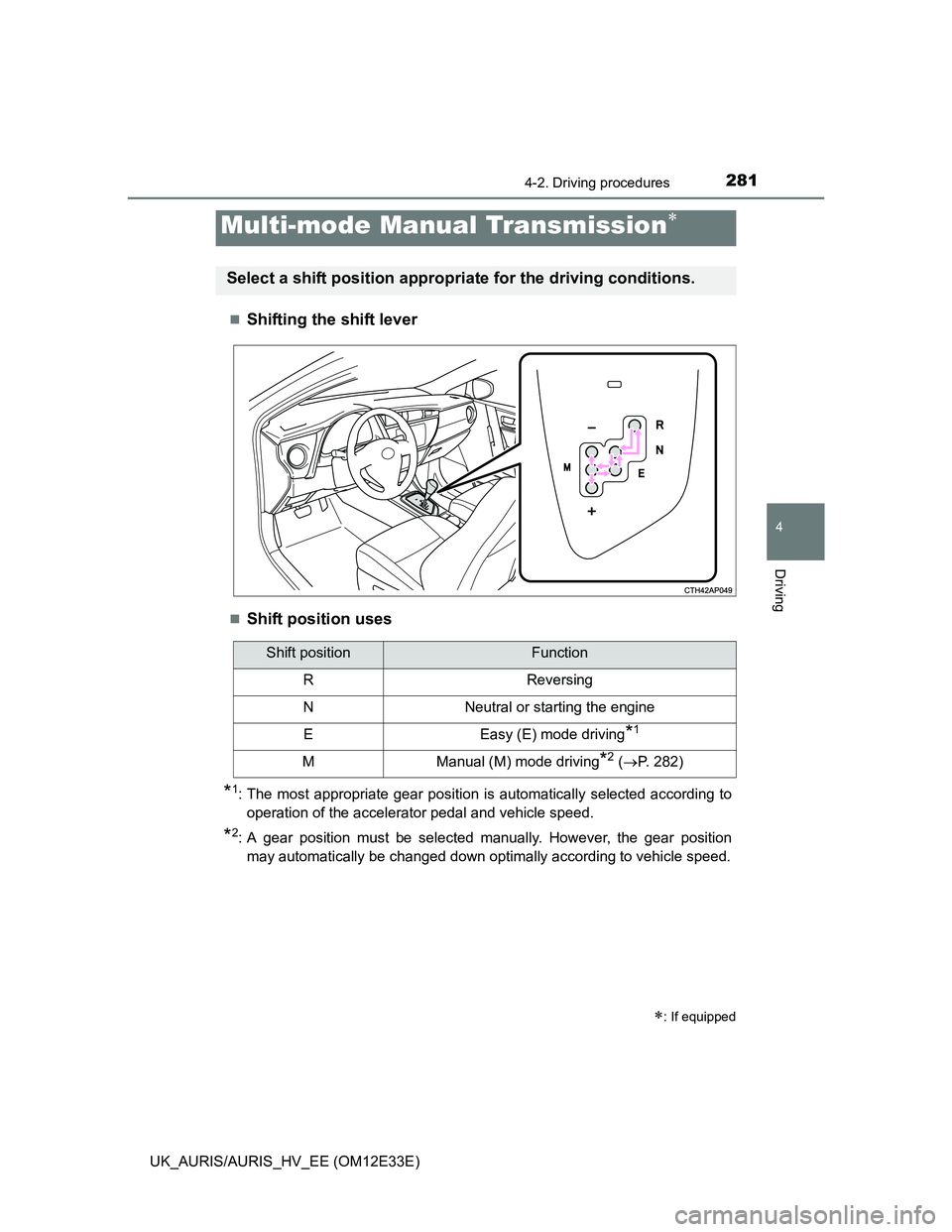
Shifting the shift lever
Shift position uses
*1: The most appropriate gear position is automatically selected according to
operation of the accelerator pedal and vehicle speed.
*2: A gear position must be selected manually. However, the gear position
may automatically be changed down optimally according to vehicle speed.
Multi-mode Manual Transmission
: If equipped
Select a shift position appropriate for the driving conditions.
Shift positionFunction
RReversing
NNeutral or starting the engine
EEasy (E) mode driving*1
MManual (M) mode driving*2 (P. 282)
Page 287 of 750

2854-2. Driving procedures
UK_AURIS/AURIS_HV_EE (OM12E33E)
4
Driving
If the parking brake is set when the shift lever is in a position other than
N with engine running
When the driver’s door is opened
A buzzer will sound and the gear position will automatically change to N in
10 seconds.
When the driver’s door is closed
A buzzer will sound and the gear position will automatically change to N in
90 seconds.
If the M indicator does not come on even after shifting the shift lever to M
This may indicate a malfunction in the multi-mode manual transmission sys-
tem. Have the vehicle inspected by any authorized Toyota dealer or repairer,
or another duly qualified and equipped professional immediately.
(In this situation, the vehicle will operate as if the shift lever is in E.)
If the N indicator is flashing
When shifting the shift lever:
Shift the shift lever to N. Wait a few seconds and shift the shift lever to the
desired position.
When the engine is turned off:
Vehicles without a smart entry & start system:
Turn the engine switch to the “ON” position and shift the shift lever to N, and
then to the desired position.
Vehicles with a smart entry & start system:
Turn the engine switch to IGNITION ON mode and shift the shift lever to N,
and then to the desired position.
If the indicator still blinks after the above operations, shift the shift lever to N
and start the engine. Then, shift the shift lever to the desired position.
If the N indicator is flashing and the warning buzzer is beeping
Shift the shift lever to N, and then to E, M or R.
CAUTION
Gear Shift Indicator display
For safety, the driver should not look only at the display. Refer to the display
when it is safe to do so while considering actual traffic and road conditions.
Failure to do so may lead to an accident.
Page 327 of 750

3254-5. Using the driving support systems
UK_AURIS/AURIS_HV_EE (OM12E33E)
4
Driving
Cruise control can be set when
The shift lever is in D. (Multidrive)
The shift position is in D. (Hybrid transmission)
Gear step 4 or higher of M has been selected. (Multidrive)
Gear step 4 or higher of D has been selected by using the paddle shift.
(vehicles with a paddle shift switch)
Vehicle speed is above approximately 40 km/h (25 mph).
Accelerating after setting the vehicle speed
The vehicle can be accelerated normally. After acceleration, the set speed
resumes.
Even without canceling the cruise control, the set speed can be increased
by first accelerating the vehicle to the desired speed and then pushing the
lever down to set the new speed.
Automatic cruise control cancelation
Cruise control will stop maintaining the vehicle speed in any of the following
situations.
Actual vehicle speed falls more than approximately 16 km/h (10 mph) below
the preset vehicle speed.
At this time, the memorized set speed is not retained.
Actual vehicle speed is below approximately 40 km/h (25 mph).
VSC is activated.
Speed limiter is activated (if equipped)
If the cruise control indicator light comes on in yellow (vehicles without
a multi-information display) or warning message for the cruise control is
shown on the multi-information display (vehicles with a multi-informa-
tion display)
Press the “ON-OFF” button once to deactivate the system, and then press
the button again to reactivate the system.
If the cruise control speed cannot be set or if the cruise control cancels imme-
diately after being activated, there may be a malfunction in the cruise control
system. Have the vehicle inspected by any authorized Toyota dealer or
repairer, or another duly qualified and equipped professional.
Page 740 of 750

738Alphabetical index
UK_AURIS/AURIS_HV_EE (OM12E33E)
Hands-free system
(for cellular phone)*
Head restraints......................... 212
Headlights ................................ 300
Adaptive Front-lighting
System (AFS) ..................... 303
Automatic High Beam
system ................................ 306
Discharge headlights
precautions ......................... 570
Follow me home system ....... 302
Light switch ........................... 300
Replacing light bulbs ............. 555
Wattage................................. 716
Heaters
Heater system ....................... 374
Outside rear view mirrors ...... 398
Seat heaters.......................... 465
Hill-start assist control ............ 362
Hood.......................................... 488
Open ..................................... 488
Hooks
Cargo hooks.......................... 451
Coat hooks ............................ 469
Retaining hooks (floor mat) ..... 38
Horn .......................................... 299
Hybrid battery
(traction battery) ...................... 84
Hybrid battery
(traction battery) air vents ...... 85Hybrid system ............................ 80
Emergency shut off system .... 85
Energy monitor/
consumption screen ........... 142
EV drive mode ...................... 274
High voltage components ....... 84
Hybrid System Indicator........ 136
Hybrid system precautions ..... 84
Hybrid vehicle driving tips ..... 366
If the hybrid system
will not start ........................ 670
Overheating .......................... 687
Power (ignition) switch .......... 268
Starting the hybrid system .... 268
Hybrid System Indicator ......... 136
Hybrid transmission ................ 289
Identification ............................ 699
Engine................................... 700
Vehicle .................................. 699
Ignition switch
(engine switch) .............. 254, 258
Ignition switch
(power switch) ....................... 268
Illuminated entry system ........ 444
Immobilizer system ............. 91, 99
Indicators ................................. 119
Initialization
Power windows ..................... 222
Inside rear view mirror ............ 215
Intercooler ................................ 507
Interior lights............................ 441
Intrusion sensor ...................... 107
ISOFIX rigid anchors ................. 68
H
I