Page 501 of 700
Maintenance and care4
501
4RUNNER_U
4-1. Maintenance and careCleaning and protecting the vehicle exterior ......... 502
Cleaning and protecting the vehicle interior .......... 505
4-2. Maintenance Maintenance requirements .................. 508
General maintenance....... 511
Emission inspection and maintenance (I/M)
programs ........................ 515
4-3. Do-it-yourself maintenance
Do-it-yourself service precautions .................... 516
Hood ................................ 519
Engine compartment ........ 520
Tires ................................. 537
Tire inflation pressure ...... 543
Wheels ............................. 547
Air conditioning filter......... 550
Wireless remote control/ electronic key battery
....... 552
Checking and replacing fuses .............................. 555
Light bulbs........................ 565
Page 533 of 700

533
4-3. Do-it-yourself maintenance
4
Maintenance and care
4RUNNER_U
■
After recharging/reconnect ing the battery (vehicles with smart key sys-
tem)
● Unlocking the doors using the smart key system may not be possible
immediately after reconnecting the battery. If this happens, use the wire-
less remote control or the mechanical key to lock/unlock the doors.
● Start the engine with the “ENGINE START STOP” switch in ACCES-
SORY mode. The engine may not start with the “ENGINE START STOP”
switch turned OFF. However, the engine will operate normally from the
second attempt.
● The “ENGINE START STOP” switch mode is recorded by the vehicle. If
the battery is reconnected, the vehicle will return the “ENGINE START
STOP” switch mode to the status it was in before the battery was discon-
nected. Make sure to turn off the engine before disconnect the battery.
Take extra care when connecting the battery if the “ENGINE START
STOP” switch mode prior to discharge is unknown.
If the system will not start even after multiple attempts, contact your Toyota
dealer.
CAUTION
■ Chemicals in the battery
Batteries contain poisonous and corrosive sulfuric acid and may produce
hydrogen gas which is flammable and explosive. To reduce the risk of death
or serious injury, take the following precautions while working on or near the
battery:
● Do not cause sparks by touching the battery terminals with tools.
● Do not smoke or light a match near the battery.
● Avoid contact with eyes, skin and clothes.
● Never inhale or swallow electrolyte.
● Wear protective safety glasses when working near the battery.
● Keep children away from the battery.
Page 552 of 700
552
4-3. Do-it-yourself maintenance
4RUNNER_U
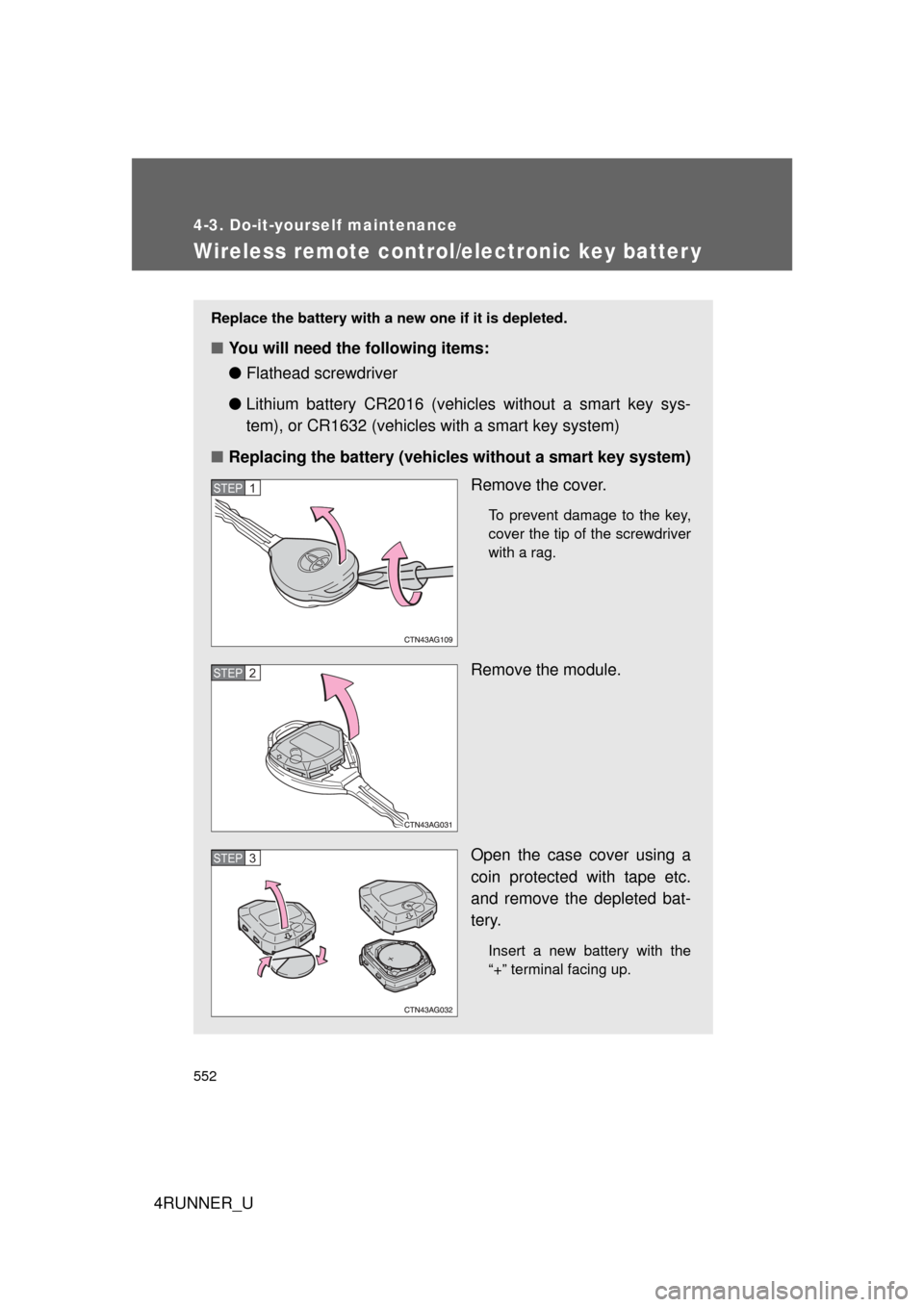
Wireless remote control/electronic key batter y
Replace the battery with a new one if it is depleted.
■You will need the following items:
●Flathead screwdriver
● Lithium battery CR2016 (vehicles without a smart key sys-
tem), or CR1632 (vehicles with a smart key system)
■ Replacing the battery (vehicles without a smart key system)
Remove the cover.
To prevent damage to the key,
cover the tip of the screwdriver
with a rag.
Remove the module.
Open the case cover using a
coin protected with tape etc.
and remove the depleted bat-
tery.
Insert a new battery with the
“+” terminal facing up.
STEP 1
STEP 2
STEP 3
Page 554 of 700
554 4-3. Do-it-yourself maintenance
4RUNNER_U
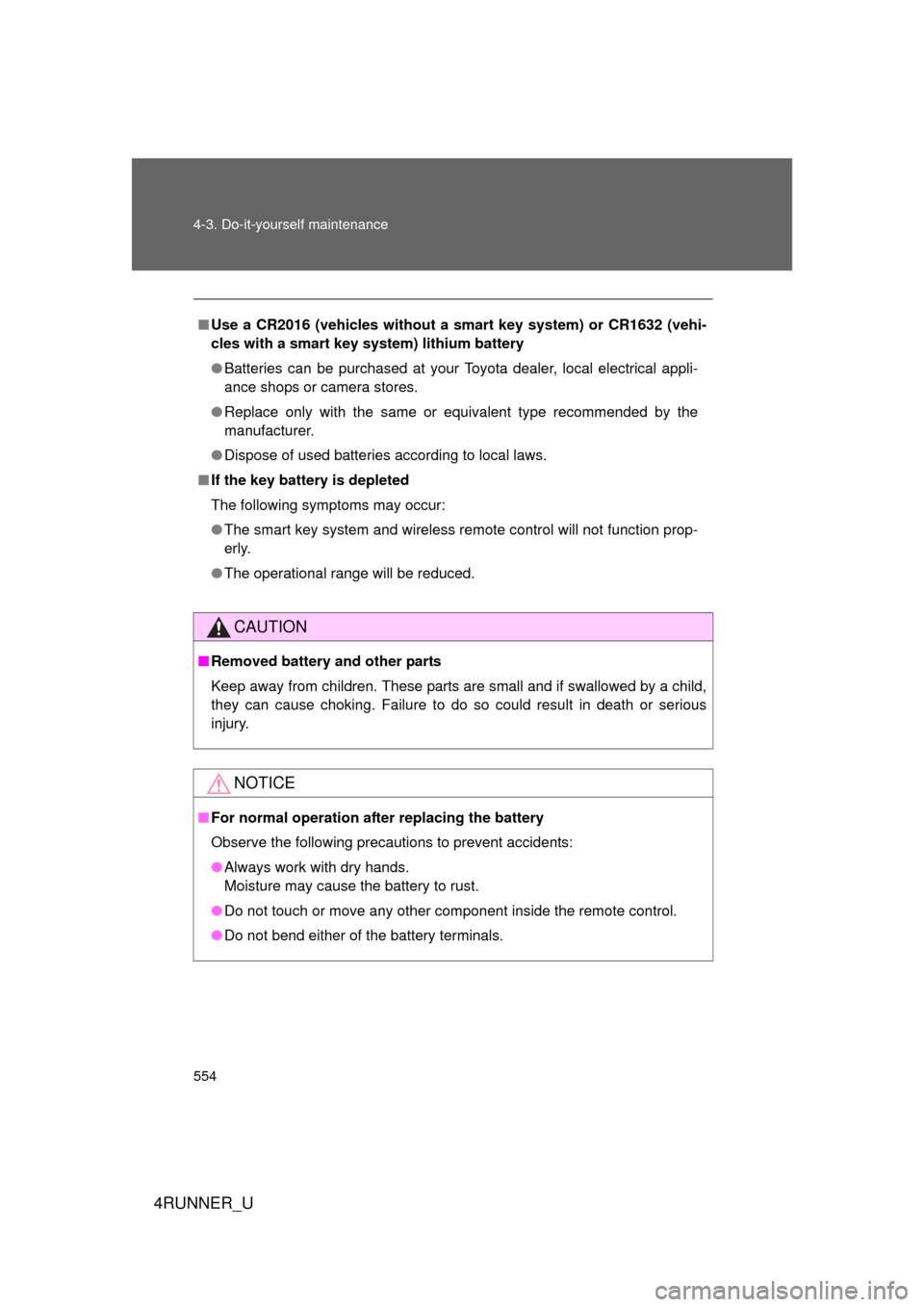
■Use a CR2016 (vehicles without a smart key system) or CR1632 (vehi-
cles with a smart key system) lithium battery
● Batteries can be purchased at your Toyota dealer, local electrical appli-
ance shops or camera stores.
● Replace only with the same or equivalent type recommended by the
manufacturer.
● Dispose of used batteries according to local laws.
■ If the key battery is depleted
The following symptoms may occur:
● The smart key system and wireless remote control will not function prop-
erly.
● The operational range will be reduced.
CAUTION
■Removed battery and other parts
Keep away from children. These parts are small and if swallowed by a child,
they can cause choking. Failure to do so could result in death or serious
injury.
NOTICE
■For normal operation after replacing the battery
Observe the following precautions to prevent accidents:
● Always work with dry hands.
Moisture may cause the battery to rust.
● Do not touch or move any other component inside the remote control.
● Do not bend either of the battery terminals.
Page 660 of 700
660
4RUNNER_U
6-2. Customization
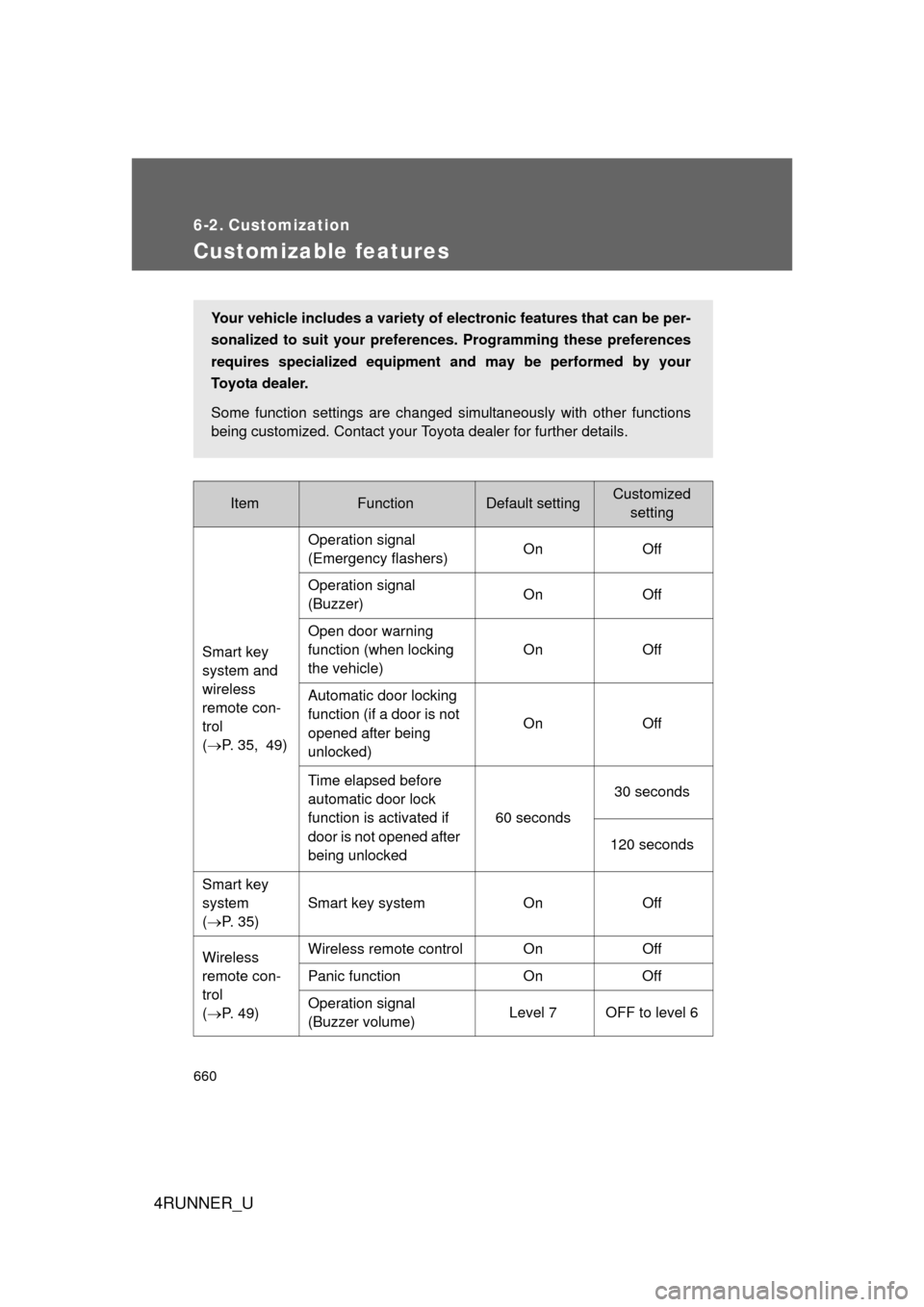
Customizable features
ItemFunctionDefault settingCustomizedsetting
Smart key
system and
wireless
remote con-
trol
( P. 35, 49) Operation signal
(Emergency flashers)
On Off
Operation signal
(Buzzer) On Off
Open door warning
function (when locking
the vehicle) On Off
Automatic door locking
function (if a door is not
opened after being
unlocked) On Off
Time elapsed before
automatic door lock
function is activated if
door is not opened after
being unlocked 60 seconds
30 seconds
120 seconds
Smart key
system
( P. 35) Smart key system On Off
Wireless
remote con-
trol
( P. 49) Wireless remote control On
Off
Panic function OnOff
Operation signal
(Buzzer volume) Level 7 OFF to level 6
Your vehicle includes a variety of electronic features that can be per-
sonalized to suit your prefer
ences. Programming these preferences
requires specialized equipment and may be performed by your
Toyota dealer.
Some function settings are changed simultaneously with other functions
being customized. Contact your Toyota dealer for further details.
Page 661 of 700

661
6-2. Customization
6
Vehicle specifications
4RUNNER_U
Door lock
(
P. 53,
621) Speed-detecting auto-
matic door lock function
Off On
Shifting the shift lever to
position other than P
locks all doors On Off
Shifting the shift lever to
P unlocks all doors On Off
Opening driver’s door
unlocks all doors Off On
Power win-
dows
( P. 98) Mechanical key linked
operation (close)
Off On
Mechanical key linked
operation (open) Off On
Wireless remote control
linked operation (open) Off On
Wireless remote control
linked operation signal
(Buzzer) On Off
Automatic
light control
system
( P. 203) Light sensor sensitivity Level 3 Levels 1 to 5
Time elapsed before
headlights automati-
cally turn off after doors
are closed
30 secondsOff
60 seconds
90 seconds
Ambient light level at
which instrument illumi-
nation begins to dim
(meter lights etc.) Standard
-2 (darker) to
2 (brighter)
Ambient light level at
which instrument illumi-
nation begins to
brighten (meter lights
etc.) Standard
-2 (darker) to
2 (brighter)
ItemFunctionDefault settingCustomized setting
Page 663 of 700
663
6-2. Customization
6
Vehicle specifications
4RUNNER_U
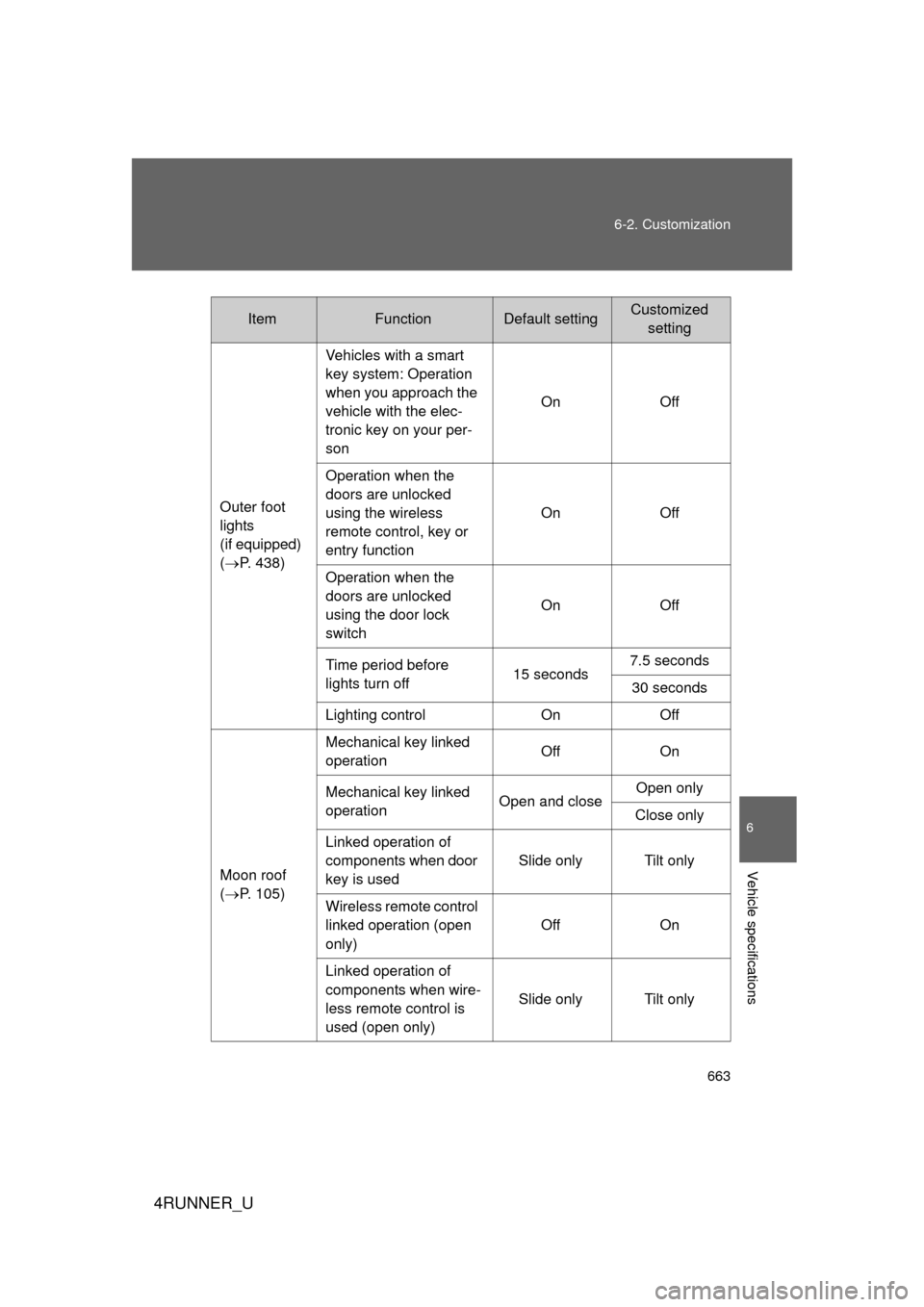
Outer foot
lights
(if equipped)
(
P. 438) Vehicles with a smart
key system: Operation
when you approach the
vehicle with the elec-
tronic key on your per-
son
On Off
Operation when the
doors are unlocked
using the wireless
remote control, key or
entry function On Off
Operation when the
doors are unlocked
using the door lock
switch On Off
Time period before
lights turn off 15 seconds7.5 seconds
30 seconds
Lighting control OnOff
Moon roof
( P. 105) Mechanical key linked
operation
Off
On
Mechanical key linked
operation Open and closeOpen only
Close only
Linked operation of
components when door
key is used Slide only Tilt only
Wireless remote control
linked operation (open
only) Off
On
Linked operation of
components when wire-
less remote control is
used (open only) Slide only Tilt only
ItemFunctionDefault settingCustomized
setting
Page 686 of 700

686
4RUNNER_U
Alphabetical index
Alphabetical index
A/C .....................................314, 320
ABS ...........................................266
Accessory meter ......................199
Active head restraints ............... 69
Active traction control ............. 243
Air conditioning filter............... 550
Air conditioning systemAir conditioning filter ..............550
Automatic air conditioning
system ................................320
Manual air conditioning system ................................314
Airbags Airbag operating conditions...124
Airbag precautions for your child .................................... 128
Airbag warning light............... 588
Curtain shield airbag operating conditions............124
Curtain shield airbag precautions .........................128
Front passenger occupant classification system ...........136
General airbag precautions ...128
Locations of airbags ..............121
Modification and disposal of airbags ............................ 133
Proper driving posture ...119, 128
Roll sensing of curtain shield airbags off switch ................134
Side airbag operating conditions............................ 124
Side airbag precautions ........ 128
SRS airbags .......................... 121 Alarm......................................... 116
Antenna ............................ 342, 385
Anti-lock brake system ........... 266
Armrest ..................................... 472
Audio input ............................... 381
Audio remote controls ............ 382
Audio system
Antenna................................. 342
Audio input ............................ 381
AUX port ............................... 381
CD player/changer ................ 345
iPod ....................................... 362
MP3/WMA disc ..................... 354
Optimal use ........................... 376
Portable music player ........... 381
Radio..................................... 338
Steering wheel audio switch.................................. 382
Type ...................................... 331
USB memory......................... 369
AUTO LSD system ................... 245
Automatic air conditioning
system .................................... 320
Automatic light control
system .................................... 203
Automatic running boards ........ 59
Automatic transmission Automatic transmission ......... 179
If the shift lever cannot be shifted from P ..................... 618
S mode.................................. 181
AUX port ................................... 381
Auxiliary box ............................ 447A