Page 84 of 700
84 1-3. Adjustable components (seats, mirrors, steering wheel)
4RUNNER_U
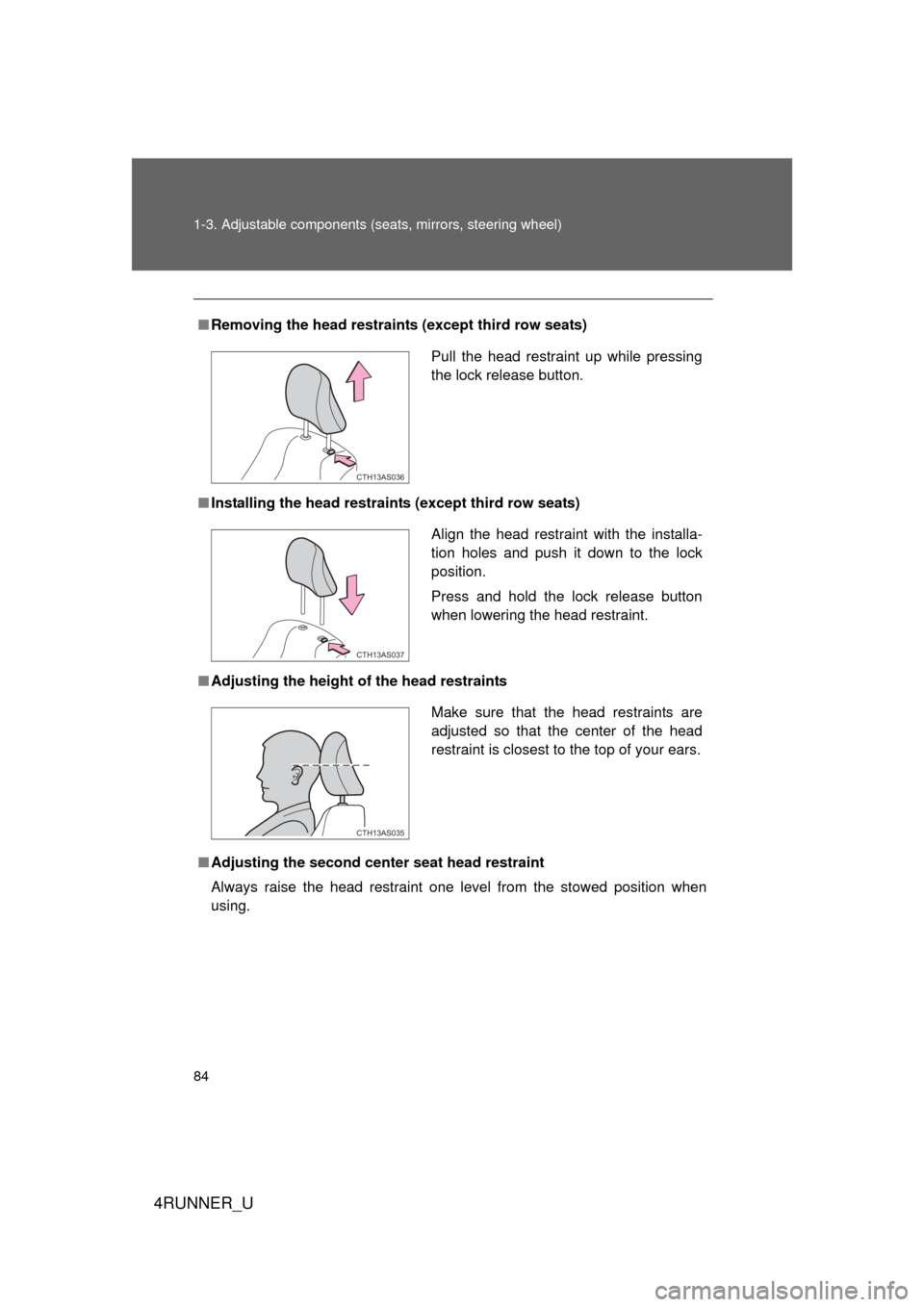
■Removing the head restraints (except third row seats)
■ Installing the head restraints (except third row seats)
■ Adjusting the height of the head restraints
■ Adjusting the second cente r seat head restraint
Always raise the head restraint one level from the stowed position when
using.
Pull the head restraint up while pressing
the lock release button.
CTH13AS036
Align the head restraint with the installa-
tion holes and push it down to the lock
position.
Press and hold the lock release button
when lowering the head restraint.
CTH13AS037
Make sure that the head restraints are
adjusted so that the center of the head
restraint is closest to the top of your ears.
CTH13AS035
Page 128 of 700

128 1-7. Safety information
4RUNNER_U
CAUTION
■SRS airbag precautions
Observe the following precautions regarding the SRS airbags.
Failure to do so may cause death or serious injury.
● The driver and all passengers in the vehicle must wear their seat belts
properly.
The SRS airbags are supplemental devices to be used with the seat belts.
● The SRS driver airbag deploys with considerable force, and can cause
death or serious injury especially if the driver is very close to the airbag.
The National Highway Traffic Safety Administration (NHTSA) advises:
Since the risk zone for the driver’s airbag is the first 2 - 3 in. (50 - 75 mm)
of inflation, placing yourself 10 in. (250 mm) from your driver airbag pro-
vides you with a clear margin of safety. This distance is measured from the
center of the steering wheel to your breastbone. If you sit less than 10 in.
(250 mm) away now, you can change your driving position in several
ways:
• Move your seat to the rear as far as you can while still reaching the pedals comfortably.
• Slightly recline the back of the seat. Although vehicle designs vary, many drivers can achieve the 10 in.
(250 mm) distance, even with the driver seat all the way forward, sim-
ply by reclining the back of the seat somewhat. If reclining the back of
your seat makes it hard to see the road, raise yourself by using a firm,
non-slippery cushion, or raise the seat if your vehicle has that feature\
.
• If your steering wheel is adjustable, tilt it downward. This points the air- bag toward your chest instead of your head and neck.
The seat should be adjusted as recommended by NHTSA above, while
still maintaining control of the foot pedals, steering wheel, and your view of
the instrument panel controls.
Page 130 of 700
130 1-7. Safety information
4RUNNER_U
CAUTION
■SRS airbag precautions
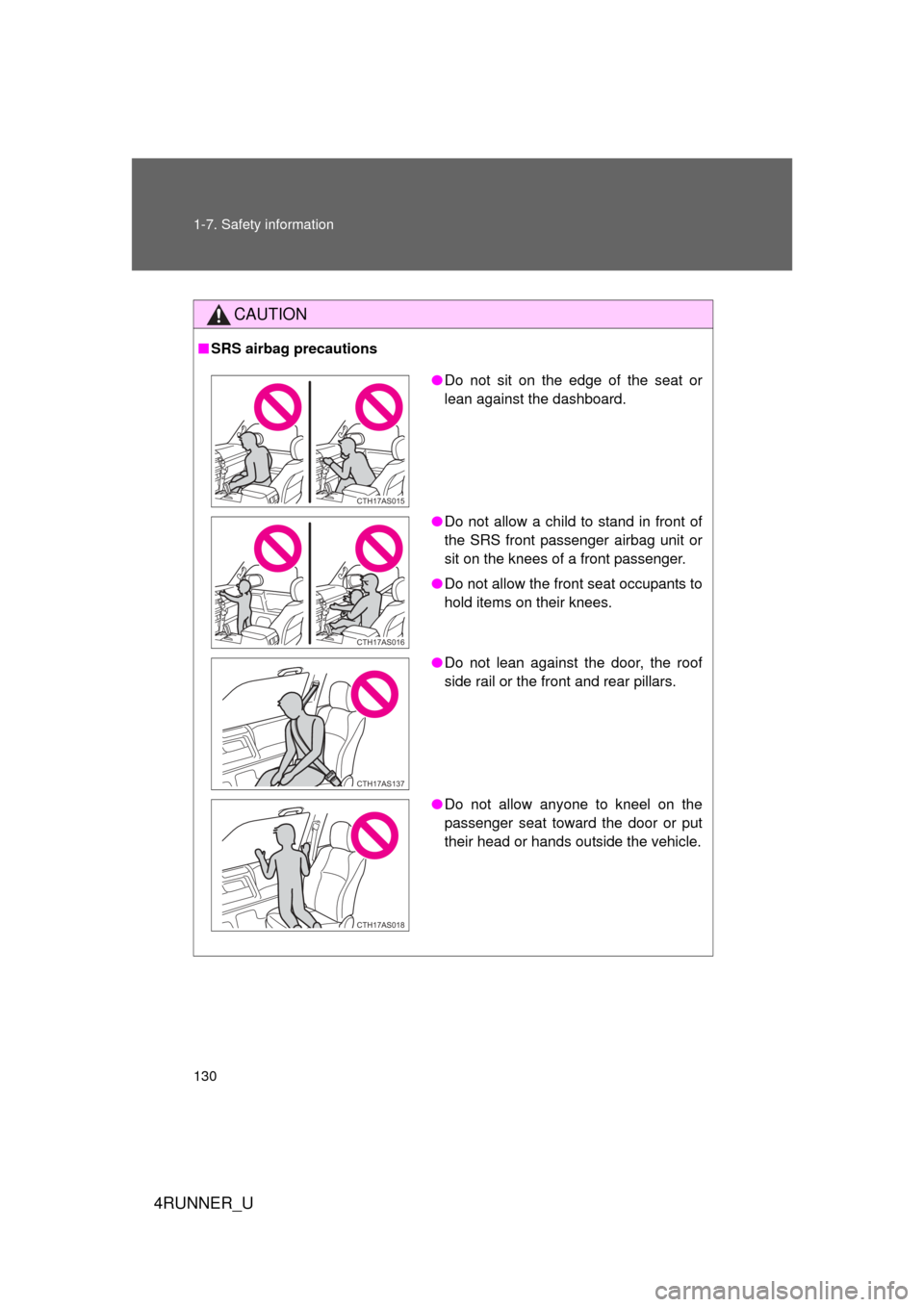
● Do not sit on the edge of the seat or
lean against the dashboard.
● Do not allow a child to stand in front of
the SRS front passenger airbag unit or
sit on the knees of a front passenger.
● Do not allow the front seat occupants to
hold items on their knees.
● Do not lean against the door, the roof
side rail or the front and rear pillars.
● Do not allow anyone to kneel on the
passenger seat toward the door or put
their head or hands outside the vehicle.
CTH17AS015
CTH17AS016
CTH17AS137
CTH17AS018
Page 159 of 700
When driving2
159
4RUNNER_U
2-1. Driving proceduresDriving the vehicle............ 160
Engine (ignition) switch (vehicles without a
smart key system).......... 170
Engine (ignition) switch (vehicles with a
smart key system).......... 173
Automatic transmission .... 179
Turn signal lever .............. 183
Parking brake ................... 184
Horn ................................. 185
2-2. Instrument cluster Gauges and meters ......... 186
Indicators and warning lights .............................. 193
Accessory meter .............. 199
2-3. Operating the lights and wipers
Headlight switch ............... 203
Fog light switch ................ 209
Windshield wipers and washer ........................... 211
Rear window wiper and washer ........................... 214 2-4. Using other driving
systems
Cruise control ................... 217
Intuitive parking assist...... 221
Rear view monitor system ........................... 226
Four-wheel drive system (part-time 4WD
models) .......................... 236
Four-wheel drive system (full-time 4WD
models) .......................... 239
Active traction control system ........................... 243
AUTO LSD system........... 245
Rear differential lock system ........................... 248
Downhill assist control system ........................... 251
Crawl Control ................... 254
Multi-terrain Select ........... 258
Driving assist systems ..... 266
2-5. Driving information Off-road precautions ........ 275
Cargo and luggage .......... 280
Vehicle load limits ............ 286
Winter driving tips ............ 288
Trailer towing ................... 293
Dinghy towing .................. 311
Page 161 of 700

161
2-1. Driving procedures
2
When driving
4RUNNER_U
Starting off on a steep uphill
Make sure that the parking brake is set and shift the shift lever
to D.
Gently depress the accelerator pedal.
Release the parking brake.
■Driving in the rain
● Drive carefully when it is raining, because visibility will be reduced, the
windows may become fogged-up, and the road will be slippery.
● Drive carefully when it starts to rain, because the road surface will be
especially slippery.
● Refrain from high speeds when driving on an expressway in the rain,
because there may be a layer of water between the tires and the road
surface, preventing the steering and brakes from operating properly.
■ Breaking in your new Toyota
To extend the life of the vehicle, observing the following precautions is rec-
ommended:
● For the first 200 miles (300 km):
Avoid sudden stops.
● For the first 500 miles (800 km):
Do not tow a trailer.
● For the first 1000 miles (1600 km):
• Do not drive at extremely high speeds.
• Avoid sudden acceleration.
• Do not drive continuously in the low gears.
• Do not drive at a constant speed for extended periods.
■ Drum-in-disc type parking brake system
Your vehicle has a drum-in-disc type parking brake system. This type of
brake system needs bedding-down of the brake shoes periodically or when-
ever the parking brake shoes and/or drum are replaced. Have your Toyota
dealer perform the bedding down operation.
STEP 1
STEP 2
STEP 3
Page 182 of 700

182 2-1. Driving procedures
4RUNNER_U
■S mode
When the shift range is “3” or lower, holding the shift lever toward “+” sets
the shift range to “5”.
■ AI-SHIFT
AI-SHIFT automatically selects the optimal gear according to driver perfor-
mance and driving conditions.
AI-SHIFT automatically operates when the shift lever is in the D position.
(Shifting the shift lever to the S position cancels the function.)
The engine speed may remain high after releasing the accelerator pedal.
This does not indicate a malfunction.
■ When driving with the cruise control system
Engine braking will not occur in S mode, even when downshifting to “4”.
(P. 217)
■ If the shift lever cannot be shifted from P
P. 618
■ If the “S” indicator does not come on even after shifting the shift lever
to S
This may indicate a malfunction in the automatic transmission system. Have
the vehicle inspected by your Toyota dealer immediately.
(In this situation, the transmission will operate in the same manner as when
the shift lever is in D.)
■ Downshift restriction warning buzzer (S mode)
To help ensure safety and driving performance, downshifting operation may
sometimes be restricted. In some circumstances, downshifting may not be
possible even when the shift lever is operated. (A buzzer will sound twice.)
CAUTION
■When driving on slippery road surfaces
Do not accelerate or shift gears suddenly.
Sudden changes in engine braking may cause the vehicle to spin or skid,
resulting in an accident.
Page 207 of 700

207
2-3. Operating the lights and wipers
2
When driving
4RUNNER_U
Turning on the high beam headlights
With the headlights on, push
the lever away from you to
turn on the high beams.
Pull the lever toward you to the
center position to turn the high
beams off.
Pull the lever toward you and
release it to flash the high
beams once.
You can flash the high beams
with the headlights on or off.
CTH23AS040
■Daytime running light system
● To make your vehicle more visible to other drivers, the daytime running
lights turn on automatically whenever the engine is started and the park-
ing brake is released. Daytime running lights are not designed for use at
night.
Type A and B: Daytime running lights can be turned off by operating the
switch.
● Compared to turning on the headlights, the daytime running light system
offers greater durability and consumes less electricity, so it can help
improve fuel economy.
■ Headlight control sensor (if equipped)
The sensor may not function properly if
an object is placed on the sensor, or any-
thing that blocks the sensor is affixed to
the windshield.
Doing so interferes with the sensor
detecting the level of ambient light and
may cause the automatic headlight sys-
tem to malfunction.
CTH23AS012
Page 218 of 700
218 2-4. Using other driving systems
4RUNNER_U
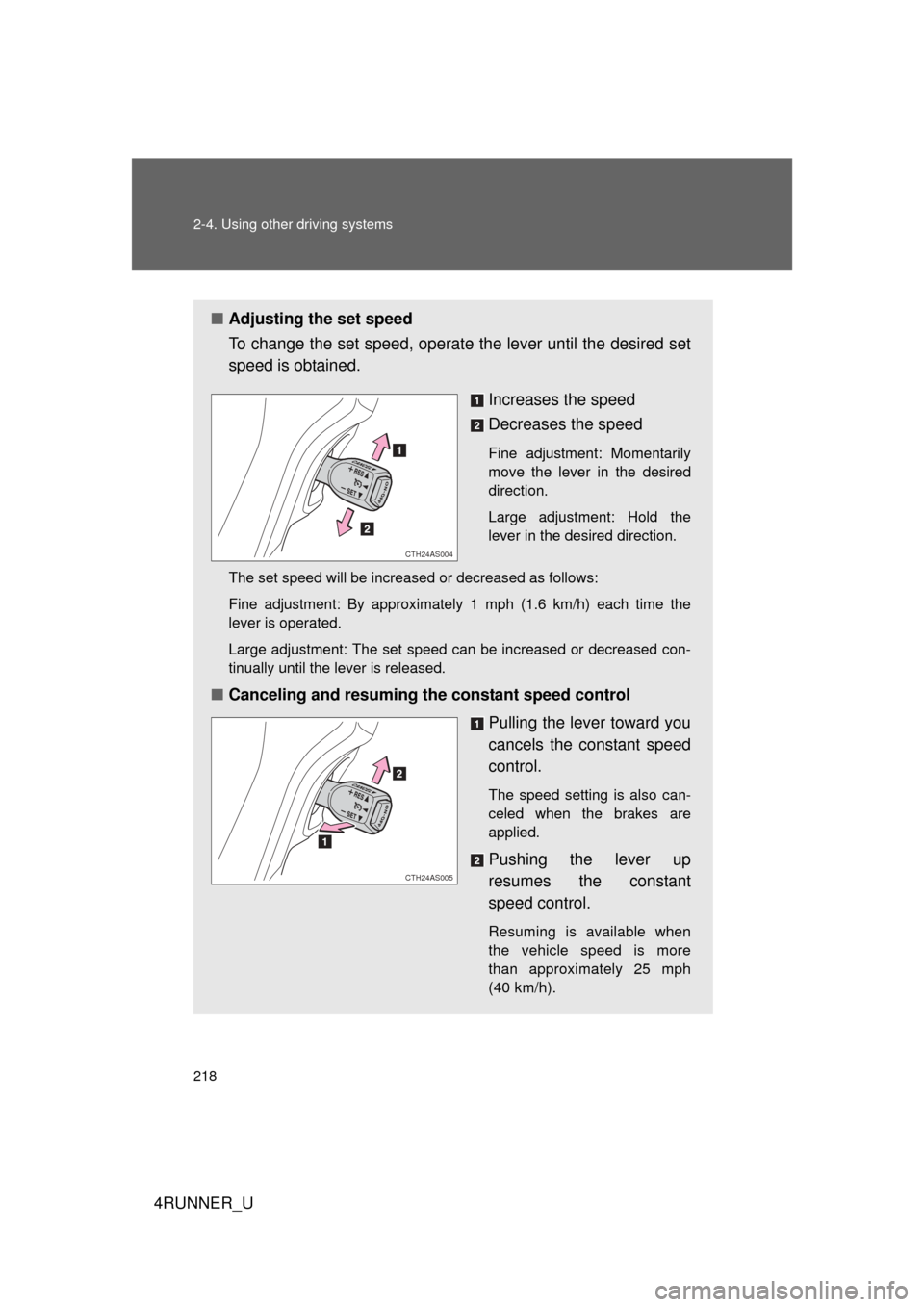
■Adjusting the set speed
To change the set speed, operate the lever until the desired set
speed is obtained.
Increases the speed
Decreases the speed
Fine adjustment: Momentarily
move the lever in the desired
direction.
Large adjustment: Hold the
lever in the desired direction.
The set speed will be increased or decreased as follows:
Fine adjustment: By approximately 1 mph (1.6 km/h) each time the
lever is operated.
Large adjustment: The set speed can be increased or decreased con-
tinually until the lever is released.
■ Canceling and resuming the constant speed control
Pulling the lever toward you
cancels the constant speed
control.
The speed setting is also can-
celed when the brakes are
applied.
Pushing the lever up
resumes the constant
speed control.
Resuming is available when
the vehicle speed is more
than approximately 25 mph
(40 km/h).
CTH24AS004
CTH24AS005