Page 205 of 438
5-32Audio
USB storage device / iPod®
operations (type C and D audio) &Play file
Refer to “Play file ”F 5-22.
& Connectable USB storage device
Mass storage class USB memory can be
connected. USB storage devices that can
be played back are accompanied by the
following restrictions. . Maximum directory layers: 8 layers
(including the ROOT). Maximum number of files in a folder:
255. Maximum number of folders: 512 (type
C audio)/255 (type D audio) (including the ROOT) . Maximum number of files on the
device: 130,560 (type C audio)/2,500
(type D audio) NOTE . HUB class USB memory cannot be
played. . ATAPI subclass USB cannot be
played.. For type C audio, High Speed USB
2.0 cannot be played. .
A USB memory that is powered by a
source other than the USB power
supply (for example, an AC power
adapter, etc.) cannot be operated.. A USB memory that is connected to
the memory card reader or multi card
reader cannot be operated.. If the USB memory consists of two
drives or more, the system will recog-
nize only one of the drives after con-
necting the USB memory.. The contents stored on the USB
memory may not be played in the same
order as they appear on a personal
computer.. A personal computer cannot be
used even if it is connected to the
system using a USB cable.. If the USB memory has a security
function, the contents stored on the
USB memory cannot be played by thesystem.. A USB memory and an iPod
®cannot
be connected to the system at the
same time.
Page 220 of 438
First menu Second menu Third menu Details Page
SETUP SECURITY SET PIN Setting a PIN code 5-53
PHBK LOCK*/
PHONE BOOK LOCK* Locking the phonebook
5-53
PHBK UNLOCK*/
PHONE BOOK UN- LOCK* Unlocking the phonebook
5-53
GO BACK
PHONE SETUP PAIR PHONE Registering a new cell phone 5-45
SELECT PHONE Selecting a cell phone to be used 5-54
CHANGE NAME Changing the registered name of the cell phone 5-54
LIST PHONES Showing the list of the registered cell phones 5-54
SET PASSKEY Changing the pass key 5-54
DELETE Deleting the registered cell phone 5-55
GO BACK
SYSTEM SETUP GUIDANCE VOL/
GUIDANCE VOLUME Setting the volume of the voice guidance 5-55
INITIALIZE Initialization 5-55
SEL LANGUAGE/SE-
LECT LANGUAGE Selecting the language (using the Hands-free system) 5-55
GO BACK
GO BACK —
*: If a PIN code is not registered, the menu described in the chart is not available. Audio
5-47
– CONTINUED –
Page 222 of 438

38 security sécurité
39 pair phonejumeler le télé- phone
40 change name modifier le nom
41 select phone sélectionner le tél- éphone
42 list phones lister les télé-phones
43 set pass key configurer le
passe-partout
44 add entry ajouter l ’entrée
45 delete entry supprimer l ’entrée
46 delete speed dial supprimer compo-
sition abrégée
47 by voice vocalement
48 by phone par téléphone
49 call history historique d ’appels
50 set speed dial configurer compo-
sition abrégée
51 incoming entrant
52 outgoing sortant
53 list names lister les noms
54 set PIN configurer NIP
55 phone book lock verrouiller le regis- tre!
Updating phonebook data
NOTE
The maximum number of phonebook
entries that can be registered in the
phonebook is 50. ! Registering by voice
1. Select the “BY VOICE ”menu.
2. Press the talk switch
.
3. Say the phone number to be regis- tered.
4. Select the “CONFIRM ”menu.
5. Perform either of the following proce- dures. –Select the “RECORD NAME ”menu
by operating the “TUNE/TRACK/CH ”
dial. – Press the talk switch
.
6. Say the name (voice tag) to be registered.
7. Select the “CONFIRM ”menu. Then
“ STORED ”is displayed and the mode
changes to the registering speed dial
mode. Refer to “Registering speed dial ”
F 5-50.
! Registering by phone
1. Select the “BY PHONE ”menu.
2. Select the “CONFIRM ”menu. Then
“ TRANSFER ”is displayed. 3. Transfer the data from the cell phone.
For details about transferring the data,
refer to the Owner
’s Manual of the cell
phone.
4. Perform either of the following proce- dures.
–Select the “RECORD NAME ”menu
by operating the “TUNE/TRACK/CH ”
dial. – Press the talk switch
.
5. Say the name (voice tag) to be registered.
6. Select the “CONFIRM ”menu. Then
“ STORED ”is displayed and the mode
changes to the registering speed dial
mode. Refer to “Registering speed dial ”
F 5-50.
! Registering by inputting manually
1. Select the “MANUAL INPUT ”menu by
operating the “TUNE/TRACK/CH ”dial.
2. Input the phone number to be regis-tered.
3. Perform either of the following proce- dures. –Select the “RECORD NAME ”menu
by operating the “TUNE/TRACK/CH ”
dial. – Press the talk switch
.
4. Say the name (voice tag) to be registered. Audio
5-49
– CONTINUED –
Page 226 of 438
!Ending a call
Press the ON hook switch
.
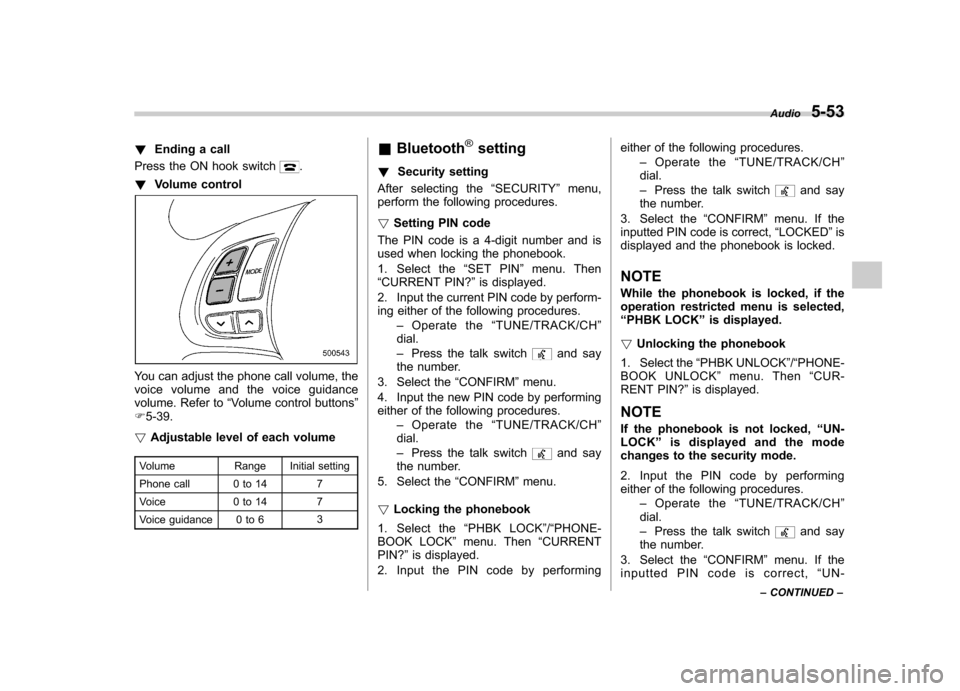
! Volume control
You can adjust the phone call volume, the
voice volume and the voice guidance
volume. Refer to “Volume control buttons ”
F 5-39.
! Adjustable level of each volume
Volume Range Initial setting
Phone call 0 to 14 7
Voice 0 to 14 7
Voice guidance 0 to 6 3&
Bluetooth
®setting
! Security setting
After selecting the “SECURITY ”menu,
perform the following procedures. ! Setting PIN code
The PIN code is a 4-digit number and is
used when locking the phonebook.
1. Select the “SET PIN ”menu. Then
“ CURRENT PIN? ”is displayed.
2. Input the current PIN code by perform-
ing either of the following procedures. –Operate the “TUNE/TRACK/CH ”
dial. – Press the talk switch
and say
the number.
3. Select the “CONFIRM ”menu.
4. Input the new PIN code by performing
either of the following procedures. –Operate the “TUNE/TRACK/CH ”
dial. – Press the talk switch
and say
the number.
5. Select the “CONFIRM ”menu.
! Locking the phonebook
1. Select the “PHBK LOCK ”/“ PHONE-
BOOK LOCK ”menu. Then “CURRENT
PIN? ”is displayed.
2. Input the PIN code by performing either of the following procedures.
–Operate the “TUNE/TRACK/CH ”
dial. – Press the talk switch
and say
the number.
3. Select the “CONFIRM ”menu. If the
inputted PIN code is correct, “LOCKED ”is
displayed and the phonebook is locked.
NOTE
While the phonebook is locked, if the
operation restricted menu is selected,“ PHBK LOCK ”is displayed.
! Unlocking the phonebook
1. Select the “PHBK UNLOCK ”/“ PHONE-
BOOK UNLOCK ”menu. Then “CUR-
RENT PIN? ”is displayed.
NOTE
If the phonebook is not locked, “UN-
LOCK ”is displayed and the mode
changes to the security mode.
2. Input the PIN code by performing
either of the following procedures.
–Operate the “TUNE/TRACK/CH ”
dial. – Press the talk switch
and say
the number.
3. Select the “CONFIRM ”menu. If the
inputted PIN code is correct, “UN-
Audio
5-53
– CONTINUED –
Page 235 of 438
6-6Interior equipment
driving position. Make sure the armrest is
securely retained.
To return the console top to the vertical
position, raise the console top.
CAUTION
Do not step or sit on the armrest,
and do not place heavy objects on it.
The armrest could break, and you
could get hurt.
To use as storage space:
Raise the console top to the vertical position.
1) Pocket console
The pocket console can be used to store
small items.
CAUTION
Be careful not to trap your hand
between the console top and con-
sole box when raising and tipping
the console top. &
Overhead console
To open the console, push on the console
lid lightly and the lid will automaticallyopen.
CAUTION
When your vehicle is in the sun or
on a warm day, the inside of the
overhead console heats up. Avoid
storing plastic or other heat-vulner-
able or flammable articles such as a
lighter in the overhead console.
Page 240 of 438

To use the cigarette lighter, push in the
knob and wait a few moments. It will
automatically spring up when ready foruse.
WARNING
To avoid being burned, never grasp
the lighter by the end with the
heating element. Doing so could
result in injury and could also
damage the heating element.
CAUTION
. Do not hold the lighter pushed in,
because it will overheat.
. Do not use non-genuine cigarette
lighter plugs in the socket. Doing
so may cause a short-circuit and
overheating, resulting in a fire.
. If the socket is ever used for a
plug-in accessory such as a cell
phone, that may damage the
portion of the socket ’s internal
mechanism that causes a cigar-
ette lighter plug to “pop out ”
after its heating element is
heated. Therefore, do not place
a cigarette lighter plug in a sock-
et that has been used, even once,
to power a plug-in accessory. Doing so may cause the plug to
stick and overheat, creating a
potential fire hazard.
Ashtray (if equipped)
CAUTION
. Do not use ashtrays as waste
receptacles or leave a lighted
cigarette in an ashtray. This
could cause a fire.
. Always extinguish matches and
cigarettes before putting them
into the ashtray, and then close
the ashtray securely. If you keep
the ashtray open, the fire on the
cigarette tip may spread to an-
other cigarette butt and start afire.
. Do not put flammable material in
the ashtray.
. Do not leave a lot of cigarette
butts in the ashtray. Interior equipment
6-11
– CONTINUED –
Page 241 of 438
6-12Interior equipment
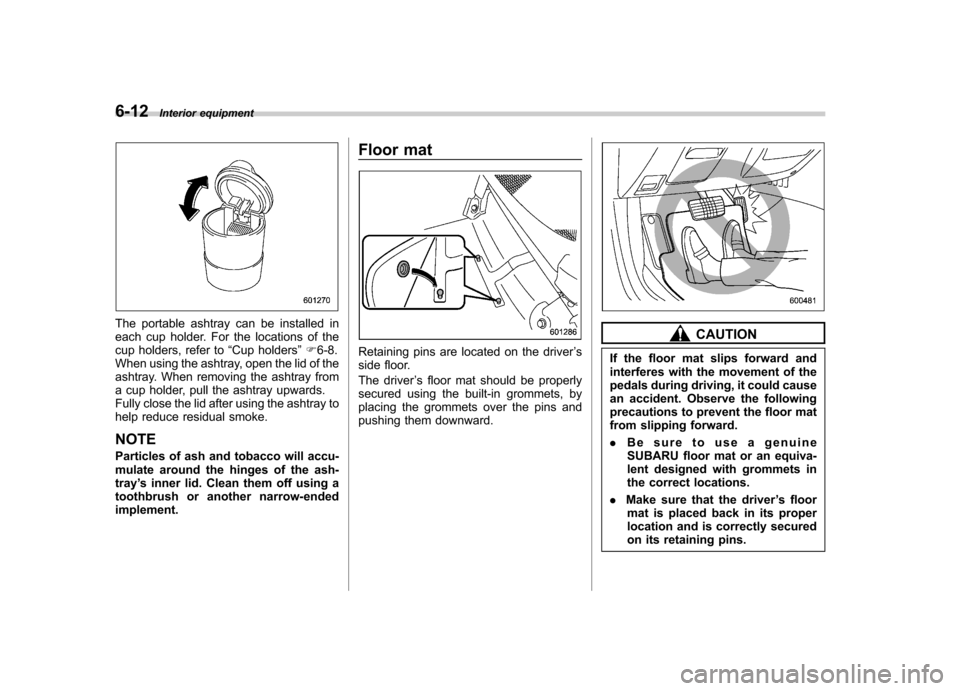
The portable ashtray can be installed in
each cup holder. For the locations of the
cup holders, refer to “Cup holders ”F 6-8.
When using the ashtray, open the lid of the
ashtray. When removing the ashtray from
a cup holder, pull the ashtray upwards.
Fully close the lid after using the ashtray to
help reduce residual smoke.
NOTE
Particles of ash and tobacco will accu-
mulate around the hinges of the ash-tray ’s inner lid. Clean them off using a
toothbrush or another narrow-endedimplement. Floor mat
Retaining pins are located on the driver
’s
side floor.
The driver ’s floor mat should be properly
secured using the built-in grommets, by
placing the grommets over the pins and
pushing them downward.
CAUTION
If the floor mat slips forward and
interferes with the movement of the
pedals during driving, it could cause
an accident. Observe the following
precautions to prevent the floor mat
from slipping forward. . Be sure to use a genuine
SUBARU floor mat or an equiva-
lent designed with grommets in
the correct locations.
. Make sure that the driver ’s floor
mat is placed back in its proper
location and is correctly secured
on its retaining pins.
Page 244 of 438
&To install the cover
1. Remove the cover of the retainers by
pryingontheedgewithaflat-head
screwdriver.
2. Insert the projections located on both ends of the cover housing into the
recesses of the retainers.
WARNING
Make sure to install the cover hous-
ing securely. Otherwise, there is a
risk of being injured. Cargo tie-down hooks
The cargo area is equipped with four tie-
down hooks so that cargo can be secured
with a cargo net or ropes.
When using the tie-down hooks, turn them
down out of the storing recesses. When
not in use, put the hooks up into the
storing recesses.Interior equipment
6-15
– CONTINUED –