2012 SKODA YETI warning lights
[x] Cancel search: warning lightsPage 54 of 225

Replacing the rear window wiper blade
Fig. 38
Rear window wiper blade
First read and observe the introductory information and safety warn-
ings on page 48.
Removing the wiper blade
›
Fold the windscreen wiper arm away from the windscreen and position the
wiper blade at a right angle to the wiper arm » Fig. 38.
› Hold the windscreen wiper arm at the top end with one hand.
› Unlock the locking button 1
with the other hand and remove the wiper blade
in the direction of the arrow 2
.
Attaching the wiper blade
› Push the windscreen wiper blade until the stop and it locks in place.
› Check that the wiper blade is correctly attached.
› Fold the wiper arm back to the windscreen. ÐRear window
Manual dimming interior mirror
Basic setting
› Pull the lever on the bottom edge of the mirror forward.
Dimming mirror
› Push the lever on the bottom edge of the mirror backwards. Ð
ä Automatic dimming interior mirror
Fig. 39
Automatic dimming interior mir-
ror
Switching on automatic dimming › Press the button B
» Fig. 39, the indicator light A
lights up.
Switching off automatic dimming
› Press the button B
again, the indicator light A
goes out.
If the automatic dimming is switched on, the mirror dims automatically depend-
ing on the light striking the mirror from the rear. The mirror has no lever on the
bottom edge of the mirror. After the reverse gear is engaged, the mirror always
moves back into the normal position.
Do not attach external navigation devices on to the windscreen or in the vicinity
of the automatic dimming interior mirror » .
WARNING
The display lighting on the external navigation device may cause the automat-
ic dimming interior mirror to malfunction – risk of accident. Note
■ Automatic mirror dimming operates only properly if the light striking the rear of
the interior rear-view mirror is not affected by other objects. ■ Do not affix any stickers in front of the light sensor, so that they do not impair
the automatic dimming function or put it out of operation.
■ If the automatic interior mirror dimming is switched off, the exterior mirror dim-
ming is also switched off. Ð
52 Using the system
Page 55 of 225

Additional rear-view mirror
Fig. 40
Additional interior mirror
The additional interior mirror allows the driver a wider field of view of the rear
seats.
Adjusting the angle › Adjust the mirror in direction of arrow to the desired position. WARNING
Concentrate fully at all times on your driving! As the driver you are fully re-
sponsible for the operation of your vehicle. Use the additional interior mirror
only to such an extent that you are in full control of your vehicle at any time. ÐExterior mirror
Fig. 41
Inner part of door: Rotary knob
Adjust the rear mirror before commencing to drive so that there is a clear view to
the rear. Heating of the external mirror
› Place the rotary knob into the position
» Fig. 41.
The exterior mirror heater only operates when the engine is running and up to an
outside temperature of +20 °C.
Adjusting left and right exterior mirrors simultaneously
› Place the rotary knob into the position
» Fig. 41. The movement of the mirror
surface is identical to the movement of the rotary knob.
The adjustment of both mirrors simultaneously or each individual mirror is possi-
ble in the Information display » table on page 16 in the menu point Mirror adjust. .
Adjusting the right-hand exterior mirror
› Place the rotary knob into the position
» Fig. 41. The movement of the mirror
surface is identical to the movement of the rotary knob.
Switching off operating control
› Place the rotary knob into the position
» Fig. 41.
Folding-in both of the exterior mirrors with the rotary knob
› Place the rotary knob into the position
.
The mirrors are folded back into the driving position after the rotary knob is
turned from the position to a different one.
It is only possible to fold in both exterior mirrors when the ignition is switched on
and at a speed of up to 15
km/h.
Folding-in both of the exterior mirrors using the remote control key
› If all of the windows are closed, press and hold the lock button 3
» Fig. 13 on
page 30 on the radio remote control for approx. 2
seconds.
The exterior mirrors are folded back into the driving position after opening the
door or switching on the ignition.
Tilting surface of front passenger exterior mirror
On vehicles fitted with the memory function for the driver seat, the surface of the
mirror tilts down slightly when the reverse gear is engaged and the rotary knob is
in the position » Fig. 41. This provides an aid in seeing the kerb of the pavement
when parking the car.
The mirror returns into its initial position, after the rotary knob is moved out of
the position and put into another position or if the speed is more than 15 km/h. £
53
Lights and visibility
Page 56 of 225

Memory function for exterior mirrors
On vehicles fitted with a memory function for the driver seat, the relevant setting
for the exterior mirrors is also stored automatically when the seat position is stor-
ed » page 57 . WARNING
■ Convex (curved outward) or a spherical exterior mirrors increase the vision
field. They do, however, make objects appear smaller in the mirror. These mir-
rors are therefore only of limited use for estimating distances to the following
vehicles.
■ Whenever possible use the interior mirror for estimating the distances to
the following vehicles. CAUTION
Never mechanically fold in or fold back the exterior mirrors with the fold-in func-
tion by hand as this will damage the electric drive. Note
■ If the exterior mirrors were folded in using the rotary knob, they can only be fol-
ded back into the driving position using the rotary knob. ■ If the exterior mirrors were folded in using the remote control key and if the ro-
tary knob was in the fold-in position before the ignition was switched on, the mir-
rors will remain in the fold-in position the next time the ignition is switched on.
The mirrors are folded back into the driving position after the rotary knob is
turned from the position to a different one.
■ Do not touch the surface of the exterior mirrors if the exterior mirror heater is
switched on. ■ If the power setting function fails at any time, the exterior mirrors can be set by
hand by pressing on the edge of the mirror surface. ■ Contact your ŠKODA specialist garage if there is a fault with the power setting
of the exterior mirrors. ÐAutomatic dimming exterior mirror on the driver's side
The exterior mirror on the driver's side is dimmed together with the interior mir-
ror. If the automatic dimming is switched on, the mirror dims automatically de-
pending on the light striking the mirror from the rear. When the interior lights are switched on or the reverse gear is engaged, the mir-
ror always moves back into the basic position (not dimmed). Note
■ Automatic mirror dimming operates only properly if the light striking the rear of
the interior rear-view mirror is not affected by other objects. ■ Do not affix any stickers in front of the light sensor, so that they do not impair
the automatic dimming function or put it out of operation.
■ If the automatic interior mirror dimming is switched off, the exterior mirror dim-
ming is also switched off. Ð54
Using the system
Page 89 of 225

Note
Below the top row of buttons is located the interior temperature sensor. Do not
stick anything on or cover the sensor, otherwise it could have an unfavourable ef-
fect on the Climatronic. ÐAutomatic mode
The automatic mode is used in order to maintain a constant temperature and to
demist the windows in the interior of the car.
Switching on
› Set a temperature between +18 °C and +26
℃.
› Move the air outlet vents
3 and 4 » Fig. 87 on page 81 so that the air flow is
directed slightly upwards.
› Press the button
AUTO 8
» Fig. 91 on page 86
. The indicator light in the top
right or left corner lights up, depending on which mode was last selected.
If the warning light in the top right corner of the button AUTO lights up, the Cli-
matronic operates in
“HIGH” mode. The “HIGH” mode is the standard setting of
the Climatronic.
When pressing again the button AUTO , the Climatronic changes into the “LOW”
mode and the indicator light in the top left corner lights up. The Climatronic uses
only in this mode the lower blower speed. However taking into account the noise
level, this is more comfortable, yet be aware that the effectiveness of the air con-
ditioning system is reduced particularly if the vehicle is fully occupied.
By pressing the button AUTO again, it is changed to “HIGH” mode.
Automatic mode is switched off by pressing one of the buttons for the air distri-
bution or by increasing/decreasing the blower speed. The temperature is never-
theless regulated. ÐSwitching the cooling system on and off
Switching the cooling system on and off › Press the button
AC » Fig. 91 on page 86
. The indicator light lights up in the
button.
› When you again press the button
AC , the air conditioning system is switched
off. The indicator light in the button goes out. Only the function of the ventila-
tion remains active when no lower temperature than the outside temperature
can be reached. Ð Setting temperature
The interior temperature for the left and right side can be set separately.
› The temperature for both sides can be set with the control dial 7
» Fig. 91 on
page 86
after switching on the ignition.
› If you wish to set the temperature for the right side, turn the control dial 14
.
The indicator light in the button DUAL lights up, this indicates that differing
temperatures for the left and right side can be set.
If the indicator light in the button DUAL is illuminated, the temperature for both
sides cannot be set with the control dial 7
. You can reactivate this function by
pressing the button DUAL . The indicator light in the button goes out.
The interior temperature can be set between +18 °C and +26 ℃. The interior tem-
perature is regulated automatically within this range. If a temperature lower than
+18 °C is selected, a blue symbol lights up at the start of the numerical scale. If a
temperature higher than +26 °C is selected, a red symbol lights up at the start of
the numerical scale. In both limit positions the Climatronic operates at maximum
cooling or heating capacity, respectively. The temperature is not controlled in this
case.
Lengthy and uneven distribution of the air flow out of the vents (especially
around the feet) and large differences in temperature, for example, when getting
out of the vehicle, can cause susceptible individuals to catch a cold. Ð Recirculated air mode
Recirculated air mode prevents polluted air outside the vehicle from getting into
the vehicle, for example when driving through a tunnel or when standing in a
traffic jam. If a considerable increase in concentration of pollutants is recognized
by the air quality sensor, when the automatic air distribution control is switched
on, the air distribution control will temporarily be switched off. If the concentra-
tion of pollutants decreases to the normal level, the air distribution control is au-
tomatically switched off so that fresh air can be guided into the vehicle interior. In
recirculated air mode air is sucked out of the interior of the vehicle and then fed
back into the interior. When the automatic air distribution control is switched on,
an air quality sensor measures the concentration of pollutants in the drawn in air.
Switching recirculated air mode on
› Repeatedly press the button
5
» Fig. 91 on page 86
until the indicator
light on the left side of the button is illuminated. £
87
Heating and air conditioning system
Page 90 of 225

Switch on automatic air distribution control
›
Repeatedly press the button
until the indicator light on the right side of
the button is illuminated.
Switch off automatic air distribution control temporarily › If the air quality sensor does not automatically switch on the air distribution
control in the event of an unpleasant odour, you can switch it on yourself by
pressing the button . The indicator light lights up in the button on the left
side.
Switching recirculated air mode off › Press the button
AUTO or repeatedly press the button
until the indicator
lights in the button go out. WARNING
Do not leave recirculated air mode on over a longer period of time, as “stale”
air can cause fatigue of the driver and passengers, reduce attention levels and
also cause the windows to mist up. The risk of having an accident increases.
Switch off recirculated air mode as soon as the windows start to mist up. Note
■ If the windscreen mists up, press the button 1
» Fig. 91 on page 86
. Press
the button AUTO when the windscreen is demisted.
■ The automatic air distribution control operates only if the outside temperature
is higher than approx. 2 °C. ÐControlling blower
The Climatronic system controls the blower stages automatically in line with the
interior temperature. However, the blower stages can be manually adapted to
suit your particular needs.
› Repeatedly press the button
» Fig. 91 on page 86
on the left side (reduce
blower speed) or on the right side (increase blower speed).
If the blower is switched off, the Climatronic system is switched off.
The set blower speed is displayed above the button when the respective num-
ber of indicator lights come on. WARNING
■ “
Stale air” may result in fatigue in the driver and occupants, reduce attention
levels and also cause the windows to mist up. The risk of having an accident
increases.
■ Do not switch off the Climatronic system for longer than necessary.
■ Switch on the Climatronic system as soon as the windows mist up. Ð Defrosting windscreen
Switching on › Press the button
1
» Fig. 91
on page
86.
› Press the button
11
» Fig. 91
on page 86.
Switching off
› Press the button
1
» Fig. 91
on page
86 again or press the button 8
AUTO
.
› Press the button
11
» Fig. 91
on page 86 again.
The temperature control is controlled automatically. More air flows out of the air
outlet vents 1
and 2 » Fig. 87 on page 81. Ð Auxiliary heating (auxiliary heating and ventilation)
ä
Introduction
This chapter contains information on the following subjects:
Direct switching on/off 89
System settings 90
Radio remote control 90
Changing the battery of the radio remote control 91
Auxiliary heating (parking heating)
The auxiliary heating (auxiliary heating) functions in connection with the air-con-
ditioning system or Climatronic.
It can be used when stationary, when the engine is switched off to preheat the
vehicle and while driving (e.g. during the heating phase of the engine). £
88 Using the system
Page 92 of 225

System settings
First read and observe the introductory information and safety warn-
ings on page 88.
The following menu items can be selected in the menu
Aux. heating in the infor-
mation display (depending on the equipment fitted in the vehicle):
■ Day of the wk. - Set the current weekday.
■ Running time- Set the desired running time in 5
minute increments. The run-
ning time can be 10 to 60 minutes.
■ Mode - Set the desired heating/ventilation mode.
■ Starting time 1-3 - In each pre-set time, the day and the time (hour and minute)
can be set for switching on the auxiliary heating and/or ventilation. An empty
position can be found between Sunday and Monday when selecting the day. If
this empty position is selected, the activation is performed without taking into
account the day.
■ Activate - Enable pre-set mode.
■ Dectivate - Disable pre-set mode.
■ Factory setting - Restore factory setting.
■ Back - Return to main menu.
Only one programmed pre-set time can be active.
The last programmed pre-set time remains active.
After the auxiliary heating activates at the set time, it is necessary to pre-set a
time again.
If the pre-set menu is closed by selecting the menu item Back or if no changes
are made on the display for more than 10 seconds, the set values are stored, but
the pre-set time is not activated.
An indicator light on the button » Fig. 92 on page 89
is illuminated when the
system is running.
The running system deactivates after expiration of the operating period or can be
deactivated earlier by pressing the button to directly switch on/off the auxiliary
heating or by using the radio remote control.
Ð
ä Radio remote control
Fig. 93
Auxiliary heating: Radio remote control
First read and observe the introductory information and safety warn-
ings on page 88.
›
For switching on, press the button
ON » Fig. 93.
› For switching off, press the button
OFF .
The transmitter and the battery are housed in the housing of the remote control.
The receiver is located in the interior of the vehicle.
If the battery is properly charged, the effective range is up to 600
m. To switch
on/off the auxiliary heating, hold the radio remote control vertically with the an-
tenna A
» Fig. 93 facing upwards. The antenna must not be covered with the fin-
gers or the palm of the hand during this process. Obstacles between the radio re-
mote control and the vehicle, bad weather conditions and a weaker battery can
clearly reduce the range.
The auxiliary heating can only be switched on/off safely using the radio remote
control, if the distance between the radio remote control and the vehicle is at
least 2
m.
Warning light in the radio remote control
The indicator light in the radio remote control C
» Fig. 93 indicates after a key-
stroke if the remote control signal was received by the auxiliary heating and if the
battery is adequately charged.
Display indicator light Importance
Lights up green for 2 seconds. The auxiliary heating was switched on.
Lights up red for 2 seconds. The auxiliary heating was switched off.
Slowly flashes green for 2 seconds. The ignition signal was not received. £ ä
90 Using the system
Page 94 of 225

Starting-off and Driving
Starting and stopping the engine
ä
Introduction
This chapter contains information on the following subjects:
Adjusting the steering wheel position 93
Electromechanical power steering 93
Electronic immobiliser 93
Ignition lock 94
Starting engine 94
Switching the engine off 94
WARNING
■ Never adjust the steering wheel when the vehicle is moving only when the
vehicle is stationary!
■ Maintain a distance of 25 cm 1
to the steering wheel
» Fig. 94 on page 93
- . Not maintaining this minimum distance will mean that the airbag system
will not be able to properly protect you - hazard!
■ The lever for adjusting the steering wheel must be locked whilst driving so
that the position of the steering wheel cannot accidently change during the
journey - risk of accident!
■ If the steering wheel is adjusted further towards the head, the protection
provided by the driver airbag in the event of an accident is reduced. Check
that the steering wheel is aligned to the chest. ■ When driving, hold the steering wheel with both hands firmly on the outer
edge in the 9 o'clock and 3 o'clock position. Never hold the steering wheel in
the 12 o'clock position or in any other way (e.g. in the middle or inner edge of
the steering wheel). In such cases, you could injure the arms, hands and head
when the driver airbag is deployed.
■ When driving, the ignition key must always be in the position 2
» Fig. 95 on
page 94 (ignition switched on) without the engine running. This position is
indicated by the indicator lights coming on. If this is not the case, it could re-
sult in unexpected locking of the steering wheel - risk of accident! WARNING (Continued)
■ Only pull the ignition key from the ignition lock when the vehicle has come
to a complete stop (by applying the handbrake). Otherwise the steering wheel
could block - risk of accident!
■ When leaving the vehicle, the ignition must always be removed. This is par-
ticularly important if children are left in the vehicle. Otherwise the children
could, for example, start the engine - risk of accident or injury!
■ Never leave the engine running in unventilated or closed rooms. The ex-
haust gases of the engine contain besides the odorless and colourless carbon
monoxide a poisonous gas - hazard! Carbon monoxide can cause unconscious-
ness and death. ■ Never leave the vehicle unattended with the engine running.
■ Never switch off the engine before the vehicle is stationary - risk of acci-
dent! CAUTION
■ The starter may only be operated (ignition key position 3
» Fig. 95 on
page 94), if the engine is not running. The starter or engine can be damaged if
the starter is activated when the engine is running.
■ Let go of the ignition key as soon as the engine starts otherwise the starter
could be damaged.
■ Avoid high engine revolutions, full throttle and high engine loads as long as the
engine has not yet reached its operating temperature - risk of damaging the en-
gine! ■ Do not tow start the engine - danger of damaging the engine! On vehicles with
a catalytic converter, unburnt fuel may get into the catalytic converter where it
may ignite. This in turn may damage the catalytic converter. The battery from an-
other vehicle can be used as a jump-start aid » page 197, Jump-starting.
■ Do not switch the engine off immediately at the end of your journey after the
engine has been operated over a prolonged period at high loads but leave it to
run at an idling speed for about 1
minute. This prevents any possible accumulation
of heat when the engine is switched off. For the sake of the environment
Do not warm up the engine while the vehicle is stationary. If possible, start your
journey as soon as the engine has started. Through this the engine reaches its
operating temperature more rapidly and the pollutant emissions are lower. £
92 Using the system
Page 98 of 225
Faults in the brake surface
If it is found that the braking distance has suddenly become longer and that the
brake pedal can be depressed further, the brake system may be faulty. Visit a
ŠKODA specialist garage immediately and adjust your style of driving appropriate-
ly as you will not know how great the damage is.
Low brake fluid level
An insufficient level of brake fluid may result in problems in the brake system. The
level of the brake fluid is monitored electronically
» page 19, Brake system .
Brake booster
The brake booster increases the pressure generated with the brake pedal. The
brake booster only operates when the engine is running. ÐHandbrake
Fig. 96
Centre console: Handbrake
First read and observe the introductory information and safety warn-
ings on page 94.
Apply
›
Pull the handbrake lever firmly upwards.
Loosening
› Pull the handbrake lever up slightly and
at the same time push in the locking
button » Fig. 96 .
› Move the lever right down while pressing the lock button.
The handbrake indicator light lights up when the handbrake is applied, provi-
ded the ignition is on.
A warning signal sounds if the vehicle is inadvertently driven off with the hand-
brake applied.
The following is displayed in the information display: ä Release parking brake!
The handbrake warning is activated if the vehicle is driven at a speed of more
than 6 km/h for more than 3
seconds. Ð Stabilisation Control (ESC)
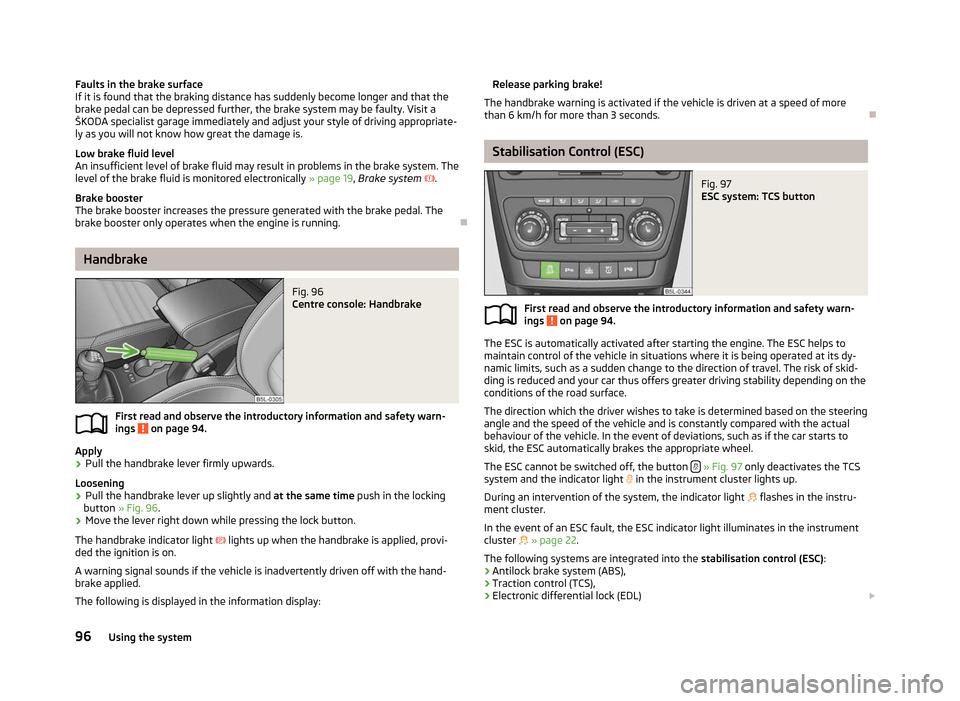
Fig. 97
ESC system: TCS button
First read and observe the introductory information and safety warn-
ings on page 94.
The ESC is automatically activated after starting the engine. The ESC helps to
maintain control of the vehicle in situations where it is being operated at its dy-
namic limits, such as a sudden change to the direction of travel. The risk of skid-
ding is reduced and your car thus offers greater driving stability depending on the
conditions of the road surface.
The direction which the driver wishes to take is determined based on the steering
angle and the speed of the vehicle and is constantly compared with the actual
behaviour of the vehicle. In the event of deviations, such as if the car starts to
skid, the ESC automatically brakes the appropriate wheel.
The ESC cannot be switched off, the button » Fig. 97 only deactivates the TCS
system and the indicator light in the instrument cluster lights up.
During an intervention of the system, the indicator light flashes in the instru-
ment cluster.
In the event of an ESC fault, the ESC indicator light illuminates in the instrument
cluster » page 22.
The following systems are integrated into the stabilisation control (ESC):
› Antilock brake system (ABS),
› Traction control (TCS),
› Electronic differential lock (EDL)
£
ä
96 Using the system