2012 SKODA SUPERB battery
[x] Cancel search: batteryPage 47 of 235

Panoramic sliding roof (Combi)
Introductory information
The panoramic sliding roof with sun screen can only be operated with the rotary
switch when the ignition is switched on » Fig. 27 on page
45. The control dial
has several positions.
The panoramic sliding roof or sun screen can still be opened, closed and tilted for
approx. 10 minutes after switching the ignition off. However, as soon as one of
the front doors is opened it is no longer possible to operate the panoramic sliding
roof and sun screen. Note
If the battery has been disconnected and reconnected, it is possible that the slid-
ing/tilting roof does not close fully. This is why the rotary switch must be set to
the switch position A
» Fig. 27
on page 45 and pressed forward for about
10 seconds. ÐUsing the system
Fig. 27
Control dial for the panoramic
sliding roof
Comfort position
› Turn the switch to position C
» Fig. 27.
Open partially
› Turn the switch to a position in area D
» Fig. 27
.
Open fully
› Turn the switch to position B
» Fig. 27 and hold it in this position (spring-ten-
sioned position). Tilting and closing
› To tilt, press the switch on the recess in the direction of the roof.
› To close, press the switch on the recess down and then push it forwards.
Closing
› Turn the switch to position A
» Fig. 27.
Force limiter
The panoramic sliding roof is fitted with a force limiter. The panoramic sliding roof
stops and moves back several centimetres when it cannot be closed because
there is something in the way (e.g. ice). The panoramic sliding roof can be fully
closed without a force limiter by pressing the switch on the recess down and then
pushing it forward until the panoramic sliding roof is fully closed » .
WARNING
Close the panoramic sliding roof carefully - risk of injury! CAUTION
During the winter it may be necessary to remove any ice and snow in the vicinity
of the panoramic sliding roof before opening it to prevent any damage to the
opening mechanism. Note
When the panoramic sliding roof is in the comfort position, the intensity of the
wind noise is reduced. Ð Sunshade open/close
Fig. 28
Buttons for sun screen
The sun screen can be closed or opened separately using the buttons » Fig. 28.£
45
Unlocking and locking
Page 48 of 235
Opening
›
Briefly press the button E
» Fig. 28
to open fully.
› Press and hold the button E
to open in the desired position. The opening proc-
ess stops when one releases the button.
Closing
› Briefly press the button F
» Fig. 28
to close fully.
› Press and hold the button F
to close in the desired position. The closing proc-
ess stops when one releases the button. ÐConvenience operation
The panoramic sliding roof and the sun screen can also be operated from the out-
side using the remote control key or when using the KESSY system with the aid
of the sensor 1
» Fig. 13 on page 32.
Closing
› Hold down the lock button
on the remote control key, or when using the
KESSY system, keep your finger on the sensor 1
» Fig. 13 on page 32
.
After releasing the button, or lifting your finger off the sensor 1
when using the
KESSY system, the closing process is immediately interrupted.
Tilting roof
› Press and hold the unlock button
on the remote control key.
When closing or tilting the panoramic sliding roof, the sun screen is closed or
opened at the same time. Note
■ The force limiter also operates for convenience closing.
■ The panoramic sliding roof can only be tilted and not opened with the conven-
ience operating feature. Ð Emergency operation
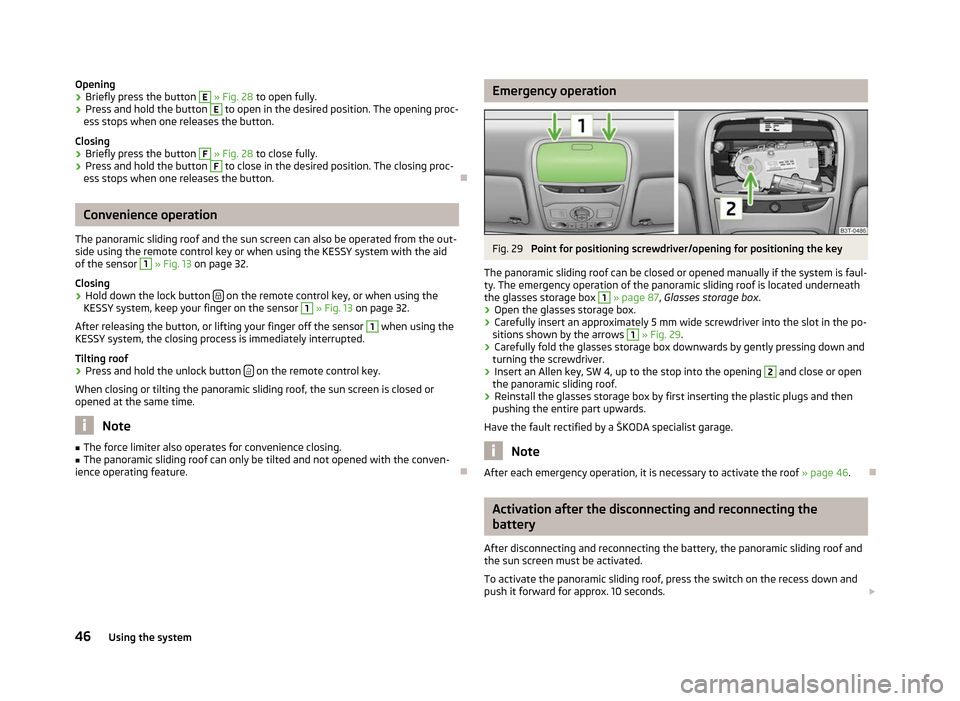
Fig. 29
Point for positioning screwdriver/opening for positioning the key
The panoramic sliding roof can be closed or opened manually if the system is faul-
ty. The emergency operation of the panoramic sliding roof is located underneath
the glasses storage box 1
» page 87,
Glasses storage box .
› Open the glasses storage box.
› Carefully insert an approximately 5 mm wide screwdriver into the slot in the po-
sitions shown by the arrows 1
» Fig. 29.
› Carefully fold the glasses storage box downwards by gently pressing down and
turning the screwdriver.
› Insert an Allen key, SW 4, up to the stop into the opening 2
and close or open
the panoramic sliding roof.
› Reinstall the glasses storage box by first inserting the plastic plugs and then
pushing the entire part upwards.
Have the fault rectified by a
ŠKODA specialist garage. Note
After each emergency operation, it is necessary to activate the roof » page 46.Ð Activation after the disconnecting and reconnecting the
battery
After disconnecting and reconnecting the battery, the panoramic sliding roof and
the sun screen must be activated.
To activate the panoramic sliding roof, press the switch on the recess down and
push it forward for approx. 10
seconds. £
46 Using the system
Page 49 of 235

To activate the sun screen, press and hold the switch F
» Fig. 28 on page 45 for
approx. 10 seconds.
If the panoramic sliding roof or sun screen is not fully closed when disconnecting
and reconnecting the battery, they must first be closed » page 45 or pushed
shut » page 45. Only then is it possible to perform the activation. Ð 47
Unlocking and locking
Page 53 of 235

Note
■ If the COMING HOME/LEAVING HOME function is switched on constantly, the
battery will be heavily discharged particularly over short distances. ■ The illumination period for the COMING HOME/LEAVING HOME function can be
changed by means of the information display. ÐAdaptive headlights (AHL)
First read and observe the introductory information and safety warn-
ings on page 48.
Switching on
›
Turn the light switch
» Fig. 31 on page 49 to position
.
The AHL system is activated if:
› the light sensor recognises a low light intensity,
› no reverse gear is engaged,
› the operation mode “tourist light” is not switched on.
The light sensor switches on the full outer illumination at low light intensity.
The AHL system makes it possible to change the length and width of illumination
from the headlights. The length and width of illumination changes automatically
in relation to the vehicle speed and the use of the windscreen wiper.
The AHL system operates in the following modes.
Out of town mode
The “out of town” mode is a basic mode. The dispersion of the cone of light in
front of the vehicle is similar to the low beam. The mode is active if none of the
following modes are active.
Rain mode
In the “rain” mode the dispersion of the cone of light in front of the vehicle is wid-
er and the width of illumination is shorter, so that during bad weather (rain) the
dazzling of the oncoming drivers can be reduced. The mode is activated at speeds
of 15 – 70 km/h and if the windscreen wipers continuously operate for a period of
time longer than 2 minutes. The mode is deactivated when dropping below or ex-
ceeding the set speed limit or if the windscreen wipers have been switched off
for a period of time longer than 8 minutes. ä
City mode
In the
“city” mode, the dispersion of the cone of light in front of the vehicle is wid-
er and the width of illumination is shorter. The aim is to illuminate also the adja-
cent footpaths, crossings, pedestrian crossings, etc. The mode is active at speeds
of 15-50 km/h.
Motorway mode
In the “motorway” mode, the dispersion of the cone of light is adapted so that it
also illuminates the left (or right) 1)
lane of the motorway, so that the driver can re-
act in time to an obstacle or any other danger. The mode is activated gradually
from a speed of 90 km/h. It is most effective at speeds above 120 km/h.
Tourist light
This mode makes it possible to drive in countries with opposing traffic system,
driving on the left/right, without dazzling the oncoming vehicles. When the “tou-
rist light” mode is active, the above-mentioned modes and the side swivel of the
headlights is deactivated.
The “tourist light” mode is activated/deactivated via the information display in
the menu:
■ Settings
■ Travel mode
■ Off
■ Switched on
Cornering lights
The cornering lights are used to illuminate the curves by means of the cone of
light swivelling together with the front headlight with Xenon lights. This function
is active when the speed of the car increases to more than 10 km/h. WARNING
If the cornering lights are defective, the headlights are automatically lowered
to the emergency position, which prevents a possible dazzling of oncoming
traffic. Thus the illuminated length of the road is shortened. Drive carefully
and visit a ŠKODA specialist garage as soon as possible. Note
The AHL system complements the functions of the fog lights with the function
CORNER » page 52 and the function of the dynamic headlight beam adjustment. Ð1)
It is valid for vehicles which are designed for driving on the left.
51
Lights and visibility
Page 57 of 235

Switching on
›
Press the switch in the area of the symbol
» Fig. 37.
Switching off
› Press the switch in the area of the symbol
O.
Operating with the door contact switch
› Place the switch into the middle position. On vehicles without an interior moni-
tor, the middle position is marked with the symbol » Fig. 37 - .
If operating lights with the door contact switch is enabled, the light will come on
when:
› the vehicle is unlocked;
› one of the doors is opened;
› or the ignition key is removed.
If operating lights with the door contact switch is enabled, the light will go off
when:
› the vehicle is locked;
› the ignition is switched on;
› about 30 seconds after all the doors have been closed.
If a door remains open, or if the switch is in the position the interior light goes
out after 10
minutes to prevent the battery from discharging. Note
■ Two diffuse lights are integrated in the front interior lighting, that illuminate
the gearshift lever and the middle of the dash panel. These are switched on auto-
matically when the parking light is activated. ■ Furthermore, after switching on the ignition when the parking lights are switch-
ed on, the door handle lighting comes on. ■ We recommend having these bulbs replaced by a ŠKODA specialist garage. Ð Front reading lights
Fig. 38
Reading lights
Front reading lights › Press switch
» Fig. 38 to switch the reading lights on or off. Ð Lit storage compartment on the front passenger side
› When opening the flap of the storage compartment on the front passenger
side the lighting in the storage compartment comes on.
› The light switches on automatically when the parking light is switched on and
goes out when the flap is closed. Ð Interior light and rear reading lights
Fig. 39
Interior light and rear reading
lights
Interior light › The rear interior light is operated together with the front interior
light » page 54. £
55
Lights and visibility
Page 58 of 235

Reading lights
›
Press switch
» Fig. 39 to switch the reading lights on or off. ÐRear interior light (Combi)
Fig. 40
Interior lights at the rear
Applies to vehicles with a panoramic sliding roof.
Switching on
› Press the cover glass in the area of the symbol
» Fig. 40.
Switching off
› Press the cover glass in the area of the symbol
O.
Operating with the door contact switch
› Place the cover glass in the middle position
. ÐFront door warning light
Fig. 41
Front door: Warning light
The warning light is located in the lower door trim panel » Fig. 41.The warning light goes on every time the door is opened. The light goes out
about 10 minutes after opening the door in order to avoid discharging the battery
of the vehicle.
There is a reflector installed on some vehicles instead of the warning light. Ð Entry lighting
The lighting is positioned on the bottom edge of the exterior mirror.
The light beam is directed towards the entry area of the front door.
The light comes on after the doors have been locked or on opening the boot lid.
The light goes out after switching on the ignition or within 30
seconds of closing
all of the doors and the boot lid.
If a door or the boot lid remains open, the light goes out within 2 minutes if the
ignition is switched off. WARNING
If the entry light is on, do not touch its cover - risk of burns! Ð Boot light
The light comes on automatically when the boot lid is opened. If the lid remains
open for more than about 10
minutes, the boot light switches off automatically. Ð
56 Using the system
Page 71 of 235

Seat heaters
Fig. 56
Regulator for heating the front seats/rear seats
The seat backrests and surfaces of the front seats and the two outer rear seats
can be heated electrically.
› The seat heaters on the driver's and front passenger's seat can be switched on
and regulated by pressing the button in the area of the symbol or »
Fig. 56 -
.
› The heaters on the left or right rear seats can be switched on and regulated by
pressing the regulator or
» Fig. 56 -
.
By pressing the button once, the heating is switched to the highest intensity -
level 3, which is indicated by all three of the indicator lights in the switch lighting
up.
With repeated pressing of the switch, the intensity of the heating is down-regula-
ted up to the switch-off. The intensity of the heating is indicated by the number
of illuminated indicator lights in the switch. WARNING
If, as an occupant, you have a subdued pain and/or temperature sensitivity,
e.g. through medication, paralysis or because of chronic illness (e.g. diabetes),
we recommend not to use the seat heating. This can lead to burns on the
back, the posterior and the legs which are difficult to heal. If the seat heating
is used, we recommend to make regular breaks in your journey when driving
long distances, so that the body can recuperate from the stress of the jour-
ney. Please consult your doctor, who can evaluate your specific condition. CAUTION
■ Do not kneel on the seats or otherwise apply pressure at specific points to
avoid damaging the heating elements for the seat heaters.
■ Do not use the seat heaters if the seats are not occupied by persons or if ob-
jects, such as a child seat, bag, etc., are fastened or stored on them. A fault of the
heating elements in the seat heating can occur.
■ Do not clean the seats using moisture » page 172, Fabric covers on electrically
heated seats. Note
■ The seat heating should only be switched on when the engine is running. This
has a significant effect of saving on the battery capacity. ■ If the on-board voltage drops, the seat heating is switched off automatically, in
order to provide sufficient electrical energy for the engine control » page 186.
■ If the heaters for the rear seats are set to the highest intensity - level 3, they
are automatically switched over to level 2 after 10 minutes (two indicator lights
are illuminated on the switch). Ð Ventilated front seats
Fig. 57
Rocker switch for the seat venti-
lation
Heat and condensation can be removed from the seat cushions and seat backr-
ests on the front seats.
The ventilation is operated using the rocker switch » Fig. 57 in the front part of
the seat cushion, in front of the seat control elements for the electric front seat
adjustment.
› Thew ventilation of the front seat is switch on by toggling the rocker switch in-
to position 1 - lower intensity, or position 2 - higher intensity.£
69
Seats and Stowage
Page 72 of 235

›
To switch off the ventilation shift the rocker switch into the horizontal position
. WARNING
If you or a passenger have limited pain and/or temperature sensitivity, e.g.
caused by medication, paralysis or because of chronic illness (e.g. diabetes),
we recommend that you consult your physician before using the ventilated
front seat. CAUTION
■ Do not kneel on the seats or otherwise apply pressure at specific points to
avoid damaging the electronic seat elements or the fan.
■ The fan is located underneath the front seat cushion. Do not place any objects
in this area - it may damage the fan.
■ Do not clean the seats using moisture » page 172, Fabric covers on electrically
heated seats. Note
■ The ventilation should only be switched on when the engine is running. This
has a significant effect of saving on the battery capacity. ■ We do not recommend using the front seat ventilation and heating at the same
time. Using the ventilation to cool the seat surface considerably reduces the
heating capacity, at the same time affecting the ability of the control unit to de-
tect the right seat surface temperature. ÐHead restraints
ä
Introduction
This chapter contains information on the following subjects:
Adjusting, removing and installing a head restraint 70
Middle rear head restraint 71
Best protection is achieved if the top edge of the head restraint is at the same
level as the upper part of your head.
The position of the front and rear outer head restraints is adjustable in height.
The middle rear head restraint is adjustable in two positions. The head restraints must be adjusted to match the size of the seat occupant. Cor-
rectly adjusted head restraints together with the seat belts offer effective protec-
tion for the occupants » page 141, Correct seated position . WARNING
■ The head restraints must be correctly adjusted in order to offer effective
protection for the occupants in the event of an accident.
■ Never drive with the head restraints removed - risk of injury.
■ If the rear seats are occupied, the rear head restraint must not be in the
lower position. Ð Adjusting, removing and installing a head restraint
Fig. 58
Head restraint: adjusting/removing
First read and observe the introductory information and safety warn-
ings on page 70.
Adjusting the height of a head restraint
› Grasp the side of the head restraint with both hands and push it upwards as
required » Fig. 58 - .
› To move the head restraint downwards, press and hold the safety but-
ton » Fig. 58 - with one hand and press the head restraint downwards with
the other hand.
Removing and installing a head restraint
› Pull the head restraint up out of the seat backrest as far as the stop (for the
rear head restraints fold the seat backrest forward).
› Press the locking button in direction of the arrow
» Fig. 58 - and pull the
head restraint out. £
ä
70 Using the system