2012 SKODA SUPERB key battery
[x] Cancel search: key batteryPage 48 of 235
Opening
›
Briefly press the button E
» Fig. 28
to open fully.
› Press and hold the button E
to open in the desired position. The opening proc-
ess stops when one releases the button.
Closing
› Briefly press the button F
» Fig. 28
to close fully.
› Press and hold the button F
to close in the desired position. The closing proc-
ess stops when one releases the button. ÐConvenience operation
The panoramic sliding roof and the sun screen can also be operated from the out-
side using the remote control key or when using the KESSY system with the aid
of the sensor 1
» Fig. 13 on page 32.
Closing
› Hold down the lock button
on the remote control key, or when using the
KESSY system, keep your finger on the sensor 1
» Fig. 13 on page 32
.
After releasing the button, or lifting your finger off the sensor 1
when using the
KESSY system, the closing process is immediately interrupted.
Tilting roof
› Press and hold the unlock button
on the remote control key.
When closing or tilting the panoramic sliding roof, the sun screen is closed or
opened at the same time. Note
■ The force limiter also operates for convenience closing.
■ The panoramic sliding roof can only be tilted and not opened with the conven-
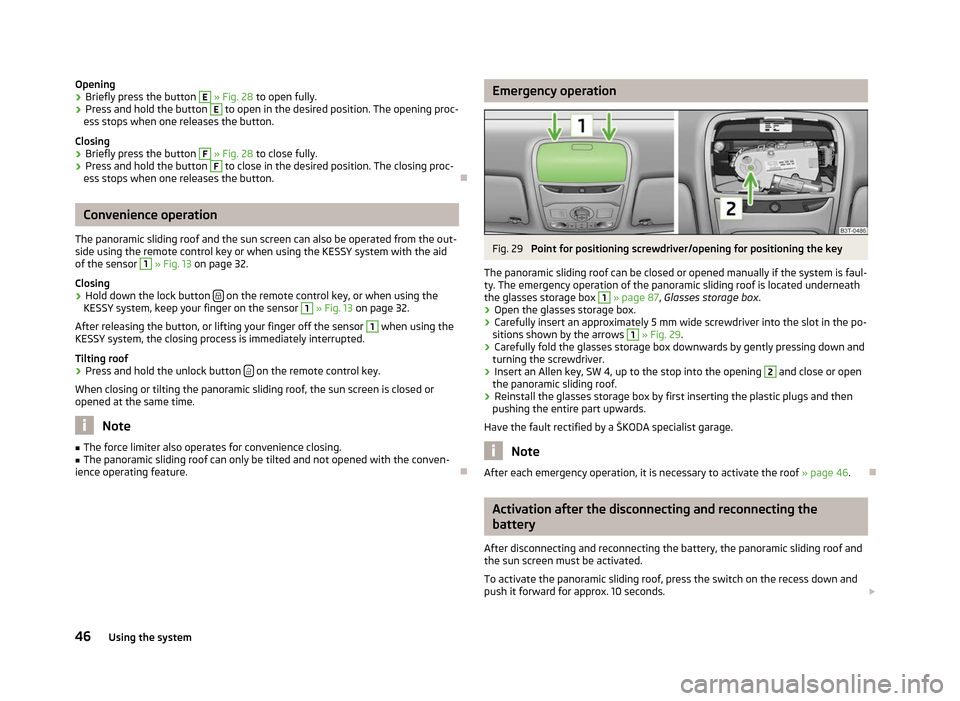
ience operating feature. Ð Emergency operation
Fig. 29
Point for positioning screwdriver/opening for positioning the key
The panoramic sliding roof can be closed or opened manually if the system is faul-
ty. The emergency operation of the panoramic sliding roof is located underneath
the glasses storage box 1
» page 87,
Glasses storage box .
› Open the glasses storage box.
› Carefully insert an approximately 5 mm wide screwdriver into the slot in the po-
sitions shown by the arrows 1
» Fig. 29.
› Carefully fold the glasses storage box downwards by gently pressing down and
turning the screwdriver.
› Insert an Allen key, SW 4, up to the stop into the opening 2
and close or open
the panoramic sliding roof.
› Reinstall the glasses storage box by first inserting the plastic plugs and then
pushing the entire part upwards.
Have the fault rectified by a
ŠKODA specialist garage. Note
After each emergency operation, it is necessary to activate the roof » page 46.Ð Activation after the disconnecting and reconnecting the
battery
After disconnecting and reconnecting the battery, the panoramic sliding roof and
the sun screen must be activated.
To activate the panoramic sliding roof, press the switch on the recess down and
push it forward for approx. 10
seconds. £
46 Using the system
Page 57 of 235

Switching on
›
Press the switch in the area of the symbol
» Fig. 37.
Switching off
› Press the switch in the area of the symbol
O.
Operating with the door contact switch
› Place the switch into the middle position. On vehicles without an interior moni-
tor, the middle position is marked with the symbol » Fig. 37 - .
If operating lights with the door contact switch is enabled, the light will come on
when:
› the vehicle is unlocked;
› one of the doors is opened;
› or the ignition key is removed.
If operating lights with the door contact switch is enabled, the light will go off
when:
› the vehicle is locked;
› the ignition is switched on;
› about 30 seconds after all the doors have been closed.
If a door remains open, or if the switch is in the position the interior light goes
out after 10
minutes to prevent the battery from discharging. Note
■ Two diffuse lights are integrated in the front interior lighting, that illuminate
the gearshift lever and the middle of the dash panel. These are switched on auto-
matically when the parking light is activated. ■ Furthermore, after switching on the ignition when the parking lights are switch-
ed on, the door handle lighting comes on. ■ We recommend having these bulbs replaced by a ŠKODA specialist garage. Ð Front reading lights
Fig. 38
Reading lights
Front reading lights › Press switch
» Fig. 38 to switch the reading lights on or off. Ð Lit storage compartment on the front passenger side
› When opening the flap of the storage compartment on the front passenger
side the lighting in the storage compartment comes on.
› The light switches on automatically when the parking light is switched on and
goes out when the flap is closed. Ð Interior light and rear reading lights
Fig. 39
Interior light and rear reading
lights
Interior light › The rear interior light is operated together with the front interior
light » page 54. £
55
Lights and visibility
Page 104 of 235

If the battery is properly charged, the effective range is up to 600
m. To switch
on/off the auxiliary heating, hold the radio remote control vertically with the an-
tenna A
» Fig. 111 facing upwards. The antenna must not be covered with the fin-
gers or the palm of the hand during this process. Obstacles between the radio re-
mote control and the vehicle, bad weather conditions and a weaker battery can
clearly reduce the range.
The auxiliary heating can only be switched on/off safely using the radio remote
control, if the distance between the radio remote control and the vehicle is at
least 2 m.
Warning light in the radio remote control
The indicator light in the radio remote control C
» Fig. 111 indicates after a key-
stroke if the remote control signal was received by the auxiliary heating and if the
battery is adequately charged.
Display indicator light Importance
Lights up green for 2 seconds. The auxiliary heating was switched on.
Lights up red for 2 seconds. The auxiliary heating was switched off.
Slowly flashes green for 2 seconds. The ignition signal was not received.
Quickly flashes green for 2 seconds. The auxiliary heating is blocked, e. g
because the tank is nearly empty or
there is a fault in the auxiliary heating.
Flashes red for 2 seconds. The switch off signal was not received.
Lights up orange for 2 seconds, then
green or red. The battery is weak, however the
switching on or off signal was received.
Lights up orange for 2 seconds, then
flashes green or red. The battery is weak, however the
switching on or off signal was not re-
ceived.
Flashes orange for 5 seconds. The battery is discharged, however the
switching on or off signal was not re-
ceived.CAUTION
The radio remote control comprises electronic components and must therefore be
protected against water, severe impacts and direct sunlight. Ð Changing the battery of the radio remote control
First read and observe the introductory information and safety warn-
ings on page 100.
If the indicator light on the radio remote control indicates a weak or discharged
battery,
C
» Fig. 111 on page 101, it must be replaced. The battery is located under
a cover B
» Fig. 111 on page 101 on the back of the radio remote control.
› Insert a flat, blunt object, such as a coin, into the gap on the battery cover, turn
the cover in the opposite direction of the arrow up to the mark and unlock it.
› Change the battery, replace the battery cover and lock it by moving it in the di-
rection of the arrow. For the sake of the environment
Dispose of the old battery in accordance with environmental regulations. Note
■ Pay attention to the correct polarity when changing the battery.
■ The replacement battery must have the same specification as the original bat-
tery. Ð ä
102 Using the system
Page 105 of 235

Starting-off and Driving
Starting and stopping the engine
ä
Introduction
This chapter contains information on the following subjects:
Adjusting the steering wheel position 104
Electromechanical power steering 104
Electronic immobiliser 104
Ignition lock 105
Starting engine 105
Switching the engine off 105
Starting and stopping the engine on vehicles with the KESSY system » page 105,
KESSY system. WARNING
■ Never adjust the steering wheel when the vehicle is moving only when the
vehicle is stationary! ■ Maintain a distance of 25 cm 1
to the steering wheel
» Fig. 112 on page 104
- . Not maintaining this minimum distance will mean that the airbag system
will not be able to properly protect you - hazard!
■ The lever for adjusting the steering wheel must be locked whilst driving so
that the position of the steering wheel cannot accidently change during the
journey - risk of accident!
■ If the steering wheel is adjusted further towards the head, the protection
provided by the driver airbag in the event of an accident is reduced. Check
that the steering wheel is aligned to the chest. ■ When driving, hold the steering wheel with both hands firmly on the outer
edge in the 9 o'clock and 3 o'clock position. Never hold the steering wheel in
the 12 o'clock position or in any other way (e.g. in the middle or inner edge of
the steering wheel). In such cases, you could severely injure the arms, hands
and head when the driver airbag is deployed. WARNING (Continued)
■ When driving, the ignition key must always be in the position 2
» Fig. 113
on
page 105 (ignition switched on) without the engine running. This position is
indicated by the indicator lights coming on. If this is not the case, it could re-
sult in unexpected locking of the steering wheel - risk of accident! ■ Only pull the ignition key from the ignition lock when the vehicle has come
to a complete stop (by applying the handbrake). Otherwise the steering wheel
could block - risk of accident! ■ When leaving the vehicle, the ignition must always be removed. This is par-
ticularly important if children are left in the vehicle. Otherwise the children
could, for example, start the engine - risk of accident or injury! ■ Never leave the engine running in unventilated or closed rooms. The ex-
haust gases of the engine contain besides the odorless and colourless carbon
monoxide a poisonous gas - hazard! Carbon monoxide can cause unconscious-
ness and death. ■ Never leave the vehicle unattended with the engine running.
■ Never switch off the engine before the vehicle is stationary - risk of acci-
dent! CAUTION
■ The starter may only be operated (ignition key position 3
» Fig. 113 on
page 105), if the engine is not running. The starter or engine can be damaged if
the starter is activated when the engine is running. ■ Let go of the ignition key as soon as the engine starts otherwise the starter
could be damaged. ■ Avoid high engine revolutions, full throttle and high engine loads as long as the
engine has not yet reached its operating temperature - risk of damaging the en-
gine!
■ Do not tow start the engine - danger of damaging the engine! On vehicles with
a catalytic converter, unburnt fuel may get into the catalytic converter where it
may ignite. This in turn may damage the catalytic converter. The battery from an-
other vehicle can be used as a jump-start aid » page 202, Jump-starting.
■ Do not switch the engine off immediately at the end of your journey after the
engine has been operated over a prolonged period at high loads but leave it to
run at an idling speed for about 1
minute. This prevents any possible accumulation
of heat when the engine is switched off. £
103
Starting-off and Driving
Page 107 of 235

Ignition lock
Fig. 113
Positions of the vehicle key in
the ignition lock
First read and observe the introductory information and safety warn-
ings on page 103.
Petrol engines
Ignition switched off, engine off, the steering can be locked
Ignition switched on
Starting engine
Diesel engines Fuel supply interrupted, ignition switched off, engine switched off, the steer-
ing can be locked.
Heating glow plugs on, ignition switched on
Starting engine
To lock the steering , with the ignition key withdrawn, turn the steering wheel
until the steering locking pin engages audibly.
If the steering is locked and the key cannot or can only be turned with difficulty
into the position 2
» Fig. 113
, move the steering wheel back and forth and the
steering lock will unlock. ÐStarting engine
First read and observe the introductory information and safety warn-
ings on page 103.
Vehicles with a diesel engine are equipped with a glow plug system. The pre-
glow indicator light comes on after the ignition has been switched on. The en-
gine should be started immediately after the preglow indicator light goes out. ä 1
2
3
1
2
3
ä You should not switch on any major electrical components during the heating
period otherwise the vehicle battery will be drained unnecessarily.
Procedure for starting the engine
› Before starting the engine, place the gearshift lever into neutral or place the se-
lector lever in the position P or N and firmly put on the handbrake.
› Fully depress and hold the clutch pedal, switch on the ignition 2
» Fig. 113 on
page 105 and start 3
- do not operate the accelerator. Depress the clutch pedal
until the engine starts.
› Let go of the key as soon as the engine starts. After letting go, the vehicle key
will return to position 2
.
› If the engine does not start within 10
seconds, abort the start-up process and
turn the key to position 1
. Repeat the start-up process after approx. half a mi-
nute.
› Release the handbrake before starting off.
The engine will not start if the clutch pedal is not depressed.
The following is displayed in the information display:
Depress clutch to start!
The following is shown in the information display of the information cluster:
CLUTCH Ð Switching the engine off
First read and observe the introductory information and safety warn-
ings on page 103.
Switch off the engine by turning the ignition key into position 1
» Fig. 113 on
page 105. Ð KESSY system
ä
Introduction
This chapter contains information on the following subjects:
Unlocking and locking the steering 106
Switching on the ignition 107
Switching off the ignition 107
£
ä
105
Starting-off and Driving
Page 121 of 235

Conditions for an automatic restart (start phase):
›
The clutch pedal is depressed.
› The max./min. temperature is set.
› The defrost function for the windscreen is switched on.
› A high blower stage has been selected.
› The START STOP
button is pressed.
Conditions for an automatic restart without driver intervention: › The vehicle moves at a speed of more than 3 km/h.
› The difference between the outdoor- and the set temperature in the interior is
too great.
› The charge state of the vehicle battery is not sufficient.
› There is insufficient pressure in the braking system.
If the driver's seat belt is removed for more than 30 seconds or the driver's door is
opened during stop mode, the engine must be started manually with the key. The
following messages in the instrument cluster display must be observed.
Messages in the instrument cluster display (valid for vehicles without
Information display)
ERROR START STOP Error in the START-STOP system
START STOP NOT POSSIBLE Automatic engine shut down is not
possible.
START STOP ACTIVE Automatic engine shut down (stop
phase)
SWITCH OFF IGNITION Switch off the ignition.
START MANUALLY Start the engine manually.WARNING
■ The brake servo unit and power steering only operate if the engine is run-
ning.
■ Never let the vehicle roll with the engine switched off. CAUTION
If the START-STOP system is used at very high outside temperatures over a very
long period of time, the vehicle battery can be damaged. Note
■ Changes to the outdoor temperature can have an effect on the internal temper-
ature of the vehicle battery even after several hours. If the vehicle remains out-
doors for a long time in minus temperatures or in direct sunlight, it can take sev-
eral hours until the internal temperature of the vehicle battery reaches a suitable
temperature for proper operation of the
START STOP system.
■ If the Climatronic is running in automatic mode, under certain conditions, the
engine may not switch off automatically. Ð Fatigue detection system (break recommendation)
The fatigue detection system advises the driver on the basis of information about
the steering behaviour, to take a break from driving. The system recommends a
break at speeds of 65 km/h to 200
km/h.
After the ignition has been switched on, the system evaluates the steering be-
haviour for 15 minutes. This baseline analysis is constantly compared with the
current steering behaviour. If the system detects deviations from normal steering
behaviour due to possible fatigue of the driver, it recommends to take a break
from driving.
The symbol will appear in the information display for a few seconds and the fol-
lowing message will be displayed:
Break recommended.
An audible signal is also emitted.
The system deletes the stored baseline analysis if one of the following condi-
tions is met:
› the vehicle is stopped and the ignition is turned off,
› the seat belt taken off and the driver's door is opened,
› the vehicle is stopped for more than 15 minutes.
If none of the conditions for deleting the stored baseline analysis is met, the sys-
tem will recommend a driving break again.
Switching on/off
The system can be switched on/off in the main menu of the information dis-
play » page 16 in the menu item Assistants. £
119
Starting-off and Driving
Page 230 of 235

Lights
Indicator lights 18
switching on and off 49
Loads 216
Locking Remote control 31
Locking and unlocking from the inside 30
M
MAXI DOT 15
Main menu 16
Settings 16
Mirror Additional interior mirror 63
Automatic dimming interior mirror 63
Exterior mirror 64
Manual dimming interior mirror 63
Vanity 58
Mobile phone 126, 128, 131
Connecting to the hands-free system 129, 132
Multifunction display Functions 12
Memory 12
Operation 13
Multimedia 137
AUX-IN 138
MDI 138
N
Net partition 79
O
Oil refer to Engine oil 178
Onboard computer see Multifunction display 12Operation in winter
De-icing windows 170
Diesel fuel 176
Vehicle battery 185
Outside temperature 13
Overview Engine compartment 178
Indicator lights 18
P
Paint see Paint damage 169
Paint damage 169
Panoramic sliding roof (Combi) Closing 45
Opening 45
Sun screen 45
Parking Park assist 113
Parking aid 112
Parking ticket holder 91
Passive Safety 140
Pedals 112
Periodic wiping 60
Petrol refer to Fuel 175
Polishing the paintwork refer to Taking care of your vehicle 169
Power steering 104
Power windows Button in the front passenger door 42
Button in the rear doors 42
Operational faults 43
Preservation refer to Taking care of your vehicle 169
R
Radiator fan 181Radio reception
Aerial 170
Functional fault 170
Raise vehicle 199
Rear mirror Automatic dimming interior mirror 63
Exterior mirror 64
Manual dimming interior mirror 63
Rear window - heating 58
Recirculated air mode Climatronic 98
Manual air conditioning system 96
Recommended gear 11
Refuelling 174
Fuel 174
Regulation Headlight beam 53
Remote control 30
Synchronisation process 32
Remote control key Replacing the battery 27
Removable lamp (Combi) 57
Replacement of parts 194
Replacing Bulbs 210
Fuses 207
Vehicle battery 186
Windscreen wiper blade 62
Replenishing Coolant 180
Engine oil 179
Windscreen washer fluid 182
Roof luggage rack Attachment points 82
Roof rack system Roof load 82
Running in Brake pads 158
Engine 158
228 Index
Page 232 of 235

U
Underbody protection 171
Unlocking Remote control 31
Uphill start assist 110
V
Vehicle battery Automatic load deactivation 186
Charging 185
Checking the electrolyte level 185
Operation in winter 185
Replacing 186
Safety instructions 182
Vehicle condition see Auto Check Control 18
Vehicle data sticker 216
Vehicle dimensions 218
Vehicle key 27
Vehicle tool kit 196
Visors 58
W
Warning symbols see Indicator lights 18
Warning triangle 195
Washing 167
Automatic car wash system 168
by hand 168
Chrome parts 169
High-pressure cleaner 168
Weights 216
Wheel bolts Anti-theft wheel bolt 199
Caps 191
Loosening and tightening 198
Wheels 187Wheels and tyres
Changing a wheel 196
Full wheel trim 191
General information 187
Handling wheels and tyres 189
new tyres 189
Service life of tyres 188
Snow chains 193
Spare wheel 190
Wheel bolts 193
Winter tyres 193
Window convenience operation 42
Windows De-icing 170
See electric power windows 40
Windscreen heating 58
see Radio reception 170
Windscreen washer fluid Checking 182
Indicator light 25
Replenishing 182
Winter 182
Windscreen washer system 182
Windscreen wipers 60
Windscreen wiper Automatic rear window wiper (Combi) 61
Replacing the rear window wiper blade 62
Replacing the windscreen wiper blades 62
Windscreen wipers Activating 60
Cleaning the windscreen wiper blades 62
Windscreen washer fluid 182
Winter operation Snow chains 193
Winter tyres see Wheels and tyres 193
230 Index