2012 SKODA CITIGO turn signal
[x] Cancel search: turn signalPage 9 of 157

Using the system
Cockpit
Overview
Electrical power window in the driver's door 26
Central locking system 23
Electric exterior mirror adjustment 36
Air outlet vents 52
Lever for the multifunction switch:
› Turn signal lights and main beam, headlight flasher 31
› Speed regulating system 63
Steering wheel:
› With horn
› With driver’s front airbag 83
Instrument cluster: Instruments and warning lights 8
Lever for the multifunction switch:
› Multifunction display 11
› Windscreen wiper and wash system 33
Regulator for left seat heating 39
Depending on equipment fitted:
› Operating controls for the heating 52
› Operating controls for the air conditioning system 53
Socket for the cradle for the multifunction device Move & Fun 72
Warning light for the deactivated front seat passenger airbag 86
Switch for hazard warning lights 31
Storage compartment on the front passenger side 48
Front passenger airbag 83
Air outlet vents 52
Light switch 29
Bonnet release lever 108
Regulator for headlamp beam adjustment for the headlights 30
Lever for adjusting the steering wheel 57
Ignition lock 581
2
3
4
5
6
7
8
9
10
11
12
13
14
15
16
17
18
19
20
21 Radio
Button for
City Safe Drive system 66
Depending on equipment fitted:
› Gearshift lever (manual gearbox) 61
› Selector lever (automated gearbox) 70
Storage compartment 49
Regulator for right seat heating 39
Note
■ Cars with factory-fitted radio are supplied with separate instructions for operat-
ing such equipment. ■ The arrangement of the controls and switches and the location of some items
on right-hand drive models may differ from that shown in » Fig. 1. The symbols on
the controls and switches are the same as for left-hand drive models. Ð 22
23
24
25
26
7
Cockpit
Page 16 of 157

If you wish to change the set speed limit, it is changed in 5 km/h intervals (e.g. the
accepted speed of 47
km/h increases to 50 km/h or decreases to 45 km/h).
› Confirm the speed limit that was set by pressing button B
again, or wait ap-
prox. 5 seconds until the setting is saved automatically (the value stops flash-
ing).
Change or delete speed limit
› With button A
» Fig. 7
on page 12, choose the menu point Warning against ex-
cessive speeds .
› Pressing the button B
deletes the speed limit.
› Pressing the button B
activates the ability to change the speed limit.
If the set speed limit is exceeded, an audible signal will sound as a warning. At
the same time the message Warning against excessive speeds appears on the
display with the set limit value.
The set speed limit value remains stored even after switching off the ignition. ÐWarning lights
Overview
The warning lights show certain functions/faults and may be accompanied by au-
dible signals.
Warning lights in the instrument cluster
Handbrake
» page 15
Brake system
» page 15
Seat belt warning light
» page 15
Generator
» page 15
Engine oil pressure
» page 16
Coolant temperature/coolant level
» page 16
Electromechanical power steering
» page 16
Electronic Stability Control (ESC)
» page 17
Traction control (TC)
» page 17
Antilock brake system (ABS)
» page 17
Rear fog light
» page 17
Exhaust inspection system
» page 17
EPC fault light (petrol engine)
» page 17
Fuel reserve
» page 9
Airbag system
» page 18
Automatic gearbox
» page 18
Turn signal (left/right)
» page 18
Speed regulating system
» page 18
Main beam
» page 18 Warning lights in the instrument cluster display
Seatbelt fastened - rear seat
» page 19
Seatbelt not fastened - rear seat
City Safe Drive system
» page 19£14
Using the system
Page 20 of 157

Airbag system
Monitoring the airbag system
The warning light comes on for a few seconds when the ignition is switched
on.
There is a fault in the system if the warning light does not go out or flashes while
driving » . This also applies if the warning light does not come on when the ig-
nition is switched on.
The functionality of the airbag system is also monitored electronically when one
airbag has been switched off.
The following situation applies if the front or side airbag or belt tensioner have
been switched off using the vehicle system tester:
› The warning light
lights up for around 4
seconds after switching on the igni-
tion and then flashes approximately another 12 seconds in 2 second intervals.
The following situation applies if the airbag has been switched off using the
key switch for the airbag in the front passenger storage compartment:
› The warning light
comes on for a few seconds when the ignition is switched
on;
› The deactivated airbag is indicated by the illumination of the warning light
in the middle of the dash panel » page 86, Key switch for
the front seat passenger airbag. WARNING
If there is a fault, have the airbag system checked immediately by a ŠKODA
specialist garage. Otherwise, there is a risk of the airbag not being activated in
the event of an accident. ÐAutomatic gearbox
Warning light
Do not continue your journey if the warning light lights up and an acoustic sig-
nal sounds. Switch off the engine and seek assistance from a
ŠKODA specialist
garage.
Warning light
If the warning light lights up and no gear can be selected, switch the ignition
on and off. If the warning light lights up after you switch on the ignition, seek as-
sistance from a ŠKODA specialist garage. If the warning light
or warning light lights up and an acoustic signal sounds,
this means that the automatic gearbox has overheated. Stop and allow the trans-
mission to cool down or drive more quickly than 20
km/h (12 mph).
If the warning light lights up again, switch off the vehicle, shut off the engine
and allow the gearbox to cool down.
Warning light
If the warning light lights up, operate the brake pedal.
Warning light
If the warning light lights up, operate the handbrake.
Further information » page 69, Automatic gearbox AGB . WARNING
If you have to stop for technical reasons, then park the vehicle at a safe dis-
tance from the traffic, switch off the engine and activate the hazard warning
light system » page 31. Ð Turn signal system
Either the left or right warning light flashes depending on the position of the
turn signal lever.
If a turn signal light fails, the warning light flashes at twice its normal rate.
Switching off the hazard warning light system is switched on will cause all of the
turn signal lights as well as both warning lights to flash.
Further information » page 31, Turn signal and main beam lever .Ð Speed regulating system
The warning light comes on when the cruise control is operating » page 63.Ð Main beam
The warning light comes on when the main beam or headlight flasher are se-
lected » page 29. Ð
18 Using the system
Page 26 of 157

■
The battery must be replaced if the central locking or anti-theft alarm system
does react to the remote control at less than 3
metres away » page 20.
■ If the driver door is open, the vehicle cannot be locked using the remote control
key. ÐUnlocking/locking
Fig. 14
Remote control key
Unlocking the vehicle
› Press the button 1
» Fig. 14.
Locking the vehicle
› Press the button 3
» Fig. 14.
Deactivating the safe securing system
› Press the button 3
» Fig. 14 twice within 2
seconds. Further informa-
tion » page 22.
Unlocking the luggage compartment lid
› Press the button 2
» Fig. 14. Further information
» page 25.
Folding out the key bit
› Press the button 4
» Fig. 14.
Folding in the key bit
› Press the button 4
» Fig. 14 and fold in the key bit.
Unlocking
The turn signal lights flash twice as confirmation that the vehicle has been un-
locked. If the vehicle is unlocked using button 1
and none of the doors or the
luggage compartment lid are opened within the next 30 seconds, the vehicle is
automatically locked again and the safe securing system is reactivated. This func-
tion is intended to prevent the car being unlocked unintentionally. Locking
The turn signal lights flash once to confirm that the vehicle has been correctly
locked.
If the doors or the luggage compartment lid remain open after the vehicle has
been locked, the turn signal lights do not flash until they have been closed.
WARNING
If the car is locked from the outside and the safe securing system is activated,
there must not be any person in the car as it is then not possible to open ei-
ther a door or a window from the inside. The locked doors make it more diffi-
cult for rescuers to get into the vehicle in an emergency – hazard! Note
■ Only operate the remote control when the doors and luggage compartment lid
are closed and the vehicle is in your line of sight. ■ To avoid the car being locked inadvertently once in the car, the lock button of the remote control must not be pressed before the key is inserted into the ig-
nition lock. Should this happen, press the unlock button
of the remote control.
Ð Synchronization
If the vehicle cannot be unlocked by actuating the remote control system then it
is possible that the code in the key and the control unit in the vehicle are no lon-
ger synchronised. This can occur when the buttons on the radio-operated key are
actuated a number of times outside of the operative range of the equipment or
the battery on the remote control was replaced.
This means it is necessary to synchronise the code as follows:
› press any button on the remote control key;
› pressing of the button means that the door will unlock with the key within 1 mi-
nute. Ð
24 Using the system
Page 31 of 157

Lights and visibility
Lights
ä
Introduction
This chapter contains information on the following subjects:
Switching lights on and off 29
DAY LIGHT function (Daytime running light) 30
Fog lights 30
Rear fog light 30
Parking light 30
Headlight beam adjustment 30
Switches for the hazard warning light system 31
Turn signal and main beam lever 31
On models fitted with right-hand steering the position of certain switches differs
from that shown in » Fig. 21 on page
29. The symbols which mark the switch po-
sitions are identical, however. WARNING
Never drive with only the side lights on! The side lights are not bright enough
to light up the road sufficiently in front of you or to be seen by other oncom-
ing traffic. Therefore always switch on the low beam when it is dark or if visi-
bility is poor. CAUTION
■ The activation of the lights should only be undertaken in accordance with na-
tional legal requirements.
■ The driver is always responsible for the correct settings and use of the lights. Note
■ If the light switch is in the position , the ignition key is removed and the driv-
er's door is open, an audible warning signal will sound. The audible warning signal
is switched off by means of the door contact when the driver's door is closed (ig-
nition off), however, the side lights remain on to illuminate the parked vehicle if
necessary. ■ The instruments are also illuminated when the side light or low beam light is
switched on. ■ In the event of cool or humid weather conditions, the headlights can be misted
up from inside. The temperature difference between interior and external area of
the headlight lenses is decisive. When the driving lights are switched on, the light
outlet surfaces are free from mist after a short period, although the headlight
lenses may still be misted up in the peripheral areas. It also concerns reverse light
and turn signal lights. This mist has no influence on the life of the lighting system. Ð Switching lights on and off
Fig. 21
Dash panel: Light switch
First read and observe the introductory information and safety warn-
ings on page 29.
Switching on the parking light
›
Turn the light switch
» Fig. 21 to position .
Switching on the low beam and main beam
› Turn the light switch
» Fig. 21 to position .
› Press the main beam lever forward in order to switch on the main
beam » Fig. 25 on page 31
.
Switching off lights (except daytime running lights)
› Turn the light switch
» Fig. 21 to position 0. Ð
ä
29
Lights and visibility
Page 33 of 157

Settings
The positions correspond approximately to the following car load.
Front seats occupied, luggage compartment empty.
All seats occupied, luggage compartment empty.
All seats occupied, luggage compartment loaded.
Driver seat occupied, luggage compartment loaded. CAUTION
Always adjust the headlight range adjustment in such a way that:
■ it does not dazzle other road users, especially oncoming traffic;
■ and the range is sufficient for safe driving. Note
We recommend you adjust the headlight beam when the low beam is switched
on. ÐSwitches for the hazard warning light system
Fig. 24
Dash panel: Switch for hazard
warning lights
First read and observe the introductory information and safety warn-
ings on page 29.
›
Press switch
» Fig. 24 to switch the hazard warning light system on or off.
All the turn signal lights on the vehicle flash at the same time when the hazard
warning light system is switched on. The warning light for the turn signals and
the warning light in the switch also flash at the same time. The hazard warning
light system can also be operated if the ignition is switched off. -
1
2
3
ä The hazard warning light system is switched on automatically if an airbag is de-
ployed in the event of an accident. Note
The hazard warning light system must be switched on if, for example:
■ you encounter a traffic congestion;
■ your vehicle breaks down or an emergency situation occurs. Ð Turn signal and main beam lever
Fig. 25
Turn signal and main beam lever
First read and observe the introductory information and safety warn-
ings on page 29.
The parking light and headlight flasher are also operated with the turn signal and
main beam lever.
Right and left turn signal light
› Push the lever
» Fig. 25 upwards A
or downwards B
.
› If you only wish to flash three times (the "convenience turn signal"), briefly
push the lever to the upper or lower pressure point and release again.
› Turn signal for changing lanes – to only flash briefly, move the lever up or down
to the pressure point and hold it in this position.
Main beam
› Switch on the low beam » page 29.
› Press the lever
» Fig. 25 in the direction of arrow C
.
› The main beam is switched off by pulling the lever into the initial position in the
direction of arrow D
.
£
ä
31
Lights and visibility
Page 34 of 157

Headlight flasher
› Pull the lever towards the steering wheel (spring-tensioned position) in the di-
rection of arrow D
» Fig. 25 - the main beam and warning light
in the instru-
ment cluster come on. CAUTION
Only use the main beam or the headlight flasher if other road users will not be
dazzled. Note
■ The turn signal system only operates when the ignition is switched on. The cor-
responding warning light or in the instrument cluster also flashes.
■ The turn signal is automatically cancelled after negotiating a curve.
■ An acoustic warning signal will sound when the driver's door is opened if the
lever is not in the middle position after removing the ignition key from the igni-
tion lock. The acoustic warning signal will stop just as soon as the driver's door is
closed. ÐInterior light
Interior light - Version 1
Fig. 26
Interior lighting – version 1
Switching on
› Press the switch into position
» Fig. 26.
Switching off
› Press the switch into position
O » Fig. 26. Operating with the door contact switch
› Press the switch into position
» Fig. 26.
If operating lights with the door contact switch is enabled, the light will come on
when:
› the vehicle is unlocked;
› one of the doors is opened;
› or the ignition key is removed.
If operating lights with the door contact switch is enabled, the light will go off
when:
› the vehicle is locked;
› the ignition is switched on;
› a few seconds after all the doors have been closed.
If a door remains open, or if the switch is in the position the interior light goes
out after 10
minutes to prevent the battery from discharging. Ð Interior light - Version 2
Fig. 27
Interior lighting – version 2
Switching on
› Turn the switch A
» Fig. 27
into the position .
Switching off
› Turn the switch A
» Fig. 27
into the 0 position.
Operating with the door contact switch
› Press the switch A
»
Fig. 27 into the middle (horizontal) position
.
Otherwise, the same principles apply as for version 1.
Reading lights
› Press switch B
» Fig. 27 to switch the reading lights on or off.
Ð
32 Using the system
Page 56 of 157
Using the system
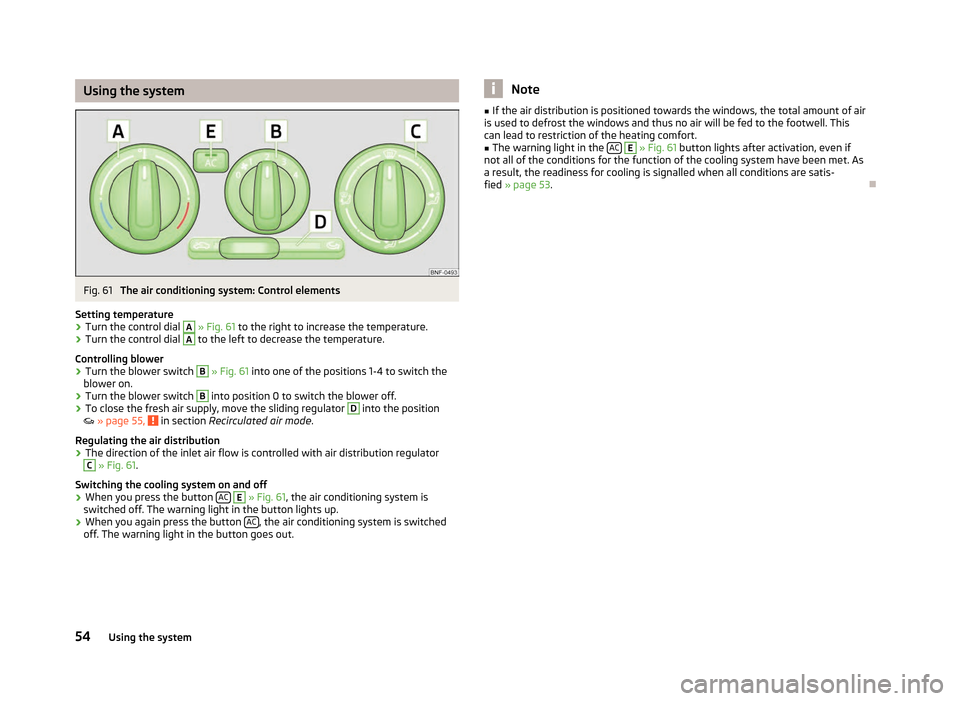
Fig. 61
The air conditioning system: Control elements
Setting temperature
› Turn the control dial A
» Fig. 61 to the right to increase the temperature.
› Turn the control dial A
to the left to decrease the temperature.
Controlling blower
› Turn the blower switch B
» Fig. 61 into one of the positions 1-4 to switch the
blower on.
› Turn the blower switch B
into position 0 to switch the blower off.
› To close the fresh air supply, move the sliding regulator D
into the position
»
page 55, in section
Recirculated air mode .
Regulating the air distribution
› The direction of the inlet air flow is controlled with air distribution regulator C
» Fig. 61.
Switching the cooling system on and off
› When you press the button
AC E
» Fig. 61
, the air conditioning system is
switched off. The warning light in the button lights up.
› When you again press the button
AC , the air conditioning system is switched
off. The warning light in the button goes out. Note
■ If the air distribution is positioned towards the windows, the total amount of air
is used to defrost the windows and thus no air will be fed to the footwell. This
can lead to restriction of the heating comfort. ■ The warning light in the AC E
» Fig. 61 button lights after activation, even if
not all of the conditions for the function of the cooling system have been met. As
a result, the readiness for cooling is signalled when all conditions are satis-
fied » page 53. Ð54
Using the system