2012 SKODA CITIGO reset
[x] Cancel search: resetPage 11 of 157

›
With service interval display
» page 10
› With multifunction display
» page 11
Reset button for the display of the daily trip counter
(trip) » page 10
Fuel gauge » page 9
Engine revolutions counter » page 9
Adjust button for the clock » page 12. ÐSpeedometer
First read and observe the introductory information and safety warn-
ings on page 8.
The speed is shown in km/h or mph and km/h depending on the vehicle.
ÐFuel gauge
Fig. 4
Fuel gauge Fig. 5
Fuel gauge - CNG 3
4
5
6
ä
First read and observe the introductory information and safety warn-
ings on page 8.
Vehicles running on petrol
The fuel gauge
» Fig. 4 only operates if the ignition is switched on.
The fuel tank has a capacity of about 35 litres. If the fuel gauge in the fuel tank
reaches the reserve capacity level, the warning symbol » Fig. 4 - will appear
in the Instrument cluster. or the symbol will flash for 10 seconds together with
the remaining segments in the instrument cluster display » Fig. 4 - . There are
now about 4 litres of fuel remaining in the tank. This symbol is a reminder for you,
that you must refuel .
An audible signal sounds as a warning signal.
Vehicles running on CNG (compressed natural gas)
The fuel gauge » Fig. 5 only operates if the ignition is switched on.
When the vehicle runs on petrol, the pointer of the fuel gauge is in the range 1
» Fig. 5. When the vehicle runs on CNG, the pointer of the fuel gauge is in the
range 2
.
If the fuel level in the fuel tank for petrol reaches the reserve level, the warning
symbol will appear in the instrument cluster. The pointer is in the red range of
the gauge 1
» Fig. 5. There are now about 5 litres of fuel remaining in the tank.
If the fuel level in the fuel tank for CNG reaches the reserve level, the warning
symbol will appear in the instrument cluster. The pointer is in the red range of
the gauge 2
» Fig. 5. There are now about 1.5
kg of fuel remaining in the tank. Ð Engine revolutions counter
First read and observe the introductory information and safety warn-
ings on page 8.
The red scale of the rev counter 5
» Fig. 3 on page 8 indicates the range in which
the engine control unit begins to limit the engine speed. The engine control unit
restricts the engine speed to a steady limit.
Before reaching the red zone of the rev counter scale, shift up into the next high-
er gear.
To maintain the optimum motor speed, observe the gearshift indica-
tor » page 10. £
ä
ä 9
Instruments and warning lights
Page 12 of 157

Avoid high engine speeds during the running-in period and before the engine has
warmed up to the operating temperature . For the sake of the environment
Shifting to a higher gear in good time helps to lower fuel consumption, minimises
operating noise levels, protects the environment and contributes to a longer life
and reliability of the engine. ÐCounter for distance driven
First read and observe the introductory information and safety warn-
ings on page 8.
The distance which you have driven with your vehicle is shown in kilometres (km).
In some countries the measuring unit
“mile” is used.
Reset button
To toggle between the odometer and the daily trip counter, briefly press the but-
ton 3
» Fig. 2 on page
8 or » Fig. 3 on page 8.
To reset the display of the daily trip counter, press button 3
for longer.
Daily trip counter (trip)
The daily trip counter indicates the distance which you have driven since it was
last reset - in steps of 100 metres or 1/10 of a mile.
Odometer
The odometer indicates the total distance in kilometres or miles which the vehicle
has been driven. ÐService Interval Display
First read and observe the introductory information and safety warn-
ings on page 8.
Before the next service interval, the message
appears for some seconds and
the remaining kilometres are indicated after switching on the ignition.
At the time of the service, an acoustic signal will sound and the message
ap-
pears for a few seconds after switching on the ignition. ä
ä Resetting Service Interval Display
The ŠKODA specialist garage:
› Resets the memory of the display after the appropriate inspection
› Adds an entry to the Service Schedule
› Affixes the sticker with the entry of the following service interval to the side of
the dashboard on the driver's side Note
■ Information is retained in the Service Interval Display even after the vehicle bat-
tery is disconnected. ■ If the instrument cluster is exchanged after a repair, the correct values must be
entered in the counter for the Service Interval Display. This work is carried out by
a ŠKODA specialist garage. ■ For more information on the service intervals » Service Plan. Ð Recommended gear
First read and observe the introductory information and safety warn-
ings on page 8.
An information for the engaged gear is shown in the display of the instrument
cluster.
In order to minimise the fuel consumption, a recommendation for shifting into an-
other gear is indicated in the display.
Show Importance
Optimal gear.
Recommends that you shift to a higher gear.
Recommends that you shift to a lower gear. CAUTION
The driver is always responsible for selecting the correct gear in different driving
situations, such as overtaking. Ð
ä
10 Using the system
Page 14 of 157

Note
All information in the memory 1 and 2 is erased if the battery of the vehicle is dis-
connected. ÐOperation
Fig. 7
Multifunction display: Control el-
ements
First read and observe the introductory information and safety warn-
ings on page 11.
The rocker switch A
and the button B
are located on the windscreen wiper lev-
er »
Fig. 7.
Select memory
› Press the button B
» Fig. 7
.
Selecting functions
› Briefly press the rocker switch A
» Fig. 7 up or down. This opens the individual
functions of the multifunction display one after the other.
Resetting
› Select the desired memory.
› Press the button B
» Fig. 7
for longer.
The following readouts of the selected memory will be set to zero by button B
:
› Average fuel consumption
› Distance driven
› Average speed
› Driving time Ð
ä Digital clock
First read and observe the introductory information and safety warn-
ings on page 11.
The time is set as follows:
›
Press the rocker switch A
» Fig. 7
on page 12 up or down to change the display
of the time.
› Press the button 6
» Fig. 3
on page 8 to select the hour display so that it
flashes.
› Press button 3
to continue setting the time. Keep the button pressed to run
through the numbers quickly.
› Press the button 6
to select the minutes display so that it flashes.
› Press button 3
to continue setting the time. Keep the button pressed to run
through the numbers quickly.
› Confirm the set value by pressing the button 6
again, or wait for around 5 sec-
onds. The setting is saved automatically (the value stops flashing). Ð Multifunction display details
First read and observe the introductory information and safety warn-
ings on page 11.
Outside temperature
The current outside temperature is shown in the display.
If the outside temperature drops below +4 °C, the temperature indicator appears
and a snow flake symbol (black ice warning) flashes for a few seconds, then re-
mains displayed together with the outside temperature.
Driving time
The driving time which has elapsed since the memory was last erased, appears in
the display » page 11. If you want to measure the driving time from a particular
moment in time on, at this moment, reset the memory by setting the button B
» Fig. 7 on page
12 to zero.
The maximum distance indicated in both memories is 19 hours and 59 minutes.
The indicator is set back to zero if this period is exceeded. £
ä
ä
12 Using the system
Page 15 of 157

Current fuel consumption
The current fuel consumption level is shown in the display in litres/100
km1)
. You
can use this information to adapt your driving style to the desired fuel consump-
tion.
The display appears in litres/hour if the vehicle is stationary or driving at a low
speed 2)
.
Average fuel consumption
The average fuel consumption since the memory was last erased is shown in the
display in litres/100 km 1 )
» page 11. You can use this information to adapt your
driving style to the desired fuel consumption.
If you wish to determine the average fuel consumption over a certain period of
time, you must set the memory at the start of the new measurement to zero us-
ing the button B
» Fig. 7 on page 12. A zero appears in the display for the first
approx. 300 m you drive after erasing the memory.
The display is updated regularly while you are driving.
Range
The estimated range in kilometres is shown on the display. It indicates the dis-
tance you can still drive with your vehicle based on the level of fuel in the tank
and the same style of driving.
The display is shown in steps of 10
km. After lighting up of the warning light for
the fuel reserve the display is shown in steps of 5 km.
The fuel consumption over the last 50 km is used to calculate the range. The
range will increase if you drive in a more economical manner.
Distance travelled
The distance driven since the memory was last erased appears in the dis-
play » page 11. If you want to measure the distance travelled from a particular mo-
ment in time on, at this moment, reset the memory by setting the button B
» Fig. 7 on page
12 to zero.
The maximum distance indicated in both memories is 1 999 km. The indicator is
set back to zero if this period is exceeded. Average speed
The average speed since the memory was last erased is shown in the display
in km/hour
»
page 11. If you wish to determine the average speed over a certain
period of time, you must set the memory to zero at the start of the measurement
using the button B
on the windscreen wiper lever
» Fig. 7 on page 12.
After erasing the memory, no value appears in the display until you have driven
approx. 300 m.
The display is updated regularly while you are driving.
Current speed
The current speed which is identical to the display of the speedometer 1
»
Fig. 3
on page 8 is indicated on the display.
Coolant temperature
The current coolant temperature is shown in the display. Ð Warning against excessive speeds
First read and observe the introductory information and safety warn-
ings on page 11.
Adjust the speed limit while the vehicle is stationary
›
With button A
» Fig. 7
on page 12, choose the menu point Warning against ex-
cessive speeds .
› Press the button B
to activate the ability to set the speed limit (value flashes).
› Use the button A
to set the required speed limit, e.g. 50 km/h.
› Confirm the speed limit that was set with button B
, or wait approx. 5 seconds
until the setting is saved automatically (the value stops flashing).
This allows you to set the speed in 5
km/h intervals.
Adjusting the speed limit while the vehicle is moving
› With button A
» Fig. 7
on page 12, choose the menu point Warning against ex-
cessive speeds .
› Drive at the desired speed, e.g. 50 km/h.
› Press button B
to accept the current speed as the speed limit (the value flash-
es). £
ä
1)
On some models in certain countries, the display appears in kilometres/litre.
2) On some models in certain countries, the display appears in --,- kilometres/litres if the vehicle is sta-
tionary.
13
Instruments and warning lights
Page 66 of 157
CAUTION
■ Always depress the clutch pedal if switching to the neutral position (vehicle
with a manual gearbox) when the cruise control system is switched on! Otherwise
the engine can rev up unintentionally.
■ The cruise control system is not able to maintain a constant speed when driving
in areas with steeper gradients. The weight of the vehicle increases the speed at
which it travels. Therefore, shift to a lower gear in good time or slow the vehicle
down by applying the foot brake. Note
It is not possible on vehicles fitted with an automatic gearbox to switch on the
cruise control system if the selector lever is in the position N or R.ÐStoring a speed
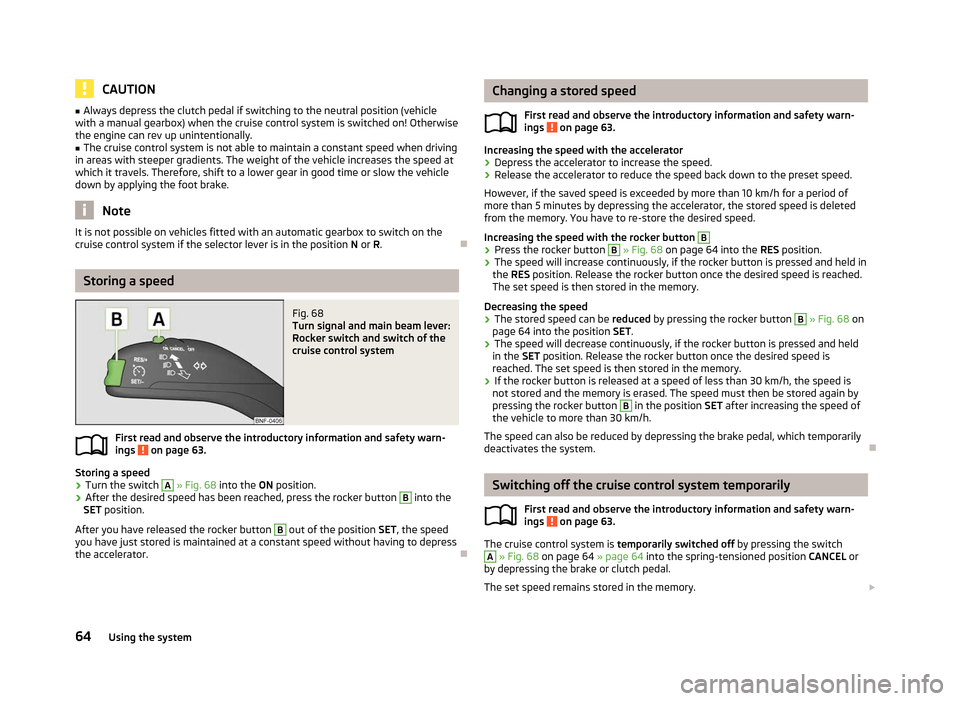
Fig. 68
Turn signal and main beam lever:
Rocker switch and switch of the
cruise control system
First read and observe the introductory information and safety warn-
ings on page 63.
Storing a speed
› Turn the switch A
» Fig. 68
into the ON position.
› After the desired speed has been reached, press the rocker button B
into the
SET position.
After you have released the rocker button B
out of the position SET
, the speed
you have just stored is maintained at a constant speed without having to depress
the accelerator. Ð
ä Changing a stored speed
First read and observe the introductory information and safety warn-
ings on page 63.
Increasing the speed with the accelerator
› Depress the accelerator to increase the speed.
› Release the accelerator to reduce the speed back down to the preset speed.
However, if the saved speed is exceeded by more than 10
km/h for a period of
more than 5 minutes by depressing the accelerator, the stored speed is deleted
from the memory. You have to re-store the desired speed.
Increasing the speed with the rocker button B
›
Press the rocker button B
» Fig. 68
on page 64 into the RES position.
› The speed will increase continuously, if the rocker button is pressed and held in
the RES position. Release the rocker button once the desired speed is reached.
The set speed is then stored in the memory.
Decreasing the speed
› The stored speed can be
reduced by pressing the rocker button B
» Fig. 68 on
page 64
into the position SET.
› The speed will decrease continuously, if the rocker button is pressed and held
in the SET position. Release the rocker button once the desired speed is
reached. The set speed is then stored in the memory.
› If the rocker button is released at a speed of less than 30 km/h, the speed is
not stored and the memory is erased. The speed must then be stored again by
pressing the rocker button B
in the position SET after increasing the speed of
the vehicle to more than 30
km/h.
The speed can also be reduced by depressing the brake pedal, which temporarily
deactivates the system. Ð Switching off the cruise control system temporarily
First read and observe the introductory information and safety warn-
ings on page 63.
The cruise control system is
temporarily switched off
by pressing the switch A
» Fig. 68
on page 64 » page 64 into the spring-tensioned position CANCEL or
by depressing the brake or clutch pedal.
The set speed remains stored in the memory. £
ä
ä
64 Using the system