2012 Seat Toledo instrument panel
[x] Cancel search: instrument panelPage 152 of 249

151
Driving
To recover the set speed, briefly press switch B
in RES once you have re-
leased the brake or clutch pedal.
Switching off cruise control completely
– Move knob A ⇒ Fig. 110 ⇒ page 150 to OFF.
START-STOP*
Fig. 111 Instrument
panel: Start-Stop system
button
The START-STOP system helps save fuel and reduce harmful emis-
sions and CO 2.
The system is automatically switched on every time the ignition is
switched on.
The system automatically switches off the engine when the vehicle
is stationary, e.g. waiting at traffic lights.
The current status of the START-STOP system is displayed on the
general instrument panel display. Automatic engine shut down (Stop phase)
–
Stop the vehicle (if necessary using the handbrake).
– Shift to neutral.
– Release the clutch pedal.
Automatic engine start up (Start phase)
– Release the clutch pedal.
Switching the START-STOP system on and off
The START-STOP system can be switched on and off by pressing the
⇒ Fig. 111 button.
The warning lamp in the button will light up when the system is
switched off.
If the vehicle is in Stop phase when the button is pressed, the en-
gine will start immediately.
The START-STOP system works under complex driving conditions that are dif-
ficult to detect without specialist technology. The set of necessary condi-
tions for the correct operating of the START-STOP system are indicated be-
low.
Conditions for automatic engine shut down (Stop phase)
● Selector lever in neutral
● Clutch pedal not pressed
● Driver with seat belt fastened
● Driver door closed
● Bonnet closed
● Vehicle stationary
● The factory-fitted towing bracket is not electrically connected to a trailer
Safety FirstOperating instructionsPractical TipsTechnical specifications
Page 153 of 249

152Driving
● Engine at operating temperature
● Vehicle's battery sufficiently charged
● Vehicle not on a very steep slope
● Engine speed below 1200 rpm
● Vehicle's battery temperature is neither too high nor too low
● Sufficient brake system pressure
● Difference between outside temperature and set interior temperature
not too great
● Vehicle speed since last time the engine started was above 3 km/h (2
mph)
● Particulate filter ⇒ page 71 not being cleaned
● Front wheels not overly turned (steering wheel turned less than three
quarters of a turn)
Conditions for engine start up (Start phase)
● Clutch pedal pressed
● Max./min. temperature set
● Windscreen defrost function switched on
● High blower speed
● START-STOP button pressed
Conditions for automatic engine start up without driver involvement
● Vehicle moving at a speed of over 3 km/h (2 mph)
● Difference between outside temperature and interior temperature is too
great
● Vehicle's battery insufficiently charged
● Insufficient brake system pressure
If the driver seat belt is unfastened for more than 30 seconds in Stop phase,
the engine must be started using the ignition key. Please observe the mes-
sages on the general instrument panel display. Warnings on the instrument panel display (valid for vehicles not fitted with
an informative display)
FAULT: START-STOPFault in the START-STOP systemSTART-STOP IMPOSSIBLEEngine cannot be automatically shut
down
START-STOP ACTIVEAutomatic engine shut down (Stop
phase)
SWITCH OFF IGNITIONSwitch ignition off.START MANUALLYStart the engine manually
WARNING
● If the engine is switched off, neither the brake servo or the power
steering will work.
● Do not move the vehicle when the engine is switched off.
CAUTION
Switch off the START-STOP system ⇒ page 159 before driving through a
pool of water on the road.
Note
● The battery temperature may reflect the changes in outside temperature
after several hours. If the vehicle has been stopped outside at temperatures
below zero or in direct sunlight, for example, the battery temperature may
take several hours to reach the values required for the correct operating of
the START-STOP system.
● If the Climatronic system is operating automatically, this could impair
automatic engine shut down in certain conditions.
Page 163 of 249

162Driving the vehicle with a trailer
WARNING
● Exceeding the maximum established load per axle and the maximum
towing bracket load in addition to the maximum permitted load or the
load of the vehicle + trailer assembly can cause accidents and serious in-
juries.
● A sliding load could considerably affect the stability and safety of the
vehicle + trailer assembly, resulting in accidents and serious injuries.
Towing a trailer
Exterior mirrors
Check whether you can see enough of the road behind the trailer with the
standard rear vision mirrors. If this is not the case, you should have addi-
tional exterior mirrors fitted. Observe the relevant statutory requirements of
the country you are in.
Headlights
Before starting a journey, also check the headlight beam settings with the
trailer hitched up. Adjust the headlight range settings if necessary
⇒ page 96, Range control of main lights .
Driving speed
For your own safety do not drive faster than the maximum permitted speed
indicated on the trailer.
At all times, immediately reduce speed if you detect the slightest swaying
movement of the trailer. Never try to “return the trailer to a straight posi-
tion” by accelerating.
Brakes
Brake in due course! If the trailer has an overrun brake, apply the brakes
gently at first and then, firmly. This will prevent the jerking that can be caused by locking of trailer wheels. Change to a lower gear in good time be-
fore descending a slope in order to take advantage of the engine brake.
The trailer is incorporated into the vehicle anti-theft alarm system.
●
When the vehicle has a factory-fitted anti-theft alarm and a towing
bracket
● When the trailer is electrically connected to the vehicle via the towing
bracket socket
● When the vehicle electrical device and the towing bracket are operation-
al
● When the vehicle is locked and the vehicle anti-theft alarm device is ac-
tivated
Once the electrical connection is interrupted with the vehicle trailer locked,
the alarm sounds.
Always switch off the vehicle anti-theft alarm device before connecting or
disconnecting a trailer. The vehicle anti-theft alarm device could cause the
alarm to sound ⇒ page 88, Anti-theft alarm system.
Engine overheating
In the event that the coolant temperature gauge needle moves to the right
section of the scale or to the red area, immediately reduce speed. If the con-
trol lamp flashes on the general instrument panel, stop the vehicle and
switch off the engine. Wait several minutes and check the coolant level in
the tank ⇒ page 179.
Please observe the following indications ⇒ page 68, Coolant level and tem-
perature .
The coolant temperature can be reduced by switching on the heating.
Page 179 of 249

178Checking and refilling levels
Oil level in area A
–
Do not top up oil.
Oil level in area B
–
Oil can be topped up. After topping up the oil level could be in
area A.
Oil level in area C
–
Oil must be topped up. After topping up the oil level should be
in area B.
It is normal for the engine to consume a certain amount of oil. Depending
on how you drive and the conditions in which the vehicle is used, oil con-
sumption can be up to 0.5 litres per 1000 km (621 miles). Oil consumption
can also be higher for the first 5000 km (3000 miles).
You should therefore check the oil level at regular intervals, ideally every
time you fill the tank or before setting off on a long trip.
When the engine is working hard, for instance during sustained motorway
cruising in summer, when towing a trailer or caravan or climbing on moun-
tain passes, the oil level should preferably be kept within area A
, but no
higher.
A warning lamp will appear on the instrument panel ⇒ page 67, Engine oil
if the oil level is too low. In this case, check the oil level as soon as pos-
sible. Top up with the required amount of oil.
CAUTION
● The oil level must never exceed area A ⇒ Fig. 118. Risk of damage to
the exhaust system!
● If the engine oil cannot be topped up under the given conditions, do
not drive on! Stop the engine and seek the professional assistance of an Of-
ficial Service, as this could cause serious damage to the engine. Topping up engine oil
–
Check the engine oil level ⇒ page 177, Checking the engine oil
level.
– Unscrew the cap from the filler opening.
– Put in the specified grade of oil 0.5 litres at a time ⇒ page 176.
– Check the oil level ⇒ page 177.
– Replace the oil filler cap carefully and push the dipstick all the
way in.
Changing engine oil
Engine oil must be changed with the frequency indicated in the Mainte-
nance Programme or according to the service interval indicator ⇒ page 57.
CAUTION
Do not mix engine oil with additives. Risk of damage to the engine! Damage
caused by these products is not covered by the warranty.
Note
Wash your skin thoroughly if it comes into contact with engine oil.
Page 181 of 249

180Checking and refilling levels
B
(min.) and A (max.). When the engine is hot, it may be
slightly above mark A (max.).
The warning lamp (red) in the general instrument panel ⇒ page 68, Cool-
ant level and temperature will appear when the coolant level is too low.
However, we recommend checking the coolant level directly in the tank.
Coolant loss
Any loss of coolant normally indicates a leak. It is not sufficient merely to
top up the coolant. The cooling system should be inspected by an Official
Service without delay.
CAUTION
In the event of a fault that causes the engine to overheat, contact an author-
ised SEAT dealer immediately, as this could damage the engine.
Topping up coolant
– Switch the ignition off.
– Wait for the engine to cool down.
– Cover the cap on the coolant expansion tank ⇒ Fig. 119 with a
cloth and carefully unscrew the cap.
– Refill the level of coolant.
– Screw the cap on again until it clicks into place.
Do not use a different type of additive if the prescribed anti-freeze additive
is not available, in the event of an emergency. In this case, use only water
and bring the coolant concentration back up to the correct level as soon as
possible at an Official Service. Always top up with unused coolant.
Never fill the coolant tank above mark
A
(max.) ⇒ Fig. 119 Excess coolant
is forced out of the cooling system through the overpressure valve in the fill-
er cap of the expansion tank when the engine heats up.
WARNING
● The anti-freeze additive and, therefore, the entire coolant, are a
health hazard. Avoid touching the coolant. Coolant fumes are also a
health hazard. Store the coolant additive in a safe place out of the reach
of children. Risk of poisoning!
● If splashed into eyes, rinse immediately with clean water and seek
immediate medical advice.
● Seek immediate medical advice if the coolant is accidentally inges-
ted.
CAUTION
If the engine oil cannot be topped up under the given conditions, do not
drive on. We recommend contacting an authorised SEAT dealer, as this can
damage the engine.
Radiator fan
The radiator is driven by an electric motor and controlled according to the
temperature of the coolant.
After the engine has been stopped and the ignition switched off, the radia-
tor fan may continue running for around 10 minutes.
Page 182 of 249

181
Checking and refilling levels
Brake fluid Checking brake fluid level
Fig. 120 Engine com-
partment: Brake fluid res-
ervoir
The brake fluid reservoir is located in the engine compartment of
the vehicle.
– Switch the ignition off.
– Open the bonnet ⇒ page 173.
– Check the brake fluid level in the reservoir ⇒ Fig. 120. It should
be between the “MIN” and “MAX” marks.
The fluid level drops slightly after a period of time due to automatic com-
pensation for brake pad wear. This is quite normal.
However, if the level goes down noticeably in a short time, or drops below
the “MIN” mark, there may be a leak in the brake system. If the brake fluid
level in the reservoir is too low, this will be indicated by the warning lamp in
the instrument panel
⇒ page 66, Brake system .
WARNING
If the fluid level has dropped below the MIN mark, do not drive on.
Risk of accident! Seek professional help.
Changing brake fluid
Brake fluid absorbs moisture. Therefore, it gradually absorbs moisture from
the atmosphere. If the water content in the brake fluid is too high, the brake
system could corrode. The water content also reduces the boiling point of
the brake fluid.
The brake fluid must comply with one of the following standards or specifi-
cations:
● VW 50114
● FMVSS 116 DOT4
WARNING
Heavy use of the brakes may cause a vapour lock if the brake fluid is left
in the brake system for too long. This would seriously affect the efficien-
cy of the brakes and the safety of the vehicle.
CAUTION
Brake fluid damages the vehicle paintwork.
Safety FirstOperating instructionsPractical TipsTechnical specifications
Page 193 of 249
192Wheels and tyres
Removing
–Insert the plastic clip into the cap until the inner retaining
notches on the clips touch the collar of the cap and then re-
move ⇒ Fig. 127.
Fitting
– Insert the caps as far as they will go over the wheel bolts.
The wheel bolt caps are stored in a box on the spare wheel or in the spare
wheel well.
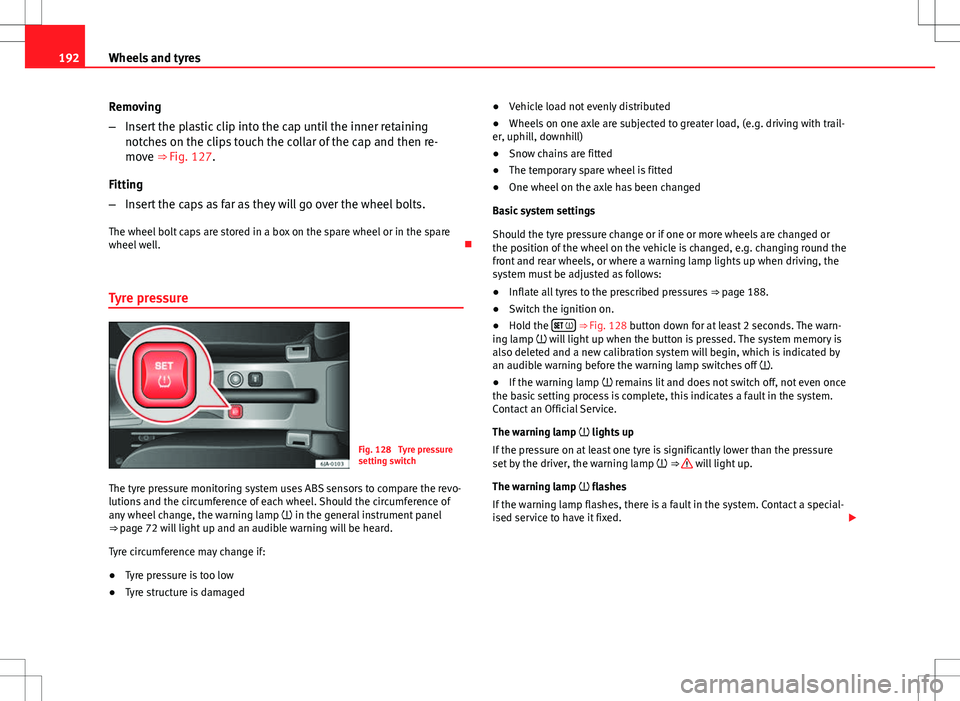
Tyre pressure
Fig. 128 Tyre pressure
setting switch
The tyre pressure monitoring system uses ABS sensors to compare the revo-
lutions and the circumference of each wheel. Should the circumference of
any wheel change, the warning lamp in the general instrument panel
⇒ page 72 will light up and an audible warning will be heard.
Tyre circumference may change if:
● Tyre pressure is too low
● Tyre structure is damaged ●
Vehicle load not evenly distributed
● Wheels on one axle are subjected to greater load, (e.g. driving with trail-
er, uphill, downhill)
● Snow chains are fitted
● The temporary spare wheel is fitted
● One wheel on the axle has been changed
Basic system settings
Should the tyre pressure change or if one or more wheels are changed or
the position of the wheel on the vehicle is changed, e.g. changing round the
front and rear wheels, or where a warning lamp lights up when driving, the
system must be adjusted as follows:
● Inflate all tyres to the prescribed pressures ⇒ page 188.
● Switch the ignition on.
● Hold the
⇒ Fig. 128 button down for at least 2 seconds. The warn-
ing lamp will light up when the button is pressed. The system memory is
also deleted and a new calibration system will begin, which is indicated by
an audible warning before the warning lamp switches off .
● If the warning lamp remains lit and does not switch off, not even once
the basic setting process is complete, this indicates a fault in the system.
Contact an Official Service.
The warning lamp lights up
If the pressure on at least one tyre is significantly lower than the pressure
set by the driver, the warning lamp ⇒
will light up.
The warning lamp flashes
If the warning lamp flashes, there is a fault in the system. Contact a special-
ised service to have it fixed.
Page 212 of 249

211
Fuses and bulbs
Fuses in the dash panel
Fig. 140 Bottom of the
dash panel. Fuse cover
Fig. 141 Diagram of the
fuse box to the left/right
of the steering wheel
The fuses are located behind a cover below the steering wheel.
● Carefully tilt the cover in the direction indicated by the arrow and remove
it ⇒ Fig. 140.
● After changing the fuse, replace the cover on the dash panel in the di-
rection opposite that is indicated by the arrow so that the cover tabs fit into
the slots on the dash panel. Subsequently, press down on the cover to
close. List of fuses in the dash panel
NumberElectrical equipment1S - ignition2START-STOP
3Instrument panel, headlight range control, telephone, oil level
sensor
4ABS/ESC control unit5Petrol engine: cruise control6Reverse light (manual gearbox)7Switch, engine control unit, automatic gearbox8Brake switch, clutch switch, cooling fan
9Heating control panel, air conditioning control unit, parking
aid, electric window riser, radiator fan, windscreen wiper jets
10DC-DC converter11Exterior mirror control12Towing bracket control unit13Automatic gearbox control unit, automatic gear selector14Headlight range control15Vacant16Power steering, speed sensor, engine control unit17Radio (START-STOP ) daytime driving light18Heated mirrors19Ignition inlet20Engine control unit, fuel pump control unit, fuel pump
21Reverse light (automatic gearbox), fog lights with CORNER func-
tion
22Heating control panel, control unit of the climate control, tele-
phone, general instrument panel, steering wheel angle sensor,
multifunction steering wheel, automatic gearbox key lock
23Interior lighting, glove compartment and luggage compartment
lighting, side lights
Safety FirstOperating instructionsPractical TipsTechnical specifications