Page 82 of 282
80Steering column controls*
Audio + Telephone Control
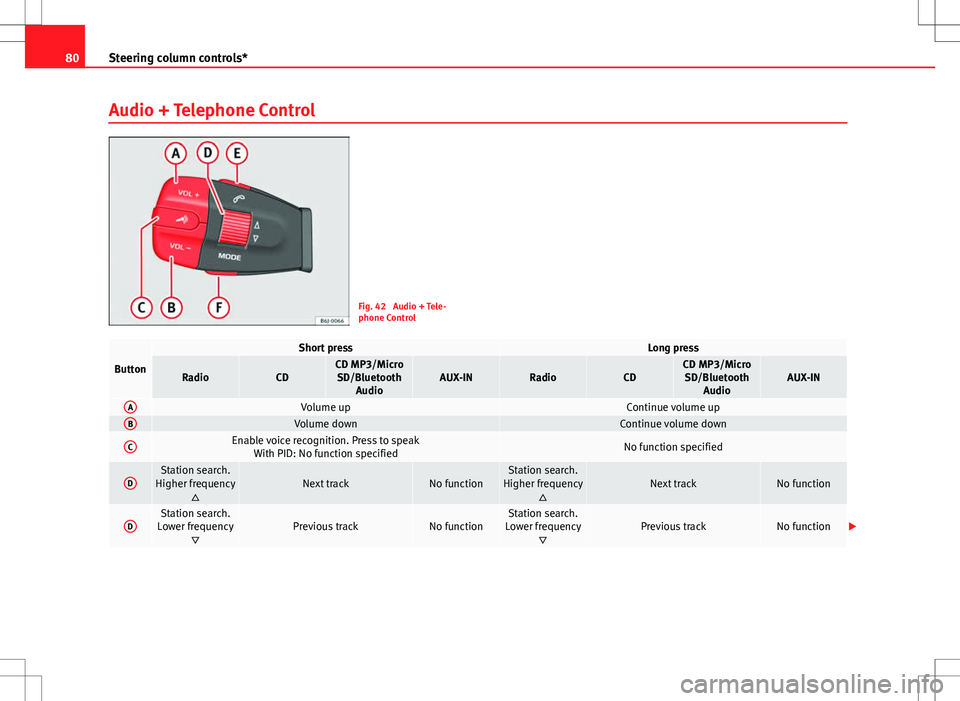
Fig. 42 Audio + Tele-
phone Control
Button
Short pressLong press
RadioCDCD MP3/Micro
SD/Bluetooth AudioAUX-INRadioCDCD MP3/MicroSD/Bluetooth AudioAUX-IN
AVolume upContinue volume upBVolume downContinue volume down
CEnable voice recognition. Press to speak With PID: No function specifiedNo function specified
DStation search.
Higher frequency Next trackNo functionStation search.
Higher frequency Next trackNo function
DStation search.
Lower frequency Previous trackNo functionStation search.
Lower frequency Previous trackNo function
Page 83 of 282
81
Steering column controls*
EAccept call/hang up a)Reject call
With PID: No function specified
FCycle through source FM - AM - CD - Micro SD - Bluetooth Audio - FM..Cycle through source FM - AM - CD - Micro SD - Bluetooth Audio - FM..a) With PID the button, E, performs more functions. Consult the specific PID Navigator manual.
Safety FirstOperating InstructionsPractical TipsTechnical Specifications
Page 89 of 282

87
Opening and closing
Keys
Set of keys
The set of keys includes a remote control, a key without a re-
mote control and a plastic key tab*.
Fig. 45 Set of keys
The set of keys may consists of the following, depending on the version of
your vehicle:
● a remote control key
⇒ Fig. 45 A
●
a key without remote control B,
● a plastic key tab* C.
or
● two keys without remote control B
●
a plastic key tab* C. Duplicate keys
If you need a replacement key, go to a Technical Service with your vehicle
identification number.
WARNING
● An incorrect use of the keys can cause serious injuries.
● Never leave children or disabled persons in the vehicle. In case of
emergency, they may not be able to leave the vehicle or manage on their
own.
● An uncontrolled use of the key could start the engine or activate any
electric equipment (e.g. electric windows), causing risk of accident. The
doors can be locked using the remote control key. This could become an
obstacle for assistance in an emergency situation.
● Never forget the keys inside the vehicle. An unauthorised use of your
vehicle could result in injury, damage or theft. Always take the key with
you when you leave the vehicle.
● Never remove the key from the ignition if the vehicle is in motion.
Otherwise, the steering could suddenly block and it would be impossible
to steer the vehicle.
CAUTION
There are electronic components in the remote control key. Avoid wetting
and hitting the keys.
Safety FirstOperating InstructionsPractical TipsTechnical Specifications
Page 105 of 282

103
Lights and visibility
Insert the key and switch the ignition on, holding it in this position for 3
seconds. Then, switch off the ignition. The daytime lights are deactivated
and cannot be switched on.
Note
See legal requirements for each country.
Adaptive headlights* (for driving round bends)
When driving around bends, the headlights will light the
most important areas of the road.
Fig. 57 Cornering light-
ing using adaptive head-
lights
This cornering light gives better illumination of the side of the road and the
corner area. The dynamic lighting is controlled automatically according to
speed and the steering wheel angle.
The two main headlights move at different angles to avoid that the front of
the vehicle is left completely in the dark.
Note
The system operates from a speed of about 10 km/h (6 mph).
Fog lights with cornering function*
This is an additional light source to dipped beam headlights
to light up the road as a bend is taken.
The cornering light operates with the lights switched on and when driving at
less than 40 Km/h (25 mph). They light up when the steering wheel is
turned or the flashers are operated.
Forward gear
● If the steering wheel is turned to the right, or the right-hand turn signal
operated, the right-hand headlight lights up.
● If the steering wheel is turned to the left, or the left-hand flasher operat-
ed, the left-hand headlight lights up.
In reverse gear both headlights light up.
Note
When the fog lamps are on, the cornering function is activated and both
headlights are continuously on.
Safety FirstOperating InstructionsPractical TipsTechnical Specifications
Page 108 of 282
106Lights and visibility
Note
● The battery will run down if the hazard warning lights are left on for a
long time, even if the ignition is switched off.
● The use of the hazard warning lights described here is subject to the rel-
evant statutory requirements.
Turn signal and main beam headlight lever
The turn signal and main beam lever also operates the park-
ing lights and the headlight flasher.
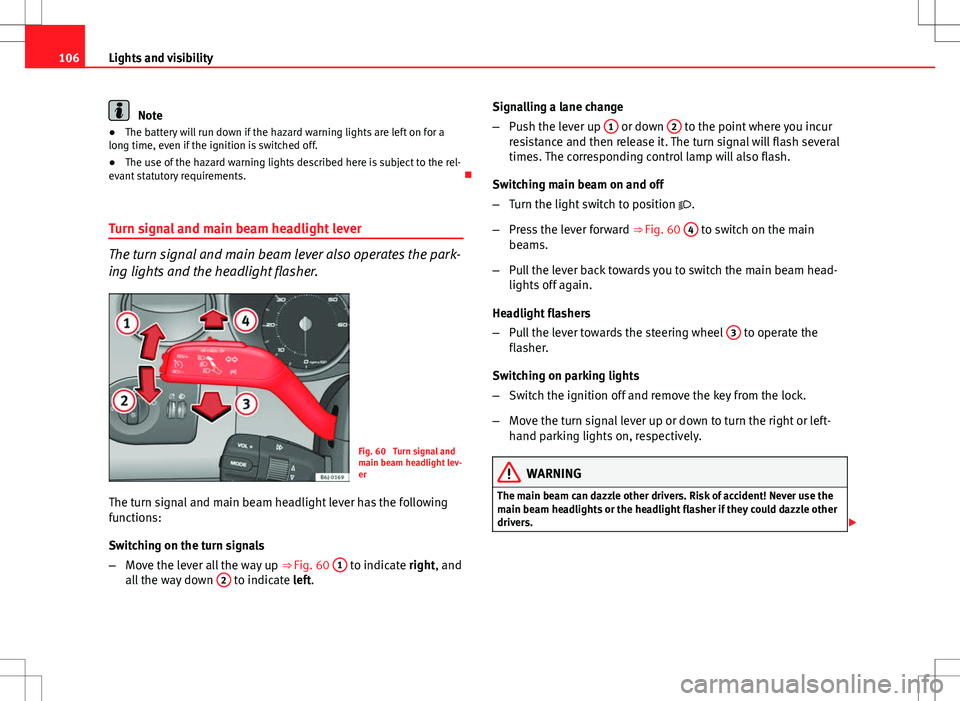
Fig. 60 Turn signal and
main beam headlight lev-
er
The turn signal and main beam headlight lever has the following
functions:
Switching on the turn signals
– Move the lever all the way up ⇒
Fig. 60 1
to indicate right, and
all the way down 2 to indicate left. Signalling a lane change
–
Push the lever up 1
or down 2 to the point where you incur
resistance and then release it. The turn signal will flash several
times. The corresponding control lamp will also flash.
Switching main beam on and off
– Turn the light switch to position .
– Press the lever forward ⇒ Fig. 60 4
to switch on the main
beams.
– Pull the lever back towards you to switch the main beam head-
lights off again.
Headlight flashers
– Pull the lever towards the steering wheel 3
to operate the
flasher.
Switching on parking lights
– Switch the ignition off and remove the key from the lock.
– Move the turn signal lever up or down to turn the right or left-
hand parking lights on, respectively.
WARNING
The main beam can dazzle other drivers. Risk of accident! Never use the
main beam headlights or the headlight flasher if they could dazzle other
drivers.
Page 111 of 282

109
Lights and visibility
The sun visors for the driver and the front passenger can be pulled out of
their central supports and turned towards the doors in the direction of the
arrow ⇒ Fig. 63. Never pull them downwards.
The driver sun visor has compartments for cards, and the passenger sun vi-
sor has a vanity mirror with a cover*.
Note
Incorrect use of the sun visors (e.g. pulling them downwards once they are
open) may result in broken hinges. This damage is not covered by the vehi-
cle warranty.
Windscreen wipers
Front windscreen wipers
The window wiper lever controls the windscreen wipers and
the automatic wash and wipe.
Fig. 64 Windscreen wip-
er and windscreen wash
leverThe window wiper lever ⇒ Fig. 64 has the following positions:
Switching off the windscreen wipers
–
Move the lever to position 0
.
Interval wipe
– Move the lever up to position 1
.
– Move the control A
to the left or right to set the length of the
wipe intervals. Control to the left: long intervals; control to the
right: short intervals. Four wiper interval stages can be set us-
ing switch A
.
Slow wipe
– Move the lever up to position 2
.
Continuous wipe
– Move the lever up to position 3
.
Short wipe
– Move the lever down to position 4
to give the windscreen a
short wipe.
Wash and wipe automatic system
– Pull the lever towards the steering wheel - Position 5
, the
windscreen washer is activated.
– Release the lever. The wipers-washers will keep running for ap-
proximately four seconds.
Safety FirstOperating InstructionsPractical TipsTechnical Specifications
Page 113 of 282

111
Lights and visibility
Note
● Do not put stickers on the windscreen in front of the rain sensor. This
may cause sensor disruption or faults.
Rear window wiper
The window wiper lever operates the windscreen wiper and
the wash and wipe system for the rear window.
Fig. 66 Windscreen wip-
er and windscreen wash
lever: rear window wiper
Switching on the interval wipe
– Press the lever forwards to position 6
⇒
Fig. 66. The wiper will
wipe the window approximately every 6 seconds.
Switching off the interval wipe function
– Pull the lever back from position 6
towards the steering wheel.
The wiper will continue to function for a short period if you
switch off whilst the wipers are in motion. Switching on the windscreen wiper and washer system
–
Press the lever fully forwards to position 7
⇒ Fig. 66. The rear
wiper and washer operate at the same time. The windscreen
wash system will function as long as you hold the lever in this
position.
– Release the lever. The washer system stops and the wipers con-
tinue until the end of the cycle.
– Move the lever towards the steering wheel to switch off.
WARNING
● A worn or dirty wiper blade will obstruct visibility and reduce safety.
● Always note the corresponding warnings on ⇒ page 210.
CAUTION
In icy conditions, always check that the wiper blade is not frozen to the
glass before using the wiper for the first time. If you switch on the wiper
when the wiper blade is frozen to the glass, this could damage both the
wiper blade and the wiper motor.
Note
● The rear window wiper will only work when the ignition is switched on.
● Depending on the version of the model, when you engage reverse gear
and with the headlight wiper activated, the lamps are wiped.
Safety FirstOperating InstructionsPractical TipsTechnical Specifications
Page 114 of 282
112Lights and visibility
Headlight washer*
The headlight washers clean the headlight lenses.
The headlight washers are activated automatically when the windscreen
washer is used and the window wiper lever is pulled towards the steering
wheel for at least 1.5 seconds – provided the dipped beam headlights or
main beams are switched on. Clean off stubborn dirt (insects, etc.) from the
headlights at regular intervals, for instance when filling the fuel tank.
Note
● To ensure that the headlight washers work properly in winter, keep the
nozzle holders in the bumper free of snow and remove any ice with a de-icer
spray.
● To remove water, the windscreen wipers will be activated from time to
time, the headlight washers will be activated every three cycles.
Rear view mirrors
Adjusting the rear view mirrors
Before beginning any journey, adjust the rear view mirrors for correct visibil-
ity. Interior rear vision mirror
It is dangerous to drive if you cannot see clearly through the
rear window.
Manual anti-dazzle function for interior rear vision mirror
In the basic mirror position, the lever at the bottom edge of the rear vision
mirror should be at the front. Pull the lever to the back to select the anti-
dazzle function.
Automatic anti-dazzle interior mirror*
The automatic anti-dazzle function can be switched on and
off as desired.
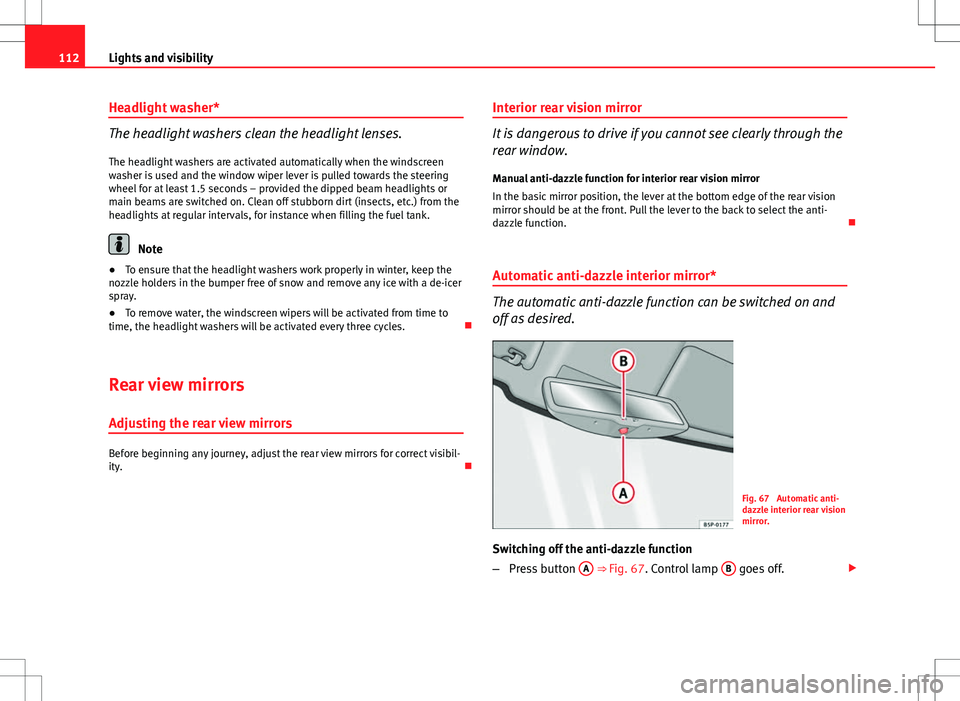
Fig. 67 Automatic anti-
dazzle interior rear vision
mirror.
Switching off the anti-dazzle function
– Press button A
⇒ Fig. 67. Control lamp B goes off.