2012 Seat Ibiza 5D ECU
[x] Cancel search: ECUPage 82 of 280
80Opening and closing
Opening and closing
Central locking
Description
The central locking system enables you to lock and unlock
all doors by just pushing the button. Central locking can be activated by using any of the following options:
● the key, by inserting it into the driver door cylinder and rotating it in the
opening direction. Depending on the vehicle version, either all doors will be
unlocked or only the driver door will be unlocked. All doors will be locked on
locking the vehicle using the key.
● the interior central lock button ⇒ page 83.
● the remote control, using the buttons on the key ⇒ page 86.
Various functions are available to improve the vehicle safety: Safe* security system
Selective unlocking system*
Self-locking system to prevent involuntary unlocking
Automatic speed-dependent locking and unlocking system*
Emergency unlocking system
-
-
-
-
-
WARNING
● Locking from the outside carelessly or without good visibility may
lead to bruising, particularly in the case of children.
● When locking a vehicle, never leave children unaccompanied inside,
as from the outside it will be difficult to provide assistance if required.
● Having the doors locked prevents an intrusion from getting in, for ex-
ample when stopped at a traffic light.
Note
For anti-theft security, only the driver door is fitted with a lock cylinder.
Safe security system*
This is an anti-theft device that consists of a double lock for
the door locks and a disabling function for the luggage
compartment in order to prevent a forced entry (depending
on country). Activation
The “safe” system is activated when the vehicle is locked using the key or
the remote control.
To activate it with the key, rotate once it is inserted in the door lock cylinder
in the locking direction.
To activate the system using the remote control, press the lock button once
on the remote.
Page 85 of 280
83
Opening and closing
inside with the central locking, after turning the ignition off and back on
again.
Central lock button*
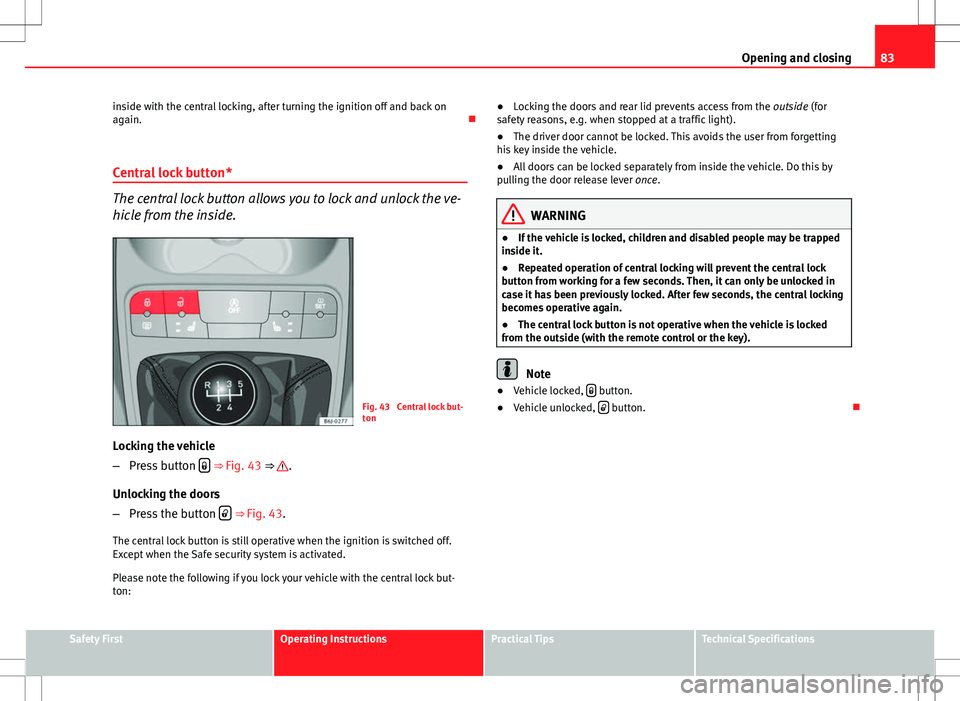
The central lock button allows you to lock and unlock the ve-
hicle from the inside.
Fig. 43 Central lock but-
ton
Locking the vehicle
– Press button
⇒ Fig. 43 ⇒ .
Unlocking the doors
– Press the button
⇒ Fig. 43.
The central lock button is still operative when the ignition is switched off.
Except when the Safe security system is activated.
Please note the following if you lock your vehicle with the central lock but-
ton: ●
Locking the doors and rear lid prevents access from the outside (for
safety reasons, e.g. when stopped at a traffic light).
● The driver door cannot be locked. This avoids the user from forgetting
his key inside the vehicle.
● All doors can be locked separately from inside the vehicle. Do this by
pulling the door release lever once.
WARNING
● If the vehicle is locked, children and disabled people may be trapped
inside it.
● Repeated operation of central locking will prevent the central lock
button from working for a few seconds. Then, it can only be unlocked in
case it has been previously locked. After few seconds, the central locking
becomes operative again.
● The central lock button is not operative when the vehicle is locked
from the outside (with the remote control or the key).
Note
● Vehicle locked, button.
● Vehicle unlocked, button.
Safety FirstOperating InstructionsPractical TipsTechnical Specifications
Page 90 of 280
88Opening and closing
Anti-theft alarm system*
Description of anti-theft alarm system*
The anti-theft alarm triggers if unauthorised movements are
detected around the vehicle.
The anti-theft alarm makes it more difficult to break into the vehicle or steal
it. The system will initiate acoustic and optical warning signals when your
vehicle is tried to be forced.
The anti-theft alarm system is automatically switched on when locking the
vehicle. For this, either rotate the key in the locking position or press button
2 on the radio frequency remote control*. The system is immediately ac-
tivated and the turn signal light located on the driver door will flash along
with the turn signals, indicating that the alarm and the locking security sys-
tem (double lock) have been turned on.
If any of the doors or the bonnet are open, they will not be included in the
protection zones of the vehicle when the alarm is connected. If the door or
the bonnet are subsequently closed, they will be automatically included in
the protection areas of the vehicle and the turn signals will flash according-
ly when the doors close.
● The turn signal light will flash twice on opening and deactivating the
alarm.
● The turn signal light will flash once on closing and activating the alarm.
When does the system trigger an alarm?
The system triggers an alarm if the following unauthorised actions are car-
ried out when the vehicle is locked: ●
Opening of vehicle with mechanical key without switching ignition on
within the next 15 seconds
● Opening a door
● Opening the bonnet
● Opening the rear lid
● Ignition switched on with a non-validated key.
● Movements in the driving compartment (vehicles with a volume sensor)
● Towing of the vehicle 1)
● Tilt angle (tow-away protection) 1)
● Undue manipulation of the alarm
● Battery handling
The acoustic signals sound and the turn signals flash for approx. 30 sec-
onds. This may be repeated up to 10 times depending on the country.
Opening all the doors in manual mode
In vehicles without alarm, when opening the driver door manually all the
doors are opened.
How to switch the alarm off
To deactivate the anti-theft alarm, turn the key in the opening direction,
open the door and switch the ignition on, or press the unlock button
on
the remote control.
In vehicles equipped with an anti-theft alarm system, you have 15 seconds
to insert the key in the ignition lock and activate the ignition if the vehicle is
opened using the driver door key.
Otherwise, the alarm will trigger for 30 sec. and the ignition will be blocked.
1)
With vehicles fitted with a tow-away protection
Page 117 of 280
115
Seats and storage compartments
Removing or adjusting head restraints
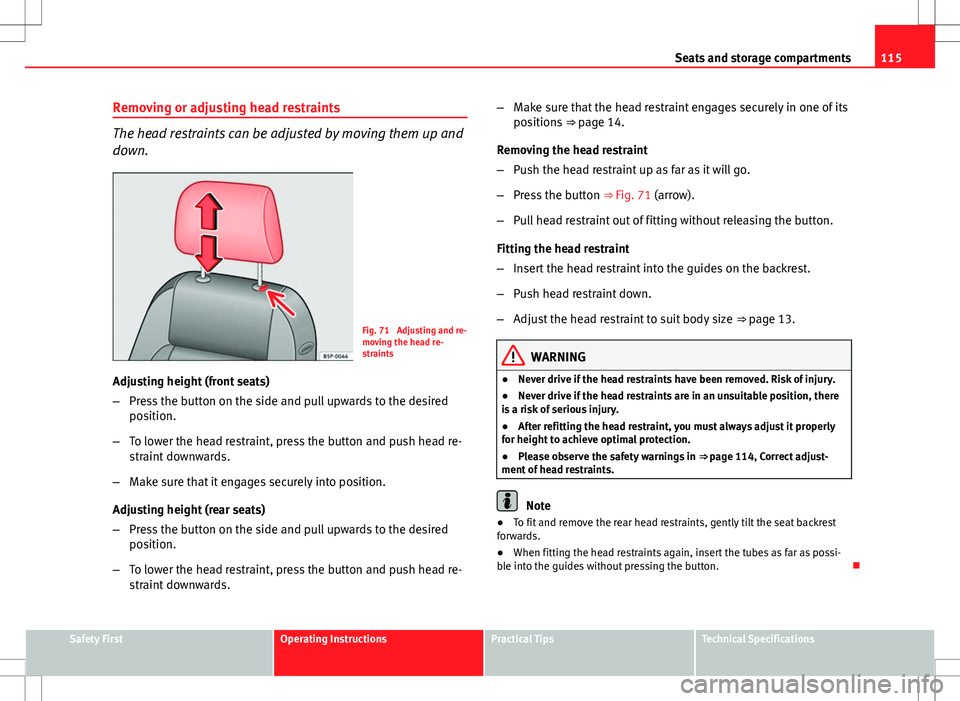
The head restraints can be adjusted by moving them up and
down.
Fig. 71 Adjusting and re-
moving the head re-
straints
Adjusting height (front seats)
– Press the button on the side and pull upwards to the desired
position.
– To lower the head restraint, press the button and push head re-
straint downwards.
– Make sure that it engages securely into position.
Adjusting height (rear seats)
– Press the button on the side and pull upwards to the desired
position.
– To lower the head restraint, press the button and push head re-
straint downwards. –
Make sure that the head restraint engages securely in one of its
positions ⇒ page 14.
Removing the head restraint
– Push the head restraint up as far as it will go.
– Press the button ⇒ Fig. 71 (arrow).
– Pull head restraint out of fitting without releasing the button.
Fitting the head restraint
– Insert the head restraint into the guides on the backrest.
– Push head restraint down.
– Adjust the head restraint to suit body size ⇒ page 13.
WARNING
● Never drive if the head restraints have been removed. Risk of injury.
● Never drive if the head restraints are in an unsuitable position, there
is a risk of serious injury.
● After refitting the head restraint, you must always adjust it properly
for height to achieve optimal protection.
● Please observe the safety warnings in ⇒ page 114, Correct adjust-
ment of head restraints.
Note
● To fit and remove the rear head restraints, gently tilt the seat backrest
forwards.
● When fitting the head restraints again, insert the tubes as far as possi-
ble into the guides without pressing the button.
Safety FirstOperating InstructionsPractical TipsTechnical Specifications
Page 118 of 280
116Seats and storage compartments
Front seats
Adjustment of the front seats
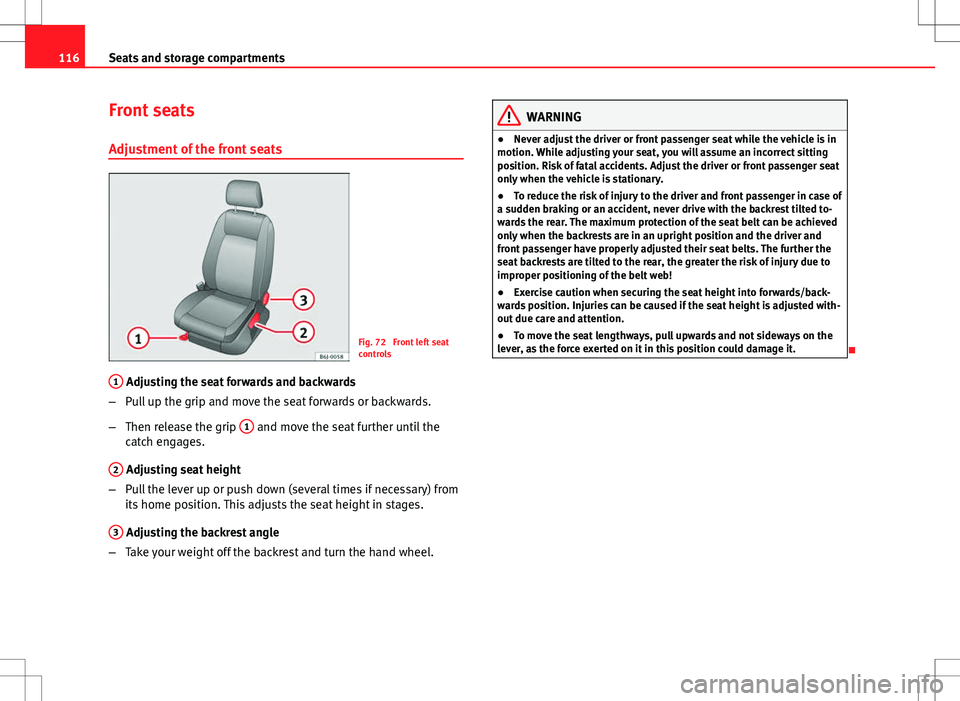
Fig. 72 Front left seat
controls
1
Adjusting the seat forwards and backwards
– Pull up the grip and move the seat forwards or backwards.
– Then release the grip 1
and move the seat further until the
catch engages.
2
Adjusting seat height
– Pull the lever up or push down (several times if necessary) from
its home position. This adjusts the seat height in stages.
3
Adjusting the backrest angle
– Take your weight off the backrest and turn the hand wheel.
WARNING
● Never adjust the driver or front passenger seat while the vehicle is in
motion. While adjusting your seat, you will assume an incorrect sitting
position. Risk of fatal accidents. Adjust the driver or front passenger seat
only when the vehicle is stationary.
● To reduce the risk of injury to the driver and front passenger in case of
a sudden braking or an accident, never drive with the backrest tilted to-
wards the rear. The maximum protection of the seat belt can be achieved
only when the backrests are in an upright position and the driver and
front passenger have properly adjusted their seat belts. The further the
seat backrests are tilted to the rear, the greater the risk of injury due to
improper positioning of the belt web!
● Exercise caution when securing the seat height into forwards/back-
wards position. Injuries can be caused if the seat height is adjusted with-
out due care and attention.
● To move the seat lengthways, pull upwards and not sideways on the
lever, as the force exerted on it in this position could damage it.
Page 120 of 280
118Seats and storage compartments
Rear seats
Folding down rear seats
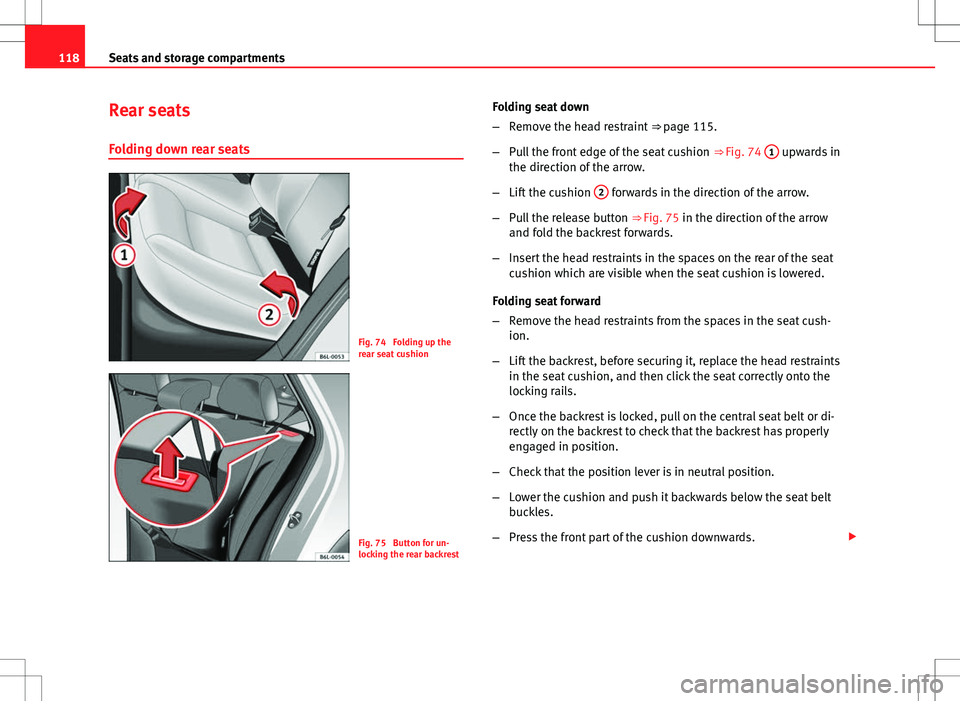
Fig. 74 Folding up the
rear seat cushion
Fig. 75 Button for un-
locking the rear backrest Folding seat down
–
Remove the head restraint ⇒ page 115.
– Pull the front edge of the seat cushion ⇒ Fig. 74 1
upwards in
the direction of the arrow.
– Lift the cushion 2
forwards in the direction of the arrow.
– Pull the release button ⇒ Fig. 75 in the direction of the arrow
and fold the backrest forwards.
– Insert the head restraints in the spaces on the rear of the seat
cushion which are visible when the seat cushion is lowered.
Folding seat forward
– Remove the head restraints from the spaces in the seat cush-
ion.
– Lift the backrest, before securing it, replace the head restraints
in the seat cushion, and then click the seat correctly onto the
locking rails.
– Once the backrest is locked, pull on the central seat belt or di-
rectly on the backrest to check that the backrest has properly
engaged in position.
– Check that the position lever is in neutral position.
– Lower the cushion and push it backwards below the seat belt
buckles.
– Press the front part of the cushion downwards.
Page 128 of 280
126Seats and storage compartments
Luggage compartment
Storing objects
All luggage must be securely stowed. Please observe the following points to ensure the vehicle handles
well at all times:
– Distribute the load as evenly as possible.
– Place heavy objects as far forward in the luggage compartment
as possible.
WARNING
● Loose luggage and other loose items in the vehicle may cause serious
injuries.
● Loose objects in the luggage compartment can suddenly move and
change the way the vehicle handles.
● In case of sudden manoeuvres or accidents, loose objects in the inte-
rior can be flung forward, injuring passengers.
● Always put objects in the luggage compartment.
● When you transport heavy objects, always take into account that a
change in the centre of gravity can also cause changes in vehicle han-
dling.
● Please observe information on safe driving ⇒ page 7, Safe driving.
CAUTION
Hard objects on the rear shelf could chafe against the wires of the heating
element in the heated rear window and cause damage.
Note
The ventilation slots in front of the rear side windows must not be covered
as this would prevent stale air being extracted from the vehicle.
Rear shelf
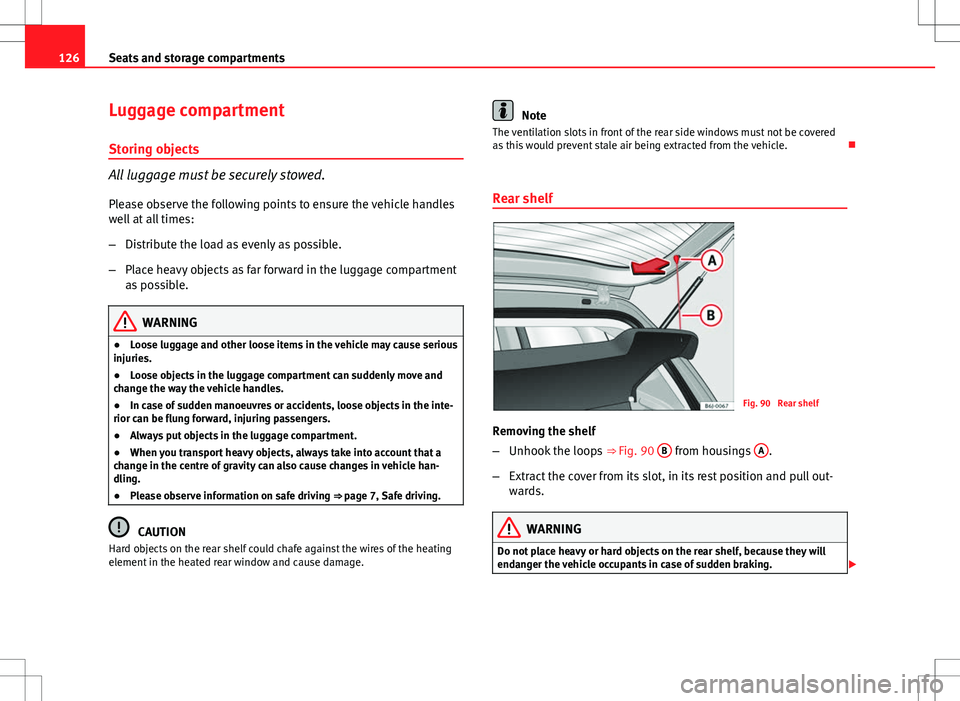
Fig. 90 Rear shelf
Removing the shelf
– Unhook the loops ⇒
Fig. 90 B
from housings A.
– Extract the cover from its slot, in its rest position and pull out-
wards.
WARNING
Do not place heavy or hard objects on the rear shelf, because they will
endanger the vehicle occupants in case of sudden braking.
Page 158 of 280
156Driving
Parking
The handbrake should always be firmly applied when the
vehicle is parked.
Always note the following points when parking the vehicle:
–Use the brake pedal to stop the vehicle.
– Apply the handbrake.
– Select first gear.
– Switch the engine off and remove the key from the ignition. Turn
the steering wheel slightly to engage the steering lock.
– Always take you keys with you when you leave the vehicle ⇒
.
Additional notes on parking the vehicle on gradients:
Turn the steering wheel so that the vehicle rolls against the kerb if it started
to roll.
● If the vehicle is parked facing downhill, turn the front wheels so that
they point towards the kerb .
● If the vehicle is parked facing uphill, turn the front wheels so that they
point away from the kerb .
● Secure the vehicle as normal by applying the handbrake firmly and se-
lecting first gear.
WARNING
● Take measures to reduce the risk of injury when you leave your vehi-
cle unattended.
● Never park where the hot exhaust system could ignite inflammable
materials, such as dry grass, low bushes, spilt fuel etc.
● Never allow vehicle occupants to remain in the vehicle when it is
locked. They would be unable to open the vehicle from the inside, and
could become trapped in the vehicle in an emergency. In the event of an
emergency, locked doors will delay assistance to vehicle occupants.
● Never leave children alone in the vehicle. They could set the vehicle
in motion, for example, by releasing the handbrake or the gearbox lever.
● Depending on weather conditions, it may become extremely hot or
cold inside the vehicle. This can be fatal.
Hill-start aid*
This function is only included in vehicles with ESC. This device helps when starting uphill.
These are the basic operation conditions: doors closed, brake pedal press-
ed down and vehicle in neutral. The system gets activated on engaging
gear.
After removing your foot from the brake pedal, the braking force is main-
tained for a few seconds to prevent the vehicle from moving backward when
putting into gear. This short space of time is enough to start the vehicle
with ease.
This system also works when reversing uphill.