2012 Seat Exeo steering wheel
[x] Cancel search: steering wheelPage 98 of 317

96Steering wheel controls
Steering wheel controls, Navigation System + Telephone* version
AB(Mode)C(PTT)D+-Press+-Press
Radio modeStation search.
Increase frequen- cyStation search.Decrease fre- quencyPress once: starts the search.
Press twice: can- cels the search
Change to phone
Enable voicerecognition
Volume upVolume down
Repetition of
the last naviga- tion order (only if active)
CD/
iPod-USB ModeCD mode: next track.
iPod/USB Mode: next trackCD mode: previ-ous track.
iPod/USB Mode: previous trackCD mode: fast for- ward.
iPod/USB Mode: fast forward
Volume upVolume down
Repetition of
the last naviga- tion order (only if active)
MP3 modeNext trackPrevious trackFast forwardVolume upVolume down
Repetition of
the last naviga- tion order (only if active)
Phone modeNext name inphone bookPrevious name in phone bookAccept
Change to ra-dio / CD /
iPod-USB / MP3
Volume upVolume down
Repetition of
the last naviga- tion order (only if active)
Incoming call modeNo functionspecifiedNo functionspecifiedOne press: accept call.
Held down: reject callNo functionspecifiedNo function specifiedVolume upVolume down
Repetition of
the last naviga- tion order (only if active)
Active callmodeNo functionspecifiedNo functionspecifiedEnd callNo functionspecifiedNo function specifiedVolume upVolume down
Repetition of
the last naviga- tion order (only if active)
Voice activation modeNo functionspecifiedNo functionspecifiedNo function speci- fiedNo functionspecifiedCancelVolume upVolume downNo function specified
Page 123 of 317
121
Lights and visibility
– Press the knob in again to prevent the setting from being
changed unintentionally.
This button activates or deactivates the daytime running lights function.
With the function activated, when the ignition is switched on the daytime
running lights are turned on automatically.
Note
Please observe any relevant legal requirements which may apply in your
country.
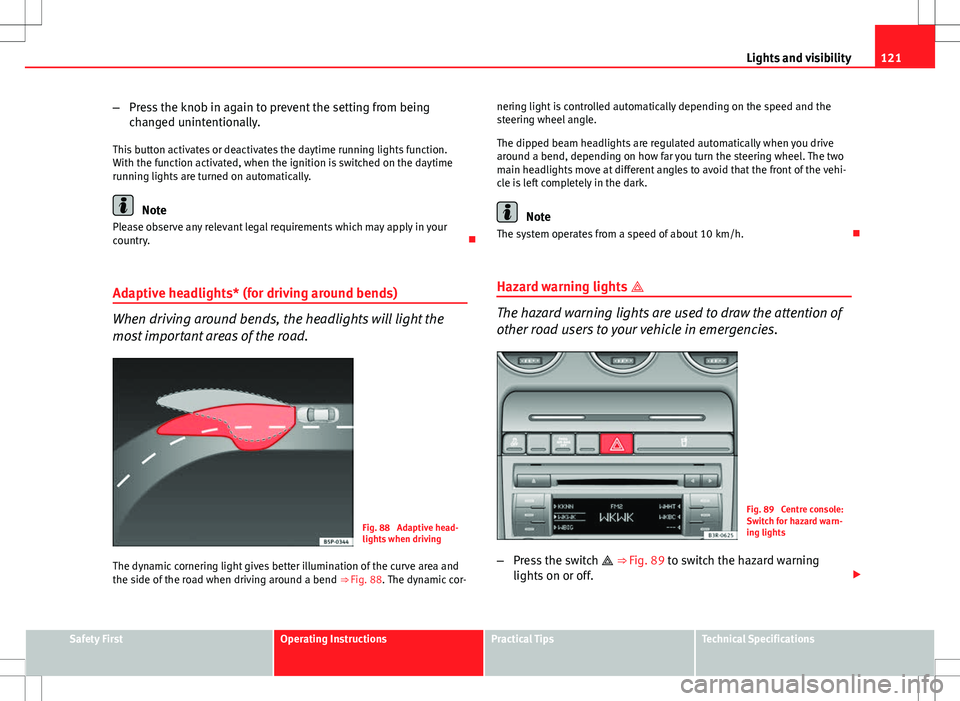
Adaptive headlights* (for driving around bends)
When driving around bends, the headlights will light the
most important areas of the road.
Fig. 88 Adaptive head-
lights when driving
The dynamic cornering light gives better illumination of the curve area and
the side of the road when driving around a bend ⇒ Fig. 88. The dynamic cor-nering light is controlled automatically depending on the speed and the
steering wheel angle.
The dipped beam headlights are regulated automatically when you drive
around a bend, depending on how far you turn the steering wheel. The two
main headlights move at different angles to avoid that the front of the vehi-
cle is left completely in the dark.
Note
The system operates from a speed of about 10 km/h.
Hazard warning lights
The hazard warning lights are used to draw the attention of
other road users to your vehicle in emergencies.
Fig. 89 Centre console:
Switch for hazard warn-
ing lights
– Press the switch
⇒
Fig. 89 to switch the hazard warning
lights on or off.
Safety FirstOperating InstructionsPractical TipsTechnical Specifications
Page 125 of 317

123
Lights and visibility
Main beam headlights
– Press the lever forward to switch on the main beams.
– Pull the lever back towards you to switch the main beam head-
lights off again.
Headlight flasher
– Pull the lever towards the steering wheel to operate the flasher.
Parking light
– Switch the ignition off.
– Move the lever up or down to turn on the right or left-hand park-
ing lights respectively.
Notes on these functions
● The turn signals only work when the ignition is switched on. The turn
signal lamp or flashes in the instrument panel when the turns signals
⇒ page 65 are working.
● The turn signals are cancelled automatically when the steering wheel is
returned to the straight-ahead position.
● The main beam headlights can only be switched on if the dipped beam
headlights are already on. The main beam headlight indicator lamp then
comes on in the instrument panel.
● The headlight flasher comes on for as long as you pull the lever, even if
no other lights are switched on. The main beam headlight indicator lamp
then comes on in the instrument panel.
● When the parking lights are switched on, the headlight and the tail light
on one side of the vehicle light up with reduced intensity. The parking lights
will only work with the ignition off.
CAUTION
Never use the main beam headlights or the headlight flasher if this would
dazzle oncoming traffic.
Interior lights
Front interior lights and glove compartment light
The front interior light also incorporates the reading lights
for the driver and passenger.
Fig. 91 Detail of headlin-
er: front interior lights
The rocker switch A
⇒
Fig. 91 for the front interior light has the
following functions:
Door light position
– Move switch A
to the centre position.
Safety FirstOperating InstructionsPractical TipsTechnical Specifications
Page 130 of 317

128Lights and visibility
Note
● An overload cut-out may be triggered if the sun blind for the rear window
is operated repeatedly. There will then be a short delay before the blind can
be operated again.
● As the material of the sun blind is less flexible at low temperatures the
electric actuator is switched off when the temperature in the car is below
-5 °C. The sun blind can only be operated when the temperature inside the
car rises above this level.
Windscreen wipers
Windscreen wipers
The windscreen wiper lever controls the windscreen wipers
and the automatic wash and wipe.
Fig. 99 Windscreen wip-
er lever
The windscreen wiper lever ⇒
Fig. 99 has the following settings: Short wipe
–
Move the lever down to position 1
to give the windscreen a
short wipe.
Intermittent wipe / Rain sensor* (activate)
– Move the lever up to position 2
.
– Move the switch A
up or down to set the wiper intervals.
– In vehicles equipped with a rain sensor*, you can move the
switch A
up and down to set the sensitivity of the rain sensor.
Slow wipe
– Move the lever up to position 3
.
Continuous wipe
– Move the lever up to position 4
.
Automatic wash and wipe
– Pull the lever towards the steering wheel, 5
, to activate the
windscreen washer.
– Release the lever. The washer will stop and the wipers will keep
running for approximately 4 seconds.
Deactivating the windscreen wiper
– Pull the lever to basic position 0
.
General notes
The washers and wipers will work only when the ignition is switched on.
Page 167 of 317

165
Driving
Driving SteeringAdjusting the steering wheel position
The height and reach of the steering wheel can be freely ad-
justed to suit the driver
Fig. 132 Lever beneath
steering column
– Push the lever ⇒ Fig. 132 down ⇒
.
– Move the steering wheel to the desired position.
– Then push the lever back up against the steering column until it
engages in position.
WARNING
● Never adjust the position of the steering wheel when the vehicle is
moving, as this could cause an accident.
● For safety reasons, the lever must always be securely engaged when
the vehicle is moving, so that the position of the steering wheel cannot
shift unexpectedly. Otherwise this could cause an accident.
Safety Electronic Stability Control (ESC)
The ESC helps make driving safer in extreme driving condi-
tions.
Fig. 133 Detailed view of
the centre console: ESC
button
Safety FirstOperating InstructionsPractical TipsTechnical Specifications
Page 169 of 317

167
Driving
Position 1
The ignition key is inserted in this position. To
engage the steering wheel
lock, take out the key and turn the wheel until you hear the pin engage. You
should always engage the steering lock when you leave the vehicle. This
will help to deter thefts ⇒
.
Switching on the ignition/pre-heating glow plugs 2
If the key is difficult to turn in the lock, move the steering wheel (to take the
load off the steering lock mechanism) until the key turns freely. In the case
of vehicles with a diesel engine, the key is turned to this position to preheat
the glow plugs.
Starting the engine 3
The engine is started in this position. Electrical components with a high
power consumption are switched off temporarily.
After the engine has started, the ignition key returns to position 2
by itself.
The ignition key has to be turned back to position 1
before re-starting the
engine. The starter inhibitor in the ignition lock prevents the starter motor
from engaging when the engine is running, as this could cause damage.
Switching off the ignition 1
Turn the ignition key to this position.
WARNING
● Never remove the ignition key until the vehicle is stationary! Other-
wise the steering lock could engage suddenly, which could cause an acci-
dent.
● Always take the key with you when leaving the vehicle, even if you
only intend to be gone for a short time. This is particularly important if
there are children in the vehicle, as they might otherwise be able to start
the engine or use power-operated equipment (e.g. the electric windows),
which could cause injuries.
Note
● If the battery has been disconnected and then reconnected, it will be
necessary to leave the key in position 2
for about 5 seconds before start-
ing the engine.
● Vehicles with automatic gearbox: After switching off the ignition, you
can only remove the ignition key if the selector lever is in position “P” (park-
ing lock). The selector lever is locked after the ignition key has been re-
moved.
Starting and stopping the engine Starting the engine
The engine can only be started with an original SEAT key.
Fig. 135 Ignition key po-
sitions
Vehicles with a petrol engine:
– Use the foot brake.
Safety FirstOperating InstructionsPractical TipsTechnical Specifications
Page 171 of 317

169
Driving
WARNING
● Never switch the engine off until the vehicle is stationary.
● The brake servo and the power steering system work only when the
engine is running. You need more strength to steer and brake the vehicle
when the engine is switched off. Given that you will be unable to steer
and brake as usual, this could lead to a risk of accidents and injuries.
CAUTION
If the engine has been running under high load for a long time, there is a
risk of heat building up in the engine compartment after the engine has
been switched off; this could cause engine damage. Therefore, you should
let the engine idle for approximately 2 minutes before you switch it off.
Note
After the engine is switched off the radiator fan may run on for up to 10 mi-
nutes, even if the ignition is switched off. It may also start running again af-
ter some time if the coolant temperature rises due to a build-up of heat un-
der the bonnet, or if the engine is already warm and the engine compart-
ment is heated up further by direct sunlight.
Start-Stop function* Description and operation
The Start-Stop function stops the engine when the vehicle is stop-
ped and starts it automatically when required.
– When the vehicle is stopped, put it in neutral and release the
clutch pedal. The engine will stop. –
When the clutch pedal is pressed, the engine starts again.
– The instrument panel screen displays information about the sta-
tus of the Start-Stop function ⇒ Fig. 137.
Start-Stop function conditions
● The driver seat belt must be buckled.
● The engine hood must be closed.
● The engine must be at operating temperature
● The steering wheel must not be turned more than 270°.
● The vehicle must not be on a steep gradient.
● The vehicle must not be in reverse.
● A trailer must not be connected.
● The temperature of the passenger compartment must be within the con-
venience limits ( ECON
button should not be selected).
● The windscreen de-mist function must be off.
● Otherwise it requires more than 50% of the airflow that the fan can sup-
ply.
● The temperature must not be set to HI or LO.
● The driver door must be closed.
● The diesel particulate filter must not be in regeneration mode, for diesel
engines.
● The battery charge must not be low for the next start.
● The battery temperature must be between -1 °C and 60 °C.
Start-Stop function interruption
In the following situations, the Start-Stop function will be interrupted and
the engine will automatically start:
● The vehicle starts moving.
● The brake pedal is pressed several times in a row.
● The battery has been discharged excessively.
Safety FirstOperating InstructionsPractical TipsTechnical Specifications
Page 172 of 317

170Driving
● The Start-Stop System is manually deactivated.
● The windscreen de-mist function is turned on.
● The temperature of the passenger compartment exceeds the comfort
limits (button ECON
should not be selected).
● If more than 50% of the airflow that the fan can supply is ordered.
● Temperature setting HI or LO is selected.
● The engine coolant temperature is insufficient.
● The alternator is faulty, for example the V-belt has ruptured.
● If any of the conditions described in the previous section are not fulfil-
led.
WARNING
Never allow the vehicle to move with the engine off for any reason. You
could lose control of your vehicle. This could cause an accident and seri-
ous injury.
● Power steering does not work when the engine is not running. That is
why it is much more difficult to turn the steering wheel.
● Disconnect the Start-Stop system when driving through water (ford-
ing streams, etc.).
Note
● For vehicles with the Start-Stop function and a manual gearbox, when
the engine is started, the clutch must be pressed.
● When the conditions for the Start-Stop function are not fulfilled, the in-
strument panel displays the Start-Stop indicator dimmed.
● If the steering wheel is turned more than 270°, Stop will not function;
however, the angle of steering wheel turn does not affect starting the vehi-
cle. Activating and deactivating the Start-Stop function
Fig. 136 The Start-Stop
function button.
Every time the ignition is switched on, the Start-Stop function is au-
tomatically switched on.
Manually deactivating the Start-Stop function
– Press the ⇒ Fig. 136 button located on the centre console.
When the Start-Stop function is deactivated, the pushbutton in-
dicator lights.
– If the Start-Stop function is operating then the engine starts im-
mediately.
Switching the Start-Stop function on manually
– Press the ⇒ Fig. 136 button located on the centre console.
The indicator on the button will go out.