2012 Seat Exeo phone
[x] Cancel search: phonePage 94 of 317
92Steering wheel controls
Steering wheel controls
Multifunction steering wheel* Introduction
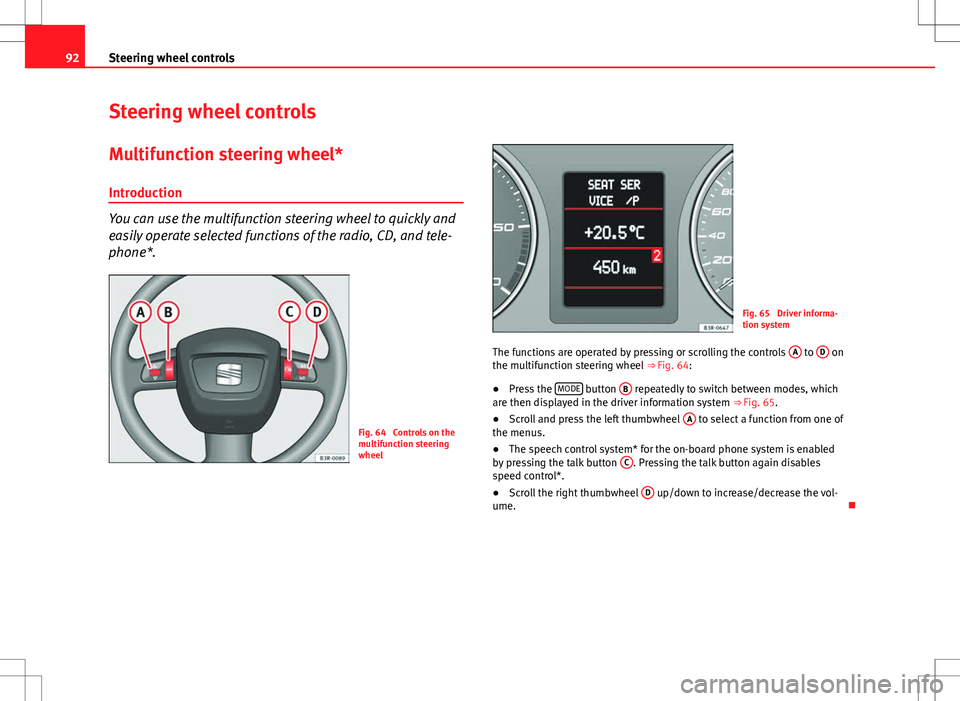
You can use the multifunction steering wheel to quickly and
easily operate selected functions of the radio, CD, and tele-
phone*.
Fig. 64 Controls on the
multifunction steering
wheel
Fig. 65 Driver informa-
tion system
The functions are operated by pressing or scrolling the controls A
to D on
the multifunction steering wheel ⇒ Fig. 64:
● Press the MODE
button
B repeatedly to switch between modes, which
are then displayed in the driver information system ⇒ Fig. 65.
● Scroll and press the left thumbwheel A
to select a function from one of
the menus.
● The speech control system* for the on-board phone system is enabled
by pressing the talk button C
. Pressing the talk button again disables
speed control*.
● Scroll the right thumbwheel D
up/down to increase/decrease the vol-
ume.
Page 96 of 317

94Steering wheel controls
Steering wheel Audio + Telephone version controls
AB(Mode)C(PTT)D+-Press+-Press
Radio modeStation search.
Increase frequen- cyStation search.Decrease fre- quencyPress once: starts the search.
Press twice: can- cels the search
Change to phone
Enable voicerecognition
Volume upVolume downMUTE
CD/
iPod-USB ModeCD mode: next track.
iPod/USB Mode: next trackCD mode: previ-ous track.
iPod/USB Mode: previous trackCD mode: fast for- ward.
iPod/USB Mode: fast forward
Volume upVolume downMUTE
MP3 modeNext trackPrevious trackFast forwardVolume upVolume downMUTE
Phone modeNext name inphone bookPrevious name in phone bookAccept
Change to ra-dio / CD /
iPod-USB / MP3
Volume upVolume downNo functionspecified
Incoming call modeNo functionspecifiedNo functionspecifiedOne press: accept call.
Held down: reject callNo functionspecifiedNo function specifiedVolume upVolume downNo functionspecified
Active call modeNo functionspecifiedNo functionspecifiedEnd callNo functionspecifiedNo function specifiedVolume upVolume downNo functionspecified
Voice activation modeNo functionspecifiedNo functionspecifiedNo function speci- fiedNo functionspecifiedCancelVolume upVolume downNo function specified
Page 98 of 317

96Steering wheel controls
Steering wheel controls, Navigation System + Telephone* version
AB(Mode)C(PTT)D+-Press+-Press
Radio modeStation search.
Increase frequen- cyStation search.Decrease fre- quencyPress once: starts the search.
Press twice: can- cels the search
Change to phone
Enable voicerecognition
Volume upVolume down
Repetition of
the last naviga- tion order (only if active)
CD/
iPod-USB ModeCD mode: next track.
iPod/USB Mode: next trackCD mode: previ-ous track.
iPod/USB Mode: previous trackCD mode: fast for- ward.
iPod/USB Mode: fast forward
Volume upVolume down
Repetition of
the last naviga- tion order (only if active)
MP3 modeNext trackPrevious trackFast forwardVolume upVolume down
Repetition of
the last naviga- tion order (only if active)
Phone modeNext name inphone bookPrevious name in phone bookAccept
Change to ra-dio / CD /
iPod-USB / MP3
Volume upVolume down
Repetition of
the last naviga- tion order (only if active)
Incoming call modeNo functionspecifiedNo functionspecifiedOne press: accept call.
Held down: reject callNo functionspecifiedNo function specifiedVolume upVolume down
Repetition of
the last naviga- tion order (only if active)
Active callmodeNo functionspecifiedNo functionspecifiedEnd callNo functionspecifiedNo function specifiedVolume upVolume down
Repetition of
the last naviga- tion order (only if active)
Voice activation modeNo functionspecifiedNo functionspecifiedNo function speci- fiedNo functionspecifiedCancelVolume upVolume downNo function specified
Page 108 of 317

106Unlocking and locking
Note
● The remote control is automatically disabled when the ignition is switch-
ed on.
● The function of the remote control may be impaired by interference from
other nearby radio signals (e.g. from a mobile phone or TV transmitter) if
these are in the same frequency range.
Locking and unlocking the vehicle
Fig. 77 Remote control
key: Control buttons
Unlocking the vehicle
–
Press button A
⇒
Fig. 77 for about 1 second.
Locking the vehicle
–
Press button B for about 1 second.
Opening the rear lid
–
Press button C and hold for at least one second. The turn signals will flash twice as confirmation when you unlock the vehi-
cle. The vehicle will be locked again automatically if you do not open one of
the doors or the rear lid within 60 seconds after unlocking the vehicle with
button
A
. This function prevents the vehicle from remaining unlocked if the
unlocking button is pressed by mistake.
In vehicles with the security central locking* feature, you can unlock just
the driver door and the tank flap by pressing button A
once or the whole
vehicle by pressing the button twice.
The turn signals flash once when the vehicle is locked to confirm that the
doors and rear lid are properly locked.
Moreover, apart from unlocking the vehicle, the seat* and mirror* memory
programmed in the key is activated. The driver seat and exterior mirrors will
be automatically adjusted to the positions stored in the memory.
The interior lights will automatically light up when the vehicle is unlocked
and go out when the vehicle is locked, provided that the switch is in the
courtesy light position.
WARNING
Do not leave anyone (especially children) in the vehicle if it is locked from
the outside and the anti-theft security system is enabled, as the doors
and windows cannot then be opened from the inside. Locked doors could
delay assistance in an emergency, potentially putting lives at risk.
Note
● The remote control should only be used when the doors and the rear lid
are closed.
● The remote control should not be used when the vehicle is out of sight.
● The anti-theft alarm* can be accidentally triggered and the vehicle
locked if you press the locking button
on the remote control inside the
vehicle before inserting the key in the ignition. If this should happen by
mistake, press the unlock button
.
Page 223 of 317

221
Accessories, replacement of parts and modifications
Accessories, replacement of parts and modifications
Accessories and spare parts
Always consult a SEAT dealership before purchasing acces-
sories and parts.
Your vehicle is designed to offer a high standard of active and passive safe-
ty.
Before purchasing accessories and parts, and before making technical
changes to your vehicle, we recommend you to consult your Technical Serv-
ice.
SEAT dealerships will be happy to provide you with the latest information
about the use, legal requirements and recommendations from the manufac-
turer regarding accessories and parts.
We recommend you use only SEAT Approved Accessories®
and SEAT Ap-
proved Spare Parts ®
. This way, SEAT can guarantee that the product in
question is suitable, reliable and safe. SEAT Technical Services have the
necessary experience and facilities to ensure that parts are correctly and
professionally installed.
Despite a continuous observation of the market, SEAT is not able to assess
the reliability, safety and suitability of those parts SEAT has not approved.
For this reason, SEAT cannot assume responsibility for any non-genuine
parts used, even if these parts have been approved by an official testing
agency or are covered by an official approval certificate.
Any equipment subsequently installed which has a direct effect on the driv-
er's control of the vehicle (e.g. cruise control system or electronically-con-
trolled suspension) must be approved by SEAT and bear the e mark (the Eu-
ropean Union's authorisation symbol). If any
additional electrical components are fitted which do not serve to con-
trol the vehicle itself (e.g. refrigerator box, laptop or ventilator fan), these
must bear the CE mark (European Union manufacturer conformity declara-
tion).
WARNING
Accessories, for example telephone holders or cup holders, should never
be fitted on the covers, or within the working range, of the airbags. Oth-
erwise, there is a danger of injury if the airbag is triggered in an accident.
Technical modifications
Modifications must always be carried out according to our
specifications.
Unauthorised modifications to the electronic components or software in the
vehicle may cause malfunctions. Due to the way the electronic components
are linked together in networks, other indirect systems may be affected by
the faults. This can seriously impair safety, lead to excessive wear of compo-
nents, and also invalidate your vehicle registration documents.
SEAT Technical Services cannot be held liable for any damage caused by
modifications and/or work incorrectly performed.
For this reason, we recommend having all work performed by a SEAT Techni-
cal Service using Genuine SEAT®
Spare Parts.
Safety FirstOperating InstructionsPractical TipsTechnical Specifications
Page 224 of 317

222Accessories, replacement of parts and modifications
WARNING
Incorrectly performed modifications or other kind of work on your vehicle
can lead to malfunctions and cause accidents.
Mobile phones and two-way radios
First consult your Technical Service if you wish to use a mobile telephone or
a two-way radio with a transmitting power output in excess of 10 watts.
Here you will receive information concerning the technical possibilities for
retrofitting this equipment.
Mobile telephones and two-way radios should be only fitted by a special-
ised workshop, for example a SEAT dealership.
WARNING
● Always concentrate primarily on driving. If you are distracted while
driving you could have an accident.
● Never attach the telephone mountings to the surfaces covering the
airbag units or within the range of the airbags. There is a high danger of
injury if the airbag is triggered.
Note
Please observe the operating instructions of your mobile telephone / two-
way radio. Athermic windscreen*
Fig. 165 Location of the
electronic toll collection
system
Vehicles with an athermic windscreen have an area without athermic treat-
ment above the rear view mirror ⇒ Fig. 165. This area has been designed for
the operating of electronic components of fitted devices (e.g. electronic toll
collection system).
Note
The customer should ensure that the electronic toll collection system is fit-
ted in the correct area to make sure it works correctly.
Page 265 of 317

263
If and when
Fuse assignment
This list shows the fuses which can be replaced relatively
easily by the owner.
No.ConsumerAmps1Air conditioner102Footwell lamps53Heated washer jets54Radiator fan55Parking aid, automatic gearbox106Air conditioner (air purity sensor), pressure sensor5
7Electronic Stability Control (ESC), brake light switch,
clutch pedal switch, steering angle sensor10
8Telephone59Lambda probe heater1010Adaptive headlights right5
11Airbag and disconnection of the front passenger air-
bag5
12Diagnostic socket1013Steering column unit1014Brake lights1015Instrument panel1016Vacant 17Tyre pressure control, rain/light sensor1018Adaptive headlights left519Start-Stop control unit1020Engine management1521Start/Stop battery power management522Vacant 23Vacant
No.ConsumerAmps24Central electrics unit for convenience equipment2025Heater blower3026Rear window heater3027Power socket for trailer (control unit)3028Fuel pump, auxiliary pump for diesel2029Radio, amplifier (with Start-Stop)2030Sliding/tilting sunroof20
31Diagnosis connection, automatic anti-dazzle interior
mirror, reverse light, automatic gearbox15
32Towing socket1533Lighter2034Rear electric windows3035Luggage compartment power socket*2036Wiper system30
37Pump for windscreen washer and headlight washer
system30
38Luggage compartment illumination, alarm1539Radio, amplifier (without Start-Stop)2040Horn2541230 volt socket3042Electronic Stability Control (ESC)2543Front electric windows3044Seat heating35
Some of the electrical items listed in the table are only fitted on certain
models or are optional extras.
Safety FirstOperating InstructionsPractical TipsTechnical Specifications
Page 309 of 317

Deactivating temporarily . . . . . . . . . . . . . . 178
Setting the speed . . . . . . . . . . . . . . . . . . . . 177
Cruise speed . . . . . . . . . . . . . . . . . . . . . . . . . . . 176
Curtain airbags . . . . . . . . . . . . . . . . . . . . . . . . . . 41 Description . . . . . . . . . . . . . . . . . . . . . . . . . . 41
Operation . . . . . . . . . . . . . . . . . . . . . . . . . . . 42
Safety notes . . . . . . . . . . . . . . . . . . . . . . . . . 42
D Danger of fitting a child seat on the front pas- senger seat . . . . . . . . . . . . . . . . . . . . . . . . . . . 29
Dash panel cleaning . . . . . . . . . . . . . . . . . . . . 219
Data entry control . . . . . . . . . . . . . . . . . . . . . . . . 90
Date display . . . . . . . . . . . . . . . . . . . . . . . . . . . . 61
Daytime running lights . . . . . . . . . . . . . . . . . . 120
Deactivating front passenger airbag Safety notes . . . . . . . . . . . . . . . . . . . . . . . . . 45
Deactivating the airbag Front passenger airbag . . . . . . . . . . . . . . . . 44
Diesel . . . . . . . . . . . . . . . . . . . . . . . . . . . . . . . . 225
Diesel engine Winter driving . . . . . . . . . . . . . . . . . . . . . . . 226
Diesel engine particulate filter . . . . . . . . . . . . 196
Diesel particulate filter . . . . . . . . . . . . . . . . . . . 81 Engine oil . . . . . . . . . . . . . . . . . . . . . . . . . . 228
Digital clock . . . . . . . . . . . . . . . . . . . . . . . . . . . . 61
Dipped beam headlights . . . . . . . . . . . . . . . . . 115
DIS Average fuel consumption . . . . . . . . . . . . . . 86
Average speed . . . . . . . . . . . . . . . . . . . . . . . 86 Driving time . . . . . . . . . . . . . . . . . . . . . . . . . 86
Instantaneous fuel consumption . . . . . . . . 86
Disposal Airbags . . . . . . . . . . . . . . . . . . . . . . . . . . . . . 30
Seat belt tensioners . . . . . . . . . . . . . . . . . . . 27
Distance covered . . . . . . . . . . . . . . . . . . . . . . . . 87
Distance to empty . . . . . . . . . . . . . . . . . . . . 74, 86
Door and rear lid warning . . . . . . . . . . . . . . . . . 75
Door lock cylinders . . . . . . . . . . . . . . . . . . . . . . 213
Doors Childproof lock . . . . . . . . . . . . . . . . . . . . . . 105
Locking the doors manually if the centrallocking fails to work . . . . . . . . . . . . . . . . 103
Driver see Correct sitting position . . . . . . . 10, 11, 12
Driver information system . . . . . . . . . . . . . . . . . 72 Auto-check system . . . . . . . . . . . . . . . . . . . . 76
CD, radio and telephone display . . . . . . . . . 73
Door and rear lid warning . . . . . . . . . . . . . . 75
Driver messages . . . . . . . . . . . . . . . . . . . . . . 77
Handbrake warning . . . . . . . . . . . . . . . . . . . 77
Menu display . . . . . . . . . . . . . . . . . . . . . . . . 89
Onboard computer . . . . . . . . . . . . . . . . . . . . 86
Outside temperature display . . . . . . . . . . . . 73
Red symbols . . . . . . . . . . . . . . . . . . . . . . . . . 78
Speed warning . . . . . . . . . . . . . . . . . . . . . . . 83
Warning messages . . . . . . . . . . . . . . . . . . . . 77
Yellow symbols . . . . . . . . . . . . . . . . . . . . . . . 80
Driver messages . . . . . . . . . . . . . . . . . . . . . . . . . 77
driver seat Assigning the key to the seat . . . . . . . . . . 139 Driver seat
Activating stored settings . . . . . . . . . . . . . 138
With memory . . . . . . . . . . . . . . . . . . . . . . . 137
Driving Driving abroad . . . . . . . . . . . . . . . . . . . . . . 198
Economically / Environmentally friendly . 196
Driving abroad . . . . . . . . . . . . . . . . . . . . . . . . . 198 Headlights . . . . . . . . . . . . . . . . . . . . . . . . . 198
Driving safety . . . . . . . . . . . . . . . . . . . . . . . . . . . . 9
DRP see Dynamic gear control programme . . . 184
Dynamic gear control programme . . . . . . . . . . 184
E
Economical driving . . . . . . . . . . . . . . . . . . . . . . 196
Electric windows . . . . . . . . . . . . . . . . . . . . . . . . 109 Central locking system . . . . . . . . . . . . . . . . 111
Possible malfunctions . . . . . . . . . . . . . . . . 111
Rear doors . . . . . . . . . . . . . . . . . . . . . . . . . . 110
Switches on the driver door . . . . . . . . . . . . 110
Switch on front passenger's door . . . . . . . 110
Electronic differential lock How it works . . . . . . . . . . . . . . . . . . . . . . . . 190
Electronic immobiliser . . . . . . . . . . . . . . . . . . . . 99
Electronic Stability Control . . . . . . . . . . . . . . . . 69 description . . . . . . . . . . . . . . . . . . . . . . . . . 165
Operation . . . . . . . . . . . . . . . . . . . . . . . . . . 188
warning lamp . . . . . . . . . . . . . . . . . . . . . . . 166
307
Index