2012 RENAULT LAGUNA COUPE warning light
[x] Cancel search: warning lightPage 67 of 221
menu for customising the vehicle settings
(up to the end of the DU)
customising the vehicle settings ........... (up to the end of the DU)
customised vehicle settings .................. (up to the end of the DU)
1.61
ENG_UD25100_1
Menu de personnalisation des réglages du véhicule (X91 - D91 - Re\
nault)
ENG_NU_939-3_D91_Renault_1
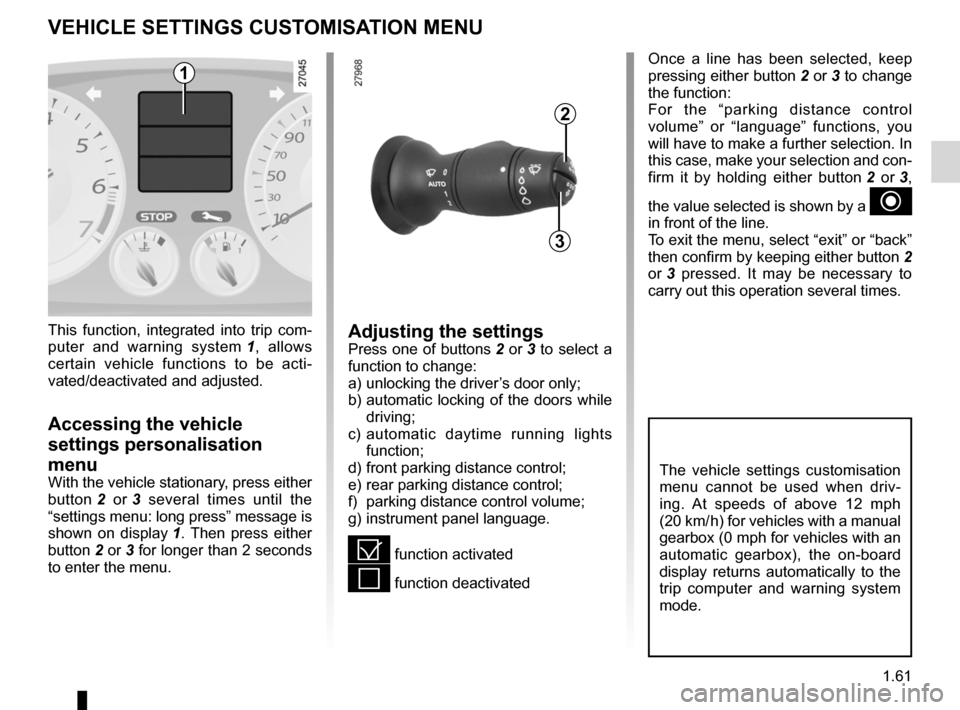
Once a line has been selected, keep
pressing either button 2 or 3 to change
the function:
For the “parking distance control
volume” or “language” functions, you
will have to make a further selection. In
this case, make your selection and con-
firm it by holding either button 2 or 3 ,
the value selected is shown by a
~
in front of the line.
To exit the menu, select “exit” or “back”
then confirm by keeping either button 2
or 3 pressed. It may be necessary to
carry out this operation several times.
vEHIcLE sETTINgs cUsTOmIsATION mENU
Adjusting the settingsPress one of buttons 2 or 3 to select a
function to change:
a) unlocking the driver’s door only;
b) automatic locking of the doors while
driving;
c) automatic daytime running lights
function;
d) front parking distance control;
e) rear parking distance control;
f) parking distance control volume;
g) instrument panel language.
= function activated
< function deactivated
This function, integrated into trip com
-
puter and warning system 1 , allows
certain vehicle functions to be acti -
vated/deactivated and adjusted.
Accessing the vehicle
settings personalisation
menu
With the vehicle stationary, press either
button 2 or 3 several times until the
“settings menu: long press” message is
shown on display 1 . Then press either
button 2 or 3 for longer than 2 seconds
to enter the menu.
2
3
1
The vehicle settings customisation
menu cannot be used when driv -
ing. At speeds of above 12 mph
(20 km/ h) for vehicles with a manual
gearbox (0 mph for vehicles with an
automatic gearbox), the on-board
display returns automatically to the
trip computer and warning system
mode.
Page 71 of 221

warning buzzer ..................................... (up to the end of the DU)
headlight flashers ................................. (up to the end of the DU)
indicators .............................................. (up to the end of the DU)
lights: hazard warning ............................... (up to the end of the DU)
lights: direction indicators .......................... (up to the end of the DU)
indicators: direction indicators .......................... (up to the end of the DU)
hazard warning lights signal ................. (up to the end of the DU)
hazard warning lights signal ................. (up to the end of the DU)
horn ...................................................... (up to the end of the DU)
horn: flash ................................................................. (current page)
horn: sounding the horn ............................................ (current page)
horn ....................................................................... (current page)
1.65
ENG_UD27625_2
Avertisseurs sonores et lumineux (X91 - B91 - K91 - D91 - Renault)
ENG_NU_939-3_D91_Renault_1
Audible and visual signals
AUdIBLE ANd vIsUAL sIgNALs
Horn
Press on the top or sides of steering
wheel boss A.
Headlight flasher
Pull stalk 1 towards you to flash the
headlights.
éHazard warning lights
Press switch 2. This device si-
multaneously activates the four direc -
tion indicators and the side indicator
lights. It must only be used in an emer-
gency to warn drivers of other vehicles
that you have had to stop in an area
where stopping is prohibited or unex -
pected or that you are obliged to drive
under special conditions.
Depending on the vehicle, the hazard
warning lights may come on automati -
cally under heavy deceleration. You can
switch them off by pressing switch 2.
direction indicators
Move stalk 1 parallel to the steering
wheel and in the direction you are going
to turn it.
One-touch mode
When driving, it is possible that the
steering wheel may not be turned suf -
ficiently to return the stalk automatically
to its starting position.
In this case, briefly turn stalk 1 to the in-
termediate position, then release it: the
stalk returns to its original point and the
indicator light flashes three times.
A12
Page 72 of 221
lighting:exterior ............................................ (up to the end of the DU)
instrument panel .................................................... (current page)
lights: side lights ......................................................... (current page)
lights: dipped beam headlights ................................... (current page)
hazard warning lights signal .................................. (current page)
signals and lights .................................. (up to the end of the DU)
lighting: instrument panel .............................................. (current page)
daytime running lights ............................................ (current page)
1.66
ENG_UD19986_4
Éclairages et signalisations extérieurs (X91 - D91 - Renault)
ENG_NU_939-3_D91_Renault_1
Jaune NoirNoir texte
daytime running lights
function
(only relates to front lights)
Depending on the vehicle, the lights
come on without using stalk 1 when the
engine is started. To activate or deacti-
vate this function, refer to the informa-
tion on the “Vehicle settings personali -
sation menu” in Section 1.
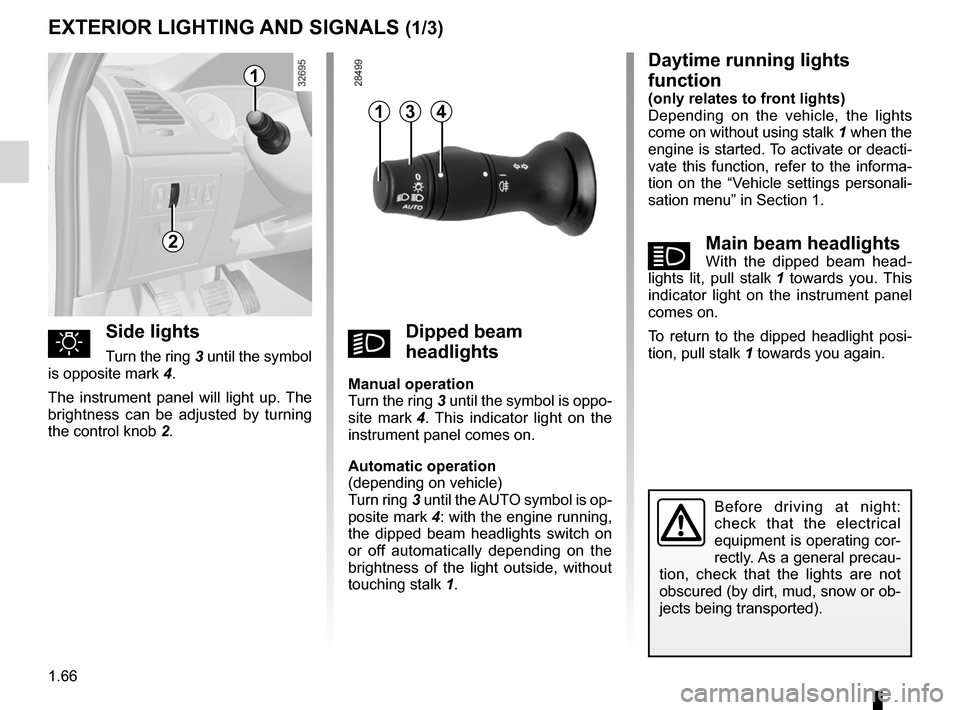
ámain beam headlightsWith the dipped beam head -
lights lit, pull stalk 1 towards you. This
indicator light on the instrument panel
comes on.
To return to the dipped headlight posi-
tion, pull stalk 1 towards you again.
Exterior lighting and signals
Before driving at night:
check that the electrical
equipment is operating cor-
rectly. As a general precau -
tion, check that the lights are not
obscured (by dirt, mud, snow or ob-
jects being transported).
EXTERIOR LIgHTINg ANd sIgNALs (1/3)
2
1
41
uside lights
Turn the ring 3 until the symbol
is opposite mark 4.
The instrument panel will light up. The
brightness can be adjusted by turning
the control knob 2.kdipped beam
headlights
manual operation
Turn the ring 3 until the symbol is oppo -
site mark 4 . This indicator light on the
instrument panel comes on.
Automatic operation
(depending on vehicle)
Turn ring 3 until the AUTO symbol is op-
posite mark 4: with the engine running,
the dipped beam headlights switch on
or off automatically depending on the
brightness of the light outside, without
touching stalk 1.
3
Page 73 of 221

lights:main beam headlights ...................................... (current page)
warning buzzer ...................................................... (current page)
see-me-home lighting ............................................ (current page)
lights mobile directional ............................................. (current page)
JauneNoirNoir texte
1.67
ENG_UD19986_4
Éclairages et signalisations extérieurs (X91 - D91 - Renault)
ENG_NU_939-3_D91_Renault_1
EXTERIOR LIgHTINg ANd sIgNALs (2/3)
1
special note:
– If the dipped beam headlights are
manually switched on and if the light
is sufficient, the directional head -
lights will remain fixed;
– If the lights come on automatically
when cornering, the directional
headlights will start working from the
next time the vehicle corners;
– When the dipped beam headlights
are switched on with the engine
running and the vehicle stationary,
the lights move to reinitialise them -
selves. If not, there is a system fault.
switching off the lightsThere are two possibilities:
– manually, move ring 3 to position 0;
– automatically, the lights will go out
when the engine is switched off, the
driver’s door is opened or the vehicle
is locked. In this case, the next time
the engine is started the lights will be
switched back on according to the
position of the ring 3.
Note: if the fog lights are lit, the lights
are not switched off automatically.
“see-me-home lighting”
function
This function allows you to briefly switch
on the dipped beam headlights (to pro-
vide light when opening a gate, etc.).
With the engine and lights off and
ring 3 in position 0, pull stalk 1 towards
you: the dipped beam headlights come
on for approximately thirty seconds.
To increase this duration, you may pull
the stalk up to four times (total time re-
stricted to two minutes). The message
“lighting for_ _ _” along with the times
the lights will be on for is displayed on
the instrument panel to confirm this
action.
To switch off the lights before they go
out automatically, turn ring 3 to any po-
sition, then return it to position 0.
directional headlights
Depending on the vehicle, with the
dipped beam headlights on and under
certain conditions (speed, steering
wheel angle, forwards gear selected,
etc.) when cornering, the dipped beam
headlights move to light the inside of
the bend.
Operating faults
When the message “check lighting” ap-
pears on the instrument panel along
with warning light
©, this indicates
that there is a lighting fault.
Consult an approved dealer.
3
Page 74 of 221

lights:fog lights .......................................................... (current page)
1.68
ENG_UD19986_4
Éclairages et signalisations extérieurs (X91 - D91 - Renault)
ENG_NU_939-3_D91_Renault_1
EXTERIOR LIgHTINg ANd sIgNALs (3/3)
When driving in fog or snow, or
when transporting objects which are
higher than the roof, the headlights
do not come on automatically.
Switching on the fog lights remains
the responsibility of the driver: the
indicator lights on the instrument
panel inform you whether the fog
lights are lit (indicator light on) or not
(indicator light not on).
5
6
fRear fog light
Turn centre ring 5 on the stalk
until the symbol faces mark 6, then re-
lease it.
Operation of the fog lights depends on
the exterior lighting selected, and an in-
dicator light will light up on the instru -
ment panel.
To avoid inconveniencing other road
users, remember to switch off the rear
fog light when it is no longer needed.
Lights-on reminder buzzer
If the lights are on after the engine is
switched off, a warning beep sounds
when the driver ’s door is opened to
warn you that the lights are still on.
switching off the lights
Turn the ring 5 again to align marker 6
with the symbol. The corresponding in-
dicator light on the instrument panel
goes out.
The fog lights switch off when the exte-
rior lights are switched off.
Page 78 of 221

1.72
ENG_UD29086_2
Réservoir carburant (X91 - D91 - Renault)
ENG_NU_939-3_D91_Renault_1
No modifications what -
soever are permitted on
any part of the fuel supply
system (computers, wiring,
fuel circuit, injector, protection
covers, etc.) as this may be danger-
ous (such work must be undertaken
by qualified Network personnel).
fUEL TANK (2/2)
persistent smell of
fuel
If you notice a persistent
smell of fuel you should:
– stop the vehicle as soon as traf-
fic conditions allow and switch off
the ignition;
– switch on the hazard warning
lights and ask your passengers
to leave the vehicle and to keep
away from traffic;
– contact an approved Dealer.
filling with fuel
With the ignition off, insert the nozzle to
open valve A and insert it fully before
turning it on to fill the fuel tank (risk of
splashing).
Keep the nozzle in this position through -
out the entire filling operation.
When the pump cuts out automatically
at the end of the filling procedure, a
maximum of two further filling attempts
may be made, as there must be suffi -
cient space in the fuel tank to allow for
expansion.
Make sure that no water enters the fuel
tank during filling. The valve A and its
surround must remain clean.
petrol versions
Using leaded petrol will damage the
antipollution system and may lead to a
loss of warranty.
To ensure that the fuel tank is not filled
with leaded petrol, the fuel tank filler
neck contains a restrictor fitted with a
foolproof system which only allows
the nozzle for unleaded petrol to be
used (at the pump).
v ehicle fitted with the stop and
start function
To fill up with fuel, the engine must
be stopped (and not on standby):
stop the engine by pressing the
engine stop button 1 (please refer
to the information on “Starting and
Stopping the engine” in Section 2).
1
Page 86 of 221

2.8
ENG_UD28949_4
Fonction Stop and Start (X91 - B91 - K91 - D91 - Renault)
ENG_NU_939-3_D91_Renault_2
operating faults
When the message “ Check Stop &
Start” appears on the instrument panel
and the integrated warning light 2 lights
up on the switch 1, the system is deac-
tivated.
Please consult an authorised dealer.
Deactivating, activating the
function
Press 1 to deactivate the function. The
message “Stop & Start deactivated ” will
appear on the instrument panel and the
integrated warning light 2 on the switch
will light up.
Pressing again will reactivate the
system. The message “Stop & Start ac-
tivated ” will appear on the instrument
panel and the integrated warning light 2
on switch 1 will go out.
StoP aND StaRt function (3/3)
The system is automatically reactivated
each time the vehicle is started using
the start button (please see “Starting,
stopping the engine)”.
Before getting out of the
vehicle, you must switch
off the ignition by pressing
the engine stop (please see
“Starting, stopping the engine”).
2
1
In the event of an emer -
gency, the engine can be
restarted by pressing on the
clutch pedal if the Stop and
Start function is activated.
Page 87 of 221
special features of petrol vehicles ........ (up to the end of the DU)
catalytic converter ................................. (up to the end of the DU)
driving ................................................... (up to the end of the DU)
catalytic converter ................................. (up to the end of the DU)
2.9
ENG_UD10553_1
Particularités des versions essence (X85 - B85 - C85 - S85 - K85 - R\
enault)
ENG_NU_939-3_D91_Renault_2
Special features of petrol versions
SPeCIaL FeatUReS oF PetRoL VeRSIoNS
The following operating conditions:
– driving for long periods when the low
fuel level warning light is lit;
– using leaded petrol;
– using fuel or lubrication additives
which are not approved.
Or operating faults such as:
– faulty ignition system, running out of
fuel or disconnected spark plugs re-
sulting in the engine misfiring or cut-
ting out when driving;
– loss of power,
as they may cause the catalytic con -
verter to overheat and thus reduce its
efficiency, or damage it irreparably
and cause heat damage to the vehi-
cle. If you notice any of the above operating
faults, have the necessary repairs car-
ried out as soon as possible by an ap-
proved Dealer.
These faults may be avoided by regu
-
larly taking your vehicle to an approved
Dealer at the intervals specified in the
Maintenance Service Booklet.
Starting problems
To avoid damaging the catalytic con -
verter, do not keep trying to start the
engine (using the start button, or by
pushing or towing the vehicle) without
having identified and corrected the
starting fault.
If the fault cannot be identified, do not
keep trying to start the engine, but con-
tact an approved Dealer.
Do not park the vehicle or
run the engine in locations
where combustible sub -
stances or materials such
as grass or leaves can come into
contact with the hot exhaust system.