2012 RENAULT KOLEOS uch
[x] Cancel search: uchPage 95 of 233

environment .......................................... (up to the end of the DU)
2.17
ENG_UD20974_4
Environnement (X35 - X44 - X45 - H45 - X65 - S65 - X77 - X81 - X85 - X91 - D91 - X76 - X83 - X61 - B65 - C65 - X77 ph2 - X95 - E95 - J95 - R95 - L38 - E33 - X33 - X38
ENG_NU_977-2_H45_Ph2_Renault_2
Environment
ENvIRONMENT
Emissions
Your vehicle has been designed to
emit fewer greenhouse gases (CO2)
while in use, and therefore to consume
less fuel (eg. 140 g/km, equivalent to
5.3 l/100 km for a diesel vehicle).
Our vehicles are also equipped with a
particle filter system including a cata -
lytic converter, an oxygen sensor and
an active carbon filter (the latter pre -
vents vapour from the fuel tank being
released into the open air).
For certain diesel vehicles, this system
also has a particle filter to reduce the
volume of soot particles emitted.
Please make your own
contribution towards
protecting the environment
too
– Worn parts replaced in the course of
routine vehicle maintenance (vehi -
cle battery, oil filter, air filter, batter -
ies, etc.) and oil containers (empty or
filled with used oil) must be disposed
of through specialist organisations. –
At the end of the vehicle’s service
life, it should be sent to approved
centres to ensure that it is recycled.
– In all cases, comply with local legis -
lation.
Recycling
Your vehicle is 85% recyclable and
95% recoverable.
To achieve these objectives, many of
the vehicle components have been de-
signed to enable them to be recycled.
The materials and structures have
been carefully designed to allow these
components to be easily removed and
reprocessed by specialist companies.
In order to preserve raw material re -
sources, this vehicle incorporates nu -
merous parts made from recycled plas-
tics or renewable materials (vegetable
or animal-derived materials such as
cotton or wool).
Your vehicle has been designed with
respect for the
environment in mind for
its entire service life: during production,
use and at the end of its life.
This commitment is illustrated by the
Renault eco² group signature.
Manufacture
Your vehicle has been manufactured at
an industrial site which uses a progress
policy to reduce environmental impacts
on rivers and natural areas (reduc -
tion of water and energy consumption,
visual and noise pollution, atmospheric
emissions and waste water, sorting and
reusing waste).
Page 98 of 233

2.20
ENG_UD27289_6
Syst me de surveillance de pression des pneumatiques (X45 - H45 - Renault)
ENG_NU_977-2_H45_Ph2_Renault_2
TYRE PRESSURE MONITOR (3/3)
Examples of messages which may appear on the instrument panel displays
Message Display Interpretation of messages
“Adjust tyre pressure ”
The tyre pressure is lower than normal.
“Underinflation critical”
Indicator light ® comes on, accompanied by a bleep. Stop the vehicle as soon as
possible and contact an approved dealer.
The tyre pressure indicated is much lower than normal and is becoming dangerously
low.
“Puncture”
Indicator light ® comes on, accompanied by a bleep. Stop the vehicle as soon as
possible and contact an approved dealer.
The tyre indicated is deflated or punctured.
“Check tyre
pressure sensors ”
One of the tyres is no longer being displayed; there is a fault with the sensor on this tyre.
“Check tyre
pressure sensors ”
None of the tyre pressure sensors can be detected, or there is a fault with the system.
“Tyre pressure
sensors absent ”
There is no signal being received from the tyre indicated and the tyre can no longer be
monitored by the pressure sensor (emergency spare wheel fitted, etc.).
Page 102 of 233

ESP: Electronic Stability Program ........ (up to the end of the DU)
ABS ...................................................... (up to the end of the DU)
anti-lock braking system: ABS ..............(up to the end of the DU)
Electronic Stability Program: ESP ........ (up to the end of the DU)
driving ................................................... (up to the end of the DU)
2.24
ENG_UD27148_7
Dispositifs de correction et d’assistance la conduite (X45 - H45 - Renault)
ENG_NU_977-2_H45_Ph2_Renault_2
Jaune NoirNoir texte
Driver correction devices
DRIvER CORRECTION DEvICES (1/5)
Depending on the vehicle, this is com-
posed of:
– the anti-lock braking system ABS;
– the electronic stability control
ESC with traction control ASR;
– the emergency brake assist;
– the hill descent control;
– the hill start assistance. Operating faults:
–
If the message “ Check ABS” is dis-
played and the
x and ©
warning lights on the instrument
panel come on when driving, brak-
ing safety is still guaranteed, but
without ABS;
– if the message “Brake system fault”
is displayed and the
x, D
and
® warning lights on the in-
strument panel come on when driv -
ing, there is a fault in the braking
system.
Consult an approved Dealer.
These functions are an ad-
ditional aid in the event of
critical driving conditions,
enabling the vehicle behav -
iour to be adapted to suit the driving
conditions.
However, the functions do not take
the place of the driver. They do
not increase the vehicle’s limits
and should not encourage you
to drive more quickly. Therefore,
they can under no circumstances
replace the vigilance or responsibil -
ity of the driver when manoeuvring
the vehicle (the driver must always
be ready for sudden incidents which
may occur when driving).
ABS (anti-lock braking
system)
Under heavy braking, the ABS prevents
the wheels from locking, allowing the
stopping distance to be managed and
keeping control of the vehicle.
Under these circumstances, the vehi -
cle can be steered to avoid an obstacle
whilst braking. In addition, this system
can increase stopping distances, par -
ticularly on roads with low surface grip
(wet ground etc.).
You will feel a pulsation through the
brake pedal each time the system is
activated. The ABS does not in any way
improve the vehicle's physical perform-
ance relating to the road surface and
roadholding. It is still essential to follow
the rules of good driving practice (such
as driving at a safe distance from the
vehicle in front etc.).
In an emergency, apply firm and
continuous pressure to the brake
pedal. There is no need to pump
it repeatedly. The ABS will modu -
late the force applied in the braking
system.
Yo u r b r a k i n g s y s t e m s
are partially operational.
However, it is dangerous
to brake suddenly and
it is essential to stop immediately,
as soon as traffic conditions allow.
Contact an approved dealer.
Page 110 of 233
cruise control ........................................ (up to the end of the DU)
cruise control-speed limiter................... (up to the end of the DU)
driving ................................................... (up to the end of the DU)
2.32
ENG_UD23498_5
Régulateur-limiteur de vitesse : fonction régulateur (X45 - H45 - Renault)
ENG_NU_977-2_H45_Ph2_Renault_2
Jaune NoirNoir texte
Cruise control
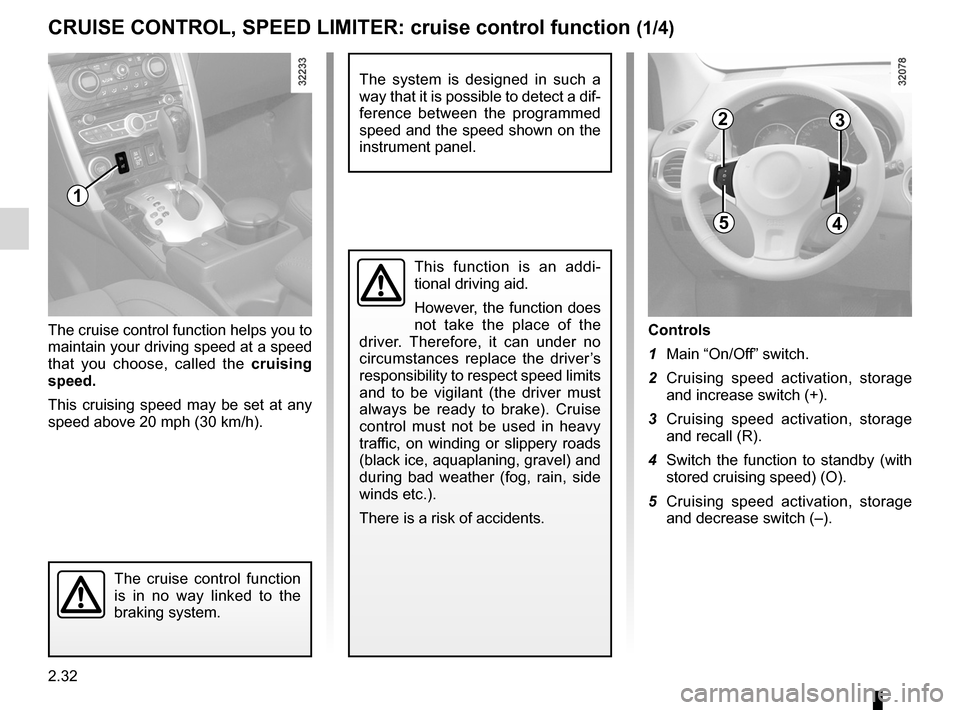
Controls
1 Main “On/Off” switch.
2 Cruising speed activation, storage
and increase switch (+).
3 Cruising speed activation, storage
and recall (R).
4 Switch the function to standby (with
stored cruising speed) (O).
5 Cruising speed activation, storage
and decrease switch (–).
The cruise control function helps you to
maintain your driving speed at a speed
that you choose, called the
cruising
speed.
This cruising speed may be set at any
speed above 20 mph (30 km/h).
The cruise control function
is in no way linked to the
braking system.
This function is an addi -
tional driving aid.
However, the function does
not take the place of the
driver. Therefore, it can under no
circumstances replace the driver’s
responsibility to respect speed limits
and to be vigilant (the driver must
always be ready to brake). Cruise
control must not be used in heavy
traffic, on winding or slippery roads
(black ice, aquaplaning, gravel) and
during bad weather (fog, rain, side
winds etc.).
There is a risk of accidents.
CRUISE CONTROL, SPEED LIMITER: cruise control function (1/4)
1
23
45
The system is designed in such a
way that it is possible to detect a dif-
ference between the programmed
speed and the speed shown on the
instrument panel.
Page 113 of 233

JauneNoirNoir texte
2.35
ENG_UD23498_5
Régulateur-limiteur de vitesse : fonction régulateur (X45 - H45 - Renault)
ENG_NU_977-2_H45_Ph2_Renault_2
CRUISE CONTROL, SPEED LIMITER: cruise control function (4/4)
Putting the function on
standby
The function is suspended when you:
– press switch 4 (O) ;
– depress the brake pedal;
– depress the clutch pedal or shift the
gear lever into neutral on vehicles
with automatic transmissions or con-
tinuously variable transmissions.
In all three cases, the message
“Memorised ” appears on the instrument
panel, followed by the stored speed.
Standby is confirmed when indicator
light
” goes out.
Returning to the cruising speed
If a speed is stored, it can be recalled,
once you are sure that the road condi -
tions are suitable (traffic, road surface,
weather conditions, etc.). With a ve -
hicle speed above 20 mph (30 km/h),
press switch 3 (R).
Note: if the speed previously stored is
much higher than the current speed,
the vehicle will accelerate more rapidly
to reach this threshold.
When the cruise control is sus -
pended, pressing switches 2 (+)
or 5 (-) reactivates the function with-
out taking into account the stored
speed: it is the speed at which the
vehicle is moving that is taken into
account.
Switching off the function
The cruise control function is deacti -
vated if you press switch 1: in this case
a speed is no longer stored. The instru-
ment panel green indicator lights
Î
and
” go out, confirming that the
function is deactivated.
Putting the cruise control
on standby or switching it
off does not cause a rapid
reduction in speed: you
must brake by depressing the brake
pedal.
1
23
45
Page 114 of 233

parking distance control........................(up to the end of the DU)
driving ................................................... (up to the end of the DU)
reversing sensor ................................... (up to the end of the DU)
2.36
ENG_UD27281_8
Aide au parking (X45 - H45 - Renault)
ENG_NU_977-2_H45_Ph2_Renault_2
Jaune NoirNoir texte
Parking sensor
Operating principle
On equipped vehicles, ultrasonic sen -
sors fitted in the vehicle’s rear and/or
front bumper measure the distance
between the vehicle and an obstacle
when reversing.
This measurement is indicated by
beeps which become more frequent the
closer you come to the obstacle, until
they become a continuous beep when
the vehicle is approximately 25 centi -
metres from the obstacle.
Special features
Ensure that the ultrasonic sensors are
not obscured (by dirt, mud, snow, etc.).
This function is an additional aid that indicates the distance between the
vehicle and an obstacle whilst reversing, using sound signals.
Under no circumstances should it replace the driver’s care or responsibil -
ity whilst reversing.
The driver should always look out for sudden hazards during driving: always
ensure that there are no moving obstacles (such as a child, animal, pram or bi-
cycle, etc.) or small, narrow objects such as stones or posts in your path when
manoeuvring.
PARKING DISTANCE CONTROL (1/3)
Front parking distance
control
(Depending on the vehicle)
Operation
when moving forwards at less than
7 mph (12 km/h), when any object
is detected less than approximately
1 metre from the front of the vehicle: a
beep sounds.
Automatic activation/deactivation of
front parking distance control
The system deactivates:
– when the vehicle speed is above ap-
proximately 7 mph (12 km/h);
– When the vehicle is stationary for
more than three seconds: only in the
case that the vehicle speed dropped
from above approximately 7 mph
(12 km/h) and an obstacle is more
than 30 centimetres away from the
vehicle (e.g., traffic jam);
– when the vehicle is in neutral or
when the gear lever has been shifted
to N or P for automatic gearboxes.
Page 116 of 233

2.38
ENG_UD27281_8
Aide au parking (X45 - H45 - Renault)
ENG_NU_977-2_H45_Ph2_Renault_2
Temporary activation/deactivation
Press switch 1 to deactivate the
system: the indicator light on the switch
comes on and the message “ Parking
sensor off ” is displayed on the instru -
ment panel.
The system is reactivated by pressing
the switch.
Note: in this case, the system is au -
tomatically reactivated each time the
engine is switched off.
1
Activating/deactivating for long
periods
Press the switch for approximately
3 seconds to deactivate the system: the
indicator light on the switch comes on
and the message “ Parking sensor off”
is displayed on the instrument panel.
The system is reactivated by press -
ing the switch again for approximately
3 seconds.
Operating faultsWhen the system detects an operat -
ing fault, the message “ Check parking
sensor ” is displayed on the instrument
panel, the
© warning light comes
on and a beep sounds.
Consult an approved Dealer.
When the vehicle is being driven
at a speed below 7 mph (12 km/h),
certain noises (motorcycle, lorry,
pneumatic drill, rain, alarm etc.) may
trigger the beeping sound.
PARKING DISTANCE CONTROL (3/3)
Under the following conditions, the
parking distance control system
may not function:
– the sensors are obscured (dirt,
mud, snow, etc.);
Clean with a soft cloth.
– the sensors are frozen.
Under the following conditions, the
parking distance control system
may malfunction:
– uneven surface, gravel track, hill,
forest track, etc.
– floods or water splashes.
The system may not detect objects
such as the following:
– narrow obstacles (sharp-edged
objects or rope);
– materials which absorb sound
waves easily (cotton, sponge,
snow, etc.)
Page 117 of 233

automatic gearbox (use) ....................... (up to the end of the DU)
automatic gearbox selector lever ..........(up to the end of the DU)
driving ................................................... (up to the end of the DU)
reverse gear selecting .......................................... (up to the end of the DU)
changing gear ....................................... (up to the end of the DU)
continuous variation ..............................(up to the end of the DU)
continuously variable transmission ....... (up to the end of the DU)
2.39
ENG_UD27292_7
Bo tes de vitesses automatiques ou variation continue (X45 - H45 - Renault)
ENG_NU_977-2_H45_Ph2_Renault_2
Automatic or continuously variable transmission
AUTOMATIC OR CONTINUOUSLY vARIABLE TRANSMISSION (1/3)
Depending on the vehicle, the vehicle is
either fitted with an automatic transmis-
sion, or a continuously variable trans -
mission.
Selector lever 2
Display A on the instrument panel
shows the mode and gear selected.
3: P: park
4: R: reverse gear
5: N: neutral
6: D: automatic mode
7: manual mode
8: zone displaying gearbox mode or
gear engaged in manual mode
1
2
8
3
6
5
4
7
Operation
N With the gear lever 2 in position P,
switch on the ignition.
To move out of position P, you must de-
press the brake pedal before pressing
the unlocking button 1.
With the foot on the brake pedal (warn-
ing light
c on display A goes out),
move the lever out of position P.
Only engage D or R when the vehi -
cle is stopped, with your foot on the
brake and the accelerator pedal re -
leased.
A
Driving in automatic mode
Select position D. In most traffic con -
ditions, you will not have to touch the
gear selector lever again: the gears will
change automatically at the right time
and at the most suitable engine speed
because the automatic system takes
into account the vehicle load and road
contour and adjusts itself to the particu-
lar driving style you have chosen.
Economical driving
When driving, always leave the lever
in position D, keeping the accelerator
pedal lightly depressed to ensure auto-
matic gear changes at a lower engine
speed.
Accelerating and overtaking
Depress the accelerator pedal firmly
and fully (so that it goes beyond the
kickdown point).
This will enable you to change down
to the optimum gear within the
engine range.