Page 65 of 237

trip computer and warning system........(up to the end of the DU)
warning lights ........................................ (up to the end of the DU)
instrument panel messages ..................(up to the end of the DU)
instrument panel ................................... (up to the end of the DU)
1.59
ENG_UD21416_1
Ordinateur de bord : généralités (X61 - F61 - K61 - Renault)
ENG_NU_813-11_FK61_Renault_1
Trip computer
TRIp COMpUTeR: general information (1/2)
Trip computer and warning
system A
Depending on the vehicle, this includes
the following functions:
– distance travelled;
– journey parameters;
– information messages;
– operating fault messages (associ -
ated with the
© warning light);
– warning messages (connected to the
warning light
®).
All these functions are described on the
following pages.
Display selection keys 1
and 2
Scroll through the following informa -
tion upwards (button 1 ) or downwards
(button 2 ) by pressing briefly and suc -
cessively (the display depends on the
vehicle equipment and country).
a) Total mileage and trip mileage re -
corder;
b) journey parameters:
– fuel consumed;
– average fuel consumption;
– current fuel consumption;
– estimated range;
– distance travelled;
– average speed; c)
mileage before service;
d) cruise control and speed limiter pro-
grammed speed;
e) trip log, operating faults and informa-
tion message readout.
A
1
2
Page 67 of 237
trip computer and warning system........(up to the end of the DU)
warning lights ........................................ (up to the end of the DU)
instrument panel messages ..................(up to the end of the DU)
instrument panel ................................... (up to the end of the DU)
1.61
ENG_UD26556_3
Ordinateur de bord : paramètres de voyage (X85 - X61 - F61 - K61 - Renault)
ENG_NU_813-11_FK61_Renault_1
TRIp COMpUTeR AND WARNING SySTeM: journey parameters (1/4)
examples of selectionsInterpreting the display selected
a) Total mileage and trip mileage recorder
37360 KM
7080 KM
b) Journey parameters
Fuel consumed since the last reset.
FUEL USED
26.0 L
AVERAGEAverage fuel consumption since the last reset.
This value is displayed after driving 400 metres and takes into
account the distance travelled and the fuel used since the last
time the reset button was pressed.
7.3 L/100
The display of information shown below DepeNDS ON THe veHICLe eQUIpMeNT AND COUNTR
y.
Page 68 of 237

1.62
ENG_UD26556_3
Ordinateur de bord : paramètres de voyage (X85 - X61 - F61 - K61 - Renault)
ENG_NU_813-11_FK61_Renault_1
Jaune NoirNoir texte
TRIp COMpUTeR AND WARNING SySTeM: journey parameters (2/4)
examples of selectionsInterpreting the display selected
CURRENT
Current fuel consumption
This value is displayed after a speed of approximately 20 mph
(30 km/h) is reached.
8.6 L/100
RANGEestimated range with remaining fuel
This range takes into account the average fuel consumption
since the last time the reset button was pressed.
The value is displayed after driving 400 metres.
Several minutes after the reserve light has come on (refer to the
information on the “Instrument panel”), the estimated range will
no longer be displayed.
402.0 KM
DISTANCE
Distance travelled since the last reset.
430.0 KM
AVERAGE
Average speed since the last reset.
The value is displayed after driving 400 metres.
109.2 KM/H
The display of information shown below DepeNDS ON THe veHICLe eQUIpMeNT AND COUNTR
y.
Page 71 of 237

trip computer and warning system........(up to the end of the DU)
warning lights ........................................ (up to the end of the DU)
instrument panel messages ..................(up to the end of the DU)
instrument panel ................................... (up to the end of the DU)
1.65
ENG_UD23313_2
Ordinateur de bord : messages d’information (X61 - F61 - K61 - Renault)
ENG_NU_813-11_FK61_Renault_1
Information messagesThese can help in the vehicle starting phase, or give information about a selection or a driving status.
Examples of information messages are given in the following pages.
examples of messages Interpretation of messages
“NO MeSSAGe A vAILABLe” e)
On-board log
Successive display:
– of information messages (automatic lighting, etc.),
– of operating fault messages (check injection, etc.).
“BOOT OpeN ” Indicates that the tailgate has been left open.
“BATTeR y MODe:eCONOMy” Indicates that vehicle accessories have been switched off to preserve the battery.
“OIL LeveL CORReCT” Indicates that the oil level is correct when the ignition is switched on.
“AUTO LIGHTS DeACTIv ATeD”Indicates that the automatic lights function is deactivated.
TRIp COMpUTeR AND WARNING SySTeM: information messages
Page 72 of 237

trip computer and warning system.........................(current page)
instrument panel messages ...................................(current page)
warning lights ......................................................... (current page)
instrument panel .................................................... (current page)
1.66
ENG_UD26591_3
Ordinateur de bord : messages d’anomalies de fonctionnement (X85 - X61 - F61 - K61 - Renault)
ENG_NU_813-11_FK61_Renault_1
These appear with the © warning light and mean that you should drive very carefully to an approved Dealer as
soon as possible. If you fail to follow this recommendation, you risk damaging your vehicle.
They disappear when the display selection key is pressed or after several seconds and are stored in the computer log. The
© warning light stays on. Examples of operating fault messages are given on the following pages .
examples of messages Interpretation of messages
“CHeCK eSp” Indicates a fault on the traction control system (please refer to the information on
the “Driver correction devices and aids” in Section 2).
“CHeCK FUeL FILTeR” Indicates that there is water present in the diesel fuel.
Contact an approved Dealer as soon as possible.
“CHeCK GeARBOX ”Indicates that a fault has occurred in the gearbox; contact an approved Dealer as
soon as possible.
“CHeCK AUTO LIGHTS ”Indicates an automatic lighting operating fault; contact an approved Dealer .
“CHeCK STeeRING” Indicates a power-assisted steering system operating fault.
TRIp COMpUTeR AND WARNING SySTeM: operating fault messages
Page 73 of 237

trip computer and warning system.........................(current page)
warning lights ......................................................... (current page)
instrument panel messages ...................................(current page)
instrument panel .................................................... (current page)
1.67
ENG_UD23315_2
Ordinateur de bord : messages d’alerte (X61 - F61 - K61 - Renault)
ENG_NU_813-11_FK61_Renault_1
These appear with the ® warning light and require you to stop immediately, for your own safety, as soon as traffic
conditions allow. Stop your engine and do not restart it. Contact an approved Dealer.
Examples of warning messages are given in the following pages. Note: the messages appear on the display either individually
or alternately (when there are several messages to be displayed), and may be accompanied by a warning light and/or a beep.
examples of messages Interpretation of messages
“INJeCTION FAULT” Indicates that the vehicle has a serious engine fault.
“eNGINe OveRHeATING” Indicates that the engine is overheating.
“STeeRING FAULT” Indicates a fault in the vehicle’s power assisted steering.
“GeARBOX OveRHeATING” Indicates that the gearbox is overheating.
TRIp COMpUTeR AND WARNING SySTeM: warning message
Page 76 of 237
signals and lights .................................. (up to the end of the DU)
lights: side lights ......................................................... (current page)
lights: dipped beam headlights ................................... (current page)
lights: main beam headlights ...................................... (current page)
1.70
ENG_UD3885_1
Eclairage et signalisation extérieure (X61 - F61 - K61 - Renault)
ENG_NU_813-11_FK61_Renault_1
Jaune NoirNoir texte
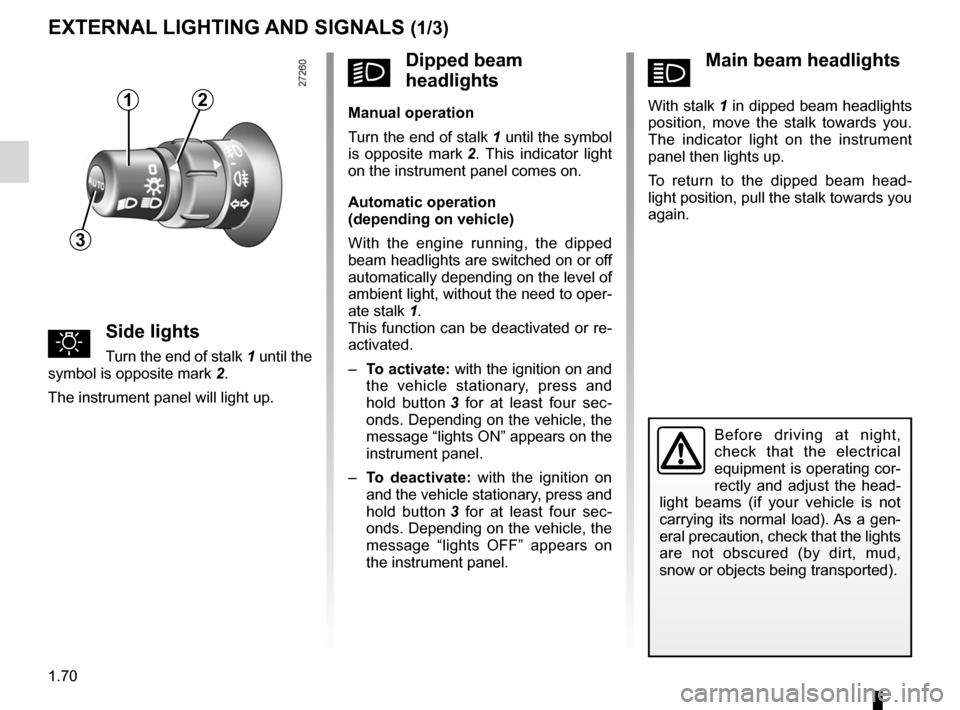
áMain beam headlights
With stalk 1 in dipped beam headlights
position, move the stalk towards you.
The indicator light on the instrument
panel then lights up.
To return to the dipped beam head -
light position, pull the stalk towards you
again.
Éclairage et signalisation extérieure
uSide lights
Turn the end of stalk 1 until the
symbol is opposite mark 2.
The instrument panel will light up.
eXTeRNAL LIGHTING AND SIGNALS (1/3)
Before driving at night,
check that the electrical
equipment is operating cor-
rectly and adjust the head -
light beams (if your vehicle is not
carrying its normal load). As a gen-
eral precaution, check that the lights
are not obscured (by dirt, mud,
snow or objects being transported).
kDipped beam
headlights
Manual operation
Turn the end of stalk 1 until the symbol
is opposite mark 2 . This indicator light
on the instrument panel comes on.
Automatic operation
(depending on vehicle)
With the engine running, the dipped
beam headlights are switched on or off
automatically depending on the level of
ambient light, without the need to oper-
ate stalk 1.
This function can be deactivated or re-
activated.
– To activate: with the ignition on and
the vehicle stationary, press and
hold button 3 for at least four sec -
onds. Depending on the vehicle, the
message “lights ON” appears on the
instrument panel.
– To deactivate: with the ignition on
and the vehicle stationary, press and
hold button 3 for at least four sec -
onds. Depending on the vehicle, the
message “lights OFF” appears on
the instrument panel.12
3
Page 78 of 237

lights:fog lights .......................................................... (current page)
fog lights ................................................................ (current page)
1.72
ENG_UD3885_1
Eclairage et signalisation extérieure (X61 - F61 - K61 - Renault)
ENG_NU_813-11_FK61_Renault_1
fRear fog light
The front fog lights and the
side lights or dipped beam headlights
must be on.
Turn ring 5 on stalk 1 until the symbol
is opposite mark 4, then release it. This
indicator light on the instrument panel
comes on.
To avoid inconveniencing other road
users, remember to switch off the rear
fog light when it is no longer needed.
Switching off the lights
Turn ring 5 again to position mark 4 op-
posite the symbol for the light you wish
to switch off.
Switching off the exterior lights or the
ignition switches off the front and rear
fog lights.
gFront fog lights(depending on vehicle)
The side lights or dipped beam head -
lights must be on.
Turn ring 5 on stalk 1 until the symbol
is opposite mark 4, then release it. This
indicator light on the instrument panel
comes on.
eXTeRNAL LIGHTING AND SIGNALS (3/3)
1
5
4
