2012 RENAULT ESPACE heating
[x] Cancel search: heatingPage 129 of 267

demistingwindscreen ....................................................... (current page)
demisting rear screen ....................................................... (current page)
rear screen demisting ......................................................... (current page)
JauneNoirNoir texte
3.7
ENG_UD20381_1
Chauffage/Air conditionné (X81 - J81 - Renault)
ENG_NU_932-3_X81ph3_Renault_3
HEATING/AIR CONDITIONING (3/7)
“Clear View” function
Press button 2: operating tell-tale
light A comes on.
This function quickly demists and
deices the windscreen, the front side
windows, the door mirrors and the elec-
tric rear screen (operating tell-tale D
comes on). For greater efficiency, the air condition
-
ing is automatically switched on (oper-
ating tell-tale C comes on) and the air
recirculation is switched off (operating
tell-tale B goes off).
Optimum air flow is then directed to -
wards the windscreen and front side
windows.
There are two ways to switch this func-
tion off:
– press button 2 again;
– press one of the air distribution but-
tons 1 or 8.
De-icing/demisting the rear
screen and rear view mirrors
Press button 7: operating tell-tale
light D comes on.
This function rapidly defrosts and de -
mists the rear screen and the heated
door mirrors.
There are two ways to switch off:
– it stops automatically after a time
specified by the system;
– by pressing button 7 again.
Note
The rear screen and rear view mirror
de-icing function is automatically
switched on when the “Clear View”
function (button 2) is running.
1
2A
B
C
7D
8
Page 130 of 267

3.8
ENG_UD20381_1
Chauffage/Air conditionné (X81 - J81 - Renault)
ENG_NU_932-3_X81ph3_Renault_3
Jaune NoirNoir texte
HEATING/AIR CONDITIONING (4/7)
Adjusting the distribution
of air in the passenger
compartment, buttons 1
and 8
The lit operating tell-tale indicates the
position selected.
Note
If the “Clear View” function, button 2 is
on, the air is automatically directed to
the windscreen and side windows: the
operating tell-tales for buttons 1 and 8
are off. Button 1
Repeatedly pressing button
1 allows
you to switch between the different
modes of distribution.
jDistribution
The air is directed to the wind -
screen, the side windows and the front
and rear passenger footwells.
Advice on use: it is recommended that
this distribution mode is used when it is
cold outside.
lDistribution
The air is distributed between
the front and rear air vents and the front
and rear passenger footwells.
Advice on use: it is recommended that
this distribution mode is used when it is
hot or sunny outside.
Button 8
Repeatedly pressing button 8 allows
you to switch between the different
modes of distribution.
ODistribution
Air exits through the front and
rear vents.
Advice on use: it is recommended that
this distribution mode is used when it is
very sunny outside or for lowering the
temperature in the passenger compart-
ment quickly if the vehicle has been sit-
ting in the sun too long.
JDistribution
Air exits through the front
vents.
Advice on use: it is recommended that
this distribution mode is used to inhibit
the flow of air to the rear air vents.
1
2
8
Page 131 of 267

JauneNoirNoir texte
3.9
ENG_UD20381_1
Chauffage/Air conditionné (X81 - J81 - Renault)
ENG_NU_932-3_X81ph3_Renault_3
HEATING/AIR CONDITIONING (5/7)
Adjusting the ventilation
speed
To adjust the ventilation speed, move
tab 9.
Pushing tab 9 upwards increases the
ventilation speed.
If tab 9 is pushed all the way down:
– the ventilation speed is zero;
– the air conditioning switches off au -
tomatically.
Advice on use of this function
For your comfort, it is recommended
that you have at least a minimum level
of ventilation to renew the air in the pas-
senger compartment and to ensure that
the air temperature is stable.
Note
When the “Clear View” function,
button 2 is on, it is normal that the ven-
tilation speed increases to de-ice and
demist the windscreen and side win -
dows more efficiently.2
9
Page 132 of 267

3.10
ENG_UD20381_1
Chauffage/Air conditionné (X81 - J81 - Renault)
ENG_NU_932-3_X81ph3_Renault_3
Jaune NoirNoir texte
HEATING/AIR CONDITIONING (6/7)
Air conditioning control
Button 6 starts or stops the air condi -
tioning system.
The air conditioning system is used for:
– lowering the temperature inside the
passenger compartment;
– e l i m i n a t i n g c o n d e n s a t i o n m o r e
quickly. Repeatedly pressing button
6 enables
you to:
– select the “air conditioning” func-
tion.
Operating tell-tale E comes on.
This is the most widely-used func -
tion: the system determines the level
of cooling needed according to the
external conditions.
– select the “Maximum air condi -
tioning” function.
Operating tell-tale C comes on.
The air conditioning is at the maxi -
mum cooling level.
– switch the air conditioning off.
Operating tell-tales E and C are off.
Note:
– there is no cold air when tab 9 is po-
sitioned right at the bottom;
– you may adjust the air temperature
in the passenger compartment at
any point by moving air adjustment
tab 5;
– the “Clear View” function automati -
cally activates the air conditioning
system: operating tell-tale C comes
on.
If no cold air is produced
Check that the controls are set cor -
rectly and that the fuses are sound.
Otherwise, switch off the air condition -
ing (press button 6 so that operating
tell-tales E and C go out) and consult
an approved dealer.
Do not open the refrigerant
fluid circuit. The fluid may
damage eyes or skin.
9
5
E
6C
Page 133 of 267

JauneNoirNoir texte
3.11
ENG_UD20381_1
Chauffage/Air conditionné (X81 - J81 - Renault)
ENG_NU_932-3_X81ph3_Renault_3
HEATING/AIR CONDITIONING (7/7)
Air recirculation (isolation of
the passenger compartment)
Press button 4: operating tell-tale
light B comes on.
Under these conditions, air is taken
from the passenger compartment and
is recirculated, with no air being taken
from outside the vehicle. Advice on use of the air recirculation
Air recirculation is for:
–
isolating the vehicle from the exter -
nal atmosphere (driving in polluted
areas, etc.);
– bringing the passenger compartment
to the desired temperature more
quickly.
Note
Air recirculation is automatically
switched off when the “Clear View” is
on.
Prolonged use of air recirculation
can lead to condensation form -
ing on the side windows and wind -
screen, and discomfort due to the
use of non-renewed air in the pas -
senger compartment.
We therefore advise you to return
to normal mode (external air) as
soon as the air recirculation function
is no longer required, by pressing
button 4 again.
Depending on the external condi -
tions, the system limits the air recir-
culation running time: operating tell-
tale B goes out.
4
B
Page 134 of 267
air conditioning ..................................... (up to the end of the DU)
heating system ..................................... (up to the end of the DU)
air conditioning ..................................... (up to the end of the DU)
demisting windscreen ....................................................... (current page)
demisting rear screen ....................................................... (current page)
rear screen demisting ......................................................... (current page)
temperature regulation ......................... (up to the end of the DU)
ventilation ............................................. (up to the end of the DU)
heating and air conditioning system ..... (up to the end of the DU)
3.12
ENG_UD20382_1
Air conditionné automatique (X81 - J81 - Renault)
ENG_NU_932-3_X81ph3_Renault_3
Jaune NoirNoir texte
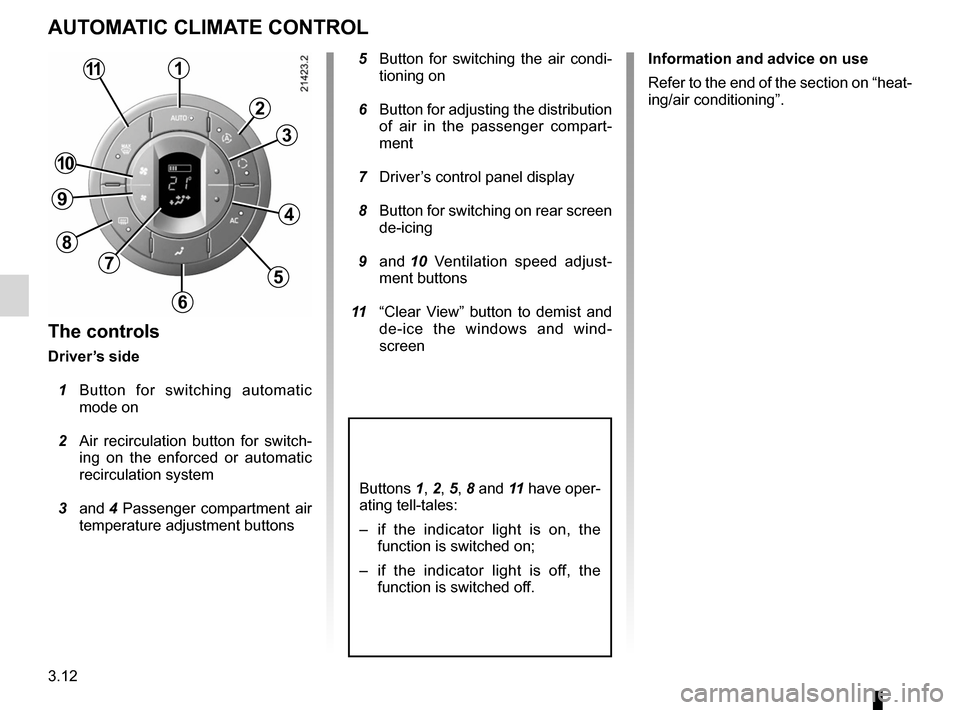
AUTOMATIC CLIMATE CONTROL
The controls
Driver’s side
1 Button for switching automatic
mode on
2 Air recirculation button for switch -
ing on the enforced or automatic
recirculation system
3 and 4 Passenger compartment air
temperature adjustment buttons
5 Button for switching the air condi -
tioning on
6 Button for adjusting the distribution
of air in the passenger compart -
ment
7 Driver’s control panel display
8 Button for switching on rear screen
de-icing
9 and 10 Ventilation speed adjust -
ment buttons
11 “Clear View” button to demist and
de-ice the windows and wind -
screen Information and advice on use
Refer to the end of the section on “heat-
ing/air conditioning”.
Buttons 1, 2, 5, 8 and 11 have oper-
ating tell-tales:
–
if the indicator light is on, the
function is switched on;
– if the indicator light is off, the
function is switched off.
1
2
3
4
5
6
7
8
9
10
11
Page 139 of 267

JauneNoirNoir texte
3.17
ENG_UD20382_1
Air conditionné automatique (X81 - J81 - Renault)
ENG_NU_932-3_X81ph3_Renault_3
AUTOMATIC CLIMATE CONTROL (continued)
Adjusting the ventilation
speed in the rear seats
(depending on vehicle)
The controls on each of the rear doors
allow the ventilation speed of the air
vents to be adjusted for the rear pas -
sengers.
Indicator B , made up of several bars
which light up, shows the requested
ventilation speed.
Press button 17 to increase the ventila -
tion speed.
Press button 16 to decrease the venti-
lation speed. To inhibit the air flow from the rear seat
air vents, press button
16 until the last
bar on indicator B goes out.
To return to normal ventilation speed
(the minimum speed adjustment as de-
fined by the system) in the rear seats,
there are two options:
– after switching off the ignition;
– by pressing and holding the AUTO
button 1 until operating tell-tale A
starts flashing (even if it was already
lit).
Special note
Depending on the vehicle, when the
“child safety” switch is activated (indi -
cator light on the switch is on), the rear
heating and ventilation controls are
deactivated. The last red bar on indi -
cator B comes on and the ventilation
speed in the rear is at the minimum
speed setting as defined by the system.
Conditions of use
In some cases (very warm passenger
compartment, for example), if the last
red bar on indicator B is lit, this means
that it is no longer possible to increase
the ventilation speed. It will be possible
to do so again once the red bar goes
out.
17
15BB
16
Page 145 of 267

JauneNoirNoir texte
3.23
ENG_UD20382_1
Air conditionné automatique (X81 - J81 - Renault)
ENG_NU_932-3_X81ph3_Renault_3
AUTOMATIC CLIMATE CONTROL (continued)
Air recirculation (isolation of
the passenger compartment)
The heating and air conditioning system
uses air from the outside to heat or cool
the passenger compartment.
However, when the “recirculation” func-
tion is in use, it is possible to isolate the
passenger compartment from the at -
mosphere outside, e.g. when driving in
polluted areas.
Note
Pressing the AUTO button 1 switches
on the “automatic recirculation” function
(indicator light C lit).
Repeatedly pressing button 2 enables
you to select:
– automatic recirculation;
– enforced recirculation;
– exterior air.
With automatic recirculation
Indicator light C comes on. The system
analyses the quality of the outside air
and, when necessary, isolates the pas-
senger compartment automatically.
With enforced recirculation
Indicator light D comes on. Air is taken
from the passenger compartment and
is recirculated without taking in air from
the outside.
Note
Prolonged use of air recirculation can
lead to condensation forming on the
side windows and windscreen and dis-
comfort due to the use of non-renewed
air in the passenger compartment. We
therefore advise you to switch back to
automatic recirculation (light C lit) or
outside air as soon as enforced recircu-
lation is no longer necessary.
With air from the outside
Indicator lights C and D are off.1
C
2
D