2012 RENAULT CLIO SPORT TOURER display
[x] Cancel search: displayPage 116 of 264
2.22
ENG_UD10563_1
Système antipatinage : A.S.R. (X85 - B85 - C85 - S85 - K85 - Renault)
ENG_NU_853-8_BCSK85_Renault_2
Deactivating the A.S.R.
function results in the E.S.P.
function being deactivated.
Refer to the information on
the “Electronic stability program:
E.S.P.” on the following pages.
Operating faults
When the system detects an operat -
ing fault the message “Check E.S.P.”
appears on the instrument panel along
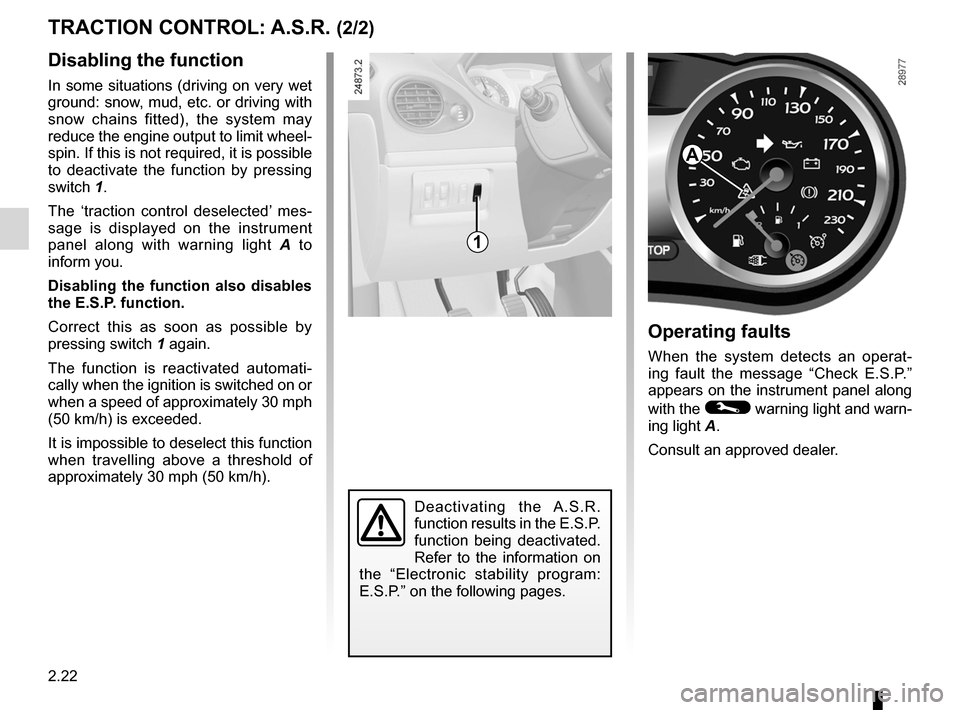
with the
© warning light and warn-
ing light A.
Consult an approved dealer.
Disabling the function
In some situations (driving on very wet
ground: snow, mud, etc. or driving with
snow chains fitted), the system may
reduce the engine output to limit wheel -
spin. If this is not required, it is possible
to deactivate the function by pressing
switch 1.
The ‘traction control deselected’ mes -
sage is displayed on the instrument
panel along with warning light A to
inform you.
Disabling the function also disables
the E.S.P. function.
Correct this as soon as possible by
pressing switch 1 again.
The function is reactivated automati -
cally when the ignition is switched on or
when a speed of approximately 30 mph
(50 km/h) is exceeded.
It is impossible to deselect this function
when travelling above a threshold of
approximately 30 mph (50 km/h).
TRACTION CONTROL: A.S.R. (2/2)
1
A
Page 120 of 264

ENG_NU_853-8_BCSK85_Renault_2
CRUISE CONTROL/SPEED LIMITER: speed limiter function (3")
2.26
ENG_UD10565_1
Régulateur-limiteur de vitesses : fonction limiteur (X85 - B85 - C85\
- S85 - K85 - Renault)
ENG_NU_853-8_BCSK85_Renault_2
CRUISE CONTROL/SPEED LIMITER: speed limiter function (3/3)
Recalling the limit speed
A stored speed can be recalled by
pressing switch 5 (R) until the message
“Speed limiter” is displayed.
Exceeding the limit speed
In the event of an emergency
It is possible to exceed the limit speed
at any moment. To do this: press the
accelerator pedal firmly and fully
(beyond the kickdown point).
Whilst the speed is being exceeded,
the cruising speed displayed on the in-
strument panel flashes.
When the emergency has passed, re -
lease the accelerator pedal: the speed
limiter function will return as soon as
you reach a speed lower than the limit
speed before the emergency.
Limit speed cannot be maintained
In some driving conditions (for example
when driving up or down a steep gradi -
ent), the system is unable to maintain
the limit speed: the stored speed on the
instrument panel information display
will flash to inform you of this situation.
Switching off the function
The speed limiter function is interrupted
when you press:
– switch 4 (O), in which case the limit
speed remains stored and the mes-
sage “Stored” appears on the instru-
ment panel;
– switch 1 , in which case the limit
speed is no longer stored, and the in-
dicator light on the instrument panel
goes out to confirm that the function
has been cancelled.
1
5423
Page 123 of 264

ENG_NU_853-8_BCSK85_Renault_2
CRUISE CONTROL/SPEED LIMITER: cr")
JauneNoirNoir texte
2.29
ENG_UD22304_2
Régulateur-limiteur de vitesses : fonction régulateur (X85 - B85 \
- C85 - S85 - K85 - Renault)
ENG_NU_853-8_BCSK85_Renault_2
CRUISE CONTROL/SPEED LIMITER: cruise control function (3/4)
Exceeding the cruising speed
In the event of an emergency
The cruising speed may be exceeded
at any time by depressing the accelera -
tor pedal. While it is being exceeded,
the cruising speed flashes on the in -
strument panel.
Cruising speed cannot be main -
tained
In some driving conditions (for exam -
ple when driving down a steep gradi -
ent), the system is unable to maintain
the cruising speed: the speed on the in-
strument panel information display will
flash to inform you of this situation.
Varying the cruising speed
The cruising speed may be changed by
pressing repeatedly or continuously on:
– switch 2 (+) to increase the speed;
– switch 3 (-) to decrease the speed.
The cruise control function
is in no way linked to the
braking system.
23
Page 125 of 264
automatic gearbox (use) ....................... (up to the end of the DU)
changing gear ....................................... (up to the end of the DU)
driving ................................................... (up to the end of the DU)
automatic gearbox selector lever ..........(up to the end of the DU)
2.31
ENG_UD12577_2
Boîte automatique (X85 - B85 - C85 - S85 - K85 - Renault)
ENG_NU_853-8_BCSK85_Renault_2
Automatic gearbox
Operation
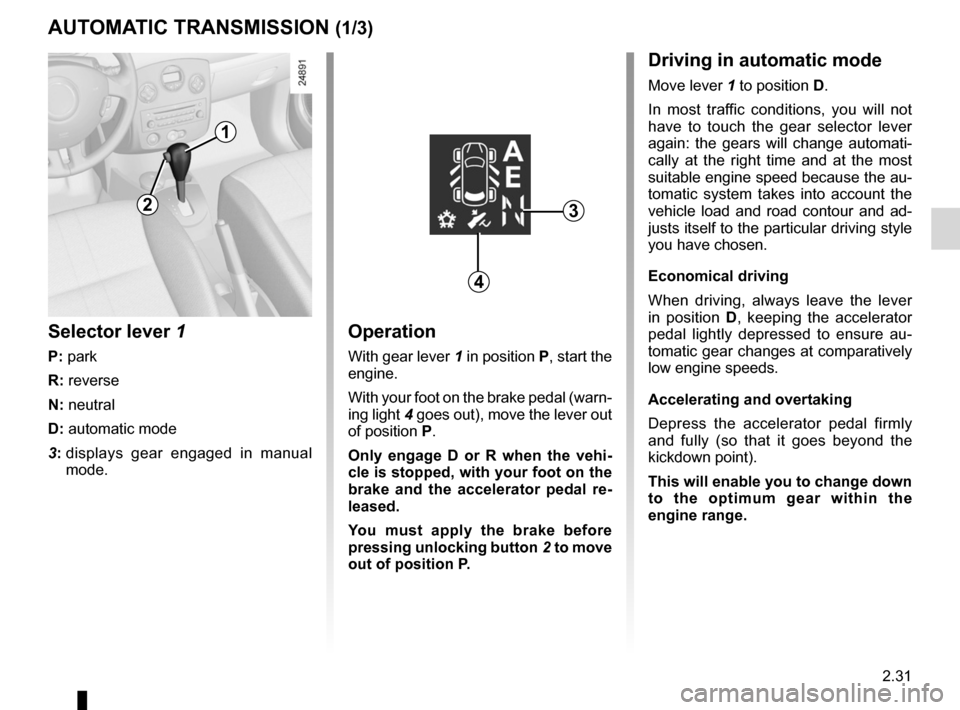
With gear lever 1 in position P, start the
engine.
With your foot on the brake pedal (warn-
ing light 4 goes out), move the lever out
of position P.
Only engage D or R when the vehi -
cle is stopped, with your foot on the
brake and the accelerator pedal re -
leased.
You must apply the brake before
pressing unlocking button 2 to move
out of position P.
Selector lever 1
P: park
R: reverse
N: neutral
D: automatic mode
3: displays gear engaged in manual
mode.
AUTOMATIC TRANSMISSION (1/3)
1
3
Driving in automatic mode
Move lever 1 to position D.
In most traffic conditions, you will not
have to touch the gear selector lever
again: the gears will change automati -
cally at the right time and at the most
suitable engine speed because the au-
tomatic system takes into account the
vehicle load and road contour and ad-
justs itself to the particular driving style
you have chosen.
Economical driving
When driving, always leave the lever
in position D, keeping the accelerator
pedal lightly depressed to ensure au -
tomatic gear changes at comparatively
low engine speeds.
Accelerating and overtaking
Depress the accelerator pedal firmly
and fully (so that it goes beyond the
kickdown point).
This will enable you to change down
to the optimum gear within the
engine range.
4
2
Page 126 of 264
2.32
ENG_UD12577_2
Boîte automatique (X85 - B85 - C85 - S85 - K85 - Renault)
ENG_NU_853-8_BCSK85_Renault_2
Jaune NoirNoir texte
AUTOMATIC TRANSMISSION (2/3)
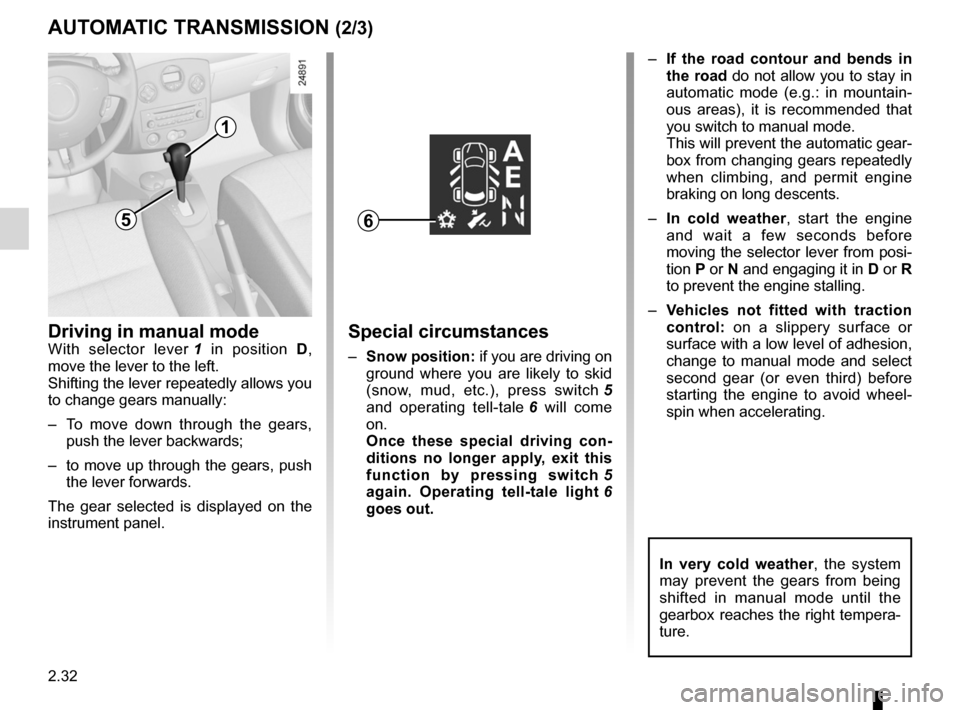
1
Driving in manual modeWith selector lever 1 in position D,
move the lever to the left.
Shifting the lever repeatedly allows you
to change gears manually:
– To move down through the gears,
push the lever backwards;
– to move up through the gears, push
the lever forwards.
The gear selected is displayed on the
instrument panel.Special circumstances
– Snow position: if you are driving on
ground where you are likely to skid
(snow, mud, etc.), press switch 5
and operating tell-tale 6 will come
on.
Once these special driving con -
ditions no longer apply, exit this
function by pressing switch 5
again. Operating tell-tale light 6
goes out. –
If the road contour and bends in
the road do not allow you to stay in
automatic mode (e.g.: in mountain -
ous areas), it is recommended that
you switch to manual mode.
This will prevent the automatic gear-
box from changing gears repeatedly
when climbing, and permit engine
braking on long descents.
– In cold weather , start the engine
and wait a few seconds before
moving the selector lever from posi-
tion P or N and engaging it in D or R
to prevent the engine stalling.
– Vehicles not fitted with traction
control: on a slippery surface or
surface with a low level of adhesion,
change to manual mode and select
second gear (or even third) before
starting the engine to avoid wheel -
spin when accelerating.
65
In very cold weather , the system
may prevent the gears from being
shifted in manual mode until the
gearbox reaches the right tempera-
ture.
Page 138 of 264
air conditioning ..................................... (up to the end of the DU)
heating system ..................................... (up to the end of the DU)
air conditioning ..................................... (up to the end of the DU)
heated windscreen ............................... (up to the end of the DU)
temperature regulation ......................... (up to the end of the DU)
ventilation ............................................. (up to the end of the DU)
heating and air conditioning system ..... (up to the end of the DU)
3.8
ENG_UD19787_3
Air conditionné automatique (X85 - B85 - C85 - S85 - K85 - Renault)\
ENG_NU_853-8_BCSK85_Renault_3
Jaune NoirNoir texte
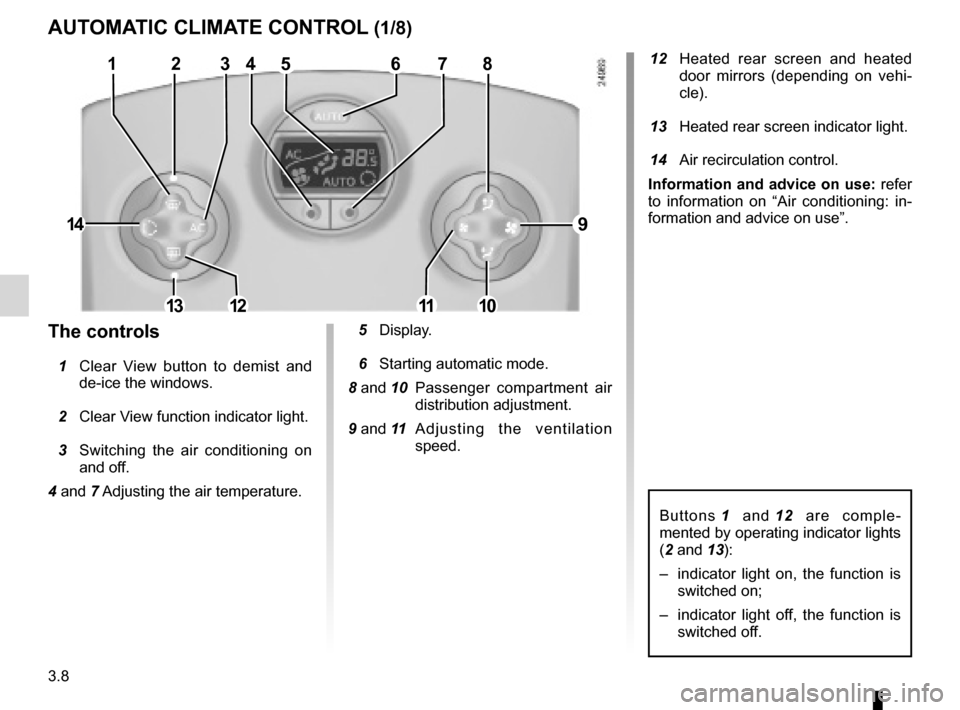
12 Heated rear screen and heated
door mirrors (depending on vehi -
cle).
13 Heated rear screen indicator light.
14 Air recirculation control.
information and advice on use: refer
to information on “Air conditioning: in -
formation and advice on use”.
Buttons 1 and 12 are comple -
mented by operating indicator lights
(2 and 13):
– indicator light on, the function is
switched on;
– indicator light off, the function is
switched off.
5 Display.
6 Starting automatic mode.
8 and 10 Passenger compartment air
distribution adjustment.
9 and 11 A d j u s t i n g t h e v e n t i l a t i o n
speed.the controls
1 Clear View button to demist and
de-ice the windows.
2 Clear View function indicator light.
3 Switching the air conditioning on
and off.
4 and 7 Adjusting the air temperature.
aUtOMatiC CLiMate COntrOL (1/8)
12345678
9
10111213
14
Page 139 of 264
\
ENG_NU_853-8_BCSK85_Renault_3
– press button 7 to increase the tem -
perature;
â€")
JauneNoirNoir texte
3.9
ENG_UD19787_3
Air conditionné automatique (X85 - B85 - C85 - S85 - K85 - Renault)\
ENG_NU_853-8_BCSK85_Renault_3
– press button 7 to increase the tem -
perature;
– press button 4 to decrease the tem-
perature.
n ote: The maximum and minimum
settings of 15°C and 27°C allow the
system to produce a minimum or maxi-
mum temperature, whatever the ambi-
ent conditions.
In automatic mode (AUTO indicator
light on the display is lit), all heating
and air conditioning functions are
controlled by the system.
When you modify certain functions
the AUTO indicator light goes out.
Only the modified function is not
controlled by the system.
The automatic heating and air con-
ditioning system guarantees com -
fort in the passenger compartment
and good visibility (except in the
event of extreme conditions), while
optimising consumption.
t his is the recommended mode
of use.
ambient temperature :
automatic mode
Press button 6.
Only the temperature and the aUtO
symbol are displayed.
Functions managed in automatic mode
are not displayed.
aUt OMatiC CLiMate COntrOL (2/8)
746
Page 140 of 264
\
ENG_NU_853-8_BCSK85_Renault_3
Jaune NoirNoir texte
adjusting automatic mode
The automatic mode is the sys")
3.10
ENG_UD19787_3
Air conditionné automatique (X85 - B85 - C85 - S85 - K85 - Renault)\
ENG_NU_853-8_BCSK85_Renault_3
Jaune NoirNoir texte
adjusting automatic mode
The automatic mode is the system’s
normal operating mode (AUTO light on)
but you may alter the selections made
by the system (air distribution, etc.).
These options are explained on the fol-
lowing pages.
aUtOMatiC CLiMate COntrOL (3/8)
this is the recommended mode
of use: the automatic heating and
air conditioning system guarantees
comfort (except in the event of ex -
treme conditions) in the passenger
compartment and good visibility
while optimising consumption.
r eturn to automatic mode as
soon as possible.
ambient temperature:
automatic mode (continued)
Operation
To reach and keep the chosen comfort
level and to maintain good visibility, the
system controls:
– ventilation speed;
– air distribution;
– air recirculation management;
– air conditioning start/stop;
– the air temperature.
The displayed temperature values
show a comfort level.
When starting the engine, increas -
ing or decreasing the value dis -
played will not allow the com -
fort level to be reached any more
quickly. The system will always op-
timise the temperature increase or
decrease (the ventilation system
does not start instantly at maximum
speed: it gradually increases). This
may take several minutes.
Generally speaking, unless there is
a particular reason not to, the dash-
board air vents should remain open.