Page 167 of 276
9.9
03
°
SCREEN AND MAIN MENU
The system uses the complete and detailed NAVTEQ maps installed directly on the equipment's hard disk.
Updates of the maps of the UK and of the other European countries, supplied by our partner NAVTEQ, are available from the PEUGEOT network.
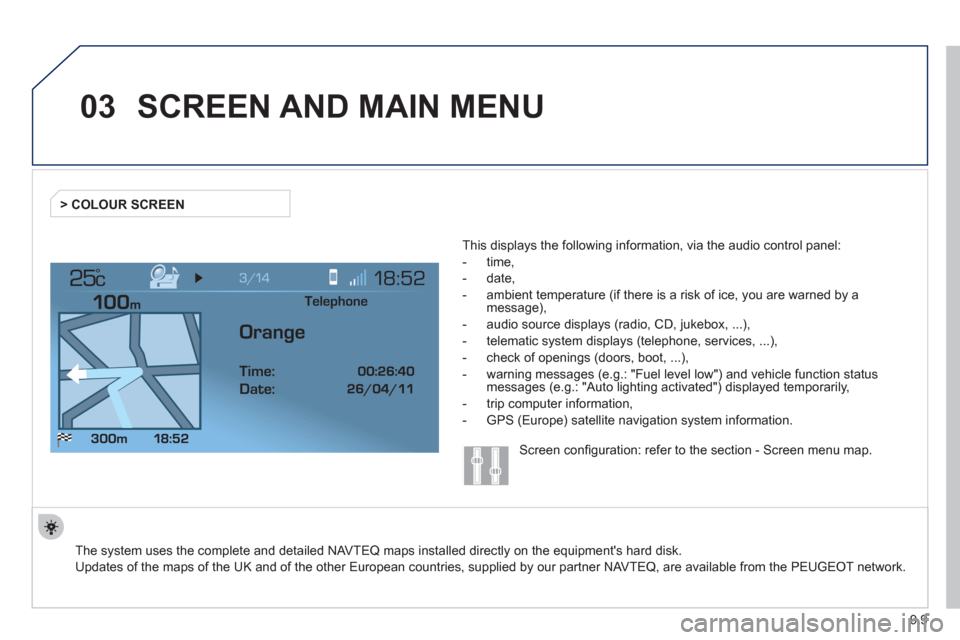
This displa
ys the following information, via the audio control panel:
- time,
- date,
- ambient temperature
(if there is a risk of ice, you are warned by amessage),
- audio source displa
ys (radio, CD, jukebox, ...),
- telematic system displays
(telephone, services, ...),
- check o
f openings (doors, boot, ...),
- warnin
g messages (e.g.: "Fuel level low") and vehicle function statusmessages (e.g.: "Auto lighting activated") displayed temporarily,
- trip computer information,
- GPS
(Europe) satellite navigation system information. > COLOUR
SCREEN
Telephone
Orange
Time:
Date:
Screen confi guration: refer to the section - Screen menu map.
Page 168 of 276
9.10
03SCREEN AND MAIN MENU
For maintenance of thescreen, the use of asoft, non-abrasive cloth(spectacles cloth) isrecommended without anyadditional product.
TRAFFI
C INFORMATION: TMC
information, messages.
MAP: orientation, details,
display.
NAVI
GAT ION GUIDANCE: GPS,stages, options.
VEHI
CLE DIAGNOSTICS: alert
log, status of the functions.
VIDEO: activation, parameters.
C
ONFIGURATION: vehicle, display,
time, languages, voice, auxiliarysocket (AUX) parameters. TELEMATI
C: telephone,
directory, SMS.
AUDIO FUNCTIONS: radio, CD, Jukebox, options.
Lon
g press on MENU: help.
Page 169 of 276
9.11
03SCREEN AND MAIN MENU
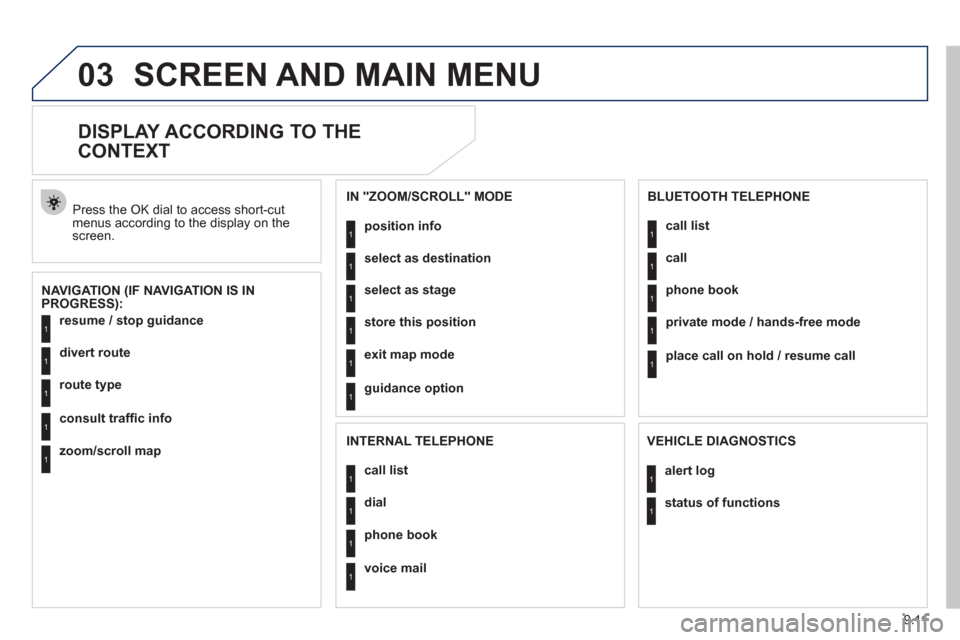
DISPLAY ACCORDING TO THE
CONTEXT
NAVIGATION (IF NAVIGATION IS IN
PROGRESS): Pr
ess the OK dial to access short-cut menus according to the display on thescreen.
resume
/ stop guidance1
1
1
1
divert route
route type
consult traffi c info
1zoom/scroll map
position info1
1
1
1
select as destination
select as sta
ge
store this position
1exit map mode
1guidance option
IN "ZOOM/SCROLL" MODE
call list1
1
1
1
dial
phone book
voice mail
INTERNAL TELEPHONE
call list1
1
1
1
call
phone book
private mode / hands-free mode
1place call on hold / resume call
BLUETOOTH TELEPHONE
alert log1
1status of functions
VEHICLE DIAGNOSTICS
Page 170 of 276
9.12
03 SCREEN AND MAIN MENU
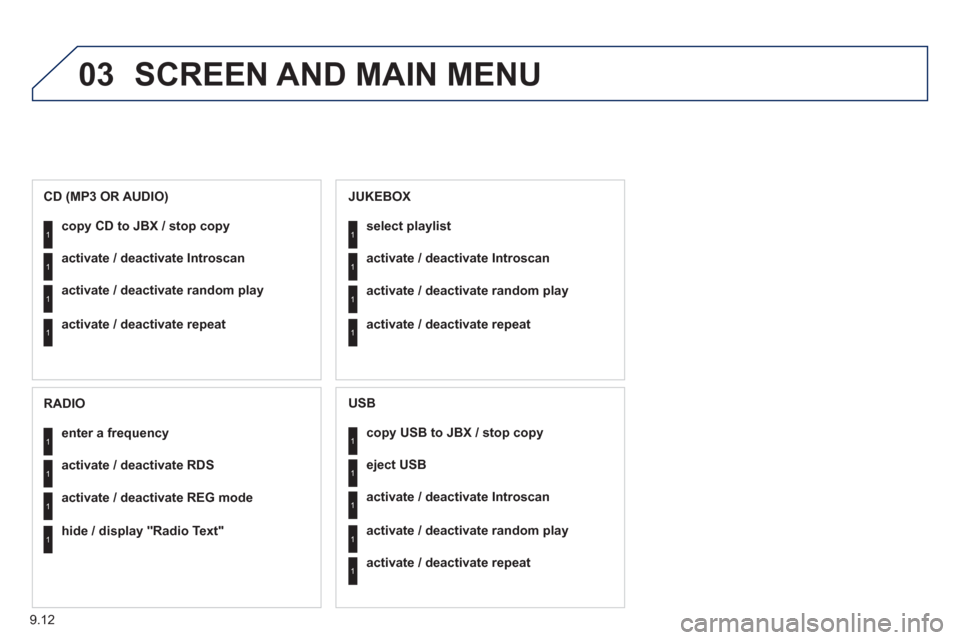
copy USB to JBX / stop copy1
1
1
1
eject USB
activate / deactivate Introscan
activate / deactivate random play
1activate / deactivate repeat
USB
copy CD to JBX / stop copy1
1
1
1
activate / deactivate Introscan
activate / deactivate random play
activate / deactivate repeat
CD (MP3 OR AUDIO)
se
lect playlist1
1
1
1
activate / deactivate Introscan
activate / deactivate random play
activate / deactivate repeat
JUKEBOX
enter a frequency1
1
1
1
activate / deactivate RDS
activate / deactivate REG mode
hide / display "Radio Text"
RADIO
Page 176 of 276

9.18
04
1
2
3
5
4
1
2
3
NAVIGATION - GUIDANCE
Select "Map" and confi rm by pressing"OK". Press the MEN
U button.
Select "Transport and automobiles"and confi rm by pressing "OK". Select "Map details" and confi rm b
y
pressing "OK". Download the "Risk areas P
OIs" update fi le onto aCD ROM or USB memory stick from the Internet. This service is available on https://www.wipinforadars.fr or
https://www.peugeot-connect-downloads.co.uk.
UPDATING THE RISK AREAS POIs
(Speed cameras)
DISPLAYING RISK AREAS POIs
Select "Risk areas" and confi rm by
pressing "OK".
Map
Map details
Transport and automobiles
Risk areas The fi les must be co
pied to the root on the chosen medium.
Insert the medium
(CD ROM or USB memory stick)containing the POI database into the system's CD player
or USB port.
The s
ystem detects the medium inserted automatically.Confi rm the start of the update by validating "YES".
Successful downloading is confi rmed by a message.
The medium must be blank with no other data present.
Page 180 of 276
9.22
04
2
3
4
5
6
7
NAVIGATION - GUIDANCE
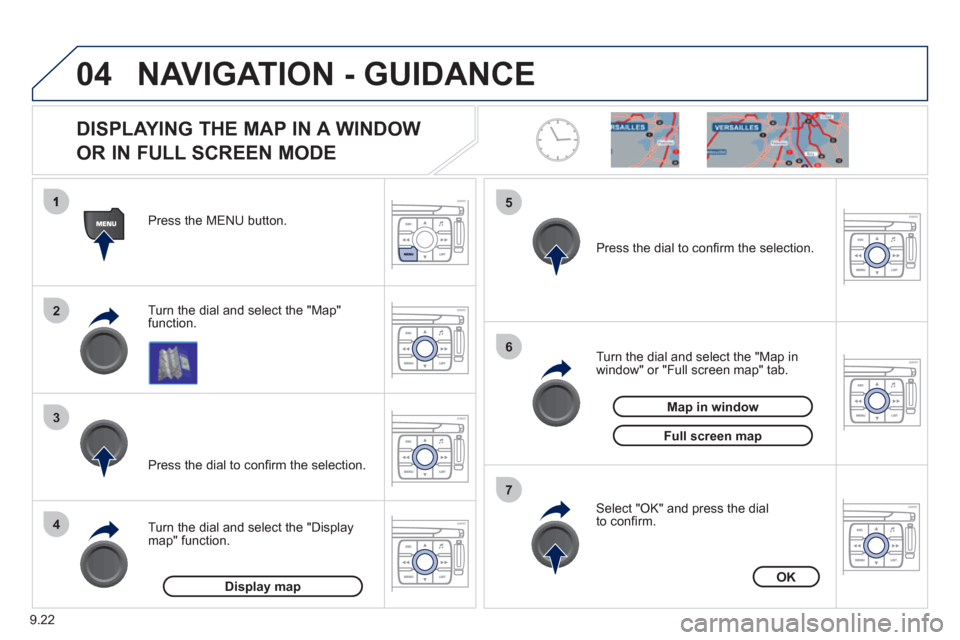
DISPLAYING THE MAP IN A WINDOW
OR IN FULL SCREEN MODE
Turn the dial and select the "Map"
function. Press the MENU button.
Turn the dial and select the "Displa
ymap" function. Pr
ess the dial to confi rm the selection.
Turn the dial and select the "Map in
window" or "Full screen map" tab.
Pr
ess the dial to confi rm the selection.
Select "OK" and press the dial
to confi rm.
Display mapOK
Map in window
Full screen map
Page 182 of 276
9.24
05
1
2
3
4
5
6
8
7
TRAFFIC INFORMATION
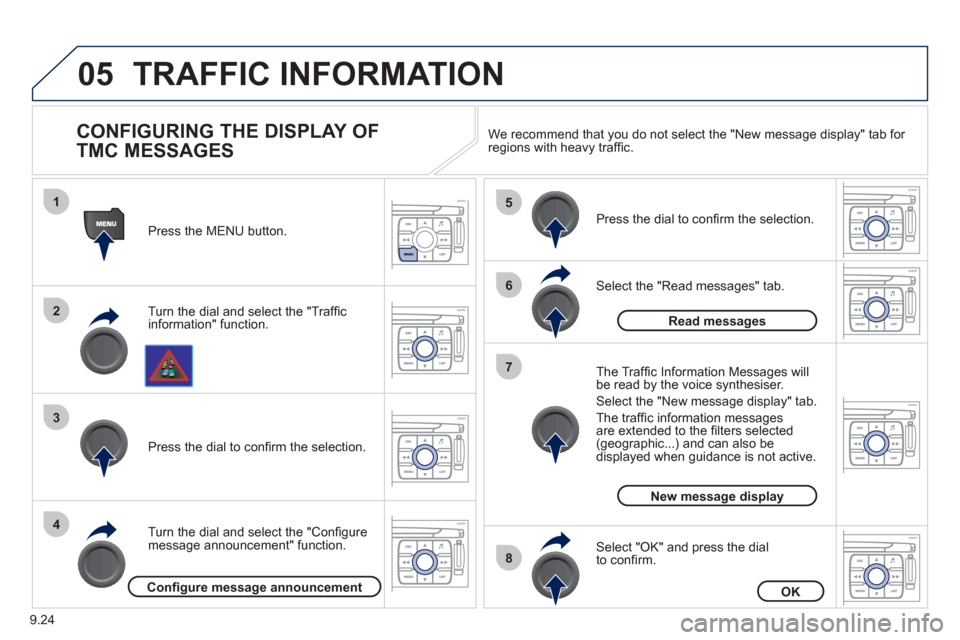
CONFIGURING THE DISPLAY OF
TMC MESSAGES
Turn the dial and select the "Traffi cinformation" function. Press the MEN
U button.
Turn the dial and select the "Confi
gure
message announcement" function. Pr
ess the dial to confi rm the selection.
Select the "Read messages" tab.
Pr
ess the dial to confi rm the selection.
Select "OK" and press the dial
to confi rm.
The Tra
ffi c Information Messages will
be read by the voice synthesiser.
Select the "New messa
ge display" tab.
The traffi c information messa
gesare extended to the fi lters selected (geographic...) and can also be displayed when guidance is not active. We recommend that
you do not select the "New message display" tab for regions with heavy traffi c.
Confi gure message announcementOK
Read messages
New message display
Page 183 of 276
9.25
06
1
2
4
3
1
2
4
3
AUDIO / VIDEO
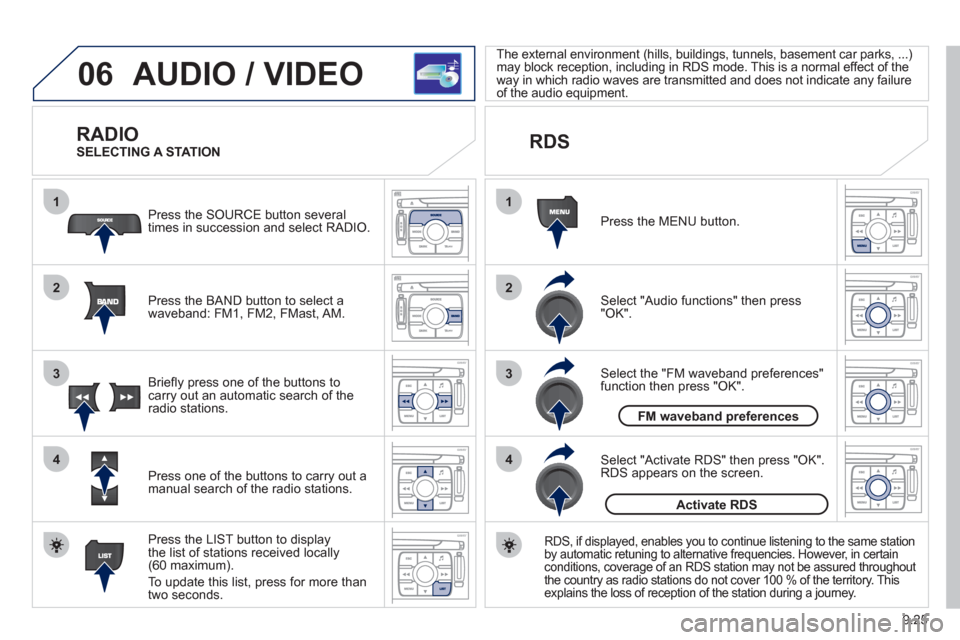
RADIO
Press the BAND button to select awaveband: FM1, FM2, FMast, AM. Pr
ess the SOURCE button several
times in succession and select RADIO.
Press the LIST button to displa
ythe list of stations received locally(60 maximum).
To update this list, press for more than
tw
o seconds.
Press one of the buttons to carr
y out a
manual search of the radio stations. Brie
fl y press one of the buttons tocarry out an automatic search of the radio stations.
RDS
Select "Audio functions" then press"OK".
Press the MENU button.
RDS, if displayed, enables you to continue listening to the same stationby automatic retuning to alternative frequencies. However, in certain conditions, coverage of an RDS station may not be assured throughout
the country as radio stations do not cover 100 % of the territory. This explains the loss of reception of the station during a journey.
Select "Activate RDS" then press "OK". RDS appears on the screen.
Select the "FM waveband preferences" function then press "OK". The external environment
(hills, buildings, tunnels, basement car parks, ...)
may block reception, including in RDS mode. This is a normal effect of the
way in which radio waves are transmitted and does not indicate any failure
of the audio equipment.
SELECTING A STATION
FM waveband preferences
Activate RDS