Page 177 of 406
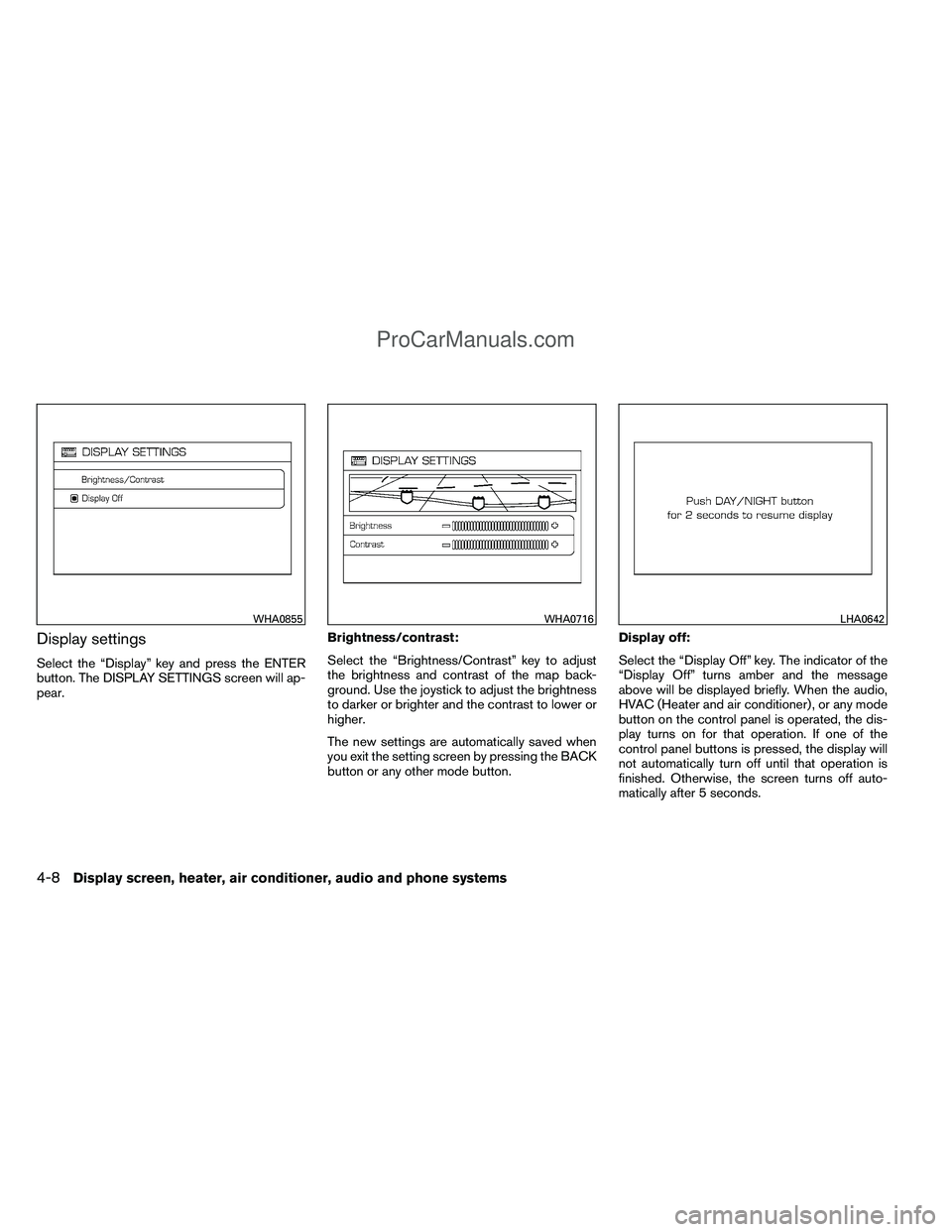
Display settings
Select the “Display” key and press the ENTER
button. The DISPLAY SETTINGS screen will ap-
pear.Brightness/contrast:
Select the “Brightness/Contrast” key to adjust
the brightness and contrast of the map back-
ground. Use the joystick to adjust the brightness
to darker or brighter and the contrast to lower or
higher.
The new settings are automatically saved when
you exit the setting screen by pressing the BACK
button or any other mode button.Display off:
Select the “Display Off” key. The indicator of the
“Display Off” turns amber and the message
above will be displayed briefly. When the audio,
HVAC (Heater and air conditioner) , or any mode
button on the control panel is operated, the dis-
play turns on for that operation. If one of the
control panel buttons is pressed, the display will
not automatically turn off until that operation is
finished. Otherwise, the screen turns off auto-
matically after 5 seconds.
WHA0855WHA0716LHA0642
4-8Display screen, heater, air conditioner, audio and phone systems
ProCarManuals.com
Page 178 of 406
To turn the screen on,● Press the SETTING button and select the
“Display” key and then select the “Display
Off” key. Then set the screen to on by press-
ing the ENTER button, or
● Hold the
button for approximately 2
seconds and the message “resuming dis-
play” will appear and the “Display Off” key
will be automatically turned on (no amber
indicator) .
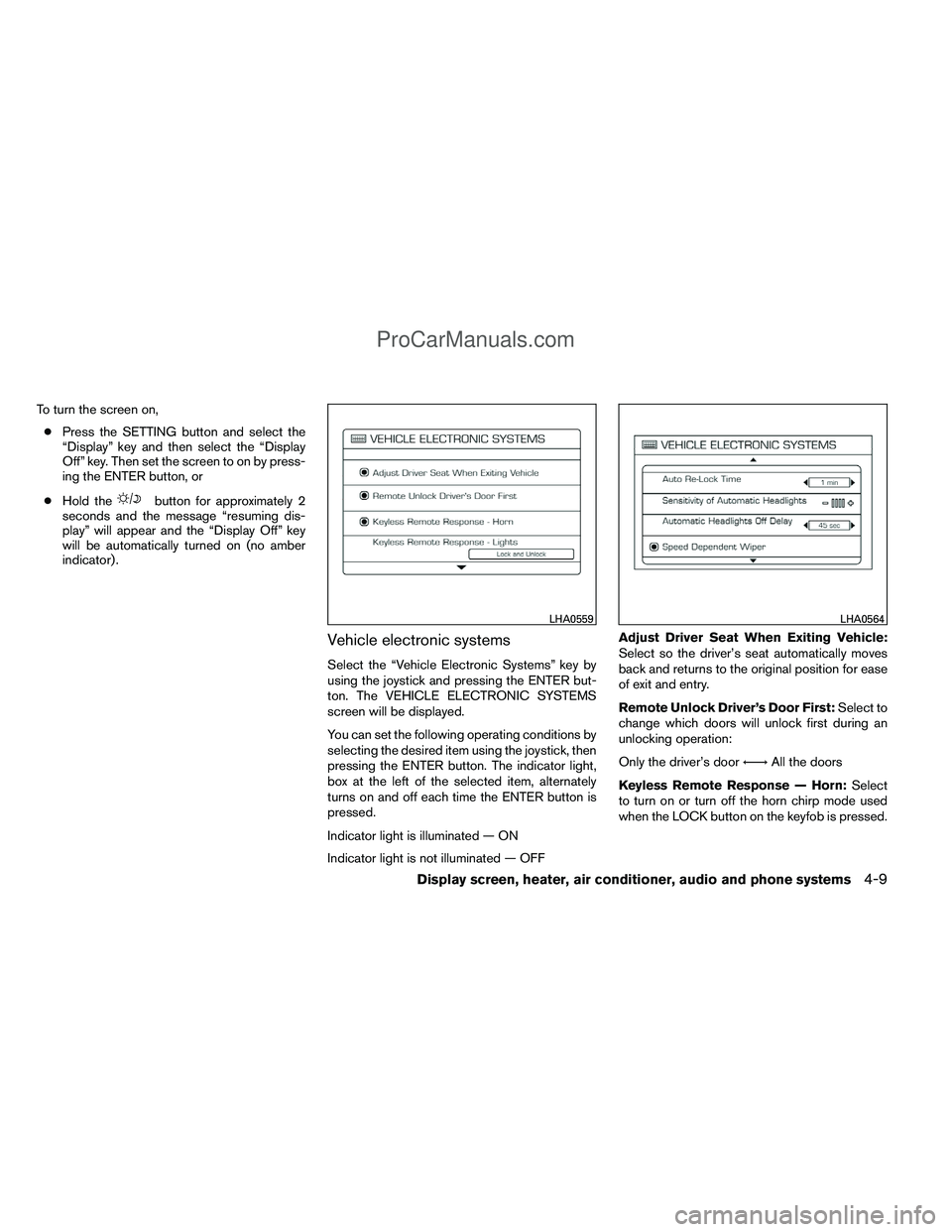
Vehicle electronic systems
Select the “Vehicle Electronic Systems” key by
using the joystick and pressing the ENTER but-
ton. The VEHICLE ELECTRONIC SYSTEMS
screen will be displayed.
You can set the following operating conditions by
selecting the desired item using the joystick, then
pressing the ENTER button. The indicator light,
box at the left of the selected item, alternately
turns on and off each time the ENTER button is
pressed.
Indicator light is illuminated — ON
Indicator light is not illuminated — OFF Adjust Driver Seat When Exiting Vehicle:
Select so the driver’s seat automatically moves
back and returns to the original position for ease
of exit and entry.
Remote Unlock Driver’s Door First:
Select to
change which doors will unlock first during an
unlocking operation:
Only the driver’s door ←→All the doors
Keyless Remote Response — Horn: Select
to turn on or turn off the horn chirp mode used
when the LOCK button on the keyfob is pressed.
LHA0559LHA0564
Display screen, heater, air conditioner, audio and phone systems4-9
ProCarManuals.com
Page 179 of 406
NOTE:
If you change the horn beep or the lamp
flash feature with the keyfob, the display
screen will not show the current mode. Use
the keyfob to return to the previous mode
and re-enable the display screen control.
Keyless Remote Response — Lights:Select
to turn on or turn off the hazard indicator flash
mode used when the LOCK or UNLOCK button
on the keyfob is pressed. NOTE:
If you change the horn beep or the lamp
flash feature with the keyfob, the mode will
not be changed with the display. Use the
keyfob to return to the previous mode and
re-enable the display control.
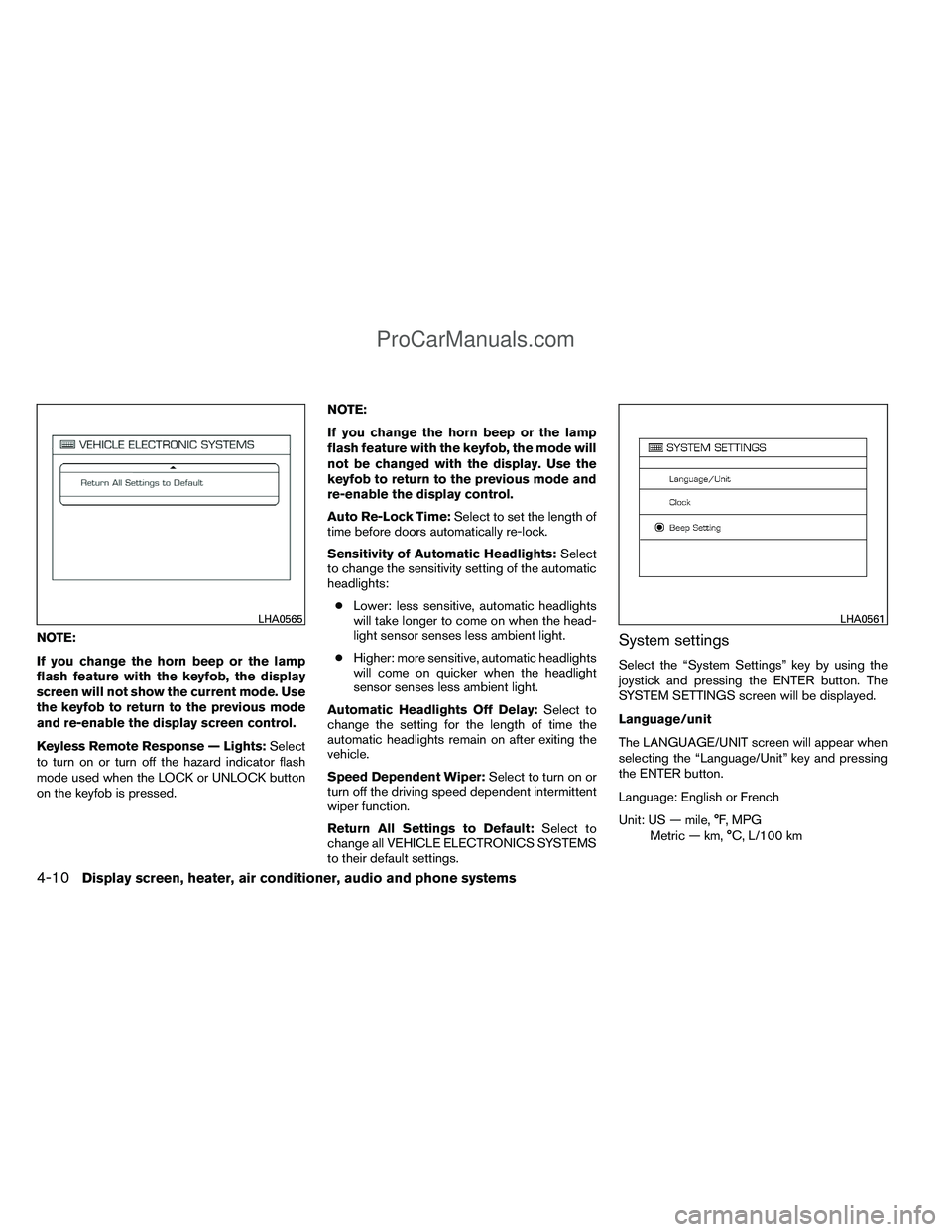
Auto Re-Lock Time:
Select to set the length of
time before doors automatically re-lock.
Sensitivity of Automatic Headlights: Select
to change the sensitivity setting of the automatic
headlights:
● Lower: less sensitive, automatic headlights
will take longer to come on when the head-
light sensor senses less ambient light.
● Higher: more sensitive, automatic headlights
will come on quicker when the headlight
sensor senses less ambient light.
Automatic Headlights Off Delay: Select to
change the setting for the length of time the
automatic headlights remain on after exiting the
vehicle.
Speed Dependent Wiper: Select to turn on or
turn off the driving speed dependent intermittent
wiper function.
Return All Settings to Default: Select to
change all VEHICLE ELECTRONICS SYSTEMS
to their default settings.System settings
Select the “System Settings” key by using the
joystick and pressing the ENTER button. The
SYSTEM SETTINGS screen will be displayed.
Language/unit
The LANGUAGE/UNIT screen will appear when
selecting the “Language/Unit” key and pressing
the ENTER button.
Language: English or French
Unit: US — mile, °F, MPG
Metric — km, °C, L/100 km
LHA0565LHA0561
4-10Display screen, heater, air conditioner, audio and phone systems
ProCarManuals.com
Page 180 of 406
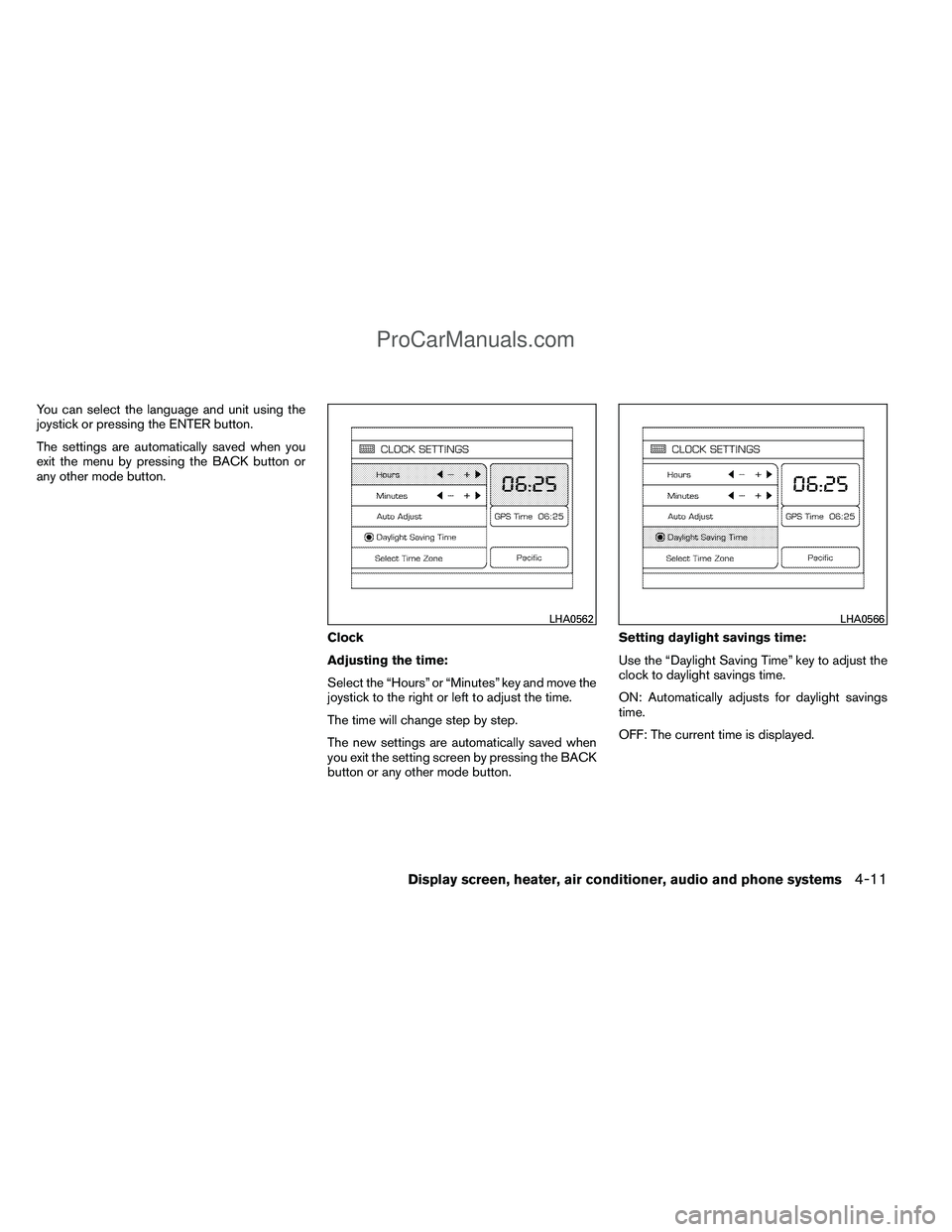
You can select the language and unit using the
joystick or pressing the ENTER button.
The settings are automatically saved when you
exit the menu by pressing the BACK button or
any other mode button.Clock
Adjusting the time:
Select the “Hours” or “Minutes” key and move the
joystick to the right or left to adjust the time.
The time will change step by step.
The new settings are automatically saved when
you exit the setting screen by pressing the BACK
button or any other mode button.Setting daylight savings time:
Use the “Daylight Saving Time” key to adjust the
clock to daylight savings time.
ON: Automatically adjusts for daylight savings
time.
OFF: The current time is displayed.
LHA0562LHA0566
Display screen, heater, air conditioner, audio and phone systems4-11
ProCarManuals.com
Page 181 of 406
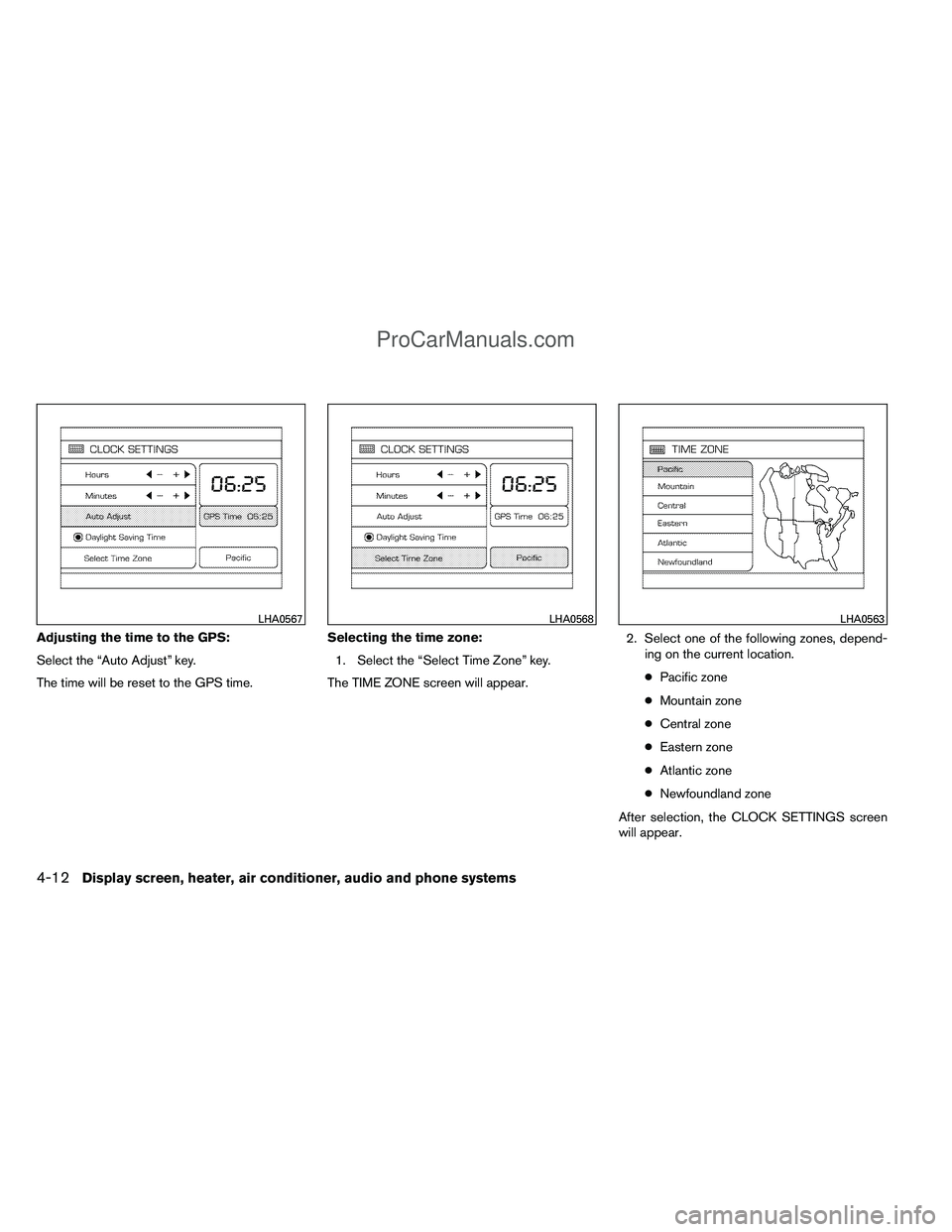
Adjusting the time to the GPS:
Select the “Auto Adjust” key.
The time will be reset to the GPS time.Selecting the time zone:
1. Select the “Select Time Zone” key.
The TIME ZONE screen will appear. 2. Select one of the following zones, depend-
ing on the current location.
● Pacific zone
● Mountain zone
● Central zone
● Eastern zone
● Atlantic zone
● Newfoundland zone
After selection, the CLOCK SETTINGS screen
will appear.
LHA0567LHA0568LHA0563
4-12Display screen, heater, air conditioner, audio and phone systems
ProCarManuals.com
Page 226 of 406
CAUTION
●The glass screen on the liquid crystal
display may break if hit with a hard or
sharp object. If the glass breaks, do not
touch the liquid crystalline material,
which contains a small amount of mer-
cury. In case of contact with skin, wash
immediately with soap and water.
● Use a damp, soft cloth when cleaning
the Mobile Entertainment System com-
ponents. Do not use solvents or clean-
ing solutions.
Do not attempt to use the system in extreme
temperature conditions [below -4°F (-20°C) or
above 158°F (70°C)].
To avoid discharging the vehicle battery, do not
operate the system more than 15 minutes without
starting the engine.
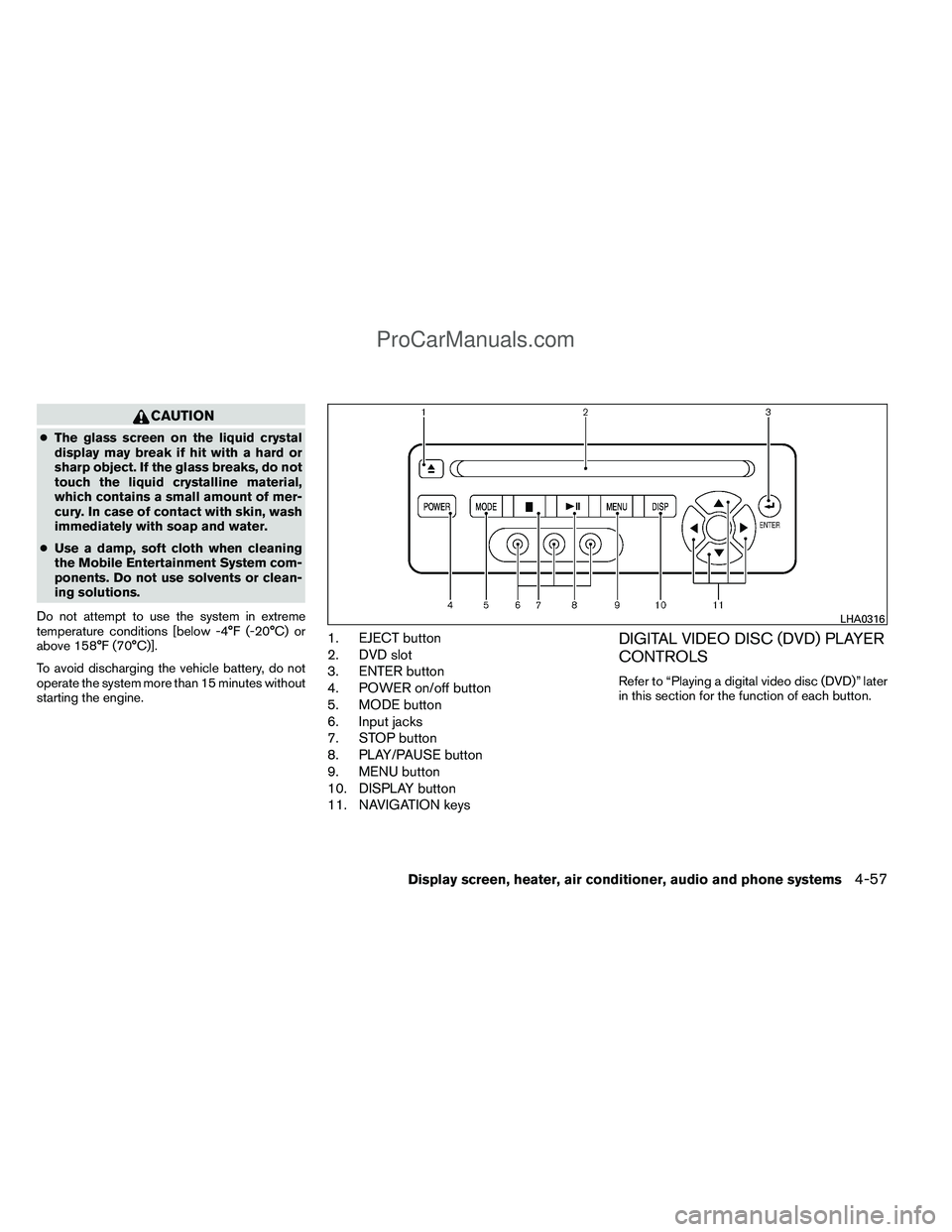
1. EJECT button
2. DVD slot
3. ENTER button
4. POWER on/off button
5. MODE button
6. Input jacks
7. STOP button
8. PLAY/PAUSE button
9. MENU button
10. DISPLAY button
11. NAVIGATION keysDIGITAL VIDEO DISC (DVD) PLAYER
CONTROLS
Refer to “Playing a digital video disc (DVD)” later
in this section for the function of each button.
LHA0316
Display screen, heater, air conditioner, audio and phone systems4-57
ProCarManuals.com
Page 227 of 406
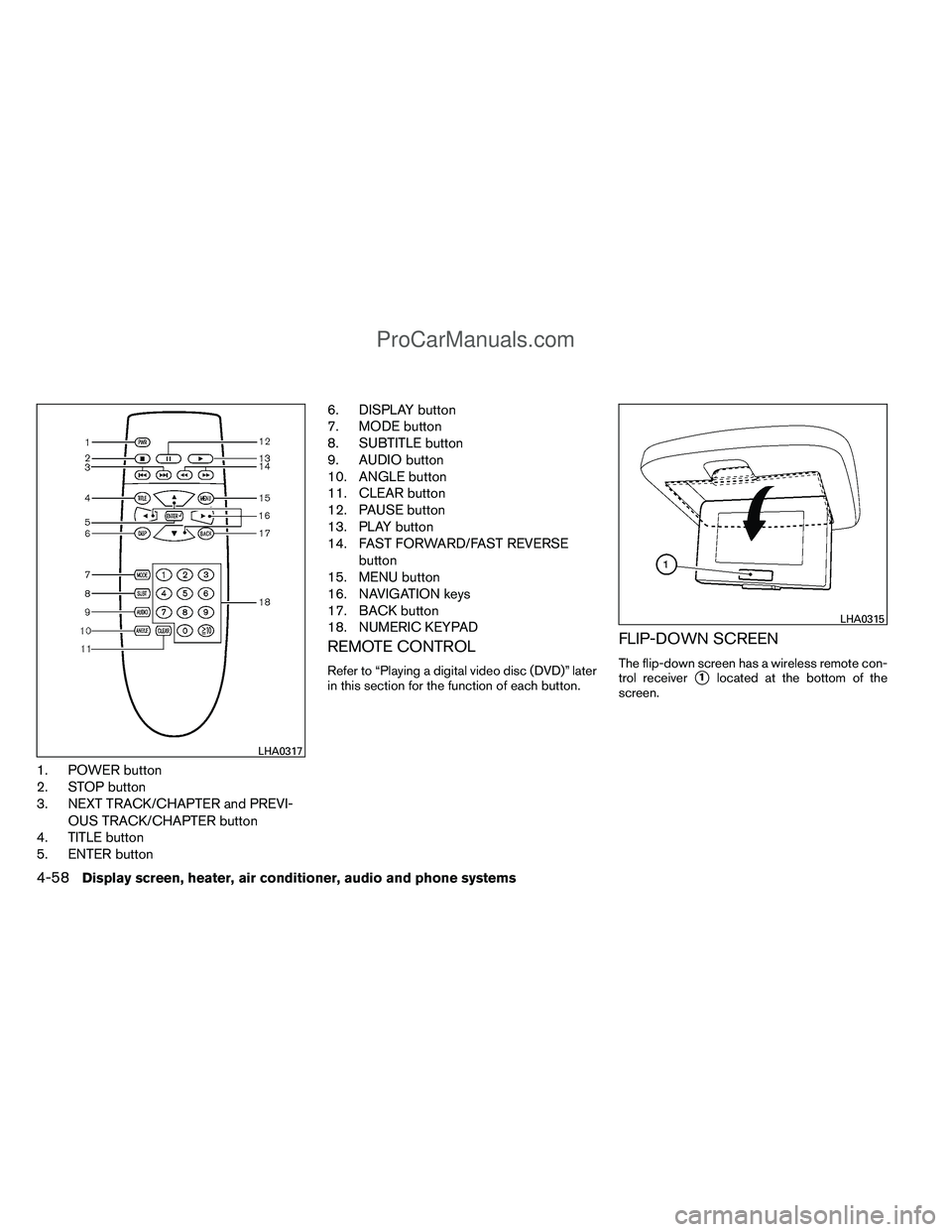
1. POWER button
2. STOP button
3. NEXT TRACK/CHAPTER and PREVI-OUS TRACK/CHAPTER button
4. TITLE button
5. ENTER button 6. DISPLAY button
7. MODE button
8. SUBTITLE button
9. AUDIO button
10. ANGLE button
11. CLEAR button
12. PAUSE button
13. PLAY button
14. FAST FORWARD/FAST REVERSE
button
15. MENU button
16. NAVIGATION keys
17. BACK button
18. NUMERIC KEYPAD
REMOTE CONTROL
Refer to “Playing a digital video disc (DVD)” later
in this section for the function of each button.
FLIP-DOWN SCREEN
The flip-down screen has a wireless remote con-
trol receiver
�1located at the bottom of the
screen.
LHA0317
LHA0315
4-58Display screen, heater, air conditioner, audio and phone systems
ProCarManuals.com
Page 230 of 406
FF (Fast Forward) , REW(Remote control only):
Press the FAST FORWARD/FAST REVERSE
buttons to carry out the fast forward or fast re-
verse presentation at 5 times normal play speed.
Press the FAST FORWARD/FAST REVERSE
buttons again or PLAY button to resume the
normal play speed.
NEXT CHAPTER/PREVIOUS
CHAPTER (Remote con-
trol only):
When the
(NEXT CHAPTER) button is
pressed while the DVD is playing, the program
next to the present one will start to play from its
beginning. Press several times to skip through
programs. The DVD will advance the number of
times the button is pressed. When the
(PREVIOUS CHAPTER) button is pressed, the
program being played returns to its beginning.
Press several times to skip back through pro-
grams. The DVD will go back the number of times
the button is pressed.
orPAUSE:
When the PLAY/PAUSE button on the player or
the PAUSE button on the remote control is
pressed, the player will pause playing of the
media. In pause mode, the player will show
on the upper left corner of the display until the
player is changed to another mode.
STOP:
Press the STOP button once to stop playing the
media. The display will show
in the upper
left corner of the display for 4 seconds, and the
last disc position will be stored. When the PLAY
button is pressed again, it will resume at the
stored disc track and time position.
If the STOP button is pressed again when the
player is already in Stop mode, it will reinitialize
the pointer to the beginning of the disc. In effect,
it will ignore the last stored disc position and
upon receipt of the next play message, will begin
at the Title Menu or at “the beginning of the disc”.
EJECT:
When the EJECT button is pressed with the DVD
loaded, it will be ejected. The display will show the EJECT symbol
in
the upper left corner of the display for 4 seconds
once the EJECT button is pressed.
If the DVD is not loaded, the display will show
“NO DISC”.
If the DVD comes out and is not removed within
25 seconds, it will be pulled back into the slot to
protect it.
DISPLAY:
If the DISPLAY control is pressed for less than 2
seconds, the display menu will appear on the
screen.
● The display menu will remain on the screen
for 10 seconds if no subsequent control
activations occur.
● Use the NAVIGATION KEYS to navigate
within the display menu and use ENTER to
select the item.
● Holding the DISPLAY control on the face-
plate for longer than approximately 2 sec-
onds while in the display menu will reset the
display characteristics to their nominal val-
ues. (Faceplate feature only)
Display screen, heater, air conditioner, audio and phone systems4-61
ProCarManuals.com