2012 NISSAN NOTE headlight
[x] Cancel search: headlightPage 49 of 235

Air bag warning light (red)Ignition knob warning light (red)Overdrive off indicator light (AT models)
(orange)
Brake warning light (red)NATS security indicator light (red)Rear fog light indicator light (orange)
Charge warning light (red)Seat belt warning light (red)SLIP indicator light (orange)
Door open warning light (red)Intelligent Key warning light (red)/Intelligent
Key indicator light (green)Front fog light indicator light (green)
Engine coolant temperature warning light
(red – HOT)Anti-lock Braking System warning light
(orange)Side light and headlight indicator light (green)
Engine oil pressure warning light (red)Electronic Stability Programme (ESP) off
indicator light (orange)Turn signal/hazard indicator light (green)
Malfunction warning (light) and Water in fuel
filter warning light (red)/Malfunction indicator
(light) (orange)Diesel particulate filter warning light (orange)High beam indicator light (blue)
Electrically Power Assisted Steering (EPAS)
warning light (red)Glow plug indicator light (Diesel engine)
(orange)
CHECKING BULBS
With all doors closed, apply the handbrake, fasten
the seat belts and turn the ignition switch to the ON
position without starting the engine.
The following lights will come on:
,,,
The following lights (where fitted) come on briefly
and then go off:
,,(red),,,,,,,
If any light fails to come on, it may indicate a burned-
out bulb or an open circuit in the electrical system.
Have the system repaired promptly.
WARNING LIGHTS
Air bag warning light
When the ignition switch is in the ON or START
position, the air bag light will illuminate for approxi-
mately 7 seconds and then turn off. This means the
system is operational.
If any of the following conditions occur, the air bag
systems and pre-tensioner seat belt need servicingand your vehicle must be taken to the nearest
NISSAN dealer or qualified workshop.
•The air bag warning light remains on after ap-
proximately 7 seconds.
•The air bag warning light flashes intermittently.
•The air bag warning light does not come on at
all.
Unless checked and repaired, the Supplemental Re-
straint System (SRS) and/or pre-tensioner seat belt
may not function properly.
For additional details on the air bag system, see
WARNING/INDICATOR LIGHTS AND AUDIBLE REMINDERS
Instruments and controls2-7
Page 54 of 235

Diesel particulate filter warning
light (where fitted)
When the warning light illuminates, it indicates that
particulate matter has accumulated to the specified
amount of the limit in the diesel particulate filter.
Drive the vehicle at more than approximately 60 km/h
(37.5 MPH) as soon as safely possible until the
warning light turns off. Always conform to local regu-
lations. Particulate matter collected in the filter can-
not be burned under low speed driving conditions.
After having burned the particulate matter com-
pletely, the warning light will turn off.
See “Diesel particulate filter (where fitted)” in the
“5. Starting and driving” section for further details.
Glow plug indicator light (Diesel
engine)
This light comes on when the ignition switch is in the
ON position, and goes out when the glow plugs
have been pre-heated. When the engine is cold, the
glow plug warm-up time will be longer.
CAUTION
If the light remains on, this may indicate a prob-
lem in the glow system. Have the system checked
at a NISSAN dealer or qualified workshop.
Overdrive off indicator light
(automatic transmission)
The overdrive off indicator light illuminates when the
overdrive is turned OFF. See “Driving with auto-
matic transmission” in the “5. Starting and driving”
section.If the vehicle is driven under extreme conditions,
such as excessive wheel spinning and subse-
quent hard braking, the Fail-safe system may be
activated. This will occur even if all electrical cir-
cuits are functioning properly. In this case, turn
the ignition key to the “OFF” position and wait for
3 seconds. Then turn the key back to the ON
position. The vehicle should return to its normal
operating condition. If it does not return to its
normal operating condition have a NISSAN dealer
or qualified workshop check the transmission
and repair if necessary.
Rear fog light indicator light
The light comes on when the rear fog light switch is
turned on.
SLIP indicator light
(where fitted)
This indicator will blink when the ESP system is
operating, thus alerting the driver to the fact that the
road surface is slippery and the vehicle is nearing its
traction limits.
You may feel or hear the system working, this is nor-
mal.
The light will blink for a few seconds after the ESP
system stops limiting wheel spin.
The
indicator light also comes on when you
turn the ignition switch to the ON position. The light
will turn off after approximately 2 seconds if the sys-tem is operational. If the light does not come on
have the system checked by a NISSAN dealer or
qualified workshop.
Front fog light indicator light
(where fitted)
The light comes on when the front fog lights are
switched on.
Side light and headlight indicator
light
The side light and headlight indicator light illumi-
nates when the side light or headlight position is
selected. See “Headlight and turn signal switch”
later in this section for further details.
Turn signal/hazard indicator
lights
The light flashes when the turn signal switch lever or
hazard switch is turned on.
High beam indicator light
This light comes on when the headlight high beam
is on, and goes out when the low beam is selected.
AUDIBLE REMINDERS
Light reminder chime
A chime will sound when the driver’s side door is
opened if the headlight switch is turned on (ignition
switch in the “OFF” or LOCK position). Turn the
headlight switch to OFF or AUTO (where fitted),
2-12Instruments and controls
Page 55 of 235

when you leave the vehicle. See “Headlight and turn
signal switch” later in this section for further details
on the lighting operation.
Key reminder chime
The chime will sound if the driver’s side door is
opened while the key is left in the ignition switch and
an attempt is made to set the power door lock switch
to the LOCK position.
The chime will sound if the driver’s door is opened
while the Intelligent Key (where fitted) is left inside
the vehicle and the ignition knob is not in the LOCK
position.
Remove the key or Intelligent Key and take it with
you when leaving the vehicle.
Handbrake reminder buzzer
(where fitted)
The buzzer will sound if the vehicle is driven and the
handbrake has not previously been released.
First release the handbrake, then start driving.
See “Handbrake lever” in the “3. Pre-driving checks
and adjustments” section for further operating infor-
mation.
Trailer direction indicator buzzer
The electrical system of the vehicle will detect an
additional electrical load of the trailer lighting when
towing a trailer and the turn signal switch is used.
As a result, the direction indicator tone will be differ-
entFor additional information, see “Trailer towing” in
the “5. Starting and driving” section.
WINDSCREEN WIPER AND WASHER
SWITCH
WARNING
In freezing temperatures the washer fluid may
freeze on the windscreen and obscure your vi-
sion. Warm the windscreen with the defroster
before you wash it.
CAUTION
•Do not open/release the bonnet when the
front wiper arms are raised from their original
position.
•Do not operate the washer continuously for
more than 15 seconds.
•Do not operate the washer if the reservoir
tank is empty or frozen.
NIC1054Z
WIPER AND WASHER SWITCH
Instruments and controls2-13
Page 56 of 235

Wiper operation
The windscreen wiper and washer can be operated
when the ignition switch is in the ON position.
Push the lever down to operate the wiper at the fol-
lowing speeds:
j1Intermittent()
— the intermittent operation speed can be
adjusted by rotating the ring towards
jA
(slower) orjB (faster).
j2Low() – continuous low speed opera-
tion
j3High() – continuous high speed
operation
To stop the wiper operation, move the lever
up to the “OFF” position.
j4Single sweep() — push the lever up for
a single sweep operation of the wiper.
Washer operation
j
5 To operate the washer, pull the lever
towards you
j5 until the desired amount of
washer fluid is spread on the windscreen.
The wiper will automatically operate several
times.
The headlight cleaner (where fitted) will also
operate with operation of the windscreen
washer.
Headlight cleaner (where fitted)
The headlight washing system is only activated
when:
– the ignition switch is in the ON position.
– the headlight switch is in the
position.
– pulling the lever once towards you
j5.
NOTE
After the first operation, the headlight cleaner
operates once every fifth operation of the
windscreen washer.
CAUTION
Do not operate the headlight cleaner if the win-
dow washer fluid reservoir is empty.
Rain sensor (where fitted)
The rain sensor is activated when the intermittent
positionj1 (AUTO) of the wiper switch is selected.
The wiper will start to operate automatically at a suit-
able speed when rain is detected on the windscreen.
NOTE
The rain sensor is only intended for use during
rain or precipitation. During other weather condi-
tions no harm will come to the rain sensor sys-
tem if left active (wiper switch set to intermit-
tent), although occasional unexpected activation
of the wipers may occur.
REAR WINDOW
The rear window wiper and washer can be oper-
ated when the ignition switch is in the ON position.
Turn the switch clockwise to the intermittent (
,j1 ) position or continuous (,j2 ) position to
operate the wiper.
To operate the rear window washer, push the switch
towards the front of the vehicle
j3 . The rear win-
dow wiper will also operate.
CAUTION
•Do not operate the washer continuously for
more than 15 seconds.
•Do not operate the washer if the reservoir
tank is empty or frozen.
NIC1055Z
2-14Instruments and controls
Page 58 of 235

NISSAN recommends you to consult the local regu-
lations concerning the use of lights.
HEADLIGHT SWITCH
Lighting
Turn the switch to themposition:
j1 The front side, tail, number plate and instru-
ment lights will come on.
Turn the switch to the
mposition:
j2 The headlights will come on and all the
other lights remain on.
CAUTION
Never leave the light switch on for extended peri-
ods of time while the engine is not running.
Daytime light system (where fitted)
Even if the headlight switch is off, the headlight low
beam, front side, rear combination and number plate
lights will come on after starting the engine. How-
ever, you cannot change low beam to high beam
when the light switch is off.
When the light switch is turned to the
position,
the headlight low beam will turn off.
Autolight system (AUTO — where fitted)
The autolight system allows the headlights to be set
so they turn on and off automatically. When active,
the autolight system will:
•Turn on the headlights, front side, tail, number
plate and instrument panel lights automatically
when it gets dark.
•Turn off all the lights when it gets light.
To activate the autolight system:
1. Turn the headlight switch to the AUTO position.
2. Turn the ignition switch to ON.To disable the autolight system:
Turn the switch to the OFF,
orposition.
A.Front of the vehicle.
Headlight beam select
1.To select the high beam when in theposi-
tion, push the lever forward. The high beam
lights come on and the
indicator light
illuminates.
2.Pull the lever back to select the low beam
(
position).
3.Pulling the lever towards you will flash the
headlight high beam, even when the headlight
switch is off.
“Friendly Lighting” (where fitted)
The “Friendly Lighting” function is a convenience
facility. It allows you to provide lighting from the
vehicle after the ignition switch has been turned to
the LOCK position: pulling the headlight switch to-
NIC1069Z
NIC1070Z
HEADLIGHT AND TURN SIGNAL
SWITCH
2-16Instruments and controls
Page 59 of 235

ward you once will activate the headlight for ap-
proximately 30 seconds. After that period of time, it
will automatically switch off.
It is possible to pull the headlight switch up to four
times to increase the lighting period up to 2 minutes.
NOTE
The “Friendly Lighting” function can be cancelled
by switching the ignition switch to the Acc or ON
position again.
Battery save function
The battery save feature prevents your vehicle from
discharging the battery after you have left the exter-
nal lights, map lamps or room lamps on (combina-
tion switch in the
orposition) when exiting
the vehicle. This occurs when the ignition switch or
ignition knob is in the “OFF” or LOCK position.
NOTE
The next time the engine is started the external
lights, map lamps or room lamp will come on
again
Battery save function for external lights:
If the ignition switch is turned to the “OFF” position
but the external lights are accidentally left on, the
external lights will automatically be switched off as
soon as the driver’s door is opened.
It is possible to leave the external lights on perma-
nently by switching them back on using the head-
light switch while the ignition switch is still in theLOCK or “OFF” position. In this case, the light re-
minder chime will sound when the driver’s door is
opened.
Battery save function for interior light:
The interior light will automatically be switched off
after approximately 15 minutes if it has been acci-
dentally left on.
TURN SIGNAL SWITCH
Lane change signal
To signal a lane change, move the lever up or downj1 to the point where lights begin flashing.
Direction indicator
Move the lever up or downj2 to indicate right or
left. When the turn is completed, the turn signal is
automatically cancelled.
FRONT FOG LIGHT (where fitted)
The front fog lights should only be used when visibil-
ity is seriously reduced – generally, to less than 100
m (328 ft).
Turn the headlight switch to the
orposi-
tion and turn the fog light switch to thepositionj1 . The front fog lights and indicator light will come
on. For additional information, see “Warning/indica-
tor lights and audible reminders” earlier in this sec-
tion.
To turn the front fog lights off, turn the fog light
switch to the OFF position.NIC1071Z
NIC1058Z
FOG LIGHT SWITCH
Instruments and controls2-17
Page 60 of 235
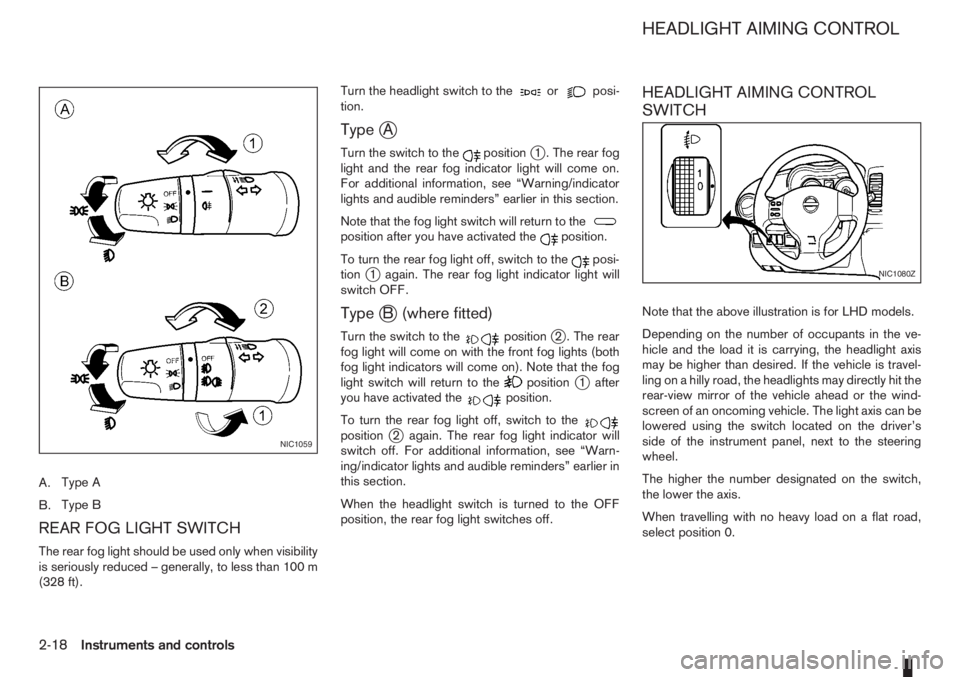
A.Type A
B.Type B
REAR FOG LIGHT SWITCH
The rear fog light should be used only when visibility
is seriously reduced – generally, to less than 100 m
(328 ft).Turn the headlight switch to the
orposi-
tion.
TypejA
Turn the switch to thepositionj1 . The rear fog
light and the rear fog indicator light will come on.
For additional information, see “Warning/indicator
lights and audible reminders” earlier in this section.
Note that the fog light switch will return to the
position after you have activated theposition.
To turn the rear fog light off, switch to the
posi-
tionj1 again. The rear fog light indicator light will
switch OFF.
TypejB (where fitted)
Turn the switch to thepositionj2 . The rear
fog light will come on with the front fog lights (both
fog light indicators will come on). Note that the fog
light switch will return to the
positionj1 after
you have activated theposition.
To turn the rear fog light off, switch to the
positionj2 again. The rear fog light indicator will
switch off. For additional information, see “Warn-
ing/indicator lights and audible reminders” earlier in
this section.
When the headlight switch is turned to the OFF
position, the rear fog light switches off.
HEADLIGHT AIMING CONTROL
SWITCH
Note that the above illustration is for LHD models.
Depending on the number of occupants in the ve-
hicle and the load it is carrying, the headlight axis
may be higher than desired. If the vehicle is travel-
ling on a hilly road, the headlights may directly hit the
rear-view mirror of the vehicle ahead or the wind-
screen of an oncoming vehicle. The light axis can be
lowered using the switch located on the driver’s
side of the instrument panel, next to the steering
wheel.
The higher the number designated on the switch,
the lower the axis.
When travelling with no heavy load on a flat road,
select position 0.
NIC1059
NIC1080Z
HEADLIGHT AIMING CONTROL
2-18Instruments and controls
Page 82 of 235
WARNING
Do not adjust the steering wheel while driving.
You could lose control of your vehicle and cause
an accident.
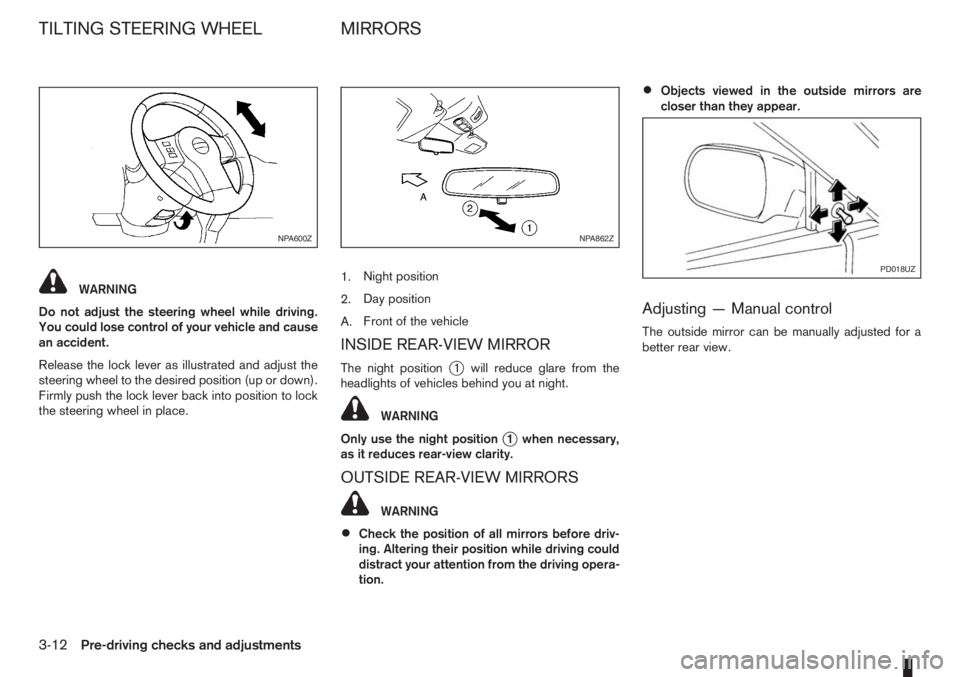
Release the lock lever as illustrated and adjust the
steering wheel to the desired position (up or down).
Firmly push the lock lever back into position to lock
the steering wheel in place.1.Night position
2.Day position
A.Front of the vehicle
INSIDE REAR-VIEW MIRROR
The night positionj1 will reduce glare from the
headlights of vehicles behind you at night.
WARNING
Only use the night position
j1 when necessary,
as it reduces rear-view clarity.
OUTSIDE REAR-VIEW MIRRORS
WARNING
•Check the position of all mirrors before driv-
ing. Altering their position while driving could
distract your attention from the driving opera-
tion.
•Objects viewed in the outside mirrors are
closer than they appear.
Adjusting — Manual control
The outside mirror can be manually adjusted for a
better rear view.
NPA600ZNPA862Z
PD018UZ
TILTING STEERING WHEEL MIRRORS
3-12Pre-driving checks and adjustments