2012 NISSAN 370Z COUPE fuse
[x] Cancel search: fusePage 210 of 427
4-54Center display, heater, air conditioner, audio, phone and voice recognition systems
.UPDATING (When the satellite radio sub-
scription is not active)
SCAN tuning:
Push the SCAN tuning button to tune from low
to high frequencies and stop at each broad-
casting station/channel for 5 seconds. Pushing
the button again during this 5 seconds period
will stop SCAN tuning and the radio will remain
tuned to that station/channel.
If the SCAN tuning button is not pushed within 5
seconds, SCAN tuning moves to the next
station/channel.
*1to*6Station memory operations:
12 stations/channels can be set for the FM band
(6 each for FM1 and FM2), 18 for XM radio (6
each for XM1, XM2 and XM3) and 6 stations
can be set for the AM band.
1. Choose the radio band using the radio band select button.
2. Tune to the desired station/channel using the SEEK/TRACK, SCAN button or the
radio TUNE knob.
3. Push and hold the desired station preset button
*1to*6until the radio mutes.
4. The station indicator will then come on and the sound will resume. Memorizing is now
complete. 5. Other buttons can be set in the same
manner.
If the battery cable is disconnected, or if the fuse
opens, the radio memory will be erased. In that
case, reset the desired stations/channels.
List (AM and FM radio):
When the “List” key on the display is selected
while the FM or AM radio is being played, the
preset station list will be displayed.
If 1 of the 6 preset stations listed is touched and
held, the current station will be stored as the
new preset.
Menu (XM Satellite Radio):
When the “Menu” key on the display is selected
while the XM Satellite Radio is being played, the
menu list will be displayed.
The following items are available.
. Preset List
Displays the preset channel list. If 1 of the 6
preset stations listed is touched and held,
the current station will be stored as the new
preset.
. Customize Channel List
Selects specific channels to skip while using
the TUNE, SEEK/CATEGORY or Menu-
Categories feature. .
Favorite Artists & Songs
Stores the current artist or song that is being
played. Touch the “Alert” key to be reminded
when the stored artist or song is playing on a
station while listening to XM.
. Categories
Selecting a category will go to the first
channel in that category as defined by XM
Radio.
. Direct Tune
Inputs the channel number by using a
keypad.
Compact Disc (CD) player operation
Push the ignition switch to the ACC or ON
position and insert the Compact Disc (CD) into
the slot with the label side facing up. The CD will
be guided automatically into the slot and start
playing.
After loading the CD, the number of tracks on
the CD and the play time will appear on the
display.
If the radio is already operating, it will auto-
matically turn off and the CD will play.
If the system has been turned off while the CD
was playing, pushing the ON·OFF button will
start the CD.
Do not use 3.1 in (8 cm) discs.
Page 246 of 427
4-90Center display, heater, air conditioner, audio, phone and voice recognition systems
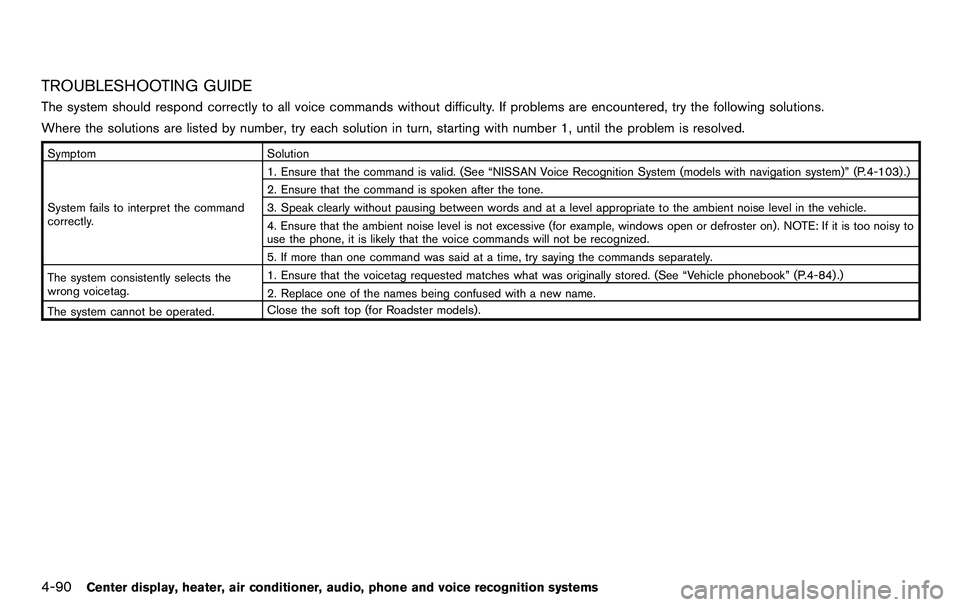
TROUBLESHOOTING GUIDE
The system should respond correctly to all voice commands without difficulty. If problems are encountered, try the following solutions.
Where the solutions are listed by number, try each solution in turn, starting with number 1, until the problem is resolved.
SymptomSolution
System fails to interpret the command
correctly. 1. Ensure that the command is valid. (See “NISSAN Voice Recognition System (models with navigation system)” (P.4-103) .)
2. Ensure that the command is spoken after the tone.
3. Speak clearly without pausing between words and at a level appropriate to the ambient noise level in the vehicle.
4. Ensure that the ambient noise level is not excessive (for example, windows open or defroster on) . NOTE: If it is too noisy to
use the phone, it is likely that the voice commands will not be recognized.
5. If more than one command was said at a time, try saying the commands separately.
The system consistently selects the
wrong voicetag. 1. Ensure that the voicetag requested matches what was originally stored. (See “Vehicle phonebook” (P.4-84) .)
2. Replace one of the names being confused with a new name.
The system cannot be operated. Close the soft top (for Roadster models) .
Page 258 of 427
4-102Center display, heater, air conditioner, audio, phone and voice recognition systems
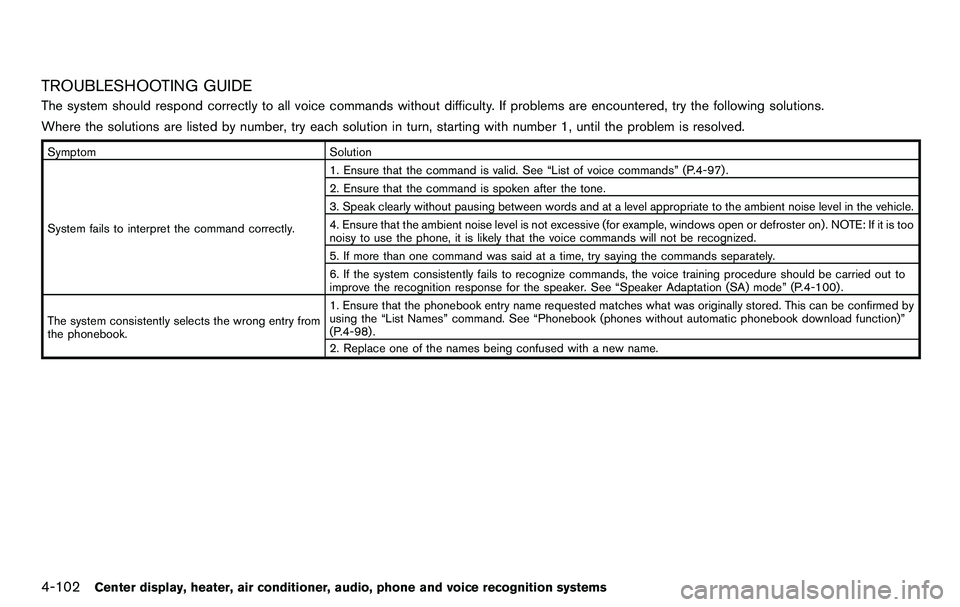
TROUBLESHOOTING GUIDE
The system should respond correctly to all voice commands without difficulty. If problems are encountered, try the following solutions.
Where the solutions are listed by number, try each solution in turn, starting with number 1, until the problem is resolved.
SymptomSolution
System fails to interpret the command correctly. 1. Ensure that the command is valid. See “List of voice commands” (P.4-97) .
2. Ensure that the command is spoken after the tone.
3. Speak clearly without pausing between words and at a level appropriate to the ambient noise level in the vehicle.
4. Ensure that the ambient noise level is not excessive (for example, windows open or defroster on) . NOTE: If it is too
noisy to use the phone, it is likely that the voice commands will not be recognized.
5. If more than one command was said at a time, try saying the commands separately.
6. If the system consistently fails to recognize commands, the voice training procedure should be carried out to
improve the recognition response for the speaker. See “Speaker Adaptation (SA) mode” (P.4-100) .
The system consistently selects the wrong entry from
the phonebook. 1. Ensure that the phonebook entry name requested matches what was originally stored. This can be confirmed by
using the “List Names” command. See “Phonebook (phones without automatic phonebook download function)”
(P.4-98) .
2. Replace one of the names being confused with a new name.
Page 284 of 427
4-128Center display, heater, air conditioner, audio, phone and voice recognition systems
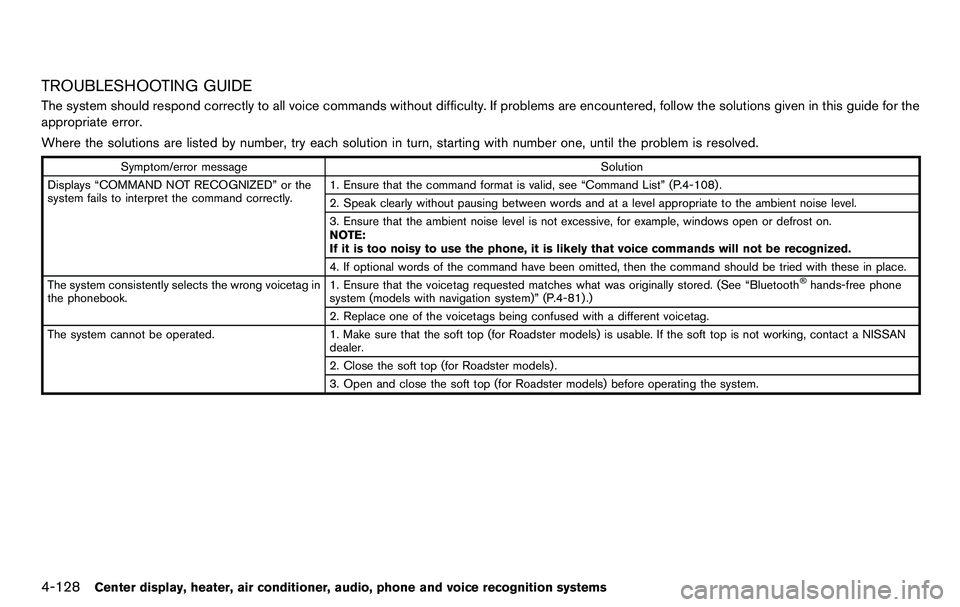
TROUBLESHOOTING GUIDE
The system should respond correctly to all voice commands without difficulty. If problems are encountered, follow the solutions given in this guide for the
appropriate error.
Where the solutions are listed by number, try each solution in turn, starting with number one, until the problem is resolved.
Symptom/error messageSolution
Displays “COMMAND NOT RECOGNIZED” or the
system fails to interpret the command correctly. 1. Ensure that the command format is valid, see “Command List” (P.4-108) .
2. Speak clearly without pausing between words and at a level appropriate to the ambient noise level.
3. Ensure that the ambient noise level is not excessive, for example, windows open or defrost on.
NOTE:
If it is too noisy to use the phone, it is likely that voice commands will not be recognized.
4. If optional words of the command have been omitted, then the command should be tried with these in place.
The system consistently selects the wrong voicetag in
the phonebook. 1. Ensure that the voicetag requested matches what was originally stored. (See “Bluetooth
®hands-free phone
system (models with navigation system)” (P.4-81) .)
2. Replace one of the voicetags being confused with a different voicetag.
The system cannot be operated. 1. Make sure that the soft top (for Roadster models) is usable. If the soft top is not working, contact a NISSAN
dealer.
2. Close the soft top (for Roadster models) .
3. Open and close the soft top (for Roadster models) before operating the system.
Page 338 of 427
6-20In case of emergency
ing to prevent damage to the
drivetrain.
SCE0836
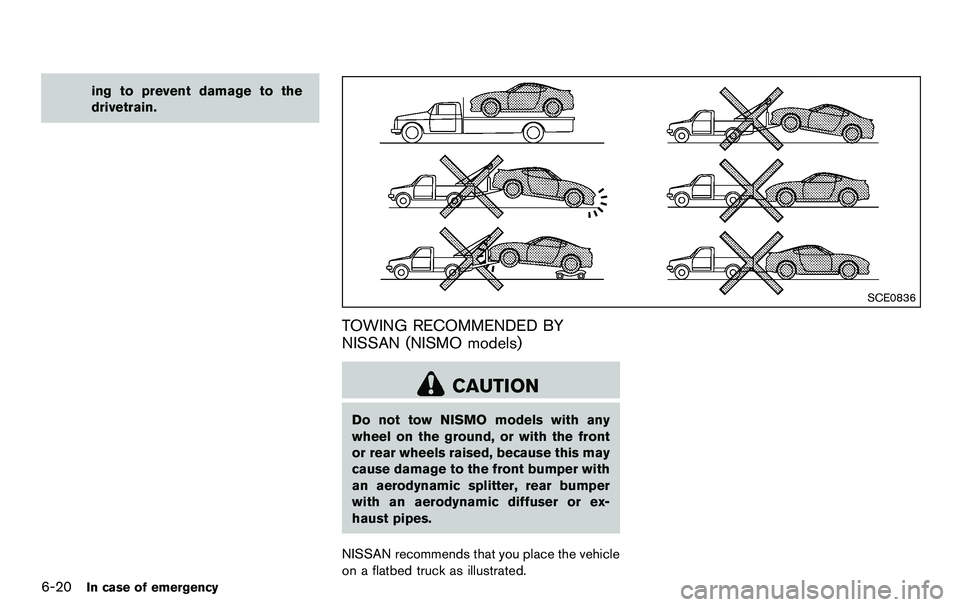
TOWING RECOMMENDED BY
NISSAN (NISMO models)
CAUTION
Do not tow NISMO models with any
wheel on the ground, or with the front
or rear wheels raised, because this may
cause damage to the front bumper with
an aerodynamic splitter, rear bumper
with an aerodynamic diffuser or ex-
haust pipes.
NISSAN recommends that you place the vehicle
on a flatbed truck as illustrated.
Page 353 of 427
8 Maintenance and do-it-yourself
Maintenance requirement ........................................................ 8-3Scheduled maintenance .................................................... 8-3
General maintenance ......................................................... 8-3
Where to go for service .................................................... 8-3
General maintenance ............................................................... 8-3 Explanation of maintenance items ................................... 8-3
Maintenance precautions ........................................................ 8-6
Engine compartment check locations .................................. 8-8 VQ37VHR engine model .................................................. 8-8
Engine cooling system ............................................................. 8-9
Checking engine coolant level ...................................... 8-10
Changing engine coolant ............................................... 8-10
Engine oil ........................................................................\
......... 8-11
Checking engine oil level ............................................... 8-11
Changing engine oil and filter ....................................... 8-11
Automatic transmission fluid ............................................... 8-13
Power steering fluid ............................................................... 8-13
Brake and clutch fluid ........................................................... 8-14 Brake fluid ........................................................................\
.. 8-14
Clutch fluid (Manual transmission models) ............... 8-15
Window washer fluid ............................................................ 8-15
Battery ........................................................................\
............... 8-16 Jump starting ..................................................................... 8-17 Variable voltage control system ......................................... 8-18
Drive belts ........................................................................\
....... 8-18
Spark plugs ........................................................................\
..... 8-19
Replacing spark plugs .................................................. 8-19
Air cleaner ........................................................................\
....... 8-19
Windshield wiper blades ..................................................... 8-20
Cleaning ........................................................................\
... 8-20
Replacing ........................................................................\
. 8-21
Brakes ........................................................................\
.............. 8-22 Self-adjusting brakes .................................................... 8-22
Brake pad wear warning .............................................. 8-22
Fuses ........................................................................\
................ 8-22 Engine compartment ..................................................... 8-22
Passenger compartment .............................................. 8-24
Intelligent Key battery replacement ................................... 8-25
Lights ........................................................................\
................ 8-27
Coupe ........................................................................\
....... 8-27
Roadster ........................................................................\
... 8-28
Headlights ........................................................................\
8-29
Exterior and interior lights ............................................ 8-29
Wheels and tires ................................................................... 8-31 Tire pressure ................................................................... 8-31
Tire labeling ..................................................................... 8-34
Page 360 of 427
8-8Maintenance and do-it-yourself
JVM0086X
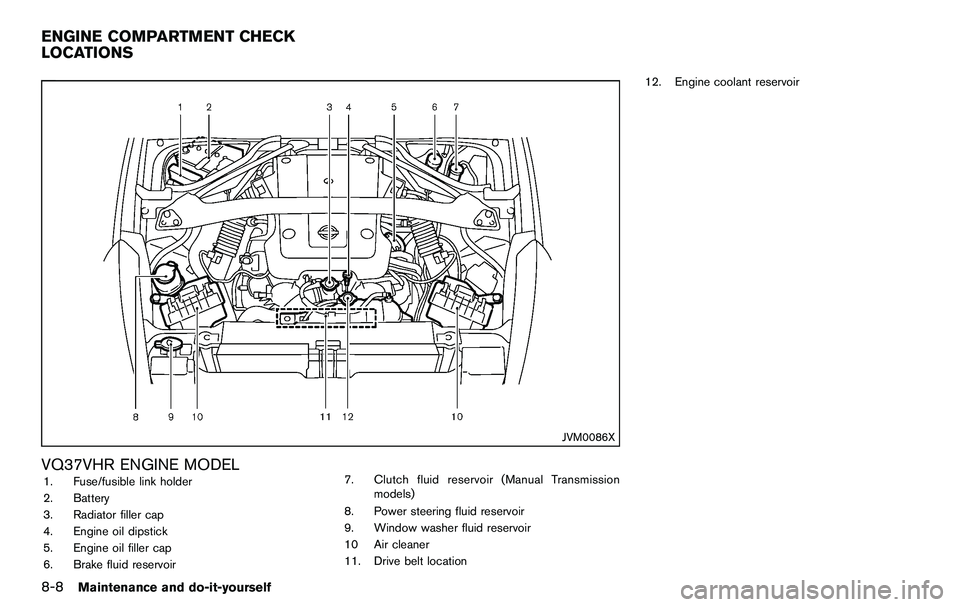
VQ37VHR ENGINE MODEL1. Fuse/fusible link holder
2. Battery
3. Radiator filler cap
4. Engine oil dipstick
5. Engine oil filler cap
6. Brake fluid reservoir7. Clutch fluid reservoir (Manual Transmission
models)
8. Power steering fluid reservoir
9. Window washer fluid reservoir
10 Air cleaner
11. Drive belt location 12. Engine coolant reservoir
ENGINE COMPARTMENT CHECK
LOCATIONS
Page 374 of 427
8-22Maintenance and do-it-yourself
If the brakes do not operate properly, have the
brakes checked by a NISSAN dealer.
SELF-ADJUSTING BRAKES
Your vehicle is equipped with self-adjusting
brakes.
The disc-type brakes self-adjust every time the
brake pedal is applied.
WARNING
See a NISSAN dealer for a brake
system check if the brake pedal height
does not return to normal.
BRAKE PAD WEAR WARNING
The disc brake pads have audible wear warn-
ings. When a brake pad requires replacement, it
will make a high pitched scraping sound when
the vehicle is in motion. This scraping sound will
first occur only when the brake pedal is
depressed. After more wear of the brake pad
the sound will always be heard even if the brake
pedal is not depressed. Have the brakes
checked as soon as possible if the wear warning
sound is heard.
Under some driving or climate conditions,
occasional brake squeak, squeal or other noise
may be heard. Occasional brake noise duringlight to moderate stops is normal and does not
affect the function or performance of the brake
system.
Proper brake inspection intervals should
be followed.
For additional information, see the
maintenance log section of your “NISSAN
Service and Maintenance Guide”.
SDI1479A
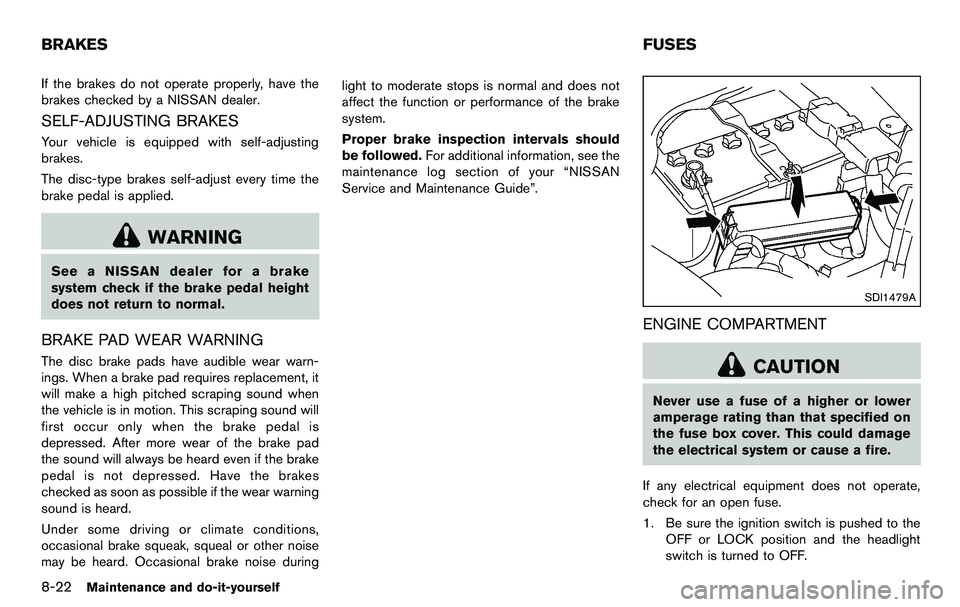
ENGINE COMPARTMENT
CAUTION
Never use a fuse of a higher or lower
amperage rating than that specified on
the fuse box cover. This could damage
the electrical system or cause a fire.
If any electrical equipment does not operate,
check for an open fuse.
1. Be sure the ignition switch is pushed to the OFF or LOCK position and the headlight
switch is turned to OFF.
BRAKES FUSES