Page 408 of 610
Comfort controls
5-31
5
Personalizing the air conditioning switch (Changing
the function setting)
N00759800045
You can change the following functions to match your prefer-
ence.
�Enable automatic air conditioning control:
When the mode selection dial or blower speed selection
dial has been set to the “AUTO” position or when the tem-
perature control dial has been set to the minimum temper-
ature, the air conditioning switch is automatically
controlled.
�Disable automatic air conditioning control:
The air conditioning switch is not automatically con-
trolled, unless the air conditioning switch is used.
�Changing the settings
Press the air conditioning switch for about 10 seconds or
longer.
When the setting has changed, the system will beep and
the indicator light will flash.
• When the setting has changed from enabled to disabled,
the system will beep three times and the indicator will
flash three times.
• When the setting has changed from disabled to enabled,
the system will beep two times and the indicator light
will flash three times.
NOTE�The factory setting is “Enable automatic air conditioning
control”.
�While the mode selection dial is set between “ ” and
“ ” position, the air conditioning will run automatically,
even if the system is set to “Disable automatic air condi-
tioning control”, in order to prevent windows from fog-
ging up.
BK0140300US.book 31 ページ 2011年6月28日 火曜日 午後5時18分
Page 410 of 610
Comfort controls
5-33
5
Operating the air conditioning system (manual
mode)
N00731800072
Blower speed and vent mode may be controlled manually by
setting the blower speed selection dial and the mode selection
dial to the desired positions. To return to automatic operation,
set the dials to the “AUTO” position.Defrosting or defogging (windshield, door windows)
N00732400280
To remove frost or mist from the windshield and door win-
dows, use the mode selection dial (“ ” or “ ”).For ordinary defrosting
Use this setting to keep the windshield and door windows clear
of mist, and to keep the leg area heated (when driving in rain or
snow).
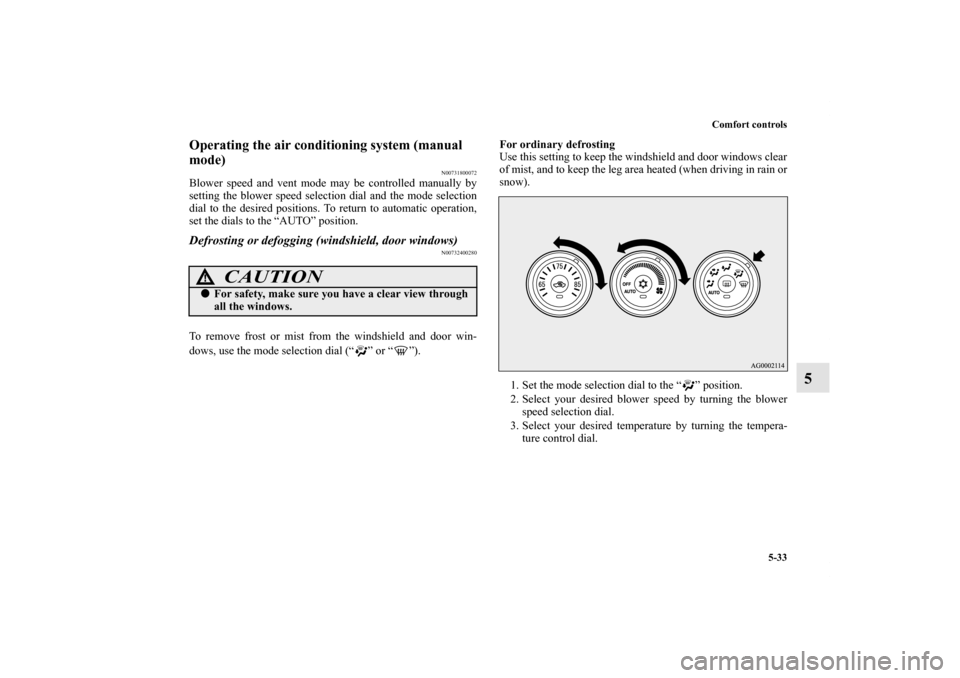
1. Set the mode selection dial to the “ ” position.
2. Select your desired blower speed by turning the blower
speed selection dial.
3. Select your desired temperature by turning the tempera-
ture control dial.
CAUTION
!�For safety, make sure you have a clear view through
all the windows.
BK0140300US.book 33 ページ 2011年6月28日 火曜日 午後5時18分
Page 414 of 610
Comfort controls
5-37
5
NOTE�While the engine coolant temperature is low, the tempera-
ture of the air from the heater will be cool/cold until the
engine warms up, even if you have selected warm air with
the dial.
�When the temperature is set to the highest or the lowest
setting under the AUTO operation, the air selection and
the air conditioning will be automatically changed as fol-
lows.
Also, if the air selection is operated manually after an
automatic changeover, manual operation will be selected.
• Quick Heating (When the temperature is set to the high-
est setting)
Outside air will be introduced and the air conditioning
will stop.
• Quick Cooling (When the temperature is set to the low-
est setting)
Inside air will be recirculated and the air conditioning
will operate.
The above indicates the factory settings. You can personalize
the air selection switch and air conditioning switch to match
your personal preferences.
Contact your Mitsubishi Motors dealer or a repair facility of
your choice for assistance.
Refer to “Personalizing the air conditioning switch (Changing
the function setting)” on page5-41.
Refer to “Personalizing the air selection (Changing the func-
tion setting)” on page5-39.
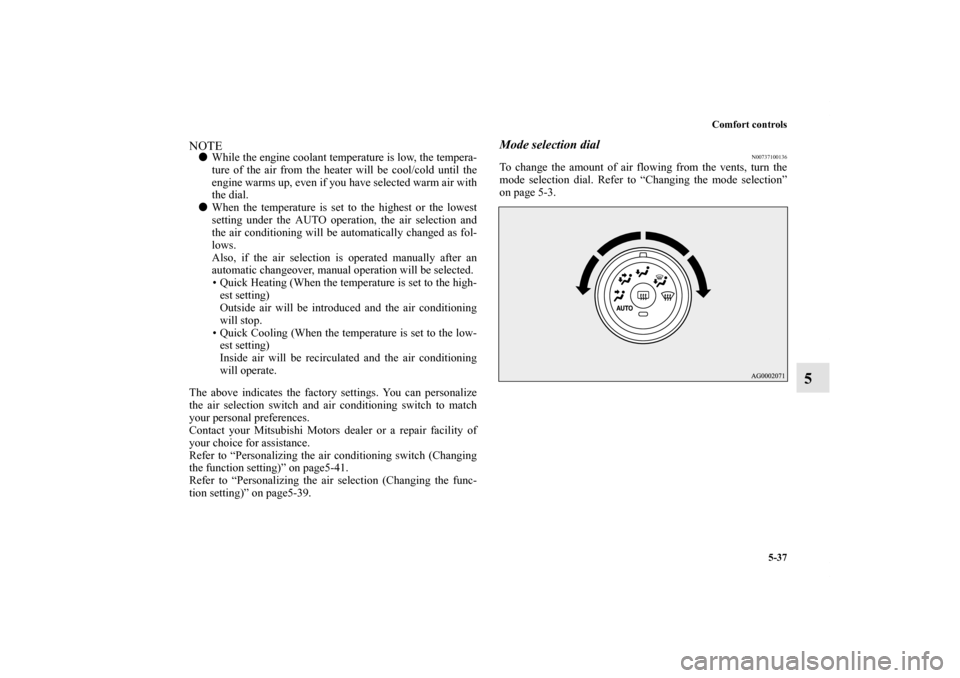
Mode selection dial
N00737100136
To change the amount of air flowing from the vents, turn the
mode selection dial. Refer to “Changing the mode selection”
on page 5-3.
BK0140300US.book 37 ページ 2011年6月28日 火曜日 午後5時18分
Page 416 of 610
Comfort controls
5-39
5
Personalizing the air selection (Changing the function
setting)
N00760000021
You can change the following functions to match your prefer-
ence.
�Enable automatic air control:
When the mode selection dial or the blower speed selec-
tion dial is set to the “AUTO” position, the air selection
switch will also be automatically controlled.
�Disable automatic air control:
Even when the mode selection dial or the blower speed
selection dial is set to the “AUTO” position, the air selec-
tion switch will not be automatically controlled.
�Changing the settings
Press the air selection switch for about 10 seconds or
longer.
When the setting has changed, the system will beep and
the indicator light will flash.
• When the setting has changed from enabled to disabled,
the system will beep three times and the indicator will
flash three times.
• When the setting has changed from disabled to enabled,
the system will beep two times and the indicator light
will flash three times.
NOTE�The factory setting is “Enable automatic air control”.
�While the mode selection dial is set to the “ ” position,
the air selection will automatically change to the outside
air position, even if the system is set to “Disable auto-
matic air control”, in order to prevent windows from fog-
ging up.
BK0140300US.book 39 ページ 2011年6月28日 火曜日 午後5時18分
Page 418 of 610
Comfort controls
5-41
5
Personalizing the air conditioning switch (Changing
the function setting)
N00759800029
You can change the following functions to match your prefer-
ence.
�Enable automatic air conditioning control:
When the mode selection dial or blower speed selection
dial has been set to the “AUTO” position or when the tem-
perature control dial has been set to the minimum temper-
ature, the air conditioning switch is automatically
controlled.
�Disable automatic air conditioning control:
The air conditioning switch is not automatically con-
trolled, unless the air conditioning switch is used.
�Changing the settings
Press the air conditioning switch for about 10 seconds or
longer.
When the setting has changed, the system will beep and
the indicator light will flash.
• When the setting has changed from enabled to disabled,
the system will beep three times and the indicator will
flash three times.
• When the setting has changed from disabled to enabled,
the system will beep two times and the indicator light
will flash three times.
NOTE�The factory setting is “Enable automatic air conditioning
control”.
�While the mode selection dial is set to the “ ” position,
the air conditioning will run automatically, even if the sys-
tem is set to “Disable automatic air conditioning control”,
in order to prevent windows from fogging up.
BK0140300US.book 41 ページ 2011年6月28日 火曜日 午後5時18分
Page 420 of 610
Comfort controls
5-43
5
Operating the air conditioning system (manual
mode)
N00731800098
Blower speed and vent mode may be controlled manually by
setting the blower speed selection dial and the mode selection
dial to the desired positions. To return to automatic operation,
set the dials to the “AUTO” position.Defrosting or defogging (windshield, door windows)
N00732400323
To remove frost or mist from the windshield and door win-
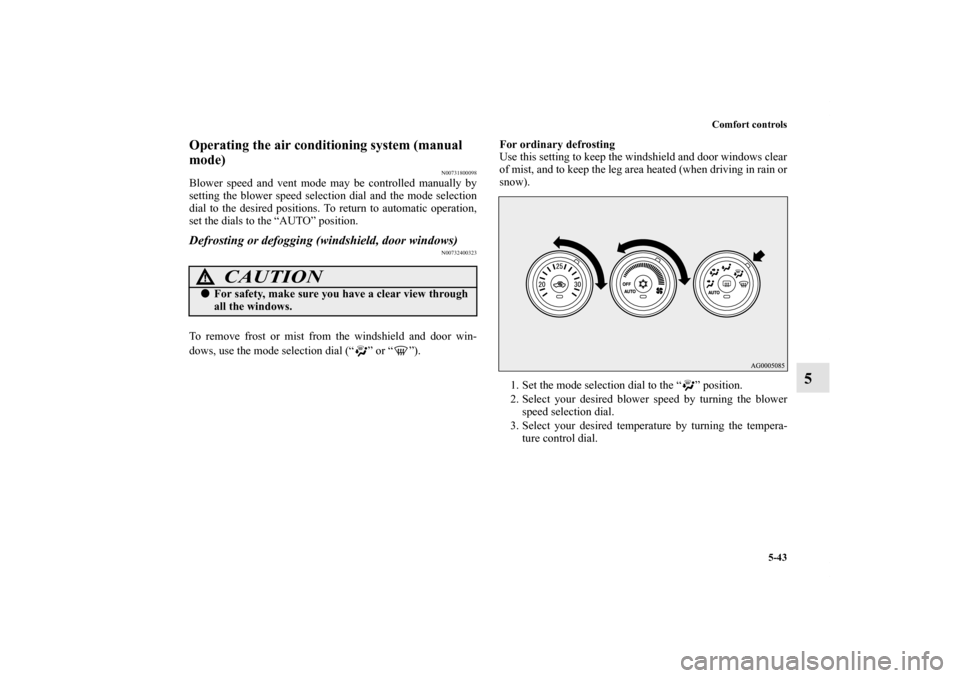
dows, use the mode selection dial (“ ” or “ ”).For ordinary defrosting
Use this setting to keep the windshield and door windows clear
of mist, and to keep the leg area heated (when driving in rain or
snow).
1. Set the mode selection dial to the “ ” position.
2. Select your desired blower speed by turning the blower
speed selection dial.
3. Select your desired temperature by turning the tempera-
ture control dial.
CAUTION
!�For safety, make sure you have a clear view through
all the windows.
BK0140300US.book 43 ページ 2011年6月28日 火曜日 午後5時18分
Page 426 of 610
Comfort controls
5-49
5
To adjust the tone
N00712100656
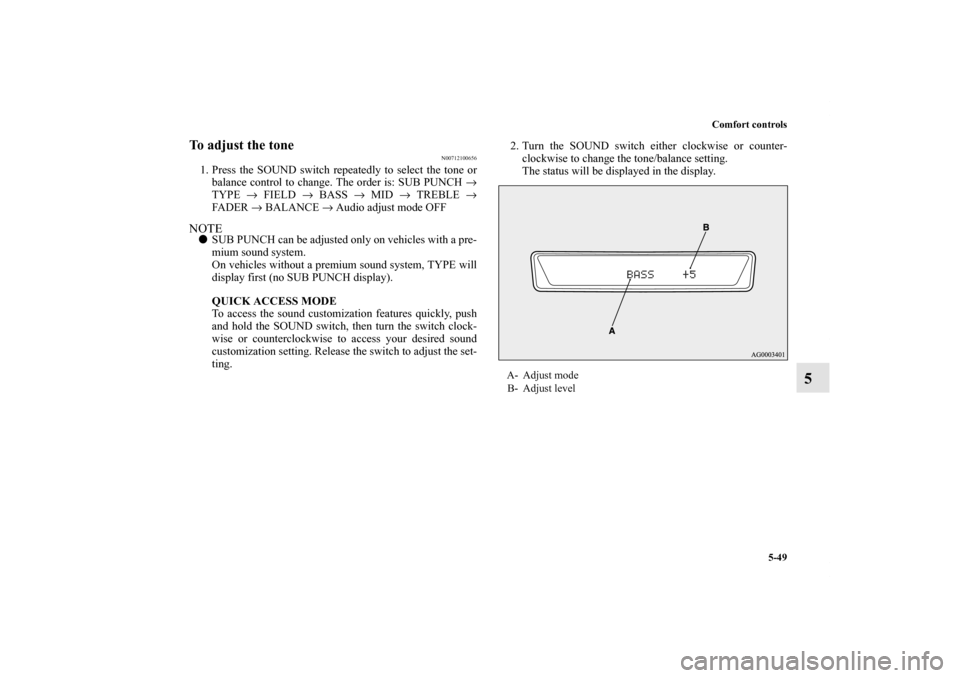
1. Press the SOUND switch repeatedly to select the tone or
balance control to change. The order is: SUB PUNCH →
TYPE → FIELD → BASS → MID → TREBLE →
FADER → BALANCE → Audio adjust mode OFFNOTE�SUB PUNCH can be adjusted only on vehicles with a pre-
mium sound system.
On vehicles without a premium sound system, TYPE will
display first (no SUB PUNCH display).
QUICK ACCESS MODE
To access the sound customization features quickly, push
and hold the SOUND switch, then turn the switch clock-
wise or counterclockwise to access your desired sound
customization setting. Release the switch to adjust the set-
ting.2. Turn the SOUND switch either clockwise or counter-
clockwise to change the tone/balance setting.
The status will be displayed in the display.
A- Adjust mode
B- Adjust level
BK0140300US.book 49 ページ 2011年6月28日 火曜日 午後5時18分
Page 429 of 610
5-52 Comfort controls
5
Speed Compensated Volume function
N00752200268
Speed Compensated Volume function is a feature that automat-
ically adjusts the VOLUME, BASS, MID, and TREBLE set-
tings in accordance with the vehicle speed. It is possible to turn
this function ON-OFF using the following methods:
1. If you are presently pushing the SOUND switch and mak-
ing a tone adjustment, finish making the tone adjustment.
2. Push the SOUND switch for at least about 2 seconds. The
system will switch to MENU mode and the characters
“SCV ON” will be shown on the display.NOTE�When you enter the MENU mode while listening to satel-
lite radio (if so equipped), “SKIP SETTING” will be
shown on the display and you will enter the satellite radio
setting mode. Every time you press the SOUND switch,
the display will change in the following order: “SKIP
SETTING” → “LOCK SETTING” → “SCV ON.” Press
the SOUND switch until “SCV ON” is shown on the dis-
play, to switch to the setting mode for the Speed Compen-
sated Volume function.
3. Turn the SOUND switch clockwise to turn the function
ON. Turn it counterclockwise to turn the function OFF.NOTE�The factory setting for the Speed Compensated Volume
function is ON.
�The MENU mode will automatically shut off when either
the radio or CD is selected or the user does not move any
of the switches for 10 seconds.
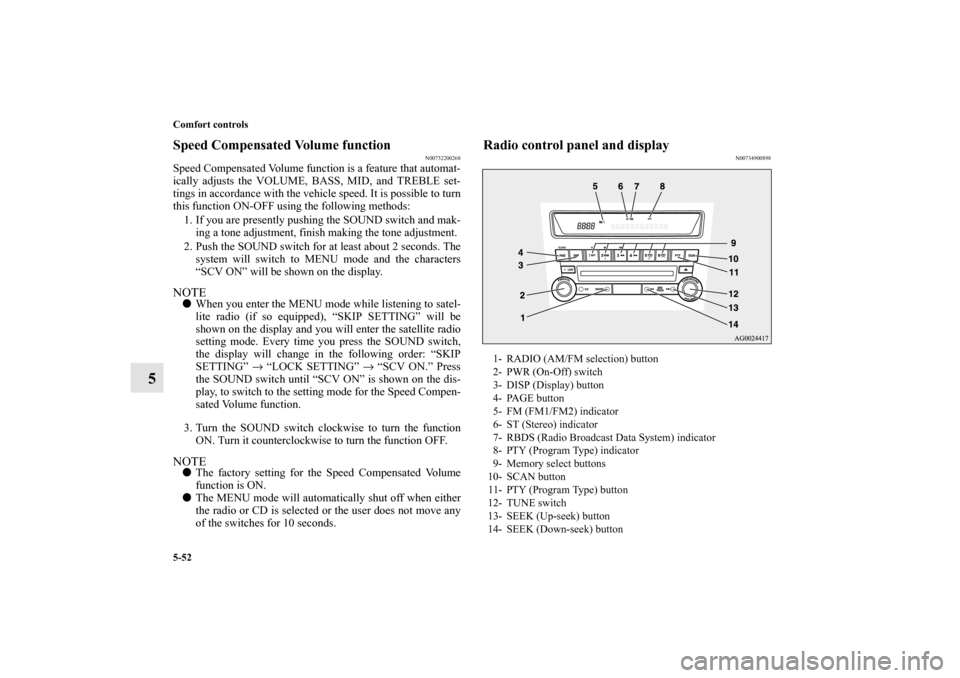
Radio control panel and display
N00734900898
1- RADIO (AM/FM selection) button
2- PWR (On-Off) switch
3- DISP (Display) button
4- PAGE button
5- FM (FM1/FM2) indicator
6- ST (Stereo) indicator
7- RBDS (Radio Broadcast Data System) indicator
8- PTY (Program Type) indicator
9- Memory select buttons
10- SCAN button
11- PTY (Program Type) button
12- TUNE switch
13- SEEK (Up-seek) button
14- SEEK (Down-seek) button
BK0140300US.book 52 ページ 2011年6月28日 火曜日 午後5時18分