Page 235 of 618

3-148 Features and controls
3
NOTE�To avoid the risk of damage to the tire inflation pressure
sensors, have any punctured tire repaired by an authorized
Mitsubishi Motors dealer. If the tire repair is not done by
an authorized Mitsubishi Motors dealer, it is not covered
by your warranty.
�Do not use an aerosol puncture-repair product on any tire.
Such a spray could damage the tire inflation pressure sen-
sors. Have any puncture repaired by an authorized
Mitsubishi Motors dealer.The tire pressure monitoring system may not work normally in
the following circumstances:
�A wireless facility or device using the same frequency is
near the vehicle.
�Snow or ice is stuck inside the fenders and/or on the
wheels.
�The tire inflation pressure sensor’s battery is dead.
�Wheels other than Mitsubishi genuine wheels are being
used.
�Wheels that are not fitted with tire inflation pressure sen-
sors are being used.
�Wheels whose ID codes are not memorized by the vehicle
are used.
�Compact spare tire is fitted on a road wheel.
�A window tint that affects the radio wave signals is
installed.
NOTE�Tire inflation pressures vary with the ambient tempera-
ture. If the vehicle is subjected to large variations in ambi-
ent temperature, the tire inflation pressures may be under-
inflated (causing the warning light/display to come on)
when the ambient temperature is relatively low. If the
warning light/display comes on, adjust the tire inflation
pressure.
WA R N I N G
!�If the warning light/display illuminates while you
are driving, avoid hard braking, sharp steering
maneuvers and high speeds. Driving with an under-
inflated tire adversely affects vehicle performance
and can result in an accident.
CAUTION
!�If a tire has a puncture, replace that tire with the
spare tire. Driving on a punctured tire could lead to
an accident.�The warning light/display may not illuminate imme-
diately in the event of a tire blowout or rapid leak.
BK0142300US.book 148 ページ 2011年8月7日 日曜日 午前10時44分
Page 288 of 618

Features and controls
3-201
3
Oil pressure warning display
N00558700074
If the engine oil pressure drops while the engine is running, the
warning display is displayed on the information screen in the
multi-information display.NOTE�The oil pressure warning display does not show the
amount of oil. The oil level must be checked using the
dipstick.
Combination headlights and dimmer switch
N00522500664
HeadlightsNOTE�Do not leave the headlights and other lights on for a long
period of time when the engine is not running. The battery
will run down.
�When it rains, or when the vehicle has been washed, the
inside of the lens sometimes becomes foggy. This is the
same as when window glass mists up on a humid day, and
does not indicate a problem. When the light is switched
on, the heat will dry out the fog. However, if water col-
lects inside the light, have it checked by an authorized
Mitsubishi Motors dealer or a repair facility of your
choice.
CAUTION
!�If the vehicle is driven while the engine oil is low, or
the oil level is normal but the warning is displayed,
the engine may overheat and damage may result.�If the warning is displayed while the engine is run-
ning, park your vehicle in a safe place as soon as
possible and check the engine oil level.�If this warning display comes on when the engine oil
level is proper, have your vehicle checked at an
authorized Mitsubishi Motors dealer or a repair
facility of your choice.
BK0142300US.book 201 ページ 2011年8月7日 日曜日 午前10時44分
Page 301 of 618
3-214 Features and controls
3
Misting function
The misting function can be used when the ignition switch is in
the “ON” or “ACC” position.
The wipers will operate once if the wiper lever is raised to the
“MIST” position and released. This operation is useful when it
is drizzling, etc. The wipers will continue to operate while the
lever is held in the “MIST” position.
Vehicles equipped with rain sensorThe windshield wipers can be operated with the ignition switch
in the “ON” or “ACC” position.
If the blades are frozen to the windshield or rear window, do
not operate the wipers until the ice has melted and the blades
are freed, otherwise the wiper motor may be damaged.MIST- Misting function
The wipers will operate once.
OFF- Off
AUTO- Auto-wiper control
Rain sensor
The wipers will automatically operate depending on the
amount of moisture on the windshield.
LO- Slow
HI- Fast
BK0142300US.book 214 ページ 2011年8月7日 日曜日 午前10時44分
Page 307 of 618
3-220 Features and controls
3
�Replace the wiper blades when they are worn. Use the
proper size replacement blades. For further information,
please contact your authorized Mitsubishi Motors dealer.
Electric rear window defogger switch
N00523700360
The rear window defogger can be used when the engine is run-
ning.
The indicator light (A) will come on when you press the elec-
tric rear window defogger switch. Electric current will flow
through the heating wires on the rear window to help clear
away moisture or frost.
After about 20 minutes of operation, the system will shut off
automatically.
To switch the defogger OFF before 20 minutes have passed,
press the switch again. The indicator light will go out and the
defogger will turn off.
If you need the defogger for more than 20 minutes, press the
switch again. This will add 20 more minutes.
BK0142300US.book 220 ページ 2011年8月7日 日曜日 午前10時44分
Page 308 of 618
Features and controls
3-221
3
NOTE�If your vehicle is equipped with heated mirrors, mist can
also be removed from the outside rearview mirrors when
the rear window defogger switch is pressed. (Refer to
“Heated mirror” on page 3-82.)
Horn switch
N00523800130
To honk the horn, press the “ ” mark on the steering wheel.
CAUTION
!�The rear window defogger is not designed to melt
snow. Remove any snow manually before using the
rear window defogger.�Use the rear window defogger only after the engine
has started and is running. Be sure to turn the
defogger switch off immediately after the window is
clear to save on battery power.�Do not place stickers, tape, or other items that are
attached with adhesive over the grid wires on the
rear window.�When cleaning the inside rear window, use a soft
cloth and wipe lightly over the grid wires.
BK0142300US.book 221 ページ 2011年8月7日 日曜日 午前10時44分
Page 312 of 618

Features and controls
3-225
3
HANG-UP button�Press this button when an incoming call is received to
refuse the call.
�Press this button during a call to end the current call.
When another call is on hold, you will switch to that call.
�If this button is pressed in the voice recognition mode, the
voice recognition mode will be deactivated.NOTE�When you press the SPEECH button to enter voice recog-
nition mode with a cellular phone paired to the system,
current information on the cellular phone, such as
“remaining battery life,” “signal strength” or “roaming,”
will be displayed on the audio display.*
*: Some cellular phones will not send this information to
the Bluetooth
® 2.0 interface.
�Call waiting and three-way calls can be used by the
Bluetooth
® 2.0 interface, only if it is possible to use those
services with your cellular phone.
Voice recognition function
N00564100057
The Bluetooth
® 2.0 interface is equipped with a voice recogni-
tion function.
Simply say voice commands and you can perform various
operations and make or receive hands-free calls.
With the Bluetooth
® 2.0 interface, voice recognition is possible
for US English, North American Spanish and Canadian French.
The factory setting is “English.”
NOTE�If the voice command that you say differs from the pre-
defined command or cannot be recognised due to ambient
noise or some other reason, the Bluetooth
® 2.0 interface
will ask you for the voice command again up to 3 times.
�For best performance and further reduction of ambient
noise, the vehicle windows should be closed while engag-
ing the voice recognition function.
�Some voice commands have alternative commands.
�Depending on the selected language, some functions may
not be available.
BK0142300US.book 225 ページ 2011年8月7日 日曜日 午前10時44分
Page 315 of 618

3-228 Features and controls
3
Entering the passcode
If a passcode has been set and the security function is enabled,
the voice guide will say “Hands-free system is locked. State the
passcode to continue” when the SPEECH button is pressed to
enter voice recognition mode. Say the 4-digit passcode number
to enter the passcode.
If the entered passcode is wrong, the voice guide will say “<4-
digit passcode>, Incorrect passcode. Please try again.” Enter
the correct passcode. NOTE�You can reenter the passcode as many times as you want.
�If you have forgotten your passcode, say “Cancel” to quit
the voice input mode and then check with an authorized
Mitsubishi Motors dealer.
Disabling the passcode
Use the following procedure to turn off the security function by
disabling the passcode. NOTE�System must be unlocked to disable the passcode.
1. Press the SPEECH button.
2. Say “Setup.”
3. Say “Passcode.”
4. The voice guide will say “Passcode is enabled. Would you
like to disable it?” Answer “Yes.”
Answer “No” to cancel the disabling of the passcode and
return to the main menu.
5. When the disabling of the passcode is completed, the
voice guide will say “Passcode is disabled” and the sys-
tem will return to the main menu.
Speaker enrollment function
N00564700011
The Bluetooth
® 2.0 interface can use the speaker enrollment
function to create a voice model for one person per language.
This makes it easier for the Bluetooth
® 2.0 interface to recogn-
ise voice commands said by you.
You can turn a voice model registered with the speaker enroll-
ment function on and off whenever you want.
Speaker enrollment
N00564800054
It takes about 2 to 3 minutes to complete the speaker enroll-
ment process.
To ensure the best results, run through the process while in the
driver’s seat, in an environment that is as quiet as possible
(when there is no rain or strong winds and the vehicle windows
are closed). Please turn off your phone while in speaker enroll-
ment to prevent interruption of the process.
Use the following procedure for speaker enrollment.
1. Stop your vehicle in a safe area, put the gearshift lever in
the “N” (Neutral) position (manual transaxle), or the gear-
shift lever in the “P” (PARK) position (Twin Clutch SST)
and pull the parking brake lever.NOTE�Speaker enrollment is not possible unless the vehicle is
parked. Make sure you park the vehicle in a safe area
before attempting speaker enrollment.
2. Press the SPEECH button.
3. Say “Voice training.”
BK0142300US.book 228 ページ 2011年8月7日 日曜日 午前10時44分
Page 374 of 618
Comfort controls
5-5
5
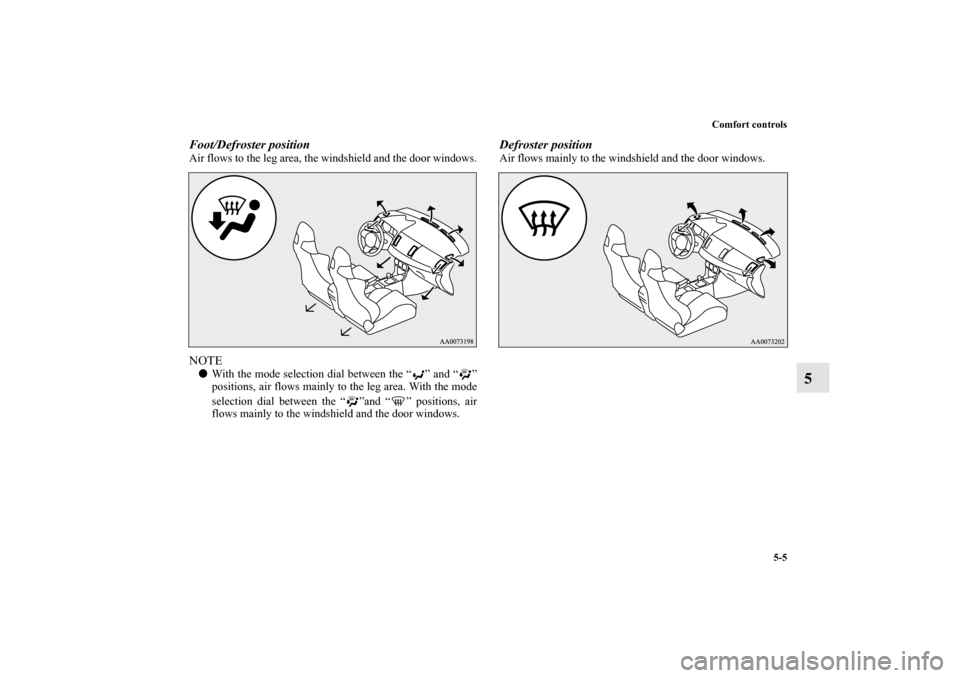
Foot/Defroster positionAir flows to the leg area, the windshield and the door windows.NOTE�With the mode selection dial between the “ ” and “ ”
positions, air flows mainly to the leg area. With the mode
selection dial between the “ ”and “ ” positions, air
flows mainly to the windshield and the door windows.
Defroster positionAir flows mainly to the windshield and the door windows.
BK0142300US.book 5 ページ 2011年8月7日 日曜日 午前10時44分