Page 311 of 618

3-224 Features and controls
3
Steering control switch
N00564000030
Volume up buttonPress this button to increase the volume. Volume down buttonPress this button to decrease the volume.SPEECH button�Press this button to change to voice recognition mode.
While the system is in voice recognition mode, “Listen-
ing” will appear on the audio display.
�If you press the button briefly while in voice recognition
mode, it will interrupt prompting and allow voice com-
mand input.
Pressing the button longer will deactivate the voice recog-
nition mode.
�Pressing this button briefly during a call will enable voice
recognition and allow voice command input.PICK-UP button�Press this button when an incoming call is received to
answer the telephone.
�When another call is received during a call, press this but-
ton to put the first caller on hold and talk to the new caller.
• In such circumstances, you can press the button briefly
to switch between callers. You will switch to the first
caller and the other caller will be put on hold.
• To establish a three-way call in such situations, press the
SPEECH button to enter voice recognition mode and
then say “Join calls.”
1- Volume up button
2- Volume down button
3- SPEECH button
4- PICK-UP button
5- HANG-UP button
BK0142300US.book 224 ページ 2011年8月7日 日曜日 午前10時44分
Page 312 of 618

Features and controls
3-225
3
HANG-UP button�Press this button when an incoming call is received to
refuse the call.
�Press this button during a call to end the current call.
When another call is on hold, you will switch to that call.
�If this button is pressed in the voice recognition mode, the
voice recognition mode will be deactivated.NOTE�When you press the SPEECH button to enter voice recog-
nition mode with a cellular phone paired to the system,
current information on the cellular phone, such as
“remaining battery life,” “signal strength” or “roaming,”
will be displayed on the audio display.*
*: Some cellular phones will not send this information to
the Bluetooth
® 2.0 interface.
�Call waiting and three-way calls can be used by the
Bluetooth
® 2.0 interface, only if it is possible to use those
services with your cellular phone.
Voice recognition function
N00564100057
The Bluetooth
® 2.0 interface is equipped with a voice recogni-
tion function.
Simply say voice commands and you can perform various
operations and make or receive hands-free calls.
With the Bluetooth
® 2.0 interface, voice recognition is possible
for US English, North American Spanish and Canadian French.
The factory setting is “English.”
NOTE�If the voice command that you say differs from the pre-
defined command or cannot be recognised due to ambient
noise or some other reason, the Bluetooth
® 2.0 interface
will ask you for the voice command again up to 3 times.
�For best performance and further reduction of ambient
noise, the vehicle windows should be closed while engag-
ing the voice recognition function.
�Some voice commands have alternative commands.
�Depending on the selected language, some functions may
not be available.
BK0142300US.book 225 ページ 2011年8月7日 日曜日 午前10時44分
Page 325 of 618

3-238 Features and controls
3
Receiving calls
N00565800019
If an incoming phone call is received while the ignition switch
is in the “ACC” or “ON” position, the audio system will be
automatically turned on and switched to the incoming call,
even when the audio system was originally off.
The voice guide announcement for the incoming call will be
output from the front passenger’s seat speaker.
If the CD player or radio was playing when the incoming call
was received, the audio system will mute the sound from the
CD player or radio and output only the incoming call.
To receive the call, press the PICK-UP button on the steering
wheel control switch.
When the call is over, the audio system will return to its previ-
ous state.
Mute function
N00565900010
At any time during a call, you can mute the vehicle micro-
phone.
Pressing the SPEECH button and then saying “Mute” during a
call will turn ON the mute function and mute the microphone.
Saying “Mute off” in the same way will turn off the mute func-
tion and cancel the mute on the microphone.Switching between hands-free mode and private mode
N00566600014
The Bluetooth
® 2.0 interface can switch between hands-free
mode (hands-free calls) and private mode (calls using cellular
phone).
If you press the SPEECH button and say “Transfer call” during
a hands-free call, you can stop the hands-free mode and talk in
private mode.
To return to hands-free mode, press the SPEECH button again
and say “Transfer call.”
BK0142300US.book 238 ページ 2011年8月7日 日曜日 午前10時44分
Page 339 of 618
3-252 Features and controls
3
5. To remove the Dock connector, turn the ignition switch to
the “LOCK” position first and perform the installation
steps in reverse.
Types of connectable devices and supported file
specifications
N00567000015
Device types
N00567100058
Devices of the following types can be connected.
*: “iPod touch,” “iPod classic,” “iPod” and “iPod nano” are
registered trademarks of Apple Inc. in the United States and
other countries.Model name
Condition
USB memory deviceStorage capacity of 256 Mbytes
or more
iPod touch* F/W Ver.1.1.1 or later
iPod classic* F/W Ver.1.0 or later
iPod (fifth generation)* F/W Ver.1.2.2 or later
iPod nano (fifth generation)* F/W Ver.1.2 or later
iPod nano (second generation)* F/W Ver.1.1.2 or later
Models other than USB mem-
ory devices and iPodsDigital audio player supporting
mass storage class
BK0142300US.book 252 ページ 2011年8月7日 日曜日 午前10時44分
Page 351 of 618
3-264 Features and controls
3
Front console boxes
(if so equipped)
N00546400061
To open, push the lid.Upper boxNOTE�The Auxiliary Audio connector (RCA) (if so equipped) or
the Auxiliary Video connector (RCA) (if so equipped) is
located in the front console upper box. For details, refer to
“To use the external audio input function” on page 5-103.
Lower box
CAUTION
!�Do not use the front console boxes as an ashtray.
This could cause a fire.
BK0142300US.book 264 ページ 2011年8月7日 日曜日 午前10時44分
Page 370 of 618
5
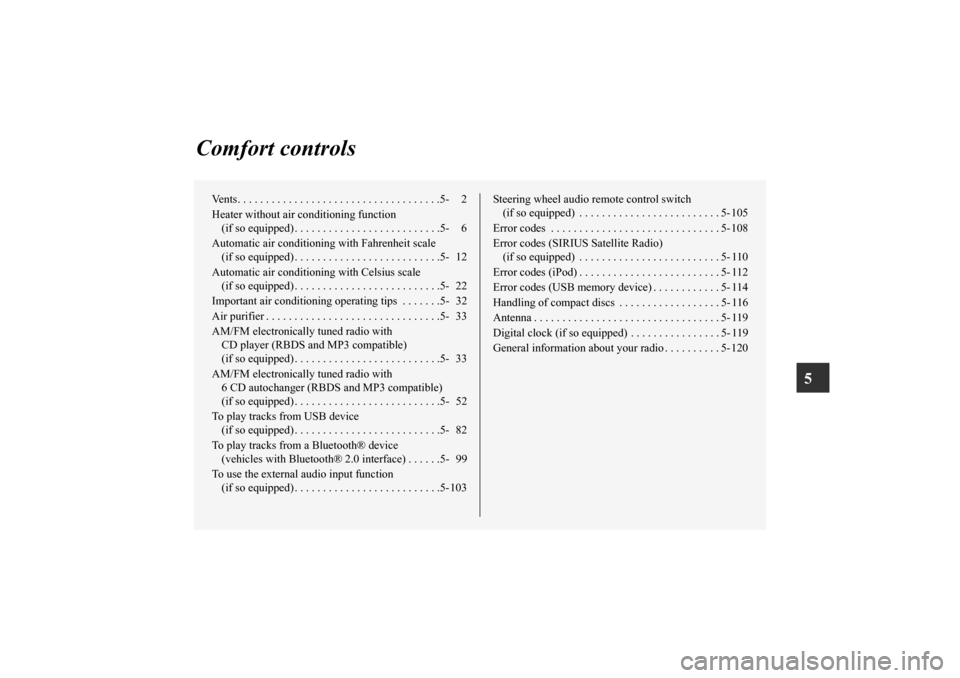
Comfort controls
Vents. . . . . . . . . . . . . . . . . . . . . . . . . . . . . . . . . . . .5- 2
Heater without air conditioning function
(if so equipped) . . . . . . . . . . . . . . . . . . . . . . . . . .5- 6
Automatic air conditioning with Fahrenheit scale
(if so equipped) . . . . . . . . . . . . . . . . . . . . . . . . . .5- 12
Automatic air conditioning with Celsius scale
(if so equipped) . . . . . . . . . . . . . . . . . . . . . . . . . .5- 22
Important air conditioning operating tips . . . . . . .5- 32
Air purifier . . . . . . . . . . . . . . . . . . . . . . . . . . . . . . .5- 33
AM/FM electronically tuned radio with
CD player (RBDS and MP3 compatible)
(if so equipped) . . . . . . . . . . . . . . . . . . . . . . . . . .5- 33
AM/FM electronically tuned radio with
6 CD autochanger (RBDS and MP3 compatible)
(if so equipped) . . . . . . . . . . . . . . . . . . . . . . . . . .5- 52
To play tracks from USB device
(if so equipped) . . . . . . . . . . . . . . . . . . . . . . . . . .5- 82
To play tracks from a Bluetooth® device
(vehicles with Bluetooth® 2.0 interface) . . . . . .5- 99
To use the external audio input function
(if so equipped) . . . . . . . . . . . . . . . . . . . . . . . . . .5-103Steering wheel audio remote control switch
(if so equipped) . . . . . . . . . . . . . . . . . . . . . . . . . 5- 105
Error codes . . . . . . . . . . . . . . . . . . . . . . . . . . . . . . 5- 108
Error codes (SIRIUS Satellite Radio)
(if so equipped) . . . . . . . . . . . . . . . . . . . . . . . . . 5- 110
Error codes (iPod) . . . . . . . . . . . . . . . . . . . . . . . . . 5- 112
Error codes (USB memory device) . . . . . . . . . . . . 5- 114
Handling of compact discs . . . . . . . . . . . . . . . . . . 5- 116
Antenna . . . . . . . . . . . . . . . . . . . . . . . . . . . . . . . . . 5- 119
Digital clock (if so equipped) . . . . . . . . . . . . . . . . 5- 119
General information about your radio . . . . . . . . . . 5- 120
BK0142300US.book 1 ページ 2011年8月7日 日曜日 午前10時44分
Page 402 of 618

Comfort controls
5-33
5 Air purifier
N00733800151
The air conditioning system is equipped with an air filter to
remove pollen and dust.
The air filter’s ability to collect pollen and dirt is reduced as it
becomes dirty, so replace it periodically. For the maintenance
interval, refer to the “WARRANTY AND MAINTENANCE
MANUAL”.NOTE�Operation in certain conditions such as driving on a dusty
road and frequent use of the air conditioning can lead to
reduction of service life of the filter. When you feel that
the air flow is lower than normal or when the windshield
or windows start to fog up easily, replace the air filter.
Contact your Mitsubishi Motors dealer or a repair facility
of your choice for assistance.
AM/FM electronically tuned radio with CD
player (RBDS and MP3 compatible)
(if so
equipped)N00734300919
The audio system can only be used when the ignition switch is
in the “ON” or “ACC” position.NOTE�To listen to the audio system while the engine is not run-
ning, turn the ignition switch to the “ACC” position.
If the ignition switch is left in the “ACC” position, the
accessory power will automatically turn off after a certain
period of time and you will no longer be able to use the
audio system. The accessory power comes on again if the
ignition switch is turned from the “ACC” position. Refer
to “ACC power auto-cutout function” on page 3-83.
�If a cellular phone is used inside the vehicle, it may create
noise in the audio equipment. This does not mean that
anything is wrong with your audio equipment. In such a
case, use the cellular phone at a place as far as possible
from the audio equipment.
�If foreign objects or water get into the audio equipment, or
if smoke or a strange odor comes from it, immediately
turn off the audio system and have it checked at an autho-
rized Mitsubishi Motors dealer or a repair facility of your
choice. Never try to repair it yourself. Avoid using the
audio system until it is inspected by a qualified person.
�If the audio system is damaged by foreign objects, water,
or fire, have the system checked by a qualified Mitsubishi
Motors technician.
BK0142300US.book 33 ページ 2011年8月7日 日曜日 午前10時44分
Page 404 of 618
Comfort controls
5-35
5
To adjust the volume
N00712000365
Turn the VOL knob (2) clockwise to increase the volume;
counterclockwise to decrease the volume.
The status will be displayed in the display (3).NOTE�The volume control mode will shut off automatically if
either the radio or CD is selected, or if no adjustment is
made within about 2 seconds.
To adjust the tone
N00712100627
1. Press the SOUND switch (4) repeatedly to select the tone
or balance control to change. The order is: TYPE →
FIELD → BASS → MID → TREBLE → FADER →
BALANCE → Audio adjust mode OFF
QUICK ACCESS MODE
To access the sound customization features quickly, push
and hold the SOUND switch (4), then turn the switch
clockwise or counterclockwise to access your desired
sound customization setting. Release the switch to adjust
the setting.
BK0142300US.book 35 ページ 2011年8月7日 日曜日 午前10時44分


